
🪶 How to slim down the prompt and spend fewer credits in Github Copilot (English version)
🪶 Cómo simplificar la solicitud y gastar menos créditos en Github Copilot
Desde el 1 de junio de 2026 dejó de cobrar por «peticiones» y pasó a cobrar por tokens: los GitHub AI Credits. El precio del plan no sube, pero lo que ese dinero compra es otra cosa. Y se ha notado.
Hay usuarios que dicen haberse fundido la cuota del mes en un par de días, por lo que, creo que parte del gasto lo puedes controlar tu, depende mucho de tu entorno y de tus hábitos.
Cada vez que enviamos un mensaje, no solo se envía nuestro mensaje, se reconstruye y se reenvía un paquete completo, que incluye las instrucciones del sistema (system prompt*), definición de las herramientas activas, catálogo de skills y agentes, ficheros de instrucciones, el historial del chat y tu pregunta. El modelo lee ese paquete entero antes de responder.
Una pregunta de una línea puede ir acompañada de cientos o miles de tokens de contexto. Consideremos la fórmula del coste siguiente, donde, cada factor es una palanca que puedes controlar: encoges el contexto (limpieza + hábitos), bajas las iteraciones (prompts claros, no repetir a ciegas), eliges un modelo más barato cuando basta y ajustas el esfuerzo de razonamiento.
Coste ≈ tamaño del contexto × nº de iteraciones × precio del modelo ( × esfuerzo de razonamiento )
¿Por qué unos tokens cuestan más que otros?
| Tipo de token | Qué es | Coste relativo |
|---|---|---|
| Caché leída | Reuso de un prefijo idéntico ya enviado | 🟢 El más barato |
| Entrada nueva | Texto fresco que el modelo lee por primera vez | 🟡 Normal |
| Escritura de caché | Lo que algunos proveedores cobran al crear la caché | 🟠 Más alto |
| Salida | Lo que el modelo genera | 🔴 El más caro |
Desde mi punto de vista, adelgazar el prompt depende del entorno (los artefactos que cargas: tools, skills, agents, extensiones e instrucciones que viajan en cada mensaje) y de tus hábitos (cómo manejas el chat en el día a día). Te muestro algunos puntos a considerar para atender estos temas:
(Entorno) Limpia herramientas y extensiones: Cada herramienta activa añade su descripción y su esquema al catálogo fijo. Desmarca las familias de tools que no usas a diario y deshabilita las extensiones esporádicas: muchas inyectan tools, skills y servidores MCP en silencio.
| Punto a revisar | Acción si no se usa |
|---|---|
| Tools / funciones activas | Desmarcar en Configure Tools |
| Extensiones de uso esporádico | Deshabilitar o desinstalar |
| Servidores MCP del workspace | Recortar .vscode\mcp.json |
Por ejemplo, si no haces desarrollo web: deshabilita las herramientas Browser, si no trabajar con el terminal ni notebooks: deshabilita las herramientas que los manipulan.
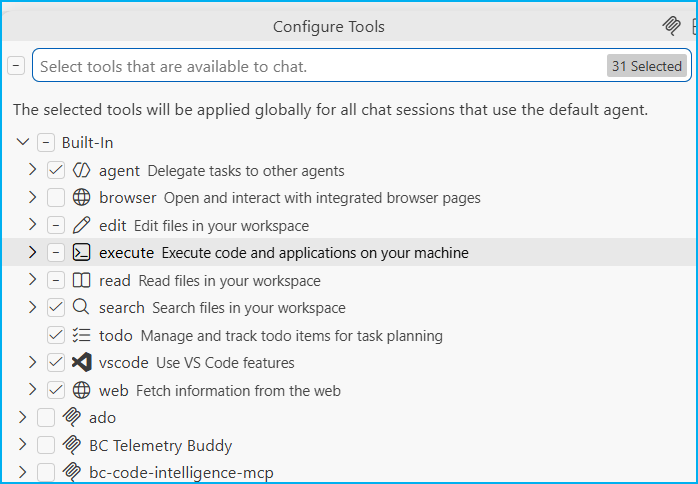
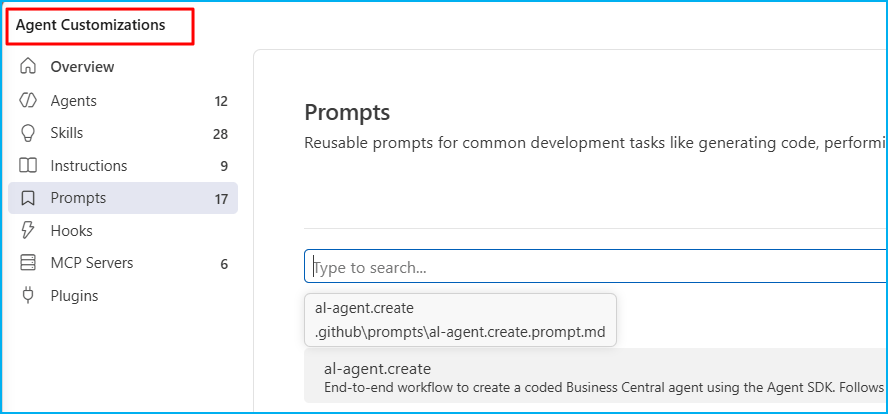
(Entorno) Revisa skills, instrucciones y el workspace: Lo que ves activo no sale de un único sitio. Saber dónde vive cada artefacto es la mitad del trabajo, porque no todo está en el mismo lugar. Habilita y expón únicamente los artefactos que vas a usar.
| Fuente | Ubicación típica |
|---|---|
| Datos de usuario de VS Code | Code\User\ |
| Agentes creados desde la interfaz | globalStorage\<ext>\ |
| Extensiones integradas en VSC | resources\app\extensions\ |
| Skills globales del usuario | ~\.agents\skills\ |
| Workspace del proyecto | .github\ · .vscode\mcp.json |
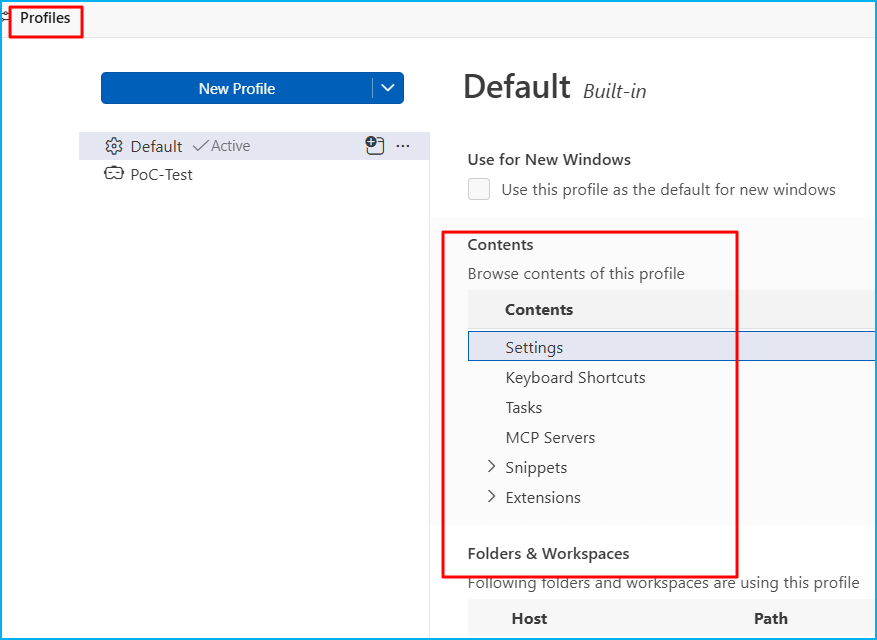
(Entorno) Plantéate los perfiles de VS Code: Un perfil aísla ajustes, extensiones, MCP, snippets y prompts, y limpia un buen porcentaje del ruido.
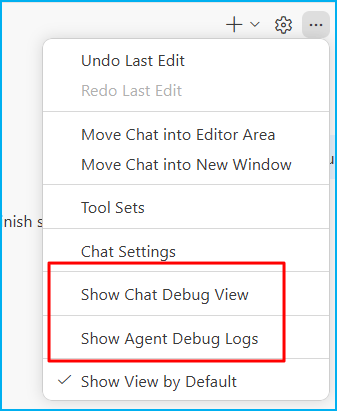
(Hábito) Hilos cortos y desechables: Cuanto más largo el chat, más historial viaja en cada mensaje. Cierra y abre uno nuevo al cambiar de tema. Cuándo cortar:
| Señal | Umbral | Acción |
|---|---|---|
| Turnos en el chat | > 12–15 | Abre un chat nuevo |
| Contexto acumulado | ~80–120K tokens | Abre un chat nuevo |
| Cambias de tema | Inmediato | Chat nuevo: no reutilices |
| Empiezas a pegar nuevamente archivos/logs | Inmediato | Referencia con #, no pegues |
Pega el texto, no la URL: Pedir al agente que lea una web (una página viene cargada de ruido que no aporta nada a tu pregunta muchas veces) genera llamadas a herramientas y más tokens. Si ya tienes el texto, pégalo. Y referencia archivos con # en lugar de pegarlos enteros. Todo esto infla la entrada cara.
El primer mensaje tras un cambio siempre cuesta más: Cada vez que cambias algo, como el modelo, una herramienta, las instrucciones, el orden del contexto, la caché se reinicia. Ese primer mensaje va «en frío» y pagas todo el contexto otra vez; el siguiente, igual que ese, saldrá más barato que el anterior.
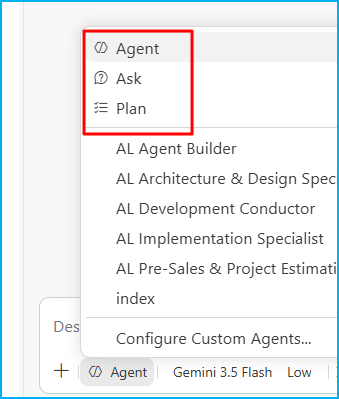
Elige el modo adecuado: Empieza barato y sube de modo solo cuando haga falta.
| Modo | Es como… | Qué hace | Coste |
|---|---|---|---|
| Ask | Un asesor | Responde, explica, da ideas. No toca tu código | 🟢 Bajo |
| Plan | Un arquitecto | Investiga y te entrega el plano antes de construir. Tú apruebas | 🟡 Medio |
| Agent | Un desarrollador autónomo | Le das un objetivo y trabaja solo: lee, escribe, ejecuta, prueba, se corrige | 🔴 Alto |
Empareja la tarea con el modelo y el esfuerzo: El modelo que eliges mueve el coste directamente: la salida de uno potente cuesta hasta 15× la de uno ligero. Nunca pongas el modelo potente «por defecto».
| Tipo de tarea | Modelo | Esfuerzo | Modo |
|---|---|---|---|
| Duda factual, explicar, buscar | Ligero | Bajo | Ask |
| Diseño, brainstorm, comparar opciones | Versátil | Medio | Ask / Plan |
| Implementación rutinaria, refactor amplio | Versátil / Potente | Bajo–Medio | Agent |
| Bug profundo, arquitectura, algoritmo | Potente | Alto | Plan → Agent |
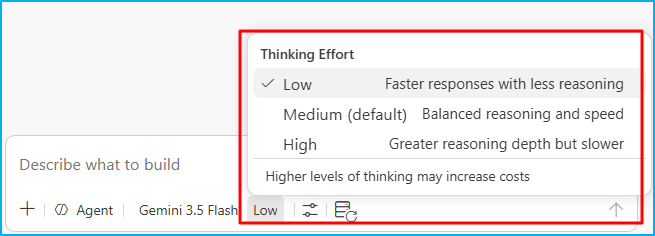
Diagnostica antes de reaccionar: Si el resultado es flojo, averigua por qué antes de insistir. Repetir el mismo prompt esperando que mejore solo rara vez converge y siempre cuesta.
| Síntoma | Acción correcta |
|---|---|
| Le faltó contexto o claridad | Mejora el prompt (barato), misma configuración |
| Entendió pero razonó superficial | Sube el esfuerzo de razonamiento, mismo modelo |
| Se pierde / errores conceptuales | Sube de modelo |
| Repetir lo mismo a ver si suena la flauta | Evítalo: rara vez converge y siempre cuesta |
Evita los patrones que vacían la cuota:
- ❌ Mega-chats que mezclan diseño, implementación y debugging en un mismo hilo.
- ❌ Reutilizar un chat para temas distintos (arrastra contexto irrelevante en cada turno).
- ❌ Re-pegar archivos o logs en cada turno (rompe la caché e infla la entrada cara).
- ❌ Modo agente para preguntas simples (muchas llamadas donde bastaba un Ask).
- ❌ Modelos potentes por defecto, o esfuerzo alto cuando no hace falta.
- ❌ Quemar créditos de chat en código que el autocompletado gratuito ya resuelve.
- ❌ Lanzar agentes y no vigilarlos: los intentos fallidos y los bucles también cuestan tokens.
Lo que conviene tener siempre presente:
- Las funciones de autocompletado de código y las sugerencias para la siguiente edición siguen incluidas en todos los planes y no consumen créditos de IA.
- Mira la factura de vista previa, que te enseña el gasto proyectado antes de que se te dispare. GitHub Copilot Billing Preview
- Hay topes de presupuesto, pero los pone el administrador.
Ojalá estas ideas te ayuden a pensar en cómo tienes tu entorno y cómo usas el chat. Limpia una vez, cuida los hábitos, y verás la diferencia.
🪶 How to slim down the prompt and spend fewer credits in Github Copilot
Since June 1, 2026, GitHub has stopped charging for «requests» and started charging for tokens: GitHub AI Credits. The plan price hasn’t increased, but what that money buys is something else entirely. And it’s made a difference.
Some users say they’ve blown their monthly fee in a couple of days, so I think you can control part of the spending; it depends a lot on your environment and your habits.
Each time we send a message, not only is our message sent, but a complete package is reconstructed and forwarded, including system prompts, definitions of active tools, a catalog of skills and agents, instruction files, the chat history, and your question. The model reads this entire package before responding.
A one-line question can be accompanied by hundreds or thousands of context tokens. Consider the following cost formula, where each factor is a lever you can control: shrink the context (cleaning up + habits), reduce the iterations (clear prompts, no blind repetition), choose a cheaper model when sufficient, and adjust the thinking effort.
Cost ≈ context size × iterations × model price ( × thinking effort )
Why do some tokens cost more than others?
| Token type | What it is | Relative cost |
|---|---|---|
| Cache read | Reuse of an identical prefix already sent | 🟢 Cheapest |
| New input | Fresh text the model reads for the first time | 🟡 Normal |
| Cache write | What some providers charge to create the cache | 🟠 Higher |
| Output | What the model generates | 🔴 Most expensive |
From my perspective, slimming down the prompt depends on the environment (the artifacts you load: tools, skills, agents, extensions, and instructions that travel in each message) and your habits (how you handle chat on a daily basis). Here are some points to consider when addressing these issues:
(Environment) Clean up tools and extensions: Each active tool adds its description and schema to the fixed catalog. Uncheck tool families you don’t use daily and disable sporadic extensions: many silently inject tools, skills, and MCP servers.
| Item to review | Action if unused |
|---|---|
| Active tools / functions | Uncheck in Configure Tools |
| Occasionally-used extensions | Disable or uninstall |
| Workspace MCP servers | Trim .vscode\mcp.json |
For example, if you don’t do web development: disable the Browser tools; if you don’t work with the terminal or notebooks: disable the tools that manipulate them.
(Environment) Review skills, instructions, and the workspace: What you see active doesn’t originate from a single location. Knowing where each artifact resides is half the battle, because not everything is in the same place. Enable and expose only the artifacts you intend to use.
| Source | Typical location |
|---|---|
| VS Code user data | Code\User\ |
| Agents created from the UI | globalStorage\<ext>\ |
| Built-in extensions (Microsoft) – VSC Extension | resources\app\extensions\ |
| Global system skills | ~\.agents\skills\ |
| Project workspace | .github\ · .vscode\mcp.json |
(Environment) Consider VS Code profiles: A profile isolates settings, extensions, MCP, snippets and prompts, and cleans up a good percentage of the noise.
(Habit) Short and disposable threads: The longer the chat, the more history travels in each message. Close and open a new one when changing topics. When to end:
| Signal | Threshold | Action |
|---|---|---|
| Turns in the chat | > 12–15 | Open a new chat |
| Accumulated context | ~80–120K tokens | Open a new chat |
| You change topic | Immediate | New chat: don’t reuse |
| You start re-pasting files/logs | Immediate | Reference with #, don’t paste |
Paste the text, not the URL: Asking the agent to read a website (a page is often full of unnecessary information that doesn’t contribute to your query) generates tool calls and more tokens. If you already have the text, paste it. And reference files with # instead of pasting them in full. All of this inflates the entry cost.
The first message after a change always costs more: Every time you change something, such as the model, a tool, the instructions, or the context order, the cache is reset. That first message is sent «from scratch,» and you pay for the entire context again; the next one, just like that one, will be cheaper than the previous one.
Choose the right mode: Start cheap and upgrade only when necessary.
| Mode | It’s like… | What it does | Cost |
|---|---|---|---|
| Ask | An advisor | Answers, explains, gives ideas. Doesn’t touch your code | 🟢 Low |
| Plan | An architect | Researches and hands you the blueprint before building. You approve | 🟡 Medium |
| Agent | An autonomous developer | You give a goal and it works alone: reads, writes, runs, tests, self-corrects | 🔴 High |
Match the task with the model and the effort: The model you choose directly impacts the cost: a powerful model costs up to 15 times more than a lightweight one. Never set the powerful model as the default.
| Task type | Model | Effort | Mode |
|---|---|---|---|
| Factual question, explain, search | Light | Low | Ask |
| Design, brainstorm, compare options | Versatile | Medium | Ask / Plan |
| Routine implementation, broad refactor | Versatile / Powerful | Low–Medium | Agent |
| Deep bug, architecture, algorithm | Powerful | High | Plan → Agent |
Diagnose before reacting: If the result is weak, find out why before persisting. Repeating the same prompt hoping it will improve rarely leads to improvement and always costs money.
| Symptom | Right action |
|---|---|
| It lacked context or clarity | Improve the prompt (cheap), same setup |
| It understood but reasoned shallowly | Raise the reasoning effort, same model |
| It gets lost / conceptual errors | Move up a model |
| Repeating the same thing hoping it sticks | Avoid it: rarely converges and always costs |
Avoid patterns that drain the quota:
- ❌ Mega-chats that mix design, implementation, and debugging in a single thread.
- ❌ Reusing a chat for different topics (drags irrelevant context into the process each turn).
- ❌ Pasting files or logs each turn (breaks the cache and inflates the cost of input).
- ❌ Agent mode for simple questions (multiple calls where a single «Ask» would suffice).
- ❌ Powerful models by default, or high effort when not needed.
- ❌ Wasting chat credits on code that free autocomplete already handles.
- ❌ Launching agents and not monitoring them: failed attempts and loops also cost tokens.
Things to keep in mind:
- Code completions and Next Edit suggestions remain included in all plans and do not consume AI Credits.
- Check out the preview bill, which shows you the projected spending before it skyrockets. GitHub Copilot Billing Preview
- There are budget limits, but they are set by the administrator.
Hopefully, these ideas will help you think about your environment and how you use chat. Clean once, take care of your habits, and you’ll see the difference.
Más información / More information:




 Gerardo Rentería Blog
Deja un comentario