🪝 VS Code Agent Hooks: Give Copilot Context Before the First Message (English version)
🪝 VS Code Agent Hooks: Give Copilot Context Before the First Message
A veces requerimos que la IA y el agente tengan un contexto diferente dependiendo de la situación en la que nos encontramos: el tipo de proyecto, la tecnología que estamos usando, el nivel del equipo con el que trabajamos. No es lo mismo arrancar una sesión en un proyecto de cliente que en uno personal, y el agente no tiene forma de saberlo si no se lo dices cada vez, en cada sesión.
¿Sabías que puedes automatizar eso con un script propio? Los Agent Hooks te permiten ejecutar código en puntos específicos del ciclo de vida del agente de forma automática, antes de que el usuario escriba cualquier cosa.
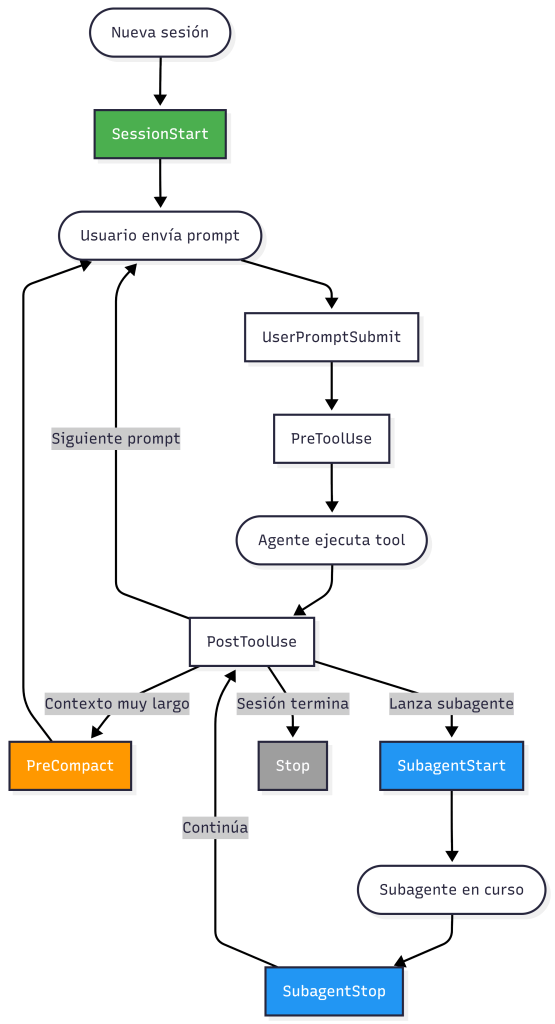
Un agent hook es un comando o un script que VS Code ejecuta en un momento específico durante una sesión del agente. VS Code le envía los datos del evento en formato JSON (por stdin), y el script puede responder con JSON (por stdout) para influir en el comportamiento del agente. Hay 8 eventos disponibles en el ciclo de vida:
VS Code carga automáticamente todos los archivos .json que estén en .github/hooks/. No se necesita ninguna configuración adicional.
En esta publicación te muestro como usar dos hooks: SessionStart para hacer el onboarding al inicio de cada sesión, y PreCompact para que el agente no pierda ese contexto cuando VS Code compacta la conversación. El objetivo concreto: al abrir una sesión nueva, el agente haga automáticamente tres preguntas (tecnología, nivel de experiencia y tipo de proyecto) y guarde las respuestas. Con estas respuestas, se carga el perfil de comportamiento adecuado para esa sesión. Y si la conversación se compacta más adelante, el segundo hook recupera ese contexto sin perderlo. La estructura de la carpeta es la siguiente:
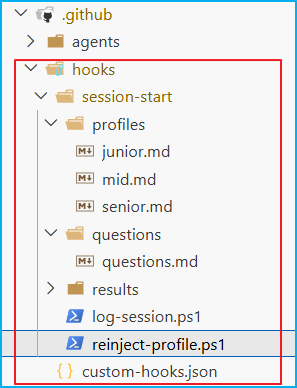
.github/ hooks/ custom-hooks.json ← define qué scripts ejecutar y cuándo session-start/ log-session.ps1 ← executor SessionStart: hace el onboarding y guarda respuestas reinject-profile.ps1 ← executor PreCompact: re-inyecta contexto antes de la compactación questions/ questions.md ← las 3 preguntas con opciones A/B/C que el agente hace al inicio profiles/ junior.md ← comportamiento del agente para devs junior (tono didáctico, explica más) mid.md ← comportamiento para devs mid (equilibrio entre detalle y velocidad) senior.md ← comportamiento para devs senior (directo, sin explicaciones básicas) results/ session-answers.jsonl ← respuestas del onboarding por sesión (stack, nivel, proyecto) session-log.jsonl ← log ligero: qué sesión corrió y cuándo trace-log.jsonl ← log completo: JSON de entrada y salida de cada ejecución
¿Cómo conseguimos que funcione?: Crea .github/hooks/custom-hooks.json
- type: Define que el hook ejecuta un comando externo («command» es el único tipo disponible por ahora).
- windows: El comando que se ejecuta en Windows, en este caso, un script de PowerShell.
- command: Fallback si no hay windows, VS Code usa este.
- cwd: Directorio de trabajo desde donde corre el script, relativo a la raíz del repositorio.
- env: Variables de entorno adicionales que el script puede leer (por ejemplo, $env:HOOK_AUTHOR).
- timeout: Segundos que VS Code espera la respuesta antes de continuar sin ella.
{ "hooks": { "SessionStart": [ { "type": "command", "windows": "powershell -ExecutionPolicy Bypass -File log-session.ps1", "command": "echo '{\"continue\":true}'", "cwd": ".github/hooks/session-start", "env": { "HOOK_AUTHOR": "GDRGDev" }, "timeout": 20 } ], "PreCompact": [ { "type": "command", "windows": "powershell -ExecutionPolicy Bypass -File reinject-profile.ps1", "command": "echo '{\"continue\":true}'", "cwd": ".github/hooks/session-start", "timeout": 10 } ] }}
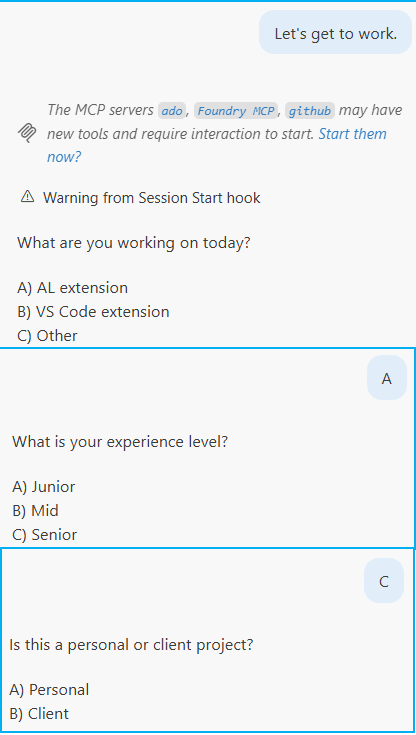
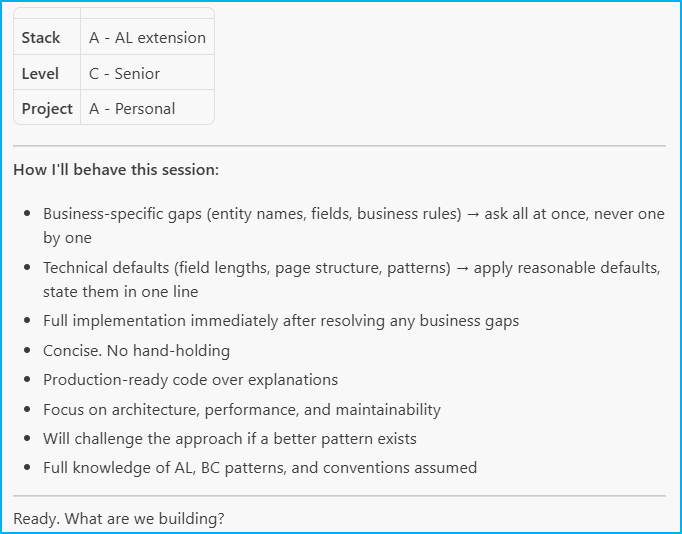
El hook «SessionStart» dispara una sola vez cuando comienza una sesión nueva. El script «log-session.ps1» le indica al agente que haga 3 preguntas al usuario (una por una).
Así se ve una entrada en trace-log.jsonl, que es el log completo con el input que recibe el hook al dispararse:
{ "timestamp": "2026-05-03T15:24:34.767Z", "session_id": "084b9fc7-121a-469c-b966-e2a11f35f5d2", "author": "GDRGDev", "input": { "timestamp": "2026-05-03T13:24:34.206Z", "hook_event_name": "SessionStart", "session_id": "084b9fc7-121a-469c-b966-e2a11f35f5d2", "transcript_path": "c:\\Users\\..\\AppData\\Roaming\\Code\\User\\workspaceStorage\\77f53d206a128cd28ad4272b080a0f7a\\GitHub.copilot-chat\\transcripts\\084b9fc7-121a-469c-b966-e2a11f35f5d2.jsonl", "source": "new", "model": "claude-sonnet-4.6", "cwd": "c:\\...\\zPersonal\\GDRGDev_1\\.github\\hooks\\session-start" }, "output": { "continue": true, "systemMessage": "[GDRGDev] SessionStart hook fired at 15:24:34", "hookSpecificOutput": { "hookEventName": "SessionStart", "additionalContext": "IMPORTANT: New session started. No context exists yet." ` "Your first response must be Q1 only. Do not greet, do not explain, do not answer anything else." ` "Ask Q1, wait for the answer, then Q2, then Q3." ` "Always ask and respond in English." ` "" ` "Q1: What are you working on today?" ` " A) AL extension" ` " B) VS Code extension" ` " C) Other" ` "" ` ..... .....
El «additionalContext» ya es suficiente para que la IA conozca el contexto de la sesión, dentro de ese mismo texto le indicamos al agente que serialice las respuestas en un archivo JSONL. Sin ese paso, «PreCompact» no tendría nada que leer si la conversación se compacta. Una vez guardadas, el agente activa el perfil correspondiente con sus propias instrucciones de comportamiento.
El archivo session-log.jsonl guarda solo timestamp, session_id y author, una línea por sesión, sin el payload completo. Útil para auditar sin abrir el trace.
Y en session-answers.jsonl queda guardado el resultado del onboarding, es lo que PreCompact va a leer para re-inyectar el contexto si la sesión se compacta:
{ "session_id": "084b9fc7-121a-469c-b966-e2a11f35f5d2", "timestamp": "2026-05-03T00:00:00Z", "answers": { "stack": "A - AL extension", "level": "C - Senior", "project": "A - Personal" }}
Cuando una conversación es muy larga, VS Code compacta el contexto automáticamente, ¿cuál sería el problema? el agente puede perder las respuestas del onboarding y empezar a comportarse como si no supiera nada. El Hook «PreCompact» se dispara justo antes de esa compactación. Por lo que, es la oportunidad de re-inyectar contexto antes de que se pierda.
El script «reinject-profile.ps1» lee las respuestas de la sesión actual desde el JSONL y carga el perfil activo, además de devolver e inyectar el contexto con las respuestas y el perfil completo.
Los hooks no reemplazan a las instructions ni a los prompts personalizados, sino que, aportan contexto dinámico en tiempo de ejecución. Si quieres usar este ejemplo directamente, tengo toda la carpeta «.github/hooks/» publicada aquí: Blog/GDRGDev_VSCHooks
Espero que esta información te ayude.
🪝 VS Code Agent Hooks: Give Copilot Context Before the First Message
Sometimes we need the AI and the human agent to have different context depending on the situation: the type of project, the technology we’re using, the level of the team we’re working with. Starting a session in a client project is not the same as starting a personal one, and the agent has no way of knowing this unless you tell it every time, in every session.
Did you know you can automate that with your own script? Agent Hooks allow you to automatically run code at specific points in the agent lifecycle, before the user types anything.
An agent hook is a command or script that VS Code executes at a specific point during an agent session. VS Code sends the event data in JSON format (via stdin), and the script can respond with JSON (via stdout) to influence the agent’s behavior. There are eight events available in the agent lifecycle:
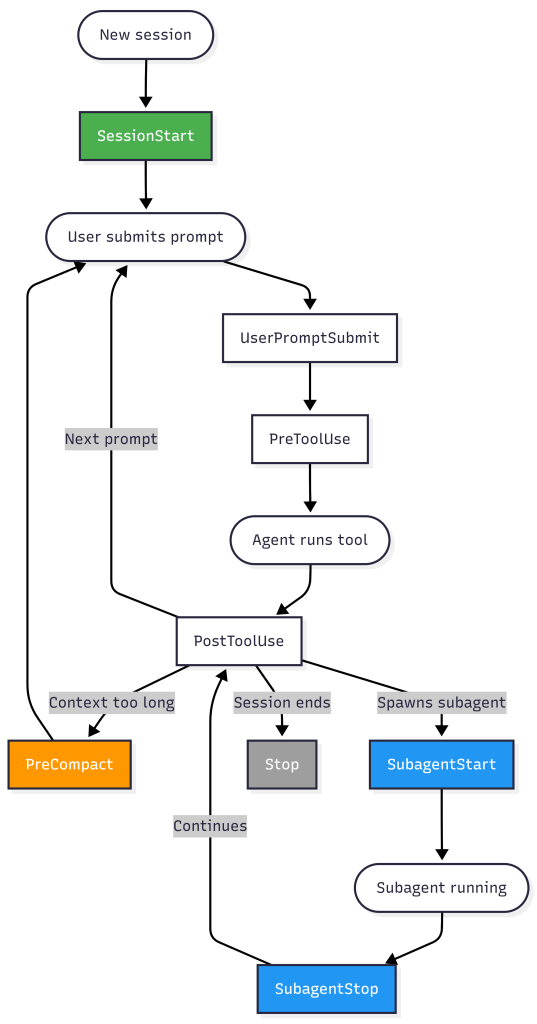
VS Code automatically loads all .json files located in .github/hooks/. No additional configuration is required.
In this post I’ll show you how to use two hooks: SessionStart to perform onboarding at the beginning of each session, and PreCompact so that the agent doesn’t lose context when VS Code compacts the conversation. The specific goal: when a new session opens, the agent automatically asks three questions (technology, experience level, and project type) and saves the answers. These answers are then used to load the appropriate behavioral profile for that session. And if the conversation is later condensed, the second hook retrieves that context without losing it. The folder structure is as follows:
.github/ hooks/ custom-hooks.json ← defines which scripts to run and when session-start/ log-session.ps1 ← SessionStart executor: runs onboarding and saves answers reinject-profile.ps1 ← PreCompact executor: re-injects context before compaction questions/ questions.md ← the 3 questions with A/B/C options the agent asks at session start profiles/ junior.md ← agent behavior for junior devs (didactic tone, more explanations) mid.md ← behavior for mid-level devs (balance between detail and speed) senior.md ← behavior for senior devs (direct, no basic explanations) results/ session-answers.jsonl ← onboarding answers per session (stack, level, project) session-log.jsonl ← lightweight log: which session ran and when trace-log.jsonl ← full trace log: input and output JSON for each execution
How do we make it work?: Create .github/hooks/custom-hooks.json
- type: Defines that the hook runs an external command («command» is the only type available right now).
- windows: The command executed on Windows, in this case, a PowerShell script.
- command: Fallback when windows is not defined; VS Code uses this on Linux/macOS.
- cwd: Working directory from which the script runs, relative to the repository root.
- env: Additional environment variables the script can read (e.g., $env:HOOK_AUTHOR).
- timeout: Seconds VS Code waits for a response before continuing without it.
{ "hooks": { "SessionStart": [ { "type": "command", "windows": "powershell -ExecutionPolicy Bypass -File log-session.ps1", "command": "echo '{\"continue\":true}'", "cwd": ".github/hooks/session-start", "env": { "HOOK_AUTHOR": "GDRGDev" }, "timeout": 20 } ], "PreCompact": [ { "type": "command", "windows": "powershell -ExecutionPolicy Bypass -File reinject-profile.ps1", "command": "echo '{\"continue\":true}'", "cwd": ".github/hooks/session-start", "timeout": 10 } ] }}
The «SessionStart» hook fires only once when a new session begins. The «log-session.ps1» script instructs the agent to ask the user three questions (one at a time).
This is what an entry in trace-log.jsonl looks like, which is the complete log with the input received by the hook when it fires:
{ "timestamp": "2026-05-03T15:24:34.767Z", "session_id": "084b9fc7-121a-469c-b966-e2a11f35f5d2", "author": "GDRGDev", "input": { "timestamp": "2026-05-03T13:24:34.206Z", "hook_event_name": "SessionStart", "session_id": "084b9fc7-121a-469c-b966-e2a11f35f5d2", "transcript_path": "c:\\Users\\..\\AppData\\Roaming\\Code\\User\\workspaceStorage\\77f53d206a128cd28ad4272b080a0f7a\\GitHub.copilot-chat\\transcripts\\084b9fc7-121a-469c-b966-e2a11f35f5d2.jsonl", "source": "new", "model": "claude-sonnet-4.6", "cwd": "c:\\...\\zPersonal\\GDRGDev_1\\.github\\hooks\\session-start" }, "output": { "continue": true, "systemMessage": "[GDRGDev] SessionStart hook fired at 15:24:34", "hookSpecificOutput": { "hookEventName": "SessionStart", "additionalContext": "IMPORTANT: New session started. No context exists yet." ` "Your first response must be Q1 only. Do not greet, do not explain, do not answer anything else." ` "Ask Q1, wait for the answer, then Q2, then Q3." ` "Always ask and respond in English." ` "" ` "Q1: What are you working on today?" ` " A) AL extension" ` " B) VS Code extension" ` " C) Other" ` "" ` ..... .....
The «additionalContext» is already sufficient for the AI to understand the session context. Within that same text, we instruct the agent to serialize the responses into a JSONL file. Without this step, «PreCompact» would have nothing to read if the conversation is compacted. Once saved, the agent activates the corresponding profile with its own behavioral instructions.
The session-log.jsonl file saves only the timestamp, session_id, and author, one line per session, without the full payload. Useful for auditing without opening the trace.
The onboarding result is saved in session-answers.json; this is what PreCompact will read to reinject the context if the session is compacted.
{ "session_id": "084b9fc7-121a-469c-b966-e2a11f35f5d2", "timestamp": "2026-05-03T00:00:00Z", "answers": { "stack": "A - AL extension", "level": "C - Senior", "project": "A - Personal" }}
When a conversation is very long, VS Code automatically compacts the context. What’s the problem? The agent might miss the onboarding responses and start behaving as if it knows nothing. The «PreCompact» hook fires just before this compaction occurs. Therefore, it’s an opportunity to reinject context before it’s lost.
The script «reinject-profile.ps1» reads the responses from the current session from the JSONL and loads the active profile, in addition to returning and injecting the context with the responses and the complete profile.
Hooks don’t replace instructions or custom prompts; instead, they provide dynamic runtime context. If you want to use this example directly, I’ve published the entire «.github/hooks/» folder here.: Blog/GDRGDev_VSCHooks
I hope this information helps you.
Más información / More information:


 Gerardo Rentería Blog
Deja un comentario