🔍 Field Magnifier for BC: Enhanced Accessibility 👓(English version)
🔍 Lupa de campo para BC: Accesibilidad mejorada 👓
Considero que la accesibilidad es muy importante, especialmente en herramientas empresariales. Si bien es cierto, tenemos la lupa nativa del sistema operativo o podemos aumentar el zoom del navegador, creo que la lupa resulta incómoda de activar constantemente y el zoom del navegador afecta toda la interfaz, dificultando la navegación cuando necesitamos magnificar solo algunos campos específicos.
Por lo que, la idea de esta publicación es ofrecer una solución simple y práctica, un magnificador de campos contextual que funciona con hover (al pasar el cursor sobre cualquier campo), mostrando únicamente el contenido ampliado en una ventana flotante sin afectar el resto de la interfaz.
Esta solución beneficia tanto a usuarios con necesidades visuales que requieren magnificación instantánea, como a cualquiera que desee disfrutar de mejor legibilidad, todo sin ajustar el navegador ni realizar cambios permanentes en la interfaz.
¿Cómo funciona?
Es una extensión que intercepta eventos de hover en campos de BC. Cuando pasas el cursor sobre cualquier campo, la extensión detecta automáticamente el campo, extrae su caption (etiqueta) y valor, y crea un popup flotante con el texto magnificado. El popup se posiciona y se oculta automáticamente cuando mueves el cursor a otra zona.
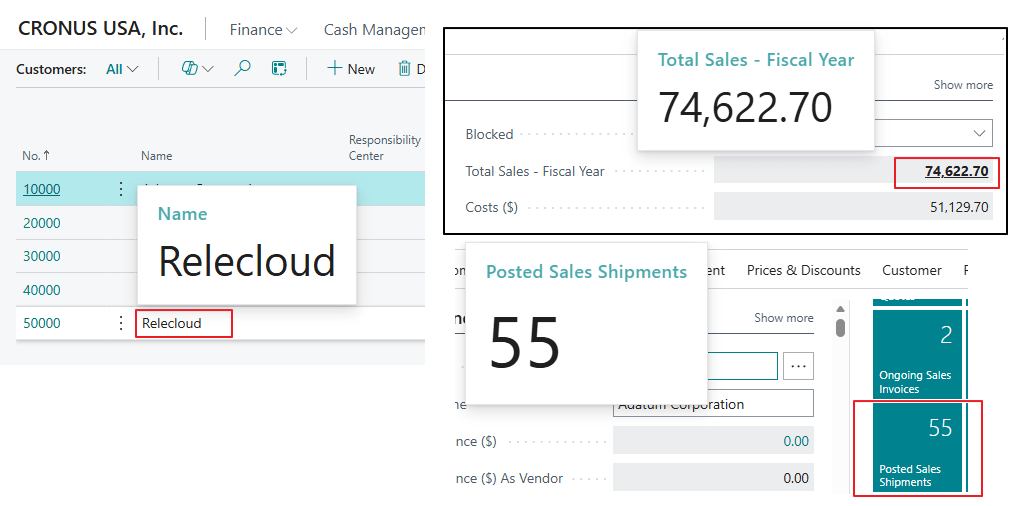
Una característica es que el magnificador ofrece tres niveles de zoom ajustables (3x, 4x y 5x), donde el caption y el value crecen proporcionalmente.
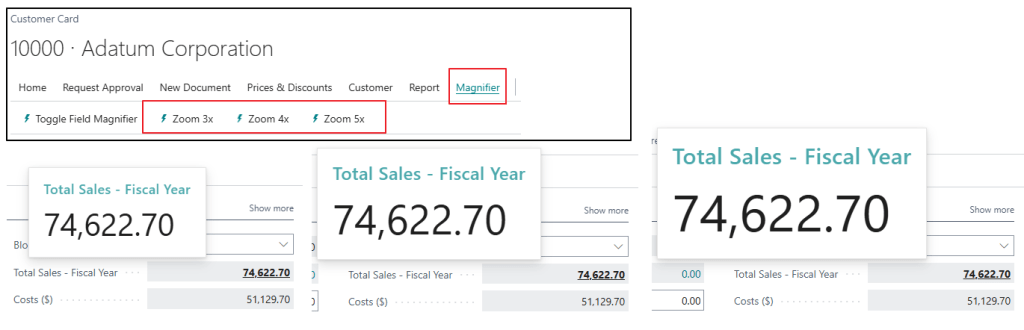
El botón Toggle Field Magnifier permite activar o desactivar la funcionalidad en cualquier momento
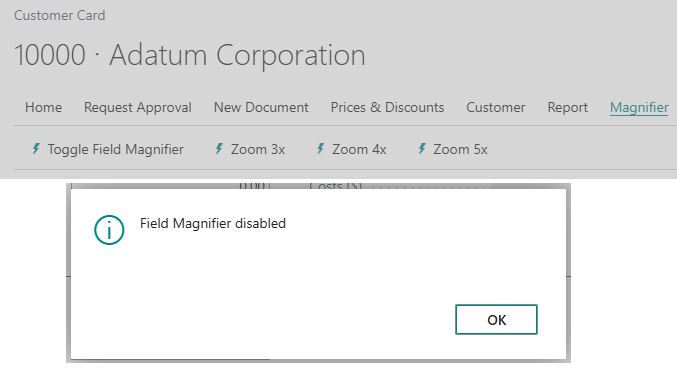
Arquitectura y Patrón Universal
La solución se compone de un Control AddIn JavaScript + CSS que hace la detección y magnificación, Page Extensions con un patrón reutilizable y Actions para controlar el toggle y zoom.
Para activar la funcionalidad en cualquier página:
- Agregar el usercontrol MagnifierAddin en el layout.
- Incluir las acciones (Toggle + Zoom 3x/4x/5x).
- Extender la página que desees.
pageextension 50101 "Customer Card Magnifier" extends "Customer Card"{ layout { addlast(content) { usercontrol(MagnifierAddin; "GDRG Field Magnifier") { ApplicationArea = All; trigger OnMagnifierReady() begin MagnifierActive := true; end; } } } actions { addlast(processing) { action(ToggleMagnifier) { ... } action(SetZoom3x) { ... } action(SetZoom4x) { ... } action(SetZoom5x) { ... } } } var MagnifierActive: Boolean;}
El código se encuentra aquí, por si quieres revisarlo: Blog/GDRGDev_FieldMagnifier/src at main · gdrgdev/Blog
Los objetos son los siguientes:
- GDRGFieldMagnifier.ControlAddIn.al: Control AddIn que conecta AL con JavaScript.
- GDRGCustomerCardMagnifier.PageExt.al: Ejemplo de implementación en Customer Card.
- GDRGCustomerListMagnifier.PageExt.al: Ejemplo de implementación en Customer List.
- src/ControlAddIn/js/Magnifier.js: Motor JavaScript (detección, extracción, renderizado).
- src/ControlAddIn/css/Magnifier.css: Estilos del popup con gradientes y animaciones.
Espero que esta extensión te ayude en tu trabajo diario con Business Central.
🔍 Field Magnifier for BC: Enhanced Accessibility 👓
I believe accessibility is very important, especially in business tools. While it’s true we have the operating system’s built-in magnifier or we can zoom in on the browser, I think the magnifier is inconvenient to activate constantly, and the browser zoom affects the entire interface, making navigation difficult when we only need to magnify specific areas.
Therefore, the idea of this publication is to offer a simple and practical solution, a contextual field magnifier that works with hover (when the cursor passes over any field), showing only the magnified content in a floating window without affecting the rest of the interface.
This solution benefits both users with visual needs requiring instant magnification, and anyone who wants to enjoy better readability, all without adjusting the browser or making permanent changes to the interface.
How does it work?
It’s an extension that intercepts hover events in BC fields. When you hover over any field, the extension automatically detects the field, extracts its caption and value, and creates a floating popup with the magnified text. The popup automatically repositions and hides when you move the cursor to another area.
One feature is that the magnifier offers three adjustable zoom levels (3x, 4x and 5x), where the caption and value grow proportionally.
The Toggle Field Magnifier button allows you to activate or deactivate the functionality at any time.
Architecture and Universal Pattern
The solution consists of a Control AddIn (JavaScript) + CSS that performs detection and magnification, Page Extensions with a reusable pattern, and Actions to control toggle and zoom.
To activate the functionality on any page:
- Add the MagnifierAddin user control to the layout.
- Include the actions (Toggle + Zoom 3x/4x/5x).
- Extend the page as desired.
pageextension 50101 "Customer Card Magnifier" extends "Customer Card"{ layout { addlast(content) { usercontrol(MagnifierAddin; "GDRG Field Magnifier") { ApplicationArea = All; trigger OnMagnifierReady() begin MagnifierActive := true; end; } } } actions { addlast(processing) { action(ToggleMagnifier) { ... } action(SetZoom3x) { ... } action(SetZoom4x) { ... } action(SetZoom5x) { ... } } } var MagnifierActive: Boolean;}
The code is here, if you want to check it out: Blog/GDRGDev_FieldMagnifier/src at main · gdrgdev/Blog
The objects are:
- GDRGFieldMagnifier.ControlAddIn.al: Control Add-In that connects AL with JavaScript.
- GDRGCustomerCardMagnifier.PageExt.al: Example implementation in Customer Card.
- GDRGCustomerListMagnifier.PageExt.al: Example implementation in Customer List.
- src/ControlAddIn/js/Magnifier.js: JavaScript engine (detection, extraction, rendering).
- src/ControlAddIn/css/Magnifier.css: Popup styles with gradients and animations.
I hope this information helps you.
Más información / More information:



Deja una respuesta