
World Cup in Business Central: predictions and results ⚽🥅(English version)
Mundial en Business Central: predicciones y resultados ⚽🥅
El mundial de futbol ya está aquí, y empiezan las predicciones: quién gana, cuánto quedan, quién va primero en la clasificación. Así que pensé: ¿y si llevamos esa idea a Business Central y la convertimos en algo sencillo y divertido?
La idea de esta pequeña extensión es convertir Business Central en un punto de encuentro para compartir pronósticos del Mundial, consultar los partidos, registrar pronósticos y ver la clasificación entre usuarios. En este caso, los partidos y resultados se importan desde un JSON público. En la configuración de la extensión se puede configurar la URL de origen.

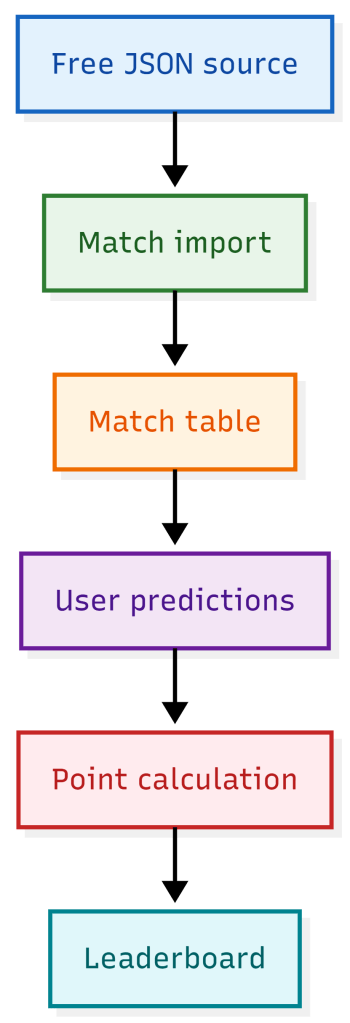
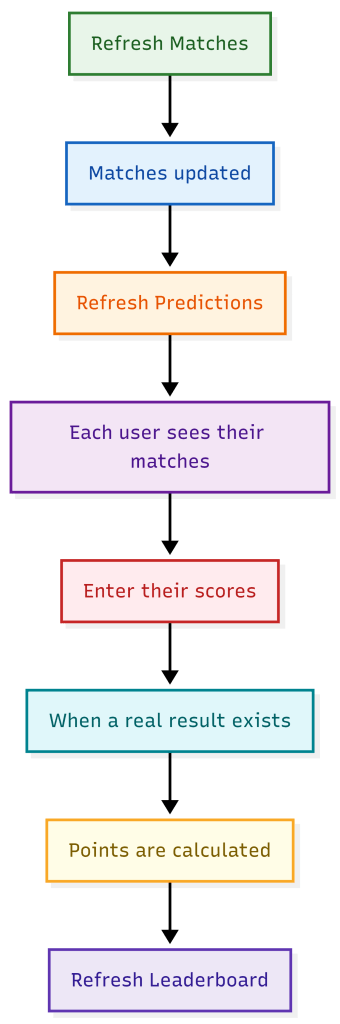
La extensión se apoya en una idea simple:
- Importar los partidos del Mundial desde una fuente externa.
- Crear una lista de predicciones por usuario.
- Permitir que cada usuario indique su predicción para cada partido.
- Calcular puntos automáticamente cuando ya existe resultado real.
- Mostrar una clasificación general para darle ese punto competitivo y divertido.
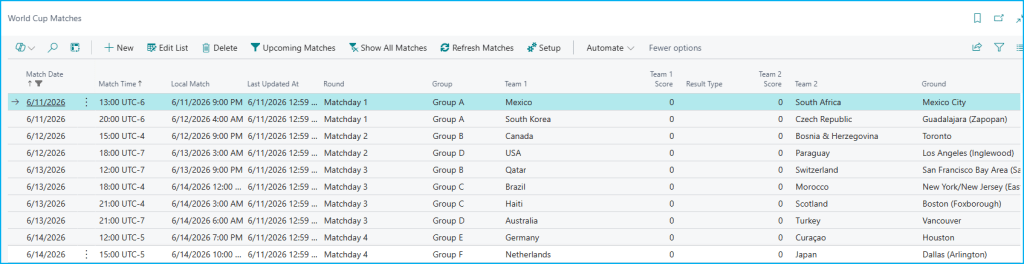
En la siguiente pantalla podemos ver cómo, una vez importados los partidos desde la fuente pública gratuita mediante el botón «Refresh Matches», nos muestra de forma clara la información más relevante del Mundial: fecha, hora, ronda, grupo, equipos, estadio y, cuando ya está disponible, también el resultado. Además, contamos con acciones que facilitan la consulta, como filtrar solo los próximos partidos, volver a mostrar todo el calendario o refrescar los datos para traer los últimos resultados y mantener la información siempre actualizado.
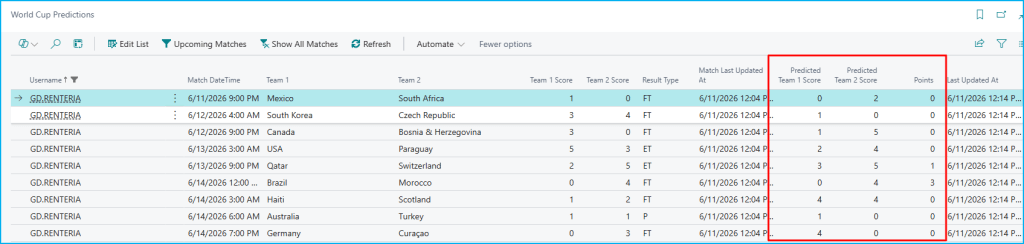
A partir de ahí, la siguiente vista reutiliza esa misma información en la pantalla de predicciones, donde cada usuario puede indicar su marcador esperado para cada partido y ver cómo se calculan los puntos cuando ya existe un resultado real
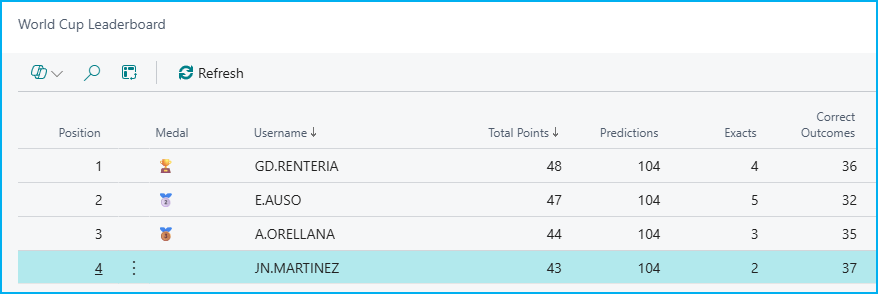
Y para cerrar la experiencia, el leaderboard reúne todas las predicciones en una clasificación general que permite ver rápidamente quién va primero, cuántos puntos lleva cada usuario y cuántos aciertos exactos y aciertos de resultado ha conseguido. La lógica de puntuación es sencilla:
- 3 puntos si aciertas el marcador exacto.
- 1 punto si aciertas el signo del partido.
- 0 puntos en el resto de casos.
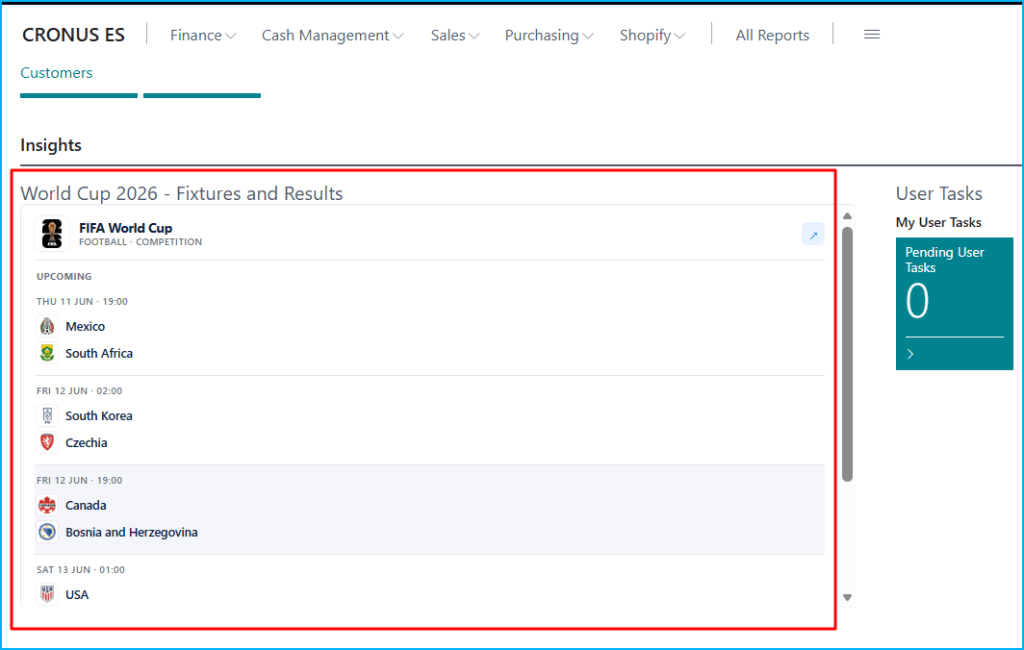
Además añadí un pequeño widget en el Role Center para mostrar de forma visual los partidos y resultados del Mundial.
Si quieres revisar el código, lo tienes aquí: https://github.com/gdrgdev/Blog/tree/main/GDRGDev_WorldCup
La solución se compone:
- GDRGWCMatch.Table.al: almacena los partidos del Mundial con fecha, hora, equipos, grupo, estadio y resultado importado desde la fuente externa.
- GDRGWCMatchList.Page.al: muestra el calendario y los resultados del Mundial, con acciones para filtrar próximos partidos, ver todo el cuadro, refrescar datos y abrir el setup.
- GDRGWCPrediction.Table.al: guarda las predicciones de cada usuario para cada partido, junto con el resultado real, el marcador pronosticado y los puntos obtenidos.
- GDRGWCPredictionList.Page.al: permite a cada usuario consultar sus partidos, introducir sus pronósticos y refrescar la información importada.
- GDRGWCPredictionMgt.Codeunit.al: sincroniza los partidos con las predicciones de usuario y calcula la puntuación según acierto exacto o resultado correcto.
- GDRGWCLeaderboard.Table.al: define la estructura de la clasificación con usuario, puntos totales, número de predicciones, aciertos exactos y posición.
- GDRGWCLeaderboard.Page.al: construye y muestra el leaderboard a partir de las predicciones registradas por todos los usuarios.
- GDRGWCSetup.Table.al: guarda la configuración básica de la solución, incluida la URL de la fuente pública de datos.
- GDRGWCSetup.Page.al: ofrece una página sencilla para configurar y mantener la URL desde la que se importan los partidos del Mundial.
- GDRGWCImport.Codeunit.al: descarga el JSON externo, interpreta su contenido y actualiza los partidos dentro de Business Central.
- GDRGWorldCupScoresPart.Page.al: añade una parte visual para mostrar información del Mundial dentro del Role Center.
- GDRGRCWorldCup.PageExt.al: inserta el widget del Mundial en el Business Manager Role Center.
- GDRGWorldCupScoresViewer.ControlAddIn.al: define el control add-in que hospeda el visor embebido de partidos y resultados.
- GDRGstartup.js: carga el iframe del widget externo que muestra los fixtures y resultados del Mundial.
Por eso, el Mundial puede ser la excusa perfecta para construir algo divertido dentro de Business Central.
Espero que esta idea te sirva de inspiración o incluso te anime a crear tu propia versión.
World Cup in Business Central: predictions and results ⚽🥅
The Football World Cup is finally here, and with it come the predictions: who will win, what the score will be, and who will top the leaderboard. So I thought: what if we brought that idea into Business Central and turned it into something simple and fun?
The idea behind this small extension is to turn Business Central into a place where users can share World Cup predictions, check matches, register their forecasts, and follow the leaderboard. In this case, matches and results are imported from a public JSON source. The extension setup allows the source URL to be configured.
The extension is based on a simple idea:
- Import World Cup matches from an external source.
- Create a prediction list for each user.
- Allow each user to enter their prediction for every match.
- Calculate points automatically once a real result is available.
- Show an overall leaderboard to add that competitive and fun touch.
In the following screen, you can see how, once the matches have been imported from the free public source using the “Refresh Matches” action, Business Central clearly displays the most relevant World Cup information: date, time, round, group, teams, stadium, and, when available, the result as well. You also have actions that make the experience easier, such as filtering only upcoming matches, showing the full schedule again, or refreshing the data to bring in the latest results and keep the information up to date.
From there, the next view reuses that same information in the predictions page, where each user can enter their expected score for every match and see how points are calculated once a real result is available.
To complete the experience, the leaderboard brings all predictions together into a general ranking that makes it easy to see who is leading, how many points each user has, and how many exact score hits and correct outcome predictions they have achieved. The scoring logic is simple:
- 3 points for an exact score prediction.
- 1 point for predicting the correct match outcome.
- 0 points in all other cases.
I also added a small widget in the Role Center to visually display World Cup matches and results.
If you want to review the code, you can find it here: https://github.com/gdrgdev/Blog/tree/main/GDRGDev_WorldCup
The solution is made up of:
- GDRGWCMatch.Table.al: stores World Cup matches with date, time, teams, group, stadium, and the result imported from the external source.
- GDRGWCMatchList.Page.al: shows the World Cup schedule and results, with actions to filter upcoming matches, display the full bracket, refresh data, and open the setup.
- GDRGWCPrediction.Table.al: stores each user’s predictions for every match, together with the real result, the predicted score, and the points earned.
- GDRGWCPredictionList.Page.al: allows each user to review their matches, enter predictions, and refresh the imported information.
- GDRGWCPredictionMgt.Codeunit.al: synchronizes matches with user predictions and calculates the score based on exact hits or correct outcomes.
- GDRGWCLeaderboard.Table.al: defines the leaderboard structure with user, total points, number of predictions, exact hits, and position.
- GDRGWCLeaderboard.Page.al: builds and displays the leaderboard based on the predictions registered by all users.
- GDRGWCSetup.Table.al: stores the basic setup of the solution, including the public data source URL.
- GDRGWCSetup.Page.al: provides a simple page to configure and maintain the URL used to import World Cup matches.
- GDRGWCImport.Codeunit.al: downloads the external JSON, interprets its content, and updates the matches inside Business Central.
- GDRGWorldCupScoresPart.Page.al: adds a visual part to display World Cup information inside the Role Center.
- GDRGRCWorldCup.PageExt.al: inserts the World Cup widget into the Business Manager Role Center.
- GDRGWorldCupScoresViewer.ControlAddIn.al: defines the control add-in that hosts the embedded viewer for matches and results.
- GDRGstartup.js: loads the external widget iframe that displays World Cup fixtures and results.
That is why the World Cup can be the perfect excuse to build something fun inside Business Central.
I hope this idea inspires you, or even encourages you to create your own version.
Más información / More information:



Deja una respuesta