🧩 Deriving dimensions in Business Central beyond Default Dimensions
🧩 Derivar dimensiones en Business Central más allá de las Dimensiones por defecto
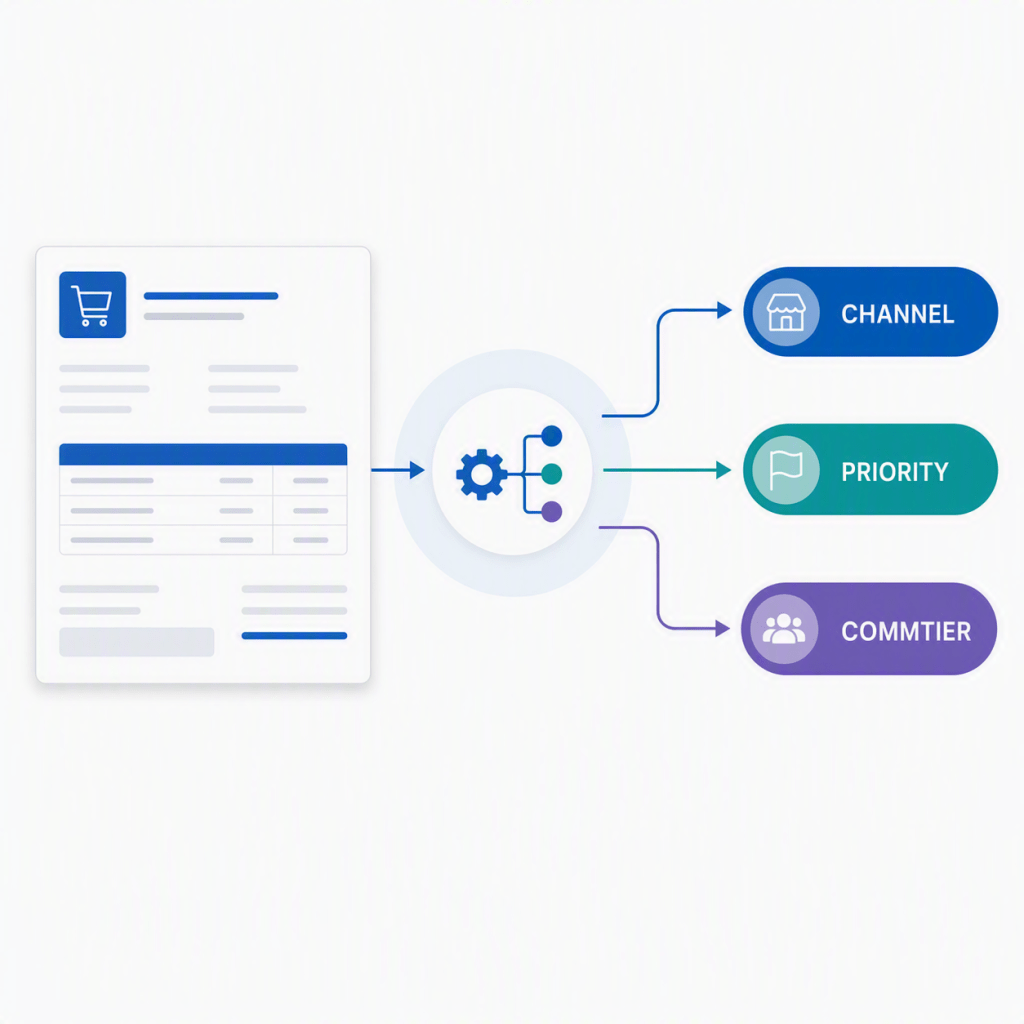
En varias implementaciones nos hemos encontrado con una necesidad bastante común: las dimensiones por defecto estándar ayudan mucho, pero llega un punto en el que requerimos algunas combinaciones más, como por ejemplo, derivar una dimensión desde un campo del documento. Otras veces necesitas mirar una tabla relacionada. Y en otros casos necesitas decidir el valor según el estado actual de otra información.
Ahí es donde este evento me parece especialmente útil, vive en la codeunit DimensionManagement del estándar y se lanza justo después de que BC termina de calcular el set de dimensiones por defecto de un registro. En ese momento te pasa el DefaultDimSetID resultante para que puedas modificarlo antes de que se aplique al documento.
[IntegrationEvent(False,False)]
local procedure OnAfterGetRecDefaultDimIDProcedure
(
RecVariant: Variant,
CurrFieldNo: Integer,
var DefaultDimSource: List of [Dictionary of [Integer, Code[20]]],
var SourceCode: Code[20],
var InheritFromDimSetID: Integer,
var InheritFromTableNo: Integer,
var GlobalDim1Code: Code[20],
var GlobalDim2Code: Code[20],
var DefaultDimSetID: Integer
)
Mi idea intenta ser sencilla: Business Central calcula primero sus dimensiones estándar y, justo después, con este evento puedes ampliar o ajustar ese resultado. No se trata de reemplazar el estándar. Se trata de apoyarnos en él y añadir lógica cuando el negocio pide algo más.
En el siguiente ejemplo he trabajado varios escenarios sencillos de entender, nos enfocaremos en un pedido de venta:
- Derivar una dimensión desde un campo del propio documento de venta (Método de Pago).
- Derivar una dimensión desde otra dimensión ya calculada.
- Derivar una dimensión leyendo una tabla relacionada (un campo de la tabla de vendedor).
- Derivar una dimensión según datos históricos (histórico de facturas de ventas).
- Sobrescribir un valor derivado con una regla de mayor prioridad (override).
Forzar el recálculo de dimensiones cuando BC no lo hace al cambiar un campo: Una parte importante de este enfoque es entender que no todos los campos recrean dimensiones de la misma manera en el pedido de venta. Por eso, en algunos casos conviene forzar el recálculo para volver a entrar al flujo estándar y luego aplicar nuestra nueva lógica. Para los que no lo hacen, puedes suscribirte al OnAfterValidateEvent del campo y forzar tú mismo el recálculo, de manera que el evento OnAfterGetRecDefaultDimIDProcedure vuelva a ejecutarse y tu lógica entre de nuevo en el punto correcto. El siguiente ejemplo se aplica con el campo «Método de pago»:
[EventSubscriber(ObjectType::Table, Database::"Sales Header", OnAfterValidateEvent, "Payment Method Code", false, false)]
local procedure ForceRecreateDimsAfterValidatePaymentMethodCode(var Rec: Record "Sales Header"; var xRec: Record "Sales Header"; CurrFieldNo: Integer)
begin
    if Rec."Payment Method Code" = xRec."Payment Method Code" then
            exit;
    ForceRecreateDimensionsFromField(Rec, xRec, Rec.FieldNo("Payment Method Code"));
end;
local procedure ForceRecreateDimensionsFromField(var SalesHeader: Record "Sales Header"; xSalesHeader: Record "Sales Header"; TriggerFieldNo: Integer)
begin
    if SalesHeader.IsTemporary() then
        exit;
    if SalesHeader."No." = '' then
        exit;
    if SalesHeader."Sell-to Customer No." = '' then
        exit;
    if SalesHeader."Dimension Set ID" <> xSalesHeader."Dimension Set ID" then
        exit;

    SalesHeader.CreateDimFromDefaultDim(TriggerFieldNo);
end;
Cómo se aplican las dimensiones derivadas al set del documento: La idea es sencilla: primero preparas en memoria lo que quieres cambiar, luego lo aplicas de golpe sobre el set real. Para no repetir lógica en cada escenario, el ejemplo se apoya en un helper con dos procedimientos muy concretos: StageDim y CommitStagedDims.
Paso 1: preparar la dimensión en un buffer temporal. StageDim se encarga de que el Dimension Value exista en base de datos (lo crea si no está) y lo guarda en un buffer temporal. No toca el documento todavía.
DerivedDimMgt.StageDim(TempDimSetEntry, 'GR_CHANNEL', 'ONLINE', 'Online');
Paso 2: fusionar el buffer con el set de dimensiones actual. CommitStagedDims carga el set actual del documento, recorre el buffer y para cada entrada: si la dimensión ya estaba, la actualiza; si no estaba, la inserta. Al final recalcula el DimSetID con el resultado y lo devuelve.
DerivedDimMgt.CommitStagedDims(DefaultDimSetID, TempDimSetEntry);
Ahora si pasaremos a comentar los escenarios:
Escenario 1: Derivar una dimensión directamente de un campo del encabezado de pedido de ventas actual. Queremos traducir el valor de un campo del pedido directamente a una dimensión. En este ejemplo usamos Payment Method Code del Sales Header, pero la lógica aplica a cualquier campo del documento.
- Input: Payment Method Code, en este ejemplo con valores BANK, CASH u otro, pero puedes adaptarlo a los que uses en tu entorno.
- Output: dimensión GR_CHANNEL, el valor resultante será ONLINE si es BANK, STORE si es CASH, u OTHER para cualquier otro caso.
local procedure DeriveDimensionFromFieldValueFromCurrRecord(SalesHeader: Record "Sales Header"; var DefaultDimSetID: Integer)
var
    TempDimSetEntry: Record "Dimension Set Entry" temporary;
begin
    if SalesHeader."Payment Method Code" = '' then
        exit;

    case SalesHeader."Payment Method Code" of
        'BANK':
            DerivedDimMgt.StageDim(TempDimSetEntry, 'GR_CHANNEL', 'ONLINE', 'Online');
        'CASH':
            DerivedDimMgt.StageDim(TempDimSetEntry, 'GR_CHANNEL', 'STORE', 'Store');
        else
            DerivedDimMgt.StageDim(TempDimSetEntry, 'GR_CHANNEL', 'OTHER', 'Other');
    end;

    DerivedDimMgt.CommitStagedDims(DefaultDimSetID, TempDimSetEntry);
end;
Escenario 2: Derivar una dimensión a partir de otra dimensión ya calculada. A veces la regla no depende de un campo del documento sino del valor que ya tiene una dimensión en el set en ese momento. Esto permite encadenar lógica: una dimensión condiciona a otra.
- Input: el valor actual de la dimensión GR_CHANNEL en el set del documento, si es ONLINE, se cumple la condición.
- Output: se añade GR_PRIORITY = HIGH al set. Si GR_CHANNEL no es ONLINE, no se hace nada.
local procedure DeriveDimensionFromAnotherDimension(var DefaultDimSetID: Integer)
var
    TempCurrentDimSetEntry: Record "Dimension Set Entry" temporary;
    TempDimSetEntry: Record "Dimension Set Entry" temporary;
    DimensionManagement: Codeunit DimensionManagement;
begin
    DimensionManagement.GetDimensionSet(TempCurrentDimSetEntry, DefaultDimSetID);
    if not TempCurrentDimSetEntry.Get(DefaultDimSetID, 'GR_CHANNEL') then
        exit;
    if TempCurrentDimSetEntry."Dimension Value Code" <> 'ONLINE' then
        exit;

    DerivedDimMgt.StageDim(TempDimSetEntry, 'GR_PRIORITY', 'HIGH', 'High Priority');
    DerivedDimMgt.CommitStagedDims(DefaultDimSetID, TempDimSetEntry);
end;
Escenario 3: Derivar una dimensión leyendo una tabla relacionada. Queremos derivar una dimensión a partir de datos que no están en el documento sino en una tabla relacionada. En este caso consultamos el registro del vendedor asignado al pedido.
- Input: Salesperson Code del Sales Header, se lee el registro de Salesperson/Purchaser y su campo Commission %.
- Output: dimensión GR_COMMTIER con valor HIGH si la comisión es ≥ 10 %, o STD en caso contrario.
local procedure DeriveDimensionFromRelatedTable(SalesHeader: Record "Sales Header"; var DefaultDimSetID: Integer)
var
    Salesperson: Record "Salesperson/Purchaser";
    TempDimSetEntry: Record "Dimension Set Entry" temporary;
begin
    if SalesHeader."Salesperson Code" = '' then
        exit;
    if not Salesperson.Get(SalesHeader."Salesperson Code") then
        exit;

    if Salesperson."Commission %" >= 10 then
        DerivedDimMgt.StageDim(TempDimSetEntry, 'GR_COMMTIER', 'HIGH', 'High Commission')
    else
        DerivedDimMgt.StageDim(TempDimSetEntry, 'GR_COMMTIER', 'STD', 'Standard Commission');

    DerivedDimMgt.CommitStagedDims(DefaultDimSetID, TempDimSetEntry);
end;
Escenario 4: Derivar una dimensión según datos históricos del cliente. Queremos decidir el valor de una dimensión consultando el historial real del cliente, no una configuración estática. Si el cliente ya tiene facturas registradas, es un cliente repetidor; si no, es nuevo.
- Input: Sell-to Customer No. del Sales Header, se consulta si existe alguna Sales Invoice Header para ese cliente.
- Output: dimensión GR_DOCTYPE con valor NEW si no tiene facturas previas, o REPEAT si ya las tiene.
local procedure DeriveDimensionFromHistoricalData(SalesHeader: Record "Sales Header"; var DefaultDimSetID: Integer)
var
    SalesInvoiceHeader: Record "Sales Invoice Header";
    TempDimSetEntry: Record "Dimension Set Entry" temporary;
begin
    SalesInvoiceHeader.SetRange("Sell-to Customer No.", SalesHeader."Sell-to Customer No.");
    if SalesInvoiceHeader.IsEmpty() then
        DerivedDimMgt.StageDim(TempDimSetEntry, 'GR_DOCTYPE', 'NEW', 'New Customer')
    else
        DerivedDimMgt.StageDim(TempDimSetEntry, 'GR_DOCTYPE', 'REPEAT', 'Repeat Customer');

    DerivedDimMgt.CommitStagedDims(DefaultDimSetID, TempDimSetEntry);
end;
Escenario 5: Sobrescribir una dimensión ya derivada con una regla de mayor prioridad. Queremos que una regla posterior pueda pisar el valor de una dimensión que ya se calculó antes en el mismo evento. En este caso, si el vendedor tiene alta comisión, el canal pasa a ser VIP independientemente de lo que se haya calculado antes.
- Input: Salesperson Code del Sales Header, se verifica que el vendedor tenga Commission % ≥ 10.
- Output: dimensión GR_CHANNEL sobrescrita con valor VIP, reemplazando cualquier valor previo como ONLINE o STORE.
local procedure OverrideDerivedDimension(SalesHeader: Record "Sales Header"; var DefaultDimSetID: Integer)
var
    Salesperson: Record "Salesperson/Purchaser";
    TempDimSetEntry: Record "Dimension Set Entry" temporary;
begin
    if SalesHeader."Salesperson Code" = '' then
        exit;
    if not Salesperson.Get(SalesHeader."Salesperson Code") then
        exit;
    if Salesperson."Commission %" < 10 then
        exit;

    DerivedDimMgt.StageDim(TempDimSetEntry, 'GR_CHANNEL', 'VIP', 'VIP Salesperson');
    DerivedDimMgt.CommitStagedDims(DefaultDimSetID, TempDimSetEntry);
end;
El código se encuentra aquí, por si quieres revisarlo: Blog/GDRGDev_DerivedDimensions at main · gdrgdev/Blog
Los objetos son los siguientes:
- GDRGCustomerDimSubs.Codeunit.al: Suscriptor principal que implementa los cinco escenarios de derivación de dimensiones sobre Sales Header, con routing por trigger y forzado de recálculo.
- GDRGDerivedDimMgt.Codeunit.al: Helper compartido que expone StageDim y CommitStagedDims para preparar y aplicar dimensiones derivadas sobre el set del documento.
OnAfterGetRecDefaultDimIDProcedure es uno de esos eventos que vale la pena conocer. Te permite enganchar justo después de que BC calcula las dimensiones por defecto y desde ahí puedes extender, condicionar o sobrescribir el resultado con tu propia lógica, sin tocar nada del estándar.
Espero que esta información te ayude en tu trabajo diario con Business Central.
🧩 Deriving dimensions in Business Central beyond Default Dimensions
In several implementations we have run into a pretty common need: the standard Default Dimensions help a lot, but at some point they are not enough. Sometimes you need to derive a dimension from a field on the document. Other times you need to look at a related table. And in other cases you need to decide the value based on the current state of other information.
This is where this event comes in handy. It lives in the DimensionManagement codeunit and fires right after BC finishes calculating the default dimension set for a record. At that point it hands you the DefaultDimSetID so you can modify it before it gets applied to the document.
[IntegrationEvent(False,False)]
local procedure OnAfterGetRecDefaultDimIDProcedure
(
RecVariant: Variant,
CurrFieldNo: Integer,
var DefaultDimSource: List of [Dictionary of [Integer, Code[20]]],
var SourceCode: Code[20],
var InheritFromDimSetID: Integer,
var InheritFromTableNo: Integer,
var GlobalDim1Code: Code[20],
var GlobalDim2Code: Code[20],
var DefaultDimSetID: Integer
)
The idea is simple: Business Central calculates its standard dimensions first and, right after, this event lets you extend or adjust the result. It is not about replacing the standard. It is about building on top of it and adding logic when the business needs more.
In the following example I have worked through several easy-to-understand scenarios:
- Derive a dimension from a field on the sales document itself (Payment Method).
- Derive a dimension from another dimension already calculated.
- Derive a dimension by reading a related table (salesperson commission %).
- Derive a dimension based on historical data (sales invoice history).
- Override a dimension with a higher-priority rule (salesperson condition).
Forcing dimension recalculation when BC does not do it on field change: An important part of this approach is understanding that not all fields recreate dimensions in the same way in the sales order. Therefore, in some cases, it’s advisable to force a recalculation to re-enter the standard flow and then apply your new logic. For those that don’t, you can subscribe to the field’s OnAfterValidateEvent and force the recalculation yourself, so that the OnAfterGetRecDefaultDimIDProcedure event fires again and your logic enters at the correct point. The following example applies this to the «Payment Method Code» field:
[EventSubscriber(ObjectType::Table, Database::"Sales Header", OnAfterValidateEvent, "Payment Method Code", false, false)]
local procedure ForceRecreateDimsAfterValidatePaymentMethodCode(var Rec: Record "Sales Header"; var xRec: Record "Sales Header"; CurrFieldNo: Integer)
begin
    if Rec."Payment Method Code" = xRec."Payment Method Code" then
            exit;
    ForceRecreateDimensionsFromField(Rec, xRec, Rec.FieldNo("Payment Method Code"));
end;
local procedure ForceRecreateDimensionsFromField(var SalesHeader: Record "Sales Header"; xSalesHeader: Record "Sales Header"; TriggerFieldNo: Integer)
begin
    if SalesHeader.IsTemporary() then
        exit;
    if SalesHeader."No." = '' then
        exit;
    if SalesHeader."Sell-to Customer No." = '' then
        exit;
    if SalesHeader."Dimension Set ID" <> xSalesHeader."Dimension Set ID" then
        exit;

    SalesHeader.CreateDimFromDefaultDim(TriggerFieldNo);
end;
How derived dimensions are applied to the document’s dimension set: The idea is simple: first you prepare in memory what you want to change, then you apply it all at once to the real set. To avoid repeating logic in every scenario, the example relies on a small helper with two very specific procedures: StageDim and CommitStagedDims.
Step 1: stage the dimension in a temporary buffer. StageDim makes sure the Dimension Value exists in the database (creates it if missing) and stores it in a temporary buffer. It does not touch the document yet.
DerivedDimMgt.StageDim(TempDimSetEntry, 'GR_CHANNEL', 'ONLINE', 'Online');
Step 2: merge the buffer into the current dimension set. CommitStagedDims loads the current set of the document, loops through the buffer and for each entry: updates it if the dimension already exists, inserts it if it does not. It then returns a new DimSetID with the result..
DerivedDimMgt.CommitStagedDims(DefaultDimSetID, TempDimSetEntry);
Now we will discuss the scenarios:
Scenario 1: Derive a dimension directly from a field in the current sales order header. We want to translate the value of a field in the order directly into a dimension. In this example, we use the Payment Method Code from the Sales Header, but the logic applies to any field in the document..
- Input: Payment Method Code, in this example with values like BANK, CASH, or another, but you can adapt it to the ones you use in your environment.
- Output: GR_CHANNEL dimension; the resulting value will be ONLINE if it’s BANK, STORE if it’s CASH, or OTHER for any other case.
local procedure DeriveDimensionFromFieldValueFromCurrRecord(SalesHeader: Record "Sales Header"; var DefaultDimSetID: Integer)
var
    TempDimSetEntry: Record "Dimension Set Entry" temporary;
begin
    if SalesHeader."Payment Method Code" = '' then
        exit;

    case SalesHeader."Payment Method Code" of
        'BANK':
            DerivedDimMgt.StageDim(TempDimSetEntry, 'GR_CHANNEL', 'ONLINE', 'Online');
        'CASH':
            DerivedDimMgt.StageDim(TempDimSetEntry, 'GR_CHANNEL', 'STORE', 'Store');
        else
            DerivedDimMgt.StageDim(TempDimSetEntry, 'GR_CHANNEL', 'OTHER', 'Other');
    end;

    DerivedDimMgt.CommitStagedDims(DefaultDimSetID, TempDimSetEntry);
end;
Scenario 2: Deriving a dimension from another dimension that has already been calculated. Sometimes the rule doesn’t depend on a field in the document but on the value that a dimension already has in the set at that moment. This allows for chaining logic: one dimension conditions another.
- Input: The current value of the GR_CHANNEL dimension in the document set. If it is ONLINE, the condition is met.
- Output: GR_PRIORITY = HIGH is added to the set. If GR_CHANNEL is not ONLINE, nothing is done.
local procedure DeriveDimensionFromAnotherDimension(var DefaultDimSetID: Integer)
var
    TempCurrentDimSetEntry: Record "Dimension Set Entry" temporary;
    TempDimSetEntry: Record "Dimension Set Entry" temporary;
    DimensionManagement: Codeunit DimensionManagement;
begin
    DimensionManagement.GetDimensionSet(TempCurrentDimSetEntry, DefaultDimSetID);
    if not TempCurrentDimSetEntry.Get(DefaultDimSetID, 'GR_CHANNEL') then
        exit;
    if TempCurrentDimSetEntry."Dimension Value Code" <> 'ONLINE' then
        exit;

    DerivedDimMgt.StageDim(TempDimSetEntry, 'GR_PRIORITY', 'HIGH', 'High Priority');
    DerivedDimMgt.CommitStagedDims(DefaultDimSetID, TempDimSetEntry);
end;
Scenario 3: Deriving a dimension by reading a related table. We want to derive a dimension from data that is not in the document but in a related table. In this case, we query the record of the salesperson assigned to the order..
- Input: Salesperson Code from the Sales Header, read from the Salesperson/Purchaser record and its Commission % field.
- Output: GR_COMMTIER dimension with a value of HIGH if the commission is ≥ 10%, or STD otherwise.
local procedure DeriveDimensionFromRelatedTable(SalesHeader: Record "Sales Header"; var DefaultDimSetID: Integer)
var
    Salesperson: Record "Salesperson/Purchaser";
    TempDimSetEntry: Record "Dimension Set Entry" temporary;
begin
    if SalesHeader."Salesperson Code" = '' then
        exit;
    if not Salesperson.Get(SalesHeader."Salesperson Code") then
        exit;

    if Salesperson."Commission %" >= 10 then
        DerivedDimMgt.StageDim(TempDimSetEntry, 'GR_COMMTIER', 'HIGH', 'High Commission')
    else
        DerivedDimMgt.StageDim(TempDimSetEntry, 'GR_COMMTIER', 'STD', 'Standard Commission');

    DerivedDimMgt.CommitStagedDims(DefaultDimSetID, TempDimSetEntry);
end;
Scenario 4: Derive a dimension based on historical customer data. We want to determine the value of a dimension by consulting the customer’s actual history, not a static configuration. If the customer already has registered invoices, they are a repeat customer; if not, they are new.
- Input: Sell-to Customer No. from the Sales Header; checks if a Sales Invoice Header exists for that customer.
- Output: GR_DOCTYPE dimension with the value NEW if there are no previous invoices, or REPEAT if there are.
local procedure DeriveDimensionFromHistoricalData(SalesHeader: Record "Sales Header"; var DefaultDimSetID: Integer)
var
    SalesInvoiceHeader: Record "Sales Invoice Header";
    TempDimSetEntry: Record "Dimension Set Entry" temporary;
begin
    SalesInvoiceHeader.SetRange("Sell-to Customer No.", SalesHeader."Sell-to Customer No.");
    if SalesInvoiceHeader.IsEmpty() then
        DerivedDimMgt.StageDim(TempDimSetEntry, 'GR_DOCTYPE', 'NEW', 'New Customer')
    else
        DerivedDimMgt.StageDim(TempDimSetEntry, 'GR_DOCTYPE', 'REPEAT', 'Repeat Customer');

    DerivedDimMgt.CommitStagedDims(DefaultDimSetID, TempDimSetEntry);
end;
Scenario 5: Overwrite an already derived dimension with a higher-priority rule. We want a subsequent rule to be able to override the value of a dimension that was already calculated earlier in the same event. In this case, if the salesperson has a high commission, the channel becomes VIP regardless of what was calculated previously.
- Input: Salesperson Code from the Sales Header; it is verified that the salesperson has a Commission % ≥ 10%.
- Output: GR_CHANNEL dimension overwritten with the value VIP, replacing any previous value such as ONLINE or STORE.
local procedure OverrideDerivedDimension(SalesHeader: Record "Sales Header"; var DefaultDimSetID: Integer)
var
    Salesperson: Record "Salesperson/Purchaser";
    TempDimSetEntry: Record "Dimension Set Entry" temporary;
begin
    if SalesHeader."Salesperson Code" = '' then
        exit;
    if not Salesperson.Get(SalesHeader."Salesperson Code") then
        exit;
    if Salesperson."Commission %" < 10 then
        exit;

    DerivedDimMgt.StageDim(TempDimSetEntry, 'GR_CHANNEL', 'VIP', 'VIP Salesperson');
    DerivedDimMgt.CommitStagedDims(DefaultDimSetID, TempDimSetEntry);
end;
The code is here, if you want to check it out: Blog/GDRGDev_DerivedDimensions at main · gdrgdev/Blog
The objects are:
- GDRGCustomerDimSubs.Codeunit.al: Main subscriber implementing the five dimension derivation scenarios on Sales Header, with trigger routing and forced recalculation.
- GDRGDerivedDimMgt.Codeunit.al: Shared helper exposing StageDim and CommitStagedDims to prepare and apply derived dimensions to the document set.
OnAfterGetRecDefaultDimIDProcedure is one of those events worth knowing about. It allows you to hook right after BC calculates the default dimensions, and from there you can extend, condition, or override the result with your own logic, without touching anything in the standard code.
I hope this information helps you in your daily work with Business Central.
Más información / More information:



Deja un comentario