🧹 Cleaning and anonymizing copies in Business Central: environments, companies, and traceability
🧹 Limpiar y anonimizar copias en Business Central: entornos, empresas y trazabilidad
En más de una ocasión, cuando trabajamos con Business Central, cuando copiamos un entorno o copiamos una empresa, queremos tener cierto control sobre lo que ocurre después. Después de una copia de entorno o de una copia de empresa, puede que necesites:
- Anonimizar ciertos datos sensibles.
- Decidir en qué casos sí y en cuáles no.
- Adaptar alguna configuración para que la copia no se comporte igual que producción.
- Saber la fecha y hora en la que se ejecutó el proceso.
- Saber sobre qué empresa actuó.
- Tener una base para notificar o auditar más adelante.
Mi idea en esta publicación intenta cubrir esos puntos por encima, sin complicar demasiado la solución. El enfoque se apoya en:
- Una configuración por tabla y campo para decidir qué anonimizar.
- Un flujo reutilizable de limpieza por empresa.
- La posibilidad de ejecutarlo desde eventos o manualmente.
- Un log con cabecera y detalle para dejar evidencia útil.
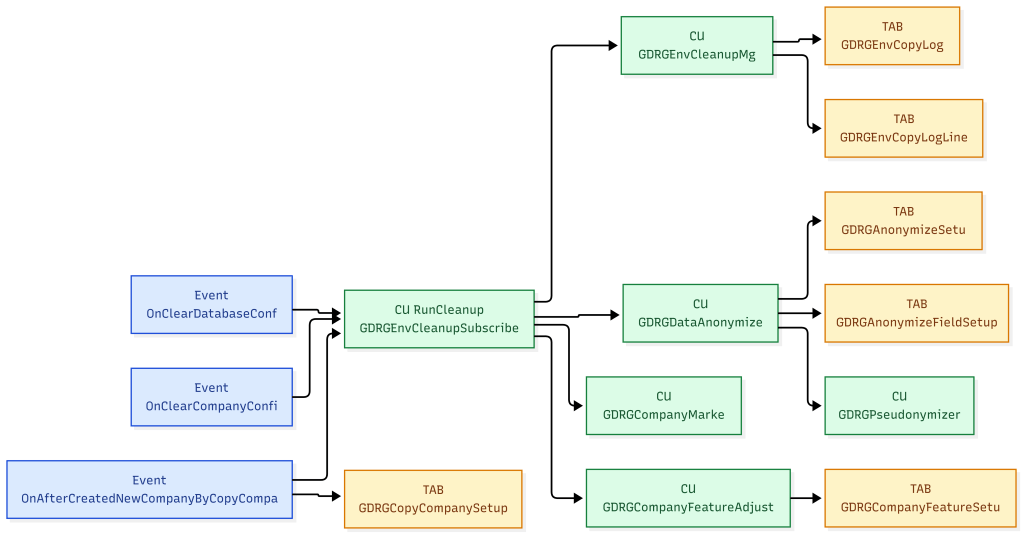
El mismo flujo se pueda reutilizar cuando la copia viene de un entorno, cuando viene de una empresa o cuando simplemente quieres probarlo manualmente dentro de un sandbox. Por un lado, aprovechamos los eventos estándar: OnClearDatabaseConfig y OnClearCompanyConfig, usados para limpiar datos al copiar una empresa a un nuevo entorno. Y cuando se crea una empresa por copia, usando el evento estándar OnAfterCreatedNewCompanyByCopyCompany.
Además, existe una configuración global de cleanup con dos opciones independientes: una para decidir si la limpieza debe ejecutarse tras una copia de entorno y otra para decidir si debe ejecutarse tras una copia de empresa. De esta forma, ambos orígenes quedan controlados desde un único punto.
    [EventSubscriber(ObjectType::Codeunit, Codeunit::"Environment Cleanup", OnClearDatabaseConfig, '', false, false)]
    local procedure OnClearDatabaseConfig()
    var
        EnvCleanupMgt: Codeunit "GDRG Env Cleanup Mgt";
    begin
        if not IsEnvironmentCopyCleanupEnabled() then
            exit;

        EnvCleanupMgt.EnsureLog(CurrentLogEntryNo, 'Environment Copy', GetEnvironmentNameSafe(), 'OnClearDatabaseConfig');
        EnvCleanupMgt.FinishLog(CurrentLogEntryNo, 'OnClearDatabaseConfig', 'Completed');
        CurrentLogEntryNo := 0;
    end;

    [EventSubscriber(ObjectType::Codeunit, Codeunit::"Environment Cleanup", OnClearCompanyConfig, '', false, false)]
    local procedure OnClearCompanyConfig(CompanyName: Text)
    begin
        if not IsEnvironmentCopyCleanupEnabled() then
            exit;

        RunCleanup(CopyStr(CompanyName, 1, 30), 'Environment Copy', 'OnClearCompanyConfig');
    end;

    [EventSubscriber(ObjectType::Report, Report::"Copy Company", OnAfterCreatedNewCompanyByCopyCompany, '', false, false)]
    local procedure OnAfterCreatedNewCompanyByCopyCompany(NewCompanyName: Text[30])
    var
        CleanupSetup: Record "GDRG Cleanup Setup";
        EnvCleanupSubscriber: Codeunit "GDRG Env Cleanup Subscriber";
    begin
        if not CleanupSetup.Get('SETUP') then
            exit;

        if not CleanupSetup."Run Company Cleanup After Copy" then
            exit;

        EnvCleanupSubscriber.RunManualCleanup(NewCompanyName);
    end;
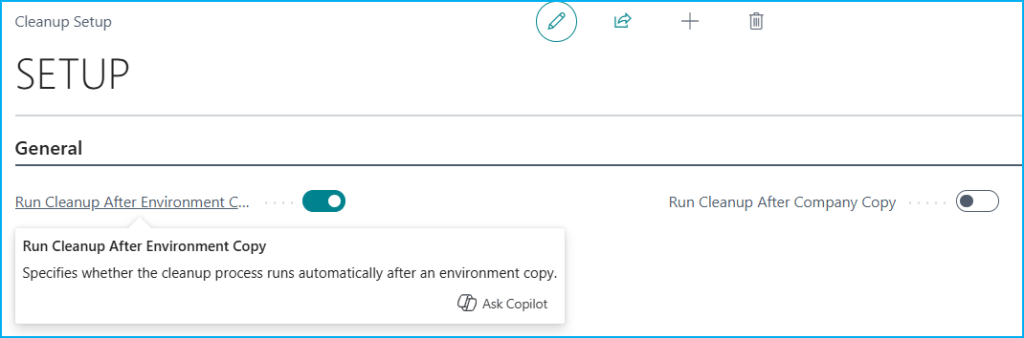
La siguiente imagen nos muestra la configuración global de cleanup. Aquí se puede decidir de forma independiente si el proceso debe ejecutarse automáticamente después de una copia de entorno o después de una copia de empresa. Es una forma simple de centralizar el control sin duplicar configuración.
Anonimizar o no anonimizar: No siempre quieres aplicar lo mismo en todos los casos. Por eso una configuración por tabla y campo te permite decidir qué tablas entran, qué campos se anonimizarán y, en la práctica, hasta qué punto quieres que la copia quede transformada.
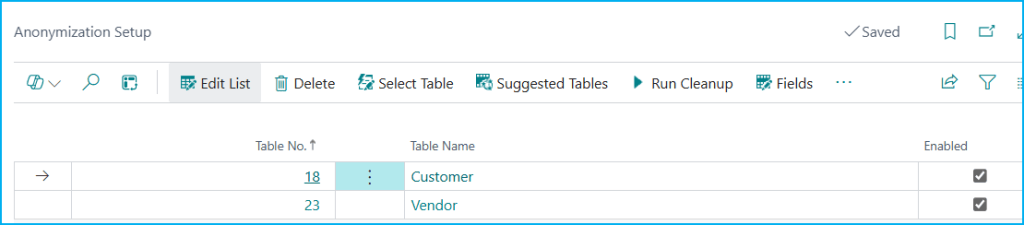
La siguiente imagen nos muestra la configuración principal de anonimización. Aquí se define qué tablas entran en el proceso, puedes seleccionar las tablas manualmente o proponer tablas sugeridas, también puedes lanzar la limpieza con «Run Cleanup» bajo demanda y abrir el detalle de campos con la opción de «Fields». Los campos nos indican el número de tabla, nombre de tabla y si está habilitada.
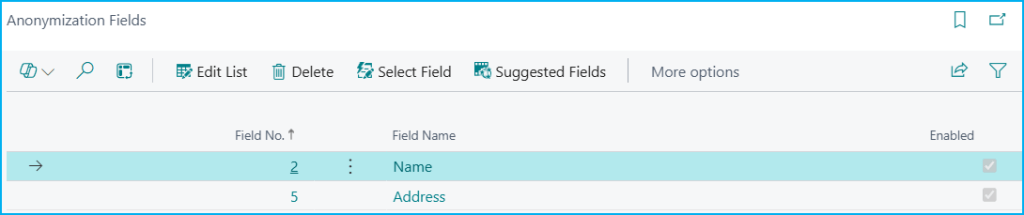
La siguiente imagen nos muestra el detalle por campos dentro de una tabla concreta. Aquí se decide exactamente qué campos se anonimizarán, con opciones para seleccionar campos manualmente o cargar sugerencias. Los campos nos indican el número de campo, nombre del campo y si está habilitado.
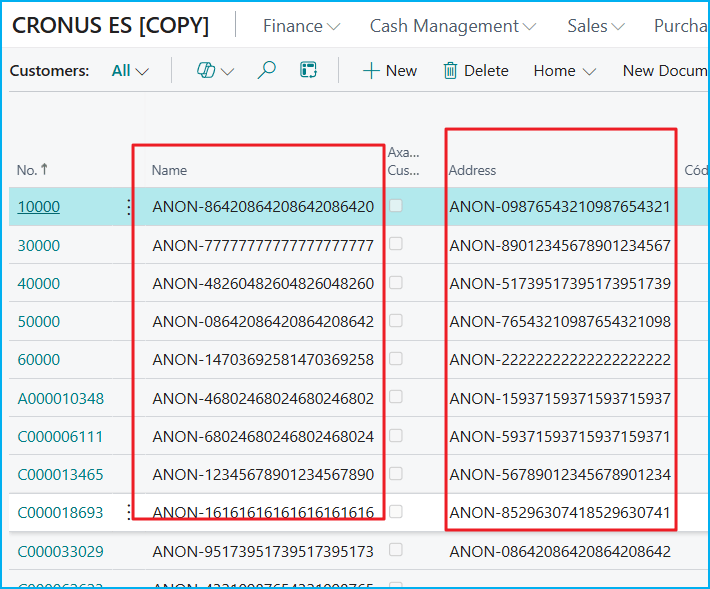
La siguiente imagen nos enseña el resultado visible de la anonimización sobre datos reales. Se aprecia cómo campos como Name y Address de la tabla Customer ya no conservan el valor original y pasan a un formato anonimizado.
Muchas veces después de copiar no solo quieres ocultar datos. También quieres dejar el entorno o la empresa en un estado más controlado para pruebas. Por lo que, la idea adicionalmente:
- Marca visualmente la empresa copiada.
- Ajusta una configuración simple para simular adaptación tras la copia.
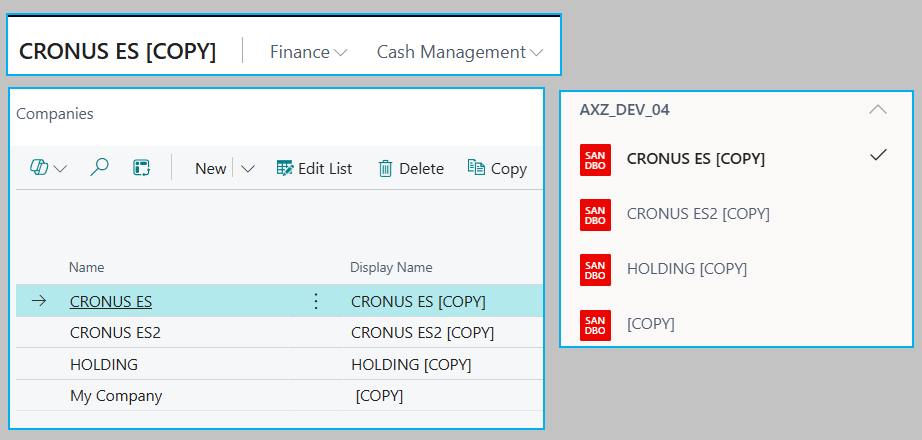
La siguiente imagen nos muestra cómo el proceso añade [COPY] al Display Name, y también a la tabla de configuración de empresa, lo que ayuda a identificar rápidamente que no estamos trabajando sobre una empresa original. Es un detalle simple, pero muy útil para evitar confusiones en pruebas o demos.
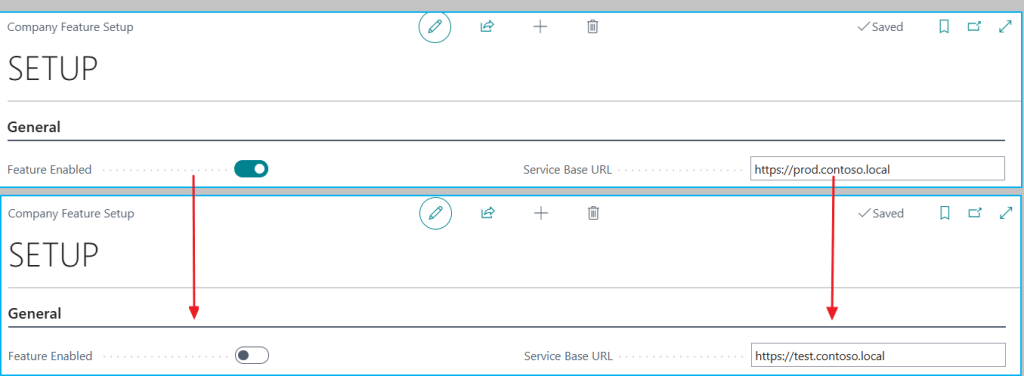
La siguiente imagen nos enseña que la configuración pasa de un estado más “productivo” a uno más seguro para testing: la feature queda desactivada y la URL base cambia de prod a test. El proceso no solo anonimiza datos, también puede adaptar configuración para que la copia quede lista para usarse con menos riesgo.
Para mí, una parte importante de esta idea no es solo ejecutar el proceso, sino dejar evidencia de todo el proceso. Por lo que, también tenemos un log que guarda en una cabecera información como:
- trigger
- evento inicial
- empresa
- fecha y hora de inicio
- fecha y hora de fin
- duración total
- estado
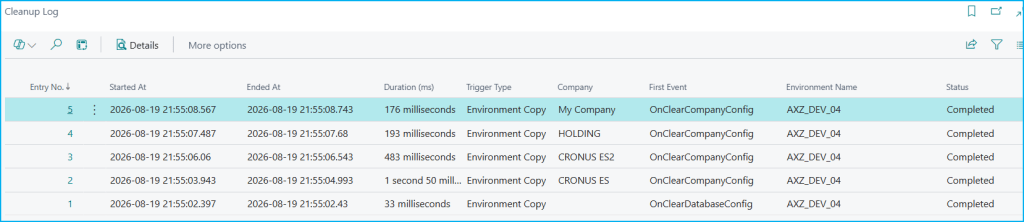
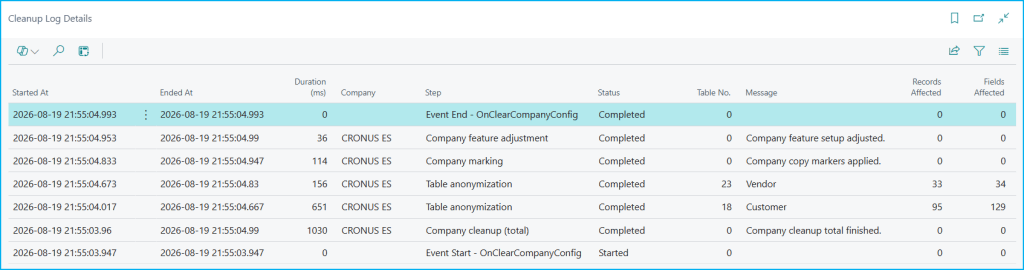
Y además guarda el detalle de pasos ejecutados. Eso permite entender mejor el comportamiento y, más adelante, puede servir como base para otras cosas: notificaciones, revisiones operativas, controles internos o simplemente soporte cuando alguien pregunte qué pasó con la copia. La siguiente imagen nos muestra la trazabilidad general del proceso. Cada línea del log resume una ejecución con su inicio, fin, duración, tipo de trigger, empresa, evento y estado, lo que permite entender rápidamente qué pasó en la copia y sobre qué compañía se ejecutó.
La siguiente imagen nos baja al detalle técnico del proceso. Aquí se ve el orden de los pasos ejecutados, su duración y el impacto de cada uno, incluyendo anonimización por tabla, marcado de empresa y ajuste de configuración.
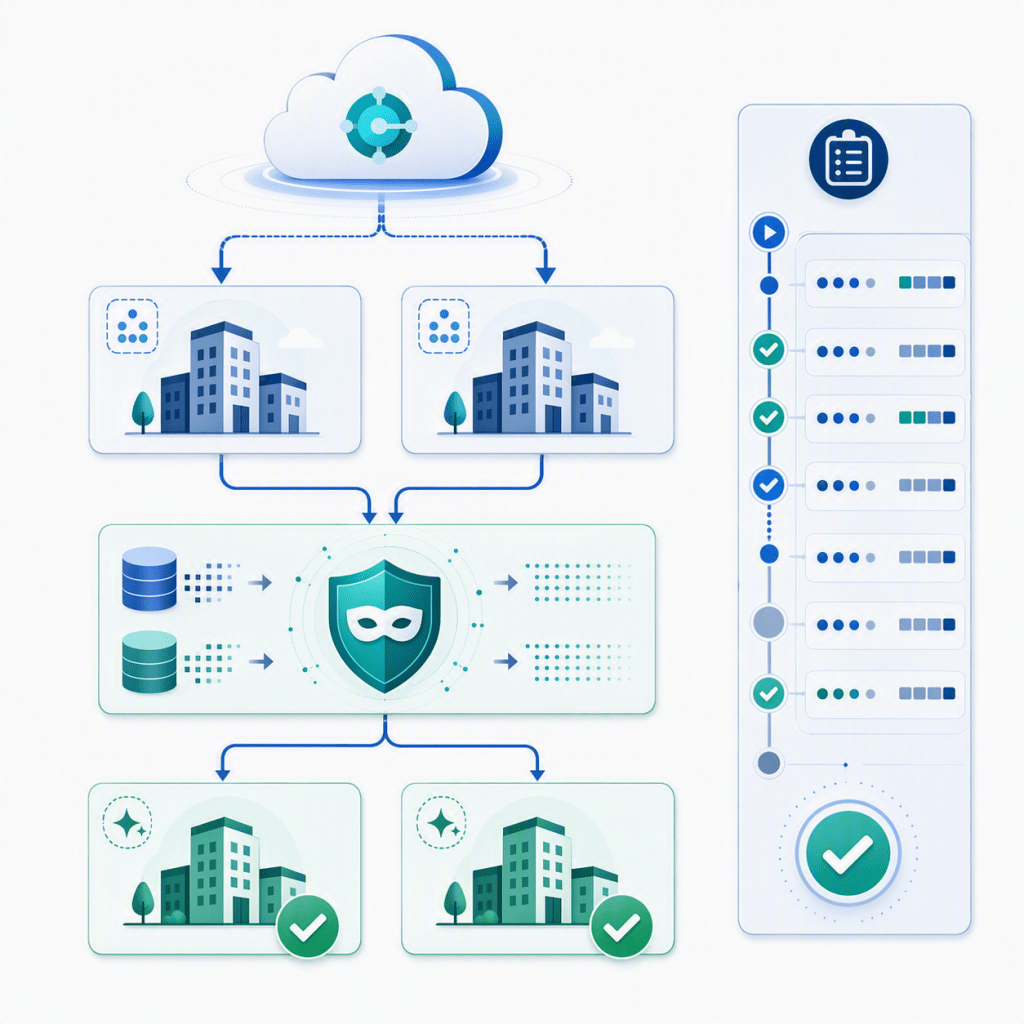
El diagrama de la solución es el siguiente:
El código del núcleo es el siguiente:
    local procedure RunCleanup(CompanyName: Text[30]; TriggerType: Text; EventName: Text)
    var
        EnvCleanupMgt: Codeunit "GDRG Env Cleanup Mgt";
        DataAnonymizer: Codeunit "GDRG Data Anonymizer";
        CompanyMarker: Codeunit "GDRG Company Marker";
        CompanyFeatureAdjuster: Codeunit "GDRG Company Feature Adjuster";
        CompanyLineNo: Integer;
    begin
        EnvCleanupMgt.EnsureLog(CurrentLogEntryNo, TriggerType, GetEnvironmentNameSafe(), EventName);
        EnvCleanupMgt.SetLogCompany(CurrentLogEntryNo, CompanyName);
        CompanyLineNo := EnvCleanupMgt.AddLineWithNo(CurrentLogEntryNo, CompanyName, 'Company cleanup (total)', 'Started', 0, EventName + ' received.');
        DataAnonymizer.RunForCompany(CurrentLogEntryNo, CompanyName);
        CompanyMarker.RunForCompany(CurrentLogEntryNo, CompanyName);
        CompanyFeatureAdjuster.RunForCompany(CurrentLogEntryNo, CompanyName);
        EnvCleanupMgt.FinishLine(CurrentLogEntryNo, CompanyLineNo, 'Completed', 'Company cleanup total finished.');
        EnvCleanupMgt.FinishLog(CurrentLogEntryNo, EventName, 'Completed');
        CurrentLogEntryNo := 0;
    end;
El código se encuentra aquí, por si quieres revisarlo: Blog/GDRGDev_CopyCleanup at main · gdrgdev/Blog
Los objetos son los siguientes:
- GDRGAnonymizeSetup.Table.al: Tabla de configuración principal para seleccionar qué tablas participan en la anonimización.
- GDRGAnonymizeFieldSetup.Table.al: Tabla de detalle para definir qué campos de cada tabla se anonimizarán.
- GDRGCleanupSetup.Table.al: Tabla de configuración global para decidir si el proceso se ejecuta después de una copia de entorno o de una copia de empresa.
- GDRGCompanyFeatureSetup.Table.al: Tabla de ejemplo para simular ajustes funcionales posteriores a la copia.
- GDRGEnvCopyLog.Table.al: Tabla de cabecera que registra cada ejecución del proceso de limpieza.
- GDRGEnvCopyLogLine.Table.al: Tabla de detalle que guarda los pasos ejecutados dentro de cada limpieza.
- GDRGEnvCleanupMgt.Codeunit.al: Codeunit que crea, actualiza y cierra la cabecera y el detalle del log.
- GDRGEnvCleanupSubscriber.Codeunit.al: Codeunit que escucha los eventos y ejecuta el flujo principal de limpieza.
- GDRGDataAnonymizer.Codeunit.al: Codeunit que anonimiza los campos configurados en cada empresa.
- GDRGCompanyMarker.Codeunit.al: Codeunit que marca visualmente la empresa copiada para diferenciarla de la original.
- GDRGPseudonymizer.Codeunit.al: Codeunit que genera valores seudonimizados de forma determinista.
- GDRGSetupProposalMgt.Codeunit.al: Codeunit que propone tablas y campos para acelerar la configuración inicial.
- GDRGCleanupOperation.Enum.al: Enum que representa los tipos de operación relacionados con la limpieza.
- GDRGCopyCompanySubscriber.Codeunit.al: Codeunit que reutiliza el mismo flujo cuando se crea una empresa por copia.
- GDRGCompanyFeatureAdjuster.Codeunit.al: Codeunit que ajusta una configuración de ejemplo para dejar la copia lista para pruebas.
- GDRGAnonymizeSetup.Page.al: Página principal para configurar tablas y lanzar la limpieza manual.
- GDRGAnonymizeFieldList.Page.al: Página de detalle para configurar los campos a anonimizar por tabla.
- GDRGFieldLookup.Page.al: Página de apoyo para seleccionar campos desde la tabla virtual Field.
- GDRGEnvCopyLogList.Page.al: Página que muestra el resumen de ejecuciones del proceso de limpieza.
- GDRGEnvCopyLogLines.Page.al: Página que muestra el detalle paso a paso de cada ejecución.
- GDRGCleanupSetup.Page.al: Página para activar o desactivar la limpieza automática tras copia de entorno y tras copia de empresa.
- GDRGCompanyFeatureSetup.Page.al: Página de ejemplo para visualizar la configuración funcional que se ajusta tras la copia.
- GDRGEnvCleanup.PermissionSet.al: Permission set que agrupa el acceso necesario para usar la solución.
Esta idea intenta contar con una base simple para tratar copias de entorno y de empresa, con anonimización opcional, reutilización del flujo y trazabilidad suficiente para evolucionar más adelante.
Espero que esta información te ayude en tu trabajo diario con Business Central.
🧹 Cleaning and anonymizing copies in Business Central: environments, companies, and traceability
More than once, when working with Business Central, after copying an environment or copying a company, we want to have some control over what happens next. After an environment copy or a company copy, you may need to:
- Anonymize certain sensitive data.
- Decide in which cases to do it and in which cases not to.
- Adjust some configuration so the copy does not behave like production.
- Know the date and time when the process was executed.
- Know which company it ran against.
- Have a foundation for future notifications or auditing.
My idea in this post is to cover those points at a high level without making the solution too complex. The approach is based on:
- A table and field configuration to decide what to anonymize.
- A reusable cleanup flow per company.
- The possibility of running it from events or manually.
- A log with header and detail to leave useful evidence.
The same flow can be reused when the copy comes from an environment, when it comes from a company, or when you simply want to test it manually inside a sandbox. On one side, we use the standard events: OnClearDatabaseConfig y OnClearCompanyConfig, used to clean data when copying a company into a new environment. And when a company is created by copy, we use the standard event OnAfterCreatedNewCompanyByCopyCompany.
In addition, there is now a global cleanup setup with two independent options: one to decide whether cleanup should run after an environment copy and another to decide whether it should run after a company copy. This way, both origins are controlled from a single point.
    [EventSubscriber(ObjectType::Codeunit, Codeunit::"Environment Cleanup", OnClearDatabaseConfig, '', false, false)]
    local procedure OnClearDatabaseConfig()
    var
        EnvCleanupMgt: Codeunit "GDRG Env Cleanup Mgt";
    begin
        if not IsEnvironmentCopyCleanupEnabled() then
            exit;

        EnvCleanupMgt.EnsureLog(CurrentLogEntryNo, 'Environment Copy', GetEnvironmentNameSafe(), 'OnClearDatabaseConfig');
        EnvCleanupMgt.FinishLog(CurrentLogEntryNo, 'OnClearDatabaseConfig', 'Completed');
        CurrentLogEntryNo := 0;
    end;

    [EventSubscriber(ObjectType::Codeunit, Codeunit::"Environment Cleanup", OnClearCompanyConfig, '', false, false)]
    local procedure OnClearCompanyConfig(CompanyName: Text)
    begin
        if not IsEnvironmentCopyCleanupEnabled() then
            exit;

        RunCleanup(CopyStr(CompanyName, 1, 30), 'Environment Copy', 'OnClearCompanyConfig');
    end;

    [EventSubscriber(ObjectType::Report, Report::"Copy Company", OnAfterCreatedNewCompanyByCopyCompany, '', false, false)]
    local procedure OnAfterCreatedNewCompanyByCopyCompany(NewCompanyName: Text[30])
    var
        CleanupSetup: Record "GDRG Cleanup Setup";
        EnvCleanupSubscriber: Codeunit "GDRG Env Cleanup Subscriber";
    begin
        if not CleanupSetup.Get('SETUP') then
            exit;

        if not CleanupSetup."Run Company Cleanup After Copy" then
            exit;

        EnvCleanupSubscriber.RunManualCleanup(NewCompanyName);
    end;
The following image shows the global cleanup setup. Here you can independently decide whether the process should run automatically after an environment copy or after a company copy. It is a simple way to centralize control without duplicating configuration.
Anonymize or not anonymize: You do not always want to apply the same behavior in every case. That is why a table and field configuration lets you decide which tables are included, which fields will be anonymized, and in practice how far you want the copy to be transformed.
The following image shows the main anonymization setup. Here you define which tables are part of the process, you can select the tables manually or suggest recommended tables, you can also launch the cleanup on demand with «Run Cleanup» and open the field detail with the «Fields» option. The visible fields show the table number, table name, and whether it is enabled.
The following image shows the field detail inside a specific table. Here you decide exactly which fields will be anonymized, with options to select fields manually or load suggestions. The fields show the field number, field name, and whether it is enabled.
The following image shows the visible result of anonymization on real data. You can see how fields such as Name and Address in the Customer table no longer keep the original value and move to an anonymized format.
Many times, after copying, you do not only want to hide data. You also want to leave the environment or company in a more controlled state for testing. So, the idea additionally:
- Visually marks the copied company.
- Adjusts a simple configuration to simulate post-copy adaptation.
The following image shows how the process adds [COPY] to the Display Name, and also to the company setup table, which helps quickly identify that we are not working on an original company. It is a simple detail, but very useful to avoid confusion in tests or demos.
The following image shows that the configuration moves from a more production-like state to a safer testing state: the feature is disabled and the base URL changes from prod to test. The process does not only anonymize data, it can also adapt configuration so the copy is ready to be used with less risk.
For me, an important part of this idea is not only executing the process, but also leaving evidence of the whole process. Because of that, we also have a log that stores in a header information such as:
- trigger
- initial event
- company
- start date and time
- end date and time
- total duration
- status
And it also stores the detail of the executed steps. This makes it easier to understand the behavior and, later on, it can serve as a foundation for other things: notifications, operational reviews, internal controls, or simply support when someone asks what happened with the copy. The following image shows the general traceability of the process. Each log line summarizes one execution with its start, end, duration, trigger type, company, event, and status, which makes it easy to understand what happened in the copy and on which company it ran.
The following image takes us down to the technical detail of the process. Here you can see the order of the executed steps, their duration, and the impact of each one, including anonymization by table, company marking, and configuration adjustment.
The solution diagram is the following:
The core code is the following:
    local procedure RunCleanup(CompanyName: Text[30]; TriggerType: Text; EventName: Text)
    var
        EnvCleanupMgt: Codeunit "GDRG Env Cleanup Mgt";
        DataAnonymizer: Codeunit "GDRG Data Anonymizer";
        CompanyMarker: Codeunit "GDRG Company Marker";
        CompanyFeatureAdjuster: Codeunit "GDRG Company Feature Adjuster";
        CompanyLineNo: Integer;
    begin
        EnvCleanupMgt.EnsureLog(CurrentLogEntryNo, TriggerType, GetEnvironmentNameSafe(), EventName);
        EnvCleanupMgt.SetLogCompany(CurrentLogEntryNo, CompanyName);
        CompanyLineNo := EnvCleanupMgt.AddLineWithNo(CurrentLogEntryNo, CompanyName, 'Company cleanup (total)', 'Started', 0, EventName + ' received.');
        DataAnonymizer.RunForCompany(CurrentLogEntryNo, CompanyName);
        CompanyMarker.RunForCompany(CurrentLogEntryNo, CompanyName);
        CompanyFeatureAdjuster.RunForCompany(CurrentLogEntryNo, CompanyName);
        EnvCleanupMgt.FinishLine(CurrentLogEntryNo, CompanyLineNo, 'Completed', 'Company cleanup total finished.');
        EnvCleanupMgt.FinishLog(CurrentLogEntryNo, EventName, 'Completed');
        CurrentLogEntryNo := 0;
    end;
The code is available here in case you want to review it: Blog/GDRGDev_CopyCleanup at main · gdrgdev/Blog
The objects are the following:
- GDRGAnonymizeSetup.Table.al: Main setup table to select which tables participate in anonymization.
- GDRGAnonymizeFieldSetup.Table.al: Detail table to define which fields of each table will be anonymized.
- GDRGCleanupSetup.Table.al: Global setup table to decide whether the process runs after an environment copy or after a company copy.
- GDRGCompanyFeatureSetup.Table.al: Example table to simulate functional adjustments after the copy.
- GDRGEnvCopyLog.Table.al: Header table that records each cleanup execution.
- GDRGEnvCopyLogLine.Table.al: Detail table that stores the executed steps inside each cleanup.
- GDRGEnvCleanupMgt.Codeunit.al: Codeunit that creates, updates, and closes the log header and detail.
- GDRGEnvCleanupSubscriber.Codeunit.al: Codeunit that listens to the events and executes the main cleanup flow.
- GDRGDataAnonymizer.Codeunit.al: Codeunit that anonymizes the configured fields in each company.
- GDRGCompanyMarker.Codeunit.al: Codeunit that visually marks the copied company to differentiate it from the original.
- GDRGPseudonymizer.Codeunit.al: Codeunit that generates pseudonymized values in a deterministic way.
- GDRGSetupProposalMgt.Codeunit.al: Codeunit that suggests tables and fields to speed up the initial setup.
- GDRGCleanupOperation.Enum.al: Enum that represents the operation types related to cleanup.
- GDRGCopyCompanySubscriber.Codeunit.al: Codeunit that reuses the same flow when a company is created by copy.
- GDRGCompanyFeatureAdjuster.Codeunit.al: Codeunit that adjusts an example configuration to leave the copy ready for testing.
- GDRGAnonymizeSetup.Page.al: Main page to configure tables and launch manual cleanup.
- GDRGAnonymizeFieldList.Page.al: Detail page to configure the fields to anonymize by table.
- GDRGFieldLookup.Page.al: Support page to select fields from the virtual Field table.
- GDRGEnvCopyLogList.Page.al: Page that shows the summary of cleanup executions.
- GDRGEnvCopyLogLines.Page.al: Page that shows the step-by-step detail of each execution.
- GDRGCleanupSetup.Page.al: Page to enable or disable automatic cleanup after an environment copy and after a company copy.
- GDRGCompanyFeatureSetup.Page.al: Example page to visualize the functional configuration adjusted after the copy.
- GDRGEnvCleanup.PermissionSet.al: Permission set that groups the access required to use the solution.
This idea aims to provide a simple foundation to handle environment and company copies, with optional anonymization, flow reuse, and enough traceability to evolve further.
I hope this information helps you in your daily work with Business Central.
Más información / More information:



Deja un comentario