
🧭 Page Explorer for Business Central: everything a page hides, in plain sight (English version)
🧭 Page Explorer para Business Central: todo lo que una página esconde, a la vista
He experimentado una situación recurrente en el trabajo diario de los usuarios con Business Central: están en un registro cualquiera y necesitas saber qué campos tiene esa página, qué valor tienen en ese momento, qué describe cada uno y qué acciones están disponibles.
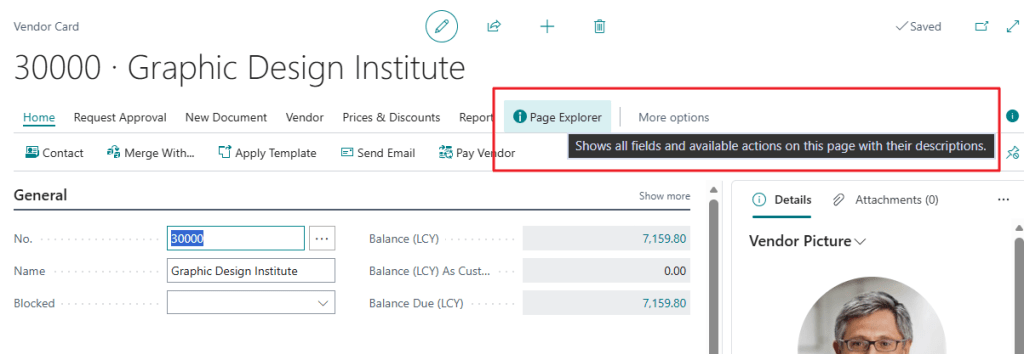
Por lo que la idea de esta extensión intenta cubrir esa necesidad: un Page Explorer que se abre desde el propio registro y muestra, en una sola ventana, todos los campos con su valor actual y descripción, y todas las acciones disponibles con su tooltip.
La extensión se apoya en la codeunit nativa Page Summary Provider y la table 2000000143 «Page Action» que Business Central ya incluye. Esta codeunit devuelve un JSON con los campos del registro activo: caption, valor, tipo de dato y tooltip. A partir de ahí, la extensión parsea ese JSON, lo carga en una tabla temporal y lo muestra en dos partes lado a lado: Fields y Actions.
El botón Page Explorer aparece en la sección de procesamiento de cada página extendida. Al pulsarlo, pasa el ID de la página y el SystemId del registro actual, y se abre la ventana.
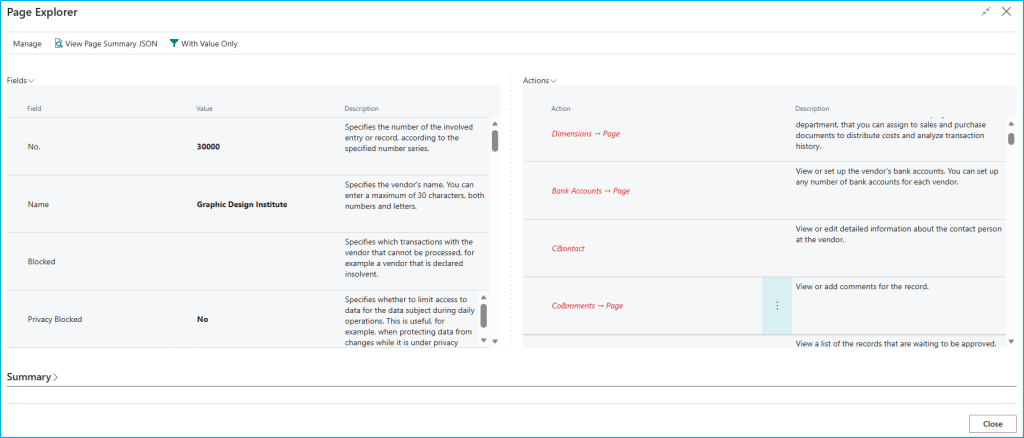
Lo que ves en el Page Explorer:
- Fields: nombre del campo, valor actual en negrita si tiene valor, y descripción si el campo tiene tooltip definido.
- Actions: nombre de la acción y su descripción. Las acciones promovidas se destacan visualmente.
- With Value Only: filtra y muestra únicamente los campos que tienen valor. Cambia a Show All Fields para volver a la vista completa.
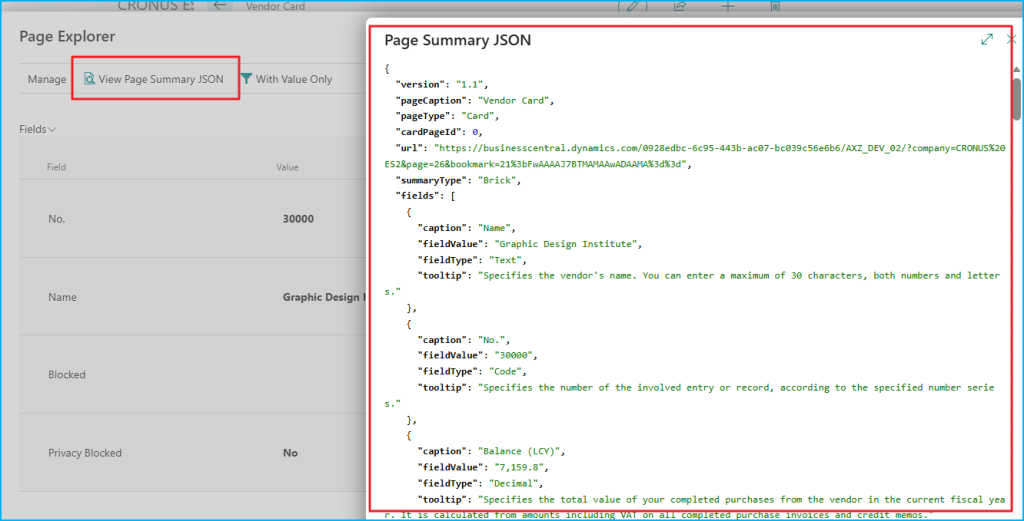
- View Page Summary JSON: muestra el JSON devuelto por el
Page Summary Provider, útil para depuración. - Summary: nombre de la página, número de campos y número de acciones.
¿Cómo extenderlo a cualquier página? El patrón es siempre el mismo: una pageextension que añade la acción en processing y pasa el Page:: correspondiente junto al SystemId del registro. Por ejemplo:
pageextension 97818 "GDRGPE Cust Card Ext" extends "Customer Card"{ actions { addlast(processing) { action(GDRGPEPageExplorer) { ApplicationArea = All; Caption = 'Page Explorer'; Image = Info; ToolTip = 'Shows all fields and available actions on this page with their descriptions.'; trigger OnAction() var PageExplorerPage: Page "GDRGPE Page Explorer"; begin PageExplorerPage.SetParameters(Page::"Customer Card", Rec.SystemId); PageExplorerPage.RunModal(); end; } } addlast(Promoted) { actionref(GDRGPEPageExplorer_Promoted; GDRGPEPageExplorer) { } } }}
El código se encuentra aquí, por si quieres revisarlo: Blog/GDRGDev_PageExplorer at main · gdrgdev/Blog
Los objetos son los siguientes:
GDRGPEGuideLine.Table.al: Tabla temporal que almacena cada línea (campo o acción) con su caption, valor, tooltip, tipo y estilo.GDRGPEGuideBuilder.Codeunit.al: Parsea el JSON delPage Summary Providery rellena la tabla temporal.GDRGPEJSONRenderer.Codeunit.al: Renderiza el JSON en HTML para la vista de depuración.GDRGPEPageExplorer.Page.al: Ventana principal con los dos ListParts lado a lado.GDRGPEFieldsPart.Page.al: ListPart de campos con filtro por valor.GDRGPEActPart.Page.al: ListPart de acciones agrupadas por sección.GDRGPERawJSON.Page.al: Visualizador del JSON raw con resaltado de sintaxis.GDRGPELineType.Enum.al: Enum con los tipos de línea: Header, Field, Action.GDRGPECustCardExt.PageExt.al: Botón en Customer Card.GDRGPEVendCardExt.PageExt.al: Botón en Vendor Card.GDRGPEItemCardExt.PageExt.al: Botón en Item Card.GDRGPESalesOrderExt.PageExt.al: Botón en Sales Order (cabecera).GDRGPESalesOrderSubExt.PageExt.al: Botón en Sales Order Subform (líneas).
De esta manera, la próxima vez que el usuario necesite entender qué tiene una página, puede usar esta funcionalidad para tener más contexto donde trabajar.
Espero que esta extensión te ayude en tu trabajo diario con Business Central.
🧭 Page Explorer for Business Central: everything a page hides, in plain sight
I have experienced a recurring situation in the daily work of Business Central users: they are on any record and need to know what fields that page has, what value they hold at that moment, what each one describes, and what actions are available.
So the idea behind this extension is to cover that need: a Page Explorer that opens directly from the record and shows you, in a single window, all fields with their current value and description, and all available actions with their tooltip.
The extension relies on the native Page Summary Provider codeunit and the table 2000000143 «Page Action» that Business Central already includes. This codeunit returns a JSON with the fields of the active record: caption, value and tooltip. From there, the extension parses that JSON, loads it into a temporary table and displays it in two side-by-side parts: Fields and Actions.
The Page Explorer button appears in the processing section of each extended page. When clicked, it passes the page ID and the SystemId of the active record, and the window opens.
What you see in the Page Explorer:
- Fields: field name, current value in bold if it has a value, and description if the field has a tooltip defined.
- Actions: action name and its description. Promoted actions are visually highlighted.
- With Value Only: filters and shows only fields that have a value. Changes to Show All Fields to return to the full view.
- View Page Summary JSON: shows the JSON returned by the
Page Summary Provider, useful for debugging. - Summary: page name, number of fields and number of actions.
How to extend it to any page? The pattern is always the same: a pageextension that adds the action in processing and passes the corresponding Page:: together with the record’s SystemId. For example:
pageextension 97818 "GDRGPE Cust Card Ext" extends "Customer Card"{ actions { addlast(processing) { action(GDRGPEPageExplorer) { ApplicationArea = All; Caption = 'Page Explorer'; Image = Info; ToolTip = 'Shows all fields and available actions on this page with their descriptions.'; trigger OnAction() var PageExplorerPage: Page "GDRGPE Page Explorer"; begin PageExplorerPage.SetParameters(Page::"Customer Card", Rec.SystemId); PageExplorerPage.RunModal(); end; } } addlast(Promoted) { actionref(GDRGPEPageExplorer_Promoted; GDRGPEPageExplorer) { } } }}
The code is here, if you want to check it out: Blog/GDRGDev_PageExplorer at main · gdrgdev/Blog
The objects are:
GDRGPELine.Table.al: Temporary table that stores each line (field or action) with its caption, value, type and style.GDRGPEBuilder.Codeunit.al: Parses thePage Summary ProviderJSON and populates the temporary table.GDRGPEJSONRenderer.Codeunit.al: Renders the JSON as HTML for the debug view.GDRGPEMain.Page.al: Main window with the two ListParts side by side.GDRGPEFieldsPart.Page.al: Fields ListPart with value filter.GDRGPEActionsPart.Page.al: Actions ListPart grouped by section.GDRGPERawJSON.Page.al: Raw JSON viewer with syntax highlighting.GDRGPELineType.Enum.al: Enum with line types: Header, Field, Action.GDRGPEVendCardExt.PageExt.al: Button on Vendor Card.GDRGPECustCardExt.PageExt.al: Button on Customer Card.GDRGPEItemCardExt.PageExt.al: Button on Item Card.GDRGPESalesOrderExt.PageExt.al: Button on Sales Order (header).GDRGPESalesOrderSubExt.PageExt.al: Button on Sales Order Subform (lines).
This way, the next time you need to understand what a page contains, you can use this functionality to have more context where you work.
I hope this extension helps you in your daily work with Business Central.
Más información / More information:



 Gerardo Rentería Blog
Deja un comentario