
🌍 Amount Conversion to Favorite Currencies in Business Central (English version)
🌍 Conversión de importes a divisas favoritas en Business Central
Seguro te ha pasado: estás en un pedido, un diario o un movimiento de cliente y quieres saber de manera rápida cuánto es ese importe en otras divisas, sin salir de la pantalla ni abrir Excel. Business Central ya tiene los tipos de cambio. Con esta propuesta de extensión no intento copiar ni guardar nada: solo vuelvo a mostrar ese dato, en unas divisas favoritas. La idea es sencilla:
- Eliges unas pocas divisas favoritas (por ejemplo USD, GBP y CHF).
- Haces clic en un importe.
- Ves ese importe en moneda local y en cada favorita, con la fecha del tipo de cambio usado y el factor.
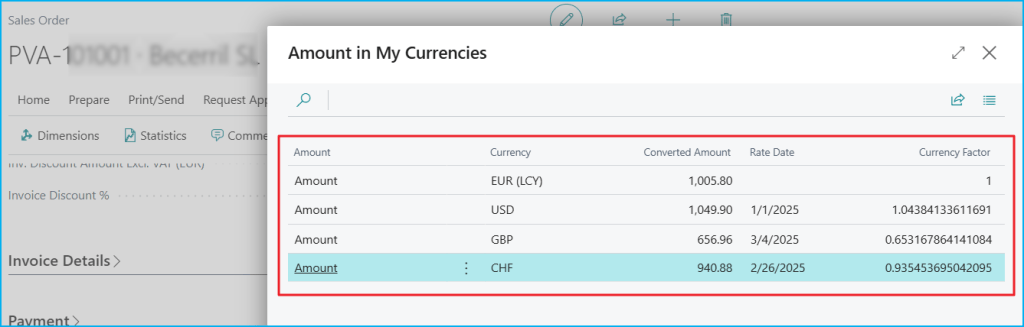
¿Cómo funciona? Para cada moneda favorita, la extensión hace lo mismo que BC al registrar:
- Busca el último tipo de cambio con fecha igual o anterior a la del documento (nunca uno posterior).
- Convierte con la función estándar, que triangula por la moneda local cuando hace falta.
- Redondea con la precisión de la divisa destino.
- Si no hay tipo de cambio, muestra 0 en rojo y no da error.
El corazón es esta línea, que usa la tabla estándar Currency Exchange Rate. Puedes ver todos sus métodos en la documentación oficial: Table «Currency Exchange Rate» | Microsoft Learn
ConvertedAmount := CurrExchRate.ApplnExchangeAmtFCYToFCY(AsOfDate, SourceCurrencyCode, ToCurrencyCode, SourceAmount, RateFound);
¿Cómo usarlo en un campo? Aquí está el patrón importante: no es una solución cerrada. Sirve para cualquier campo de importe. El patrón es este:
- Crear una pageextension.
- Añadir
OnDrillDownal campo (oOnAssistEditsi el campo es editable, como en el diario). - Pasar el importe, la divisa, el importe en moneda local (si BC ya lo guarda) y la fecha.
- Abrir la lista de resultados.
field(GDRGAmount; Rec.Amount)
{
    ApplicationArea = All;
    Caption = 'Amount';
    Editable = false;

    trigger OnDrillDown()
    var
        FXMgt: Codeunit "GDRG FX Conv. Mgt.";
    begin
        Rec.CalcFields(Amount);
        FXMgt.ShowConversion(Rec.Amount, Rec."Currency Code", 0, Rec.GetUseDate(), AmountLbl);
    end;
}
¿Cómo usarlo en un factbox? Es el mismo código, solo cambia dónde se muestra. La página del factbox usa una tabla temporal como origen (SourceTableTemporary) y se llena cada vez que cambias de registro:
- Crear una pageextension con un
partenfactboxes. - En
OnAfterGetCurrRecord, limpiar y agregar los importes.
trigger OnAfterGetCurrRecord()
begin
    Rec.CalcFields(Amount, "Remaining Amount", "Amount (LCY)", "Remaining Amt. (LCY)");
    CurrPage.GDRGFXFactbox.Page.ClearAmounts();
    CurrPage.GDRGFXFactbox.Page.AddAmount(Rec.Amount, Rec."Currency Code", Rec."Amount (LCY)", Rec."Posting Date", AmountLbl);
    CurrPage.GDRGFXFactbox.Page.AddAmount(Rec."Remaining Amount", Rec."Currency Code", Rec."Remaining Amt. (LCY)", Rec."Posting Date", RemainingLbl);
    CurrPage.GDRGFXFactbox.Page.RefreshPart();
end;
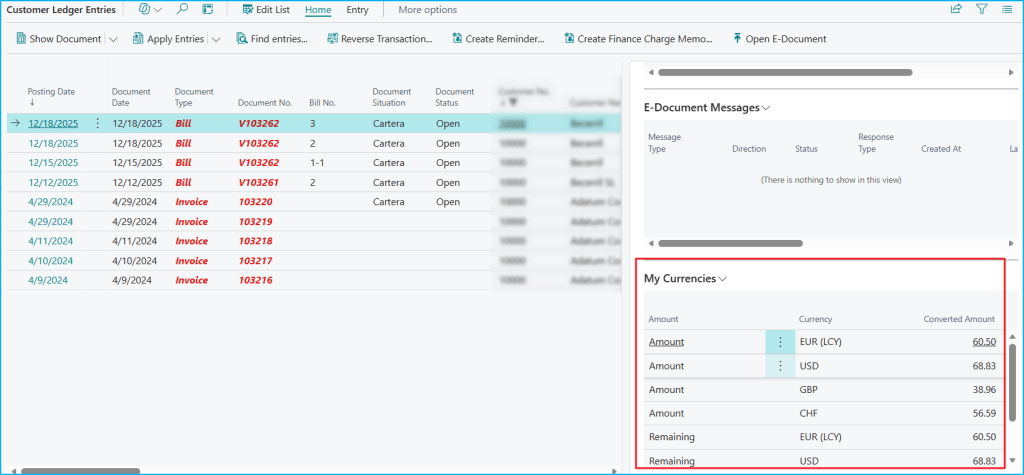
Para que el factbox se lea fácil, solo muestra importe y divisa. Al hacer clic en un importe se abre la lista completa con la fecha y el factor.
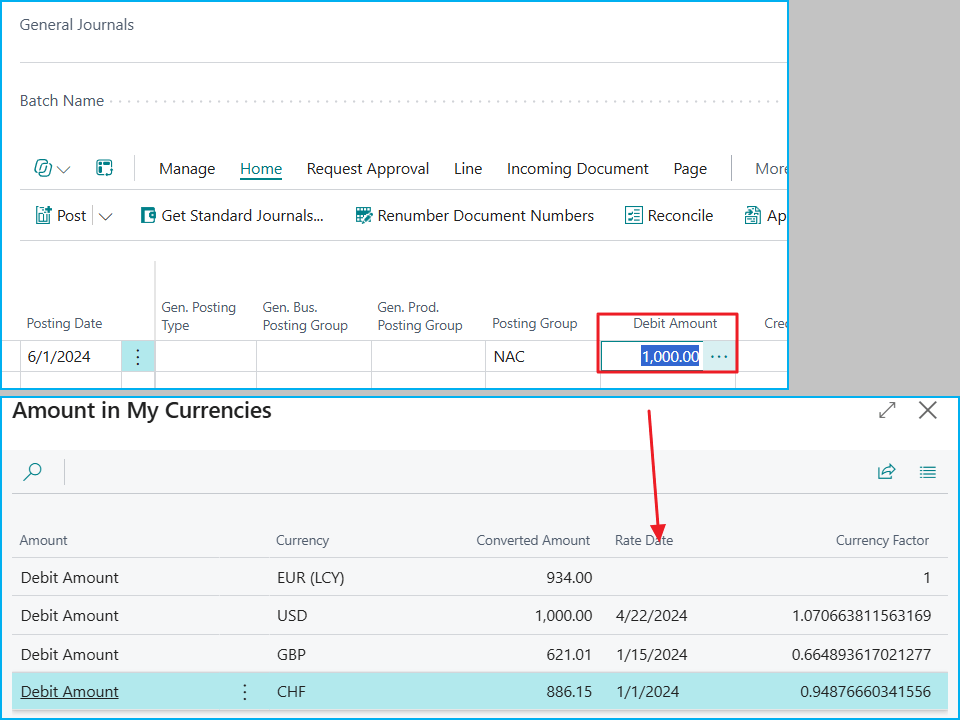
En el diario general el campo de importe es editable, así que usamos OnAssistEdit: aparece el botón … junto a Debit Amount y, al pulsarlo, se ve el importe en tus divisas favoritas con el tipo de cambio de cada una a la fecha de registro.
modify("Debit Amount")
{
    AssistEdit = true;

    trigger OnAssistEdit()
    var
        FXMgt: Codeunit "GDRG FX Conv. Mgt.";
    begin
        FXMgt.ShowConversion(Rec."Debit Amount", Rec."Currency Code", 0, Rec."Posting Date", DebitLbl);
    end;
}
¿Qué ve el usuario?
- Una fila con la moneda local, marcada como (LCY).
- Una fila por cada divisa favorita.
- La fecha del tipo de cambio usado y el factor (en la lista completa).
- En rojo, el importe de las divisas que no tienen tipo de cambio.
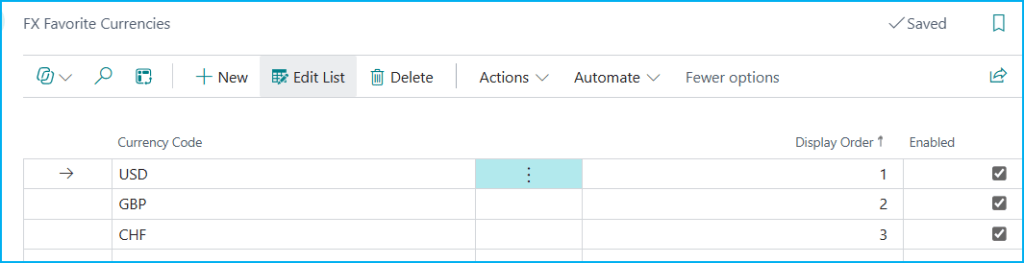
Para configurar las favoritas hay una página sencilla: código de divisa, orden y si está activa.
El código se encuentra aquí, por si quieres revisarlo: Blog/GDRGDev_FavoriteCurrencyConverter at main · gdrgdev/Blog
- GDRGFXFavCurrency.Table.al: guarda las divisas favoritas, su orden y si están activas.
- GDRGFXFavCurrencies.Page.al: página para configurar las favoritas.
- GDRGFXConvBuffer.Table.al: tabla temporal con las filas del resultado.
- GDRGFXConvMgt.Codeunit.al: lógica que convierte con el tipo de cambio estándar y arma el resultado.
- GDRGFXConvResult.Page.al: lista completa con importe, fecha del tipo de cambio y factor.
- GDRGFXConvFactbox.Page.al: versión compacta para usar como factbox.
- GDRGSalesOrderFXExt.PageExt.al: abre la conversión desde Amount y Amount Incl. VAT del pedido de venta.
- GDRGGenJournalFXExt.PageExt.al: abre la conversión desde Debit Amount y Credit Amount del diario general.
- GDRGCustLedgFXExt.PageExt.al: factbox en los movimientos de cliente.
- GDRGFX.PermissionSet.al: permisos para usar la solución.
En resumen, esta extensión muestra el tipo de cambio que BC ya tiene, en las pocas divisas que te importan, desde el mismo lugar donde estás trabajando.
Espero que esta extensión te ayude en tu trabajo diario con Business Central.
🌍 Amount Conversion to Favorite Currencies in Business Central
You have probably been there: you are on an order, a journal or a customer ledger entry, and you want to quickly know how much that amount is in other currencies, without leaving the screen or opening Excel. Business Central already has the exchange rates. With this extension proposal I am not trying to copy or store anything: I only show that data again, in a few favorite currencies. The idea is simple:
- You choose a few favorite currencies (for example USD, GBP and CHF).
- You click on an amount.
- You see that amount in local currency and in each favorite, with the exchange rate date used and the factor.
How does it work? For each favorite currency, the extension does the same as BC when posting:
- It looks for the latest exchange rate dated on or before the document date (never a later one).
- It converts with the standard function, which triangulates through the local currency when needed.
- It rounds using the precision of the target currency.
- If there is no exchange rate, it shows 0 in red and does not raise an error.
The core is this line, which uses the standard Currency Exchange Rate table. You can see all its methods in the official documentation: Table «Currency Exchange Rate» | Microsoft Learn
ConvertedAmount := CurrExchRate.ApplnExchangeAmtFCYToFCY(AsOfDate, SourceCurrencyCode, ToCurrencyCode, SourceAmount, RateFound);
How do you use it on a field? Here is the important pattern: this is not a closed solution. It works for any amount field. The pattern is this:
- Create a pageextension.
- Add OnDrillDown to the field (or OnAssistEdit if the field is editable, as in the journal).
- Pass the amount, the currency, the local currency amount (if BC already stores it) and the date.
- Open the results list.
field(GDRGAmount; Rec.Amount)
{
    ApplicationArea = All;
    Caption = 'Amount';
    Editable = false;

    trigger OnDrillDown()
    var
        FXMgt: Codeunit "GDRG FX Conv. Mgt.";
    begin
        Rec.CalcFields(Amount);
        FXMgt.ShowConversion(Rec.Amount, Rec."Currency Code", 0, Rec.GetUseDate(), AmountLbl);
    end;
}
How do you use it in a factbox? It is the same code, only where it is shown changes. The factbox page uses a temporary table as its source (SourceTableTemporary) and is filled every time you change record:
- Create a pageextension with a part in factboxes.
- In OnAfterGetCurrRecord, clear and add the amounts..
trigger OnAfterGetCurrRecord()
begin
    Rec.CalcFields(Amount, "Remaining Amount", "Amount (LCY)", "Remaining Amt. (LCY)");
    CurrPage.GDRGFXFactbox.Page.ClearAmounts();
    CurrPage.GDRGFXFactbox.Page.AddAmount(Rec.Amount, Rec."Currency Code", Rec."Amount (LCY)", Rec."Posting Date", AmountLbl);
    CurrPage.GDRGFXFactbox.Page.AddAmount(Rec."Remaining Amount", Rec."Currency Code", Rec."Remaining Amt. (LCY)", Rec."Posting Date", RemainingLbl);
    CurrPage.GDRGFXFactbox.Page.RefreshPart();
end;
To keep the factbox easy to read, it only shows the amount and the currency. Clicking an amount opens the full list with the date and the factor.
In the general journal the amount field is editable, so we use OnAssistEdit: a … button appears next to Debit Amount and, when you click it, you see the amount in your favorite currencies with each currency’s exchange rate at the posting date.
modify("Debit Amount")
{
    AssistEdit = true;

    trigger OnAssistEdit()
    var
        FXMgt: Codeunit "GDRG FX Conv. Mgt.";
    begin
        FXMgt.ShowConversion(Rec."Debit Amount", Rec."Currency Code", 0, Rec."Posting Date", DebitLbl);
    end;
}
What does the user see?
- A row with the local currency, marked as (LCY).
- One row for each favorite currency.
- The exchange rate date used and the factor (in the full list).
- In red, the amount of the currencies that have no exchange rate.
To set up the favorites there is a simple page: currency code, order and whether it is active.
The code is here, if you want to check it out: Blog/GDRGDev_FavoriteCurrencyConverter at main · gdrgdev/Blog
- GDRGFXFavCurrency.Table.al: stores the favorite currencies, their order and whether they are active.
- GDRGFXFavCurrencies.Page.al: page to set up the favorites.
- GDRGFXConvBuffer.Table.al: temporary table with the result rows.
- GDRGFXConvMgt.Codeunit.al: logic that converts with the standard exchange rate and builds the result.
- GDRGFXConvResult.Page.al: full list with amount, exchange rate date and factor.
- GDRGFXConvFactbox.Page.al: compact version to use as a factbox.
- GDRGSalesOrderFXExt.PageExt.al: opens the conversion from Amount and Amount Incl. VAT on the sales order.
- GDRGGenJournalFXExt.PageExt.al: opens the conversion from Debit Amount and Credit Amount on the general journal.
- GDRGCustLedgFXExt.PageExt.al: factbox on the customer ledger entries.
- GDRGFX.PermissionSet.al: permissions to use the solution.
In short, this extension shows the exchange rate that BC already has, in the few currencies that matter to you, from the same place where you are working.
I hope this extension helps you in your daily work with Business Central.
Más información/More Information



Deja una respuesta