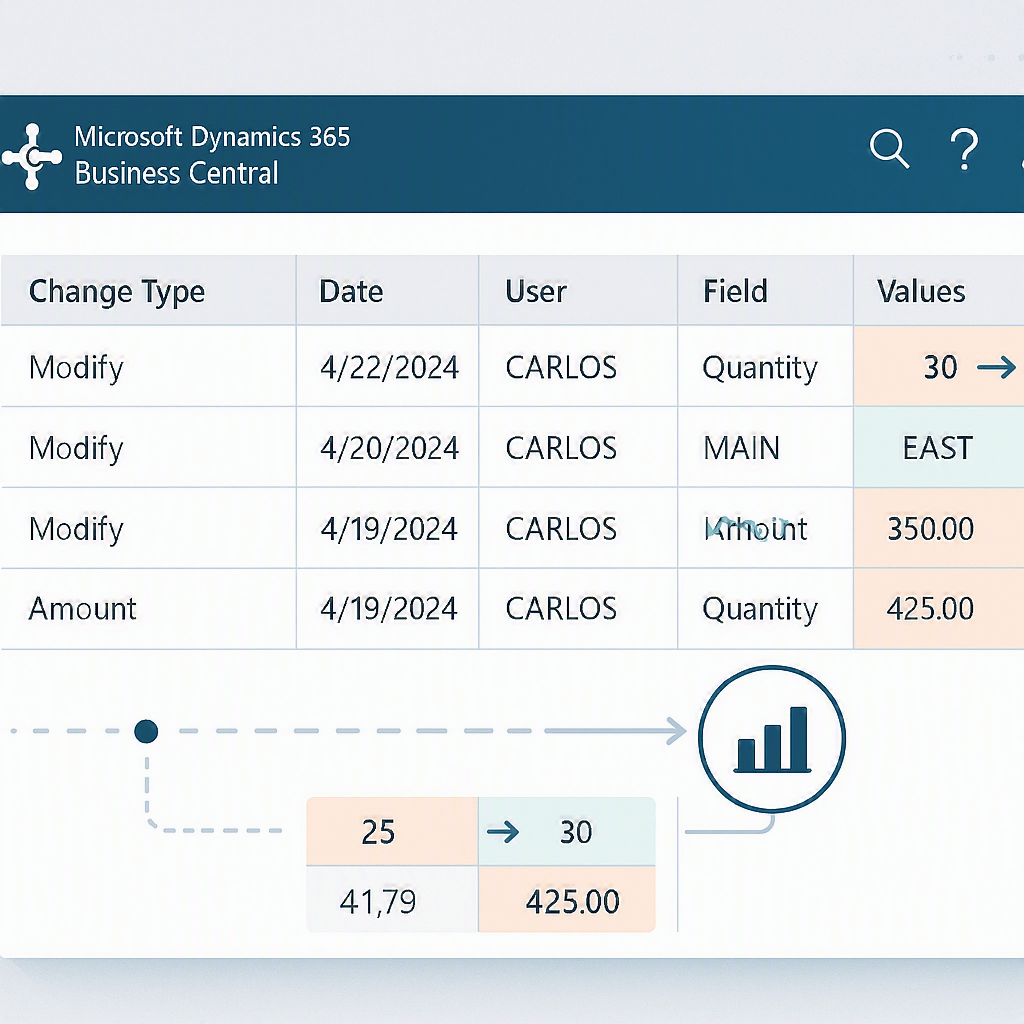
🔎 Change Log Blame View: View change history in a different way (English version)
🔎 Vista del historial de cambios: una forma diferente de ver los cambios
Luego de muchas implementaciones, puedo confirmar que hay una situación bastante común en soporte, consultoría o desarrollo: un dato ha cambiado y necesitas ver rápido qué campo cambió, cuándo cambió y qué usuario lo hizo.
El registro de cambios estándar tiene esa información, pero leerla para un registro concreto no siempre es muy cómodo. Por eso, he intentado aligerar esto, y por eso, esta extensión propone una vista tipo matriz para entender la evolución de un registro de forma mucho más clara. La idea pretende no ser complicada:
- Cada fila representa un campo.
- Cada columna representa un evento del Change Log.
- En la cabecera ves tipo de cambio, fecha y usuario.
- En cada celda ves el valor que tomó ese campo en ese evento.
Así, en lugar de revisar entradas sueltas, puedes leer el historial casi como una línea temporal visual.
¿Cómo funciona? La extensión toma el historial de cambios del registro actual y lo reorganiza en una vista mucho más fácil de leer. Para hacerlo:
- filtra la tabla estándar
Change Log Entrypor la tabla y la clave del registro. - agrupa los cambios en eventos.
- construye una matriz donde las columnas son los cambios y las filas son los campos.
- muestra para cada evento el tipo de cambio, la fecha, el usuario y el valor resultante.
Después, la página permite recorrer el histórico por bloques de eventos para que la lectura sea más cómoda.

¿Cómo usarlo en las páginas? Aquí está el patrón importante: no es una solución cerrada. La idea se puede reutilizar en cualquier página donde puedas identificar el registro actual. El patrón es este:
- Crear una
pageextension. - Añadir una acción.
- Pasar la tabla y la clave primaria del registro actual.
- Abrir la página
CL Blame.
pageextension 88893 "CL Blame Customer Card Ext" extends "Customer Card"{ actions { addlast(navigation) { action(ViewChangeLogBlame) { ApplicationArea = All; Caption = 'Change Log (Blame View)'; Image = History; trigger OnAction() var BlamePage: Page "CL Blame"; begin BlamePage.SetParameters(DATABASE::Customer, Rec."No.", '', ''); BlamePage.RunModal(); end; } } }}

¿Qué ve el usuario? La página principal permite:
- seleccionar tabla y clave primaria.
- cargar el histórico del registro.
- ver el rango de eventos mostrado.
- navegar entre bloques de cambios.
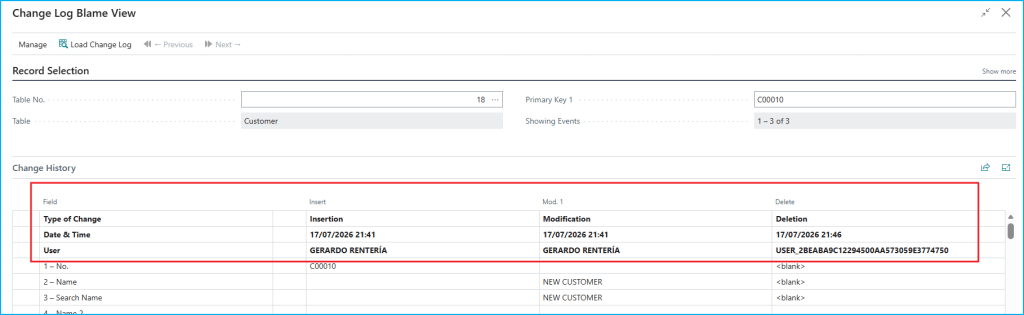
La matriz muestra:
Type of Change.Date & Time.User.- una fila por cada campo normal de la tabla.
Además, se excluyen algunos campos de auditoría como los de última modificación para reducir ruido y hacer la vista más útil.
El código se encuentra aquí, por si quieres revisarlo: Blog/GDRGDEV_ChangeLogBlameView at main · gdrgdev/Blog
Los objetos son los siguientes:
CLBlame.Page.al: página principal donde seleccionas tabla, clave y navegas por eventos.CLBlameMatrix.Page.al:ListPartque renderiza la matriz de cambios.CLBlameMgmt.Codeunit.al: lógica principal para construir filas, columnas, baseline y celdas.CLBlameRowBuffer.Table.al: buffer temporal de filas.CLBlameCellBuffer.Table.al: buffer temporal de celdas.CLBlameCustomerCardExt.PageExt.al: acción en Customer Card.CLBlameVendorCardExt.PageExt.al: acción en Vendor Card.CLBlameItemCardExt.PageExt.al: acción en Item Card.CLBlamePermSet.PermissionSet.al: permisos para usar la solución.
¿Cuándo puede ayudar?
- Cuando un usuario dice: «este dato antes no estaba así».
- Cuando quieres revisar la evolución de un cliente, proveedor o producto.
- Cuando necesitas saber qué usuario cambió un campo concreto.
- Cuando quieres leer el Change Log de forma más visual y menos dispersa.
En resumen, esta extensión convierte el histórico de cambios en una vista mucho más legible y práctica para trabajar sobre un registro concreto.
Espero que esta extensión te ayude en tu trabajo diario con Business Central.
🔎 Change Log Blame View: View change history in a different way
After many implementations, I can confirm there is a very common situation in support, consulting, and development: a piece of data has changed, and you need to quickly see which field changed, when it changed, and which user made the change.
The standard Change Log contains that information, but reading it for a specific record is not always very convenient. That is why I tried to make this easier, and why this extension proposes a matrix-style view to understand the evolution of a record much more clearly. The idea is not meant to be complicated:
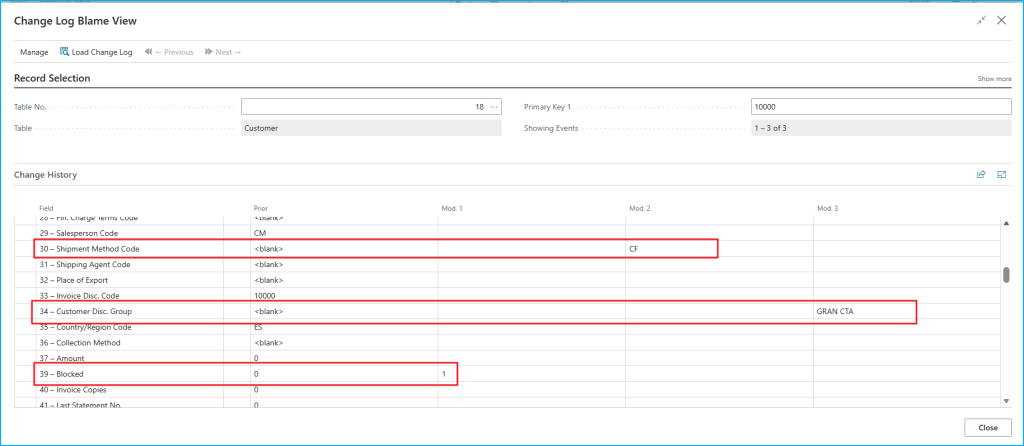
- Each row represents a field.
- Each column represents a Change Log event.
- In the header, you see the type of change, the date, and the user.
- In each cell, you see the value that field took in that event.
This way, instead of reviewing isolated entries, you can read the history almost like a visual timeline.
How does it work? The extension takes the change history of the current record and reorganizes it into a much easier-to-read view. To do that, it:
- filters the standard Change Log Entry table by the record’s table and primary key.
- groups the changes into events.
- builds a matrix where the columns are the changes and the rows are the fields.
- shows for each event the type of change, the date, the user, and the resulting value.
After that, the page lets you browse the history in blocks of events so it is easier to read.
How do you use it on pages? Here is the important pattern: this is not a closed solution. The idea can be reused on any page where you can identify the current record. The pattern is this:
- Create a pageextension.
- Add an action.
- Pass the table and the primary key of the current record.
- Open the CL Blame page.
pageextension 88893 "CL Blame Customer Card Ext" extends "Customer Card"{ actions { addlast(navigation) { action(ViewChangeLogBlame) { ApplicationArea = All; Caption = 'Change Log (Blame View)'; Image = History; trigger OnAction() var BlamePage: Page "CL Blame"; begin BlamePage.SetParameters(DATABASE::Customer, Rec."No.", '', ''); BlamePage.RunModal(); end; } } }}
What does the user see? The main page allows the user to:
- select the table and primary key.
- load the record history.
- see the range of events currently displayed.
- navigate between blocks of changes.
The matrix shows:
- Type of Change.
- Date & Time.
- User.
- one row for each normal field in the table.
In addition, some audit fields such as last modified fields are excluded to reduce noise and make the view more useful.
The code is here, if you want to check it out: Blog/GDRGDEV_ChangeLogBlameView at main · gdrgdev/Blog
The objects are:
- CLBlame.Page.al: main page where you select the table, key, and navigate through events.
- CLBlameMatrix.Page.al: ListPart that renders the change matrix.
- CLBlameMgmt.Codeunit.al: main logic to build rows, columns, baseline, and cells.
- CLBlameRowBuffer.Table.al: temporary row buffer.
- CLBlameCellBuffer.Table.al: temporary cell buffer.
- CLBlameCustomerCardExt.PageExt.al: action on Customer Card.
- CLBlameVendorCardExt.PageExt.al: action on Vendor Card.
- CLBlameItemCardExt.PageExt.al: action on Item Card.
- CLBlamePermSet.PermissionSet.al: permissions required to use the solution.
When can it help?
- When a user says: “this value was not like this before.”
- When you want to review the evolution of a customer, vendor, or item.
- When you need to know which user changed a specific field.
- When you want to read the Change Log in a more visual and less scattered way.
In short, this extension turns the change history into a much more readable and practical view for working with a specific record.
I hope this extension helps you in your daily work with Business Central.
Más información / More information:


 Gerardo Rentería Blog
Deja un comentario