
LLM’s training cut-off dates 👀MCP Server Context7 to the rescue. 🤖
Fechas de corte de entrenamiento de los modelos de lenguaje (LLM)👀MCP Server Context7 al rescate. 🤖
Las fechas de corte de entrenamiento son cruciales para los modelos de lenguaje (LLM), ya que definen el último punto en el que el modelo se entrenó con datos. Son importantes por:
- Limitaciones de conocimiento: Un LLM solo conoce la información disponible hasta su fecha de corte de entrenamiento. Todo lo que ocurra después no estará en su base de conocimiento a menos que tenga capacidades de búsqueda en tiempo real.
- Precisión y relevancia: Si un modelo se basa únicamente en conocimiento preexistente, los usuarios deben tener en cuenta que parte de la información puede estar desactualizada o incluso obsoleta, dependiendo de la fecha límite. Por ejemplo, es posible que las API, protocolos de seguridad, frameworks o metodologías que consulte ya estén obsoletas o hayan cambiado.
- Seguridad y desinformación: Si la fecha de corte de entrenamiento de un LLM es muy lejana, podría, ofrecer consejos de seguridad obsoletos, citar leyes antiguas o no advertir sobre estafas recientes. Esto hace que sea esencial que los usuarios verifiquen la información de forma independiente.
- Sesgo en los datos de entrenamiento: Los LLM se entrenan con grandes conjuntos de datos, pero estos pueden contener sesgos. Si el modelo ha estado expuesto a patrones de programación obsoletos o sesgados, podría sugerir soluciones deficientes.
- Gestión de Dependencias: Los LLM pueden sugerir bibliotecas, dependencias o marcos obsoletos que ya no reciben mantenimiento. Es necesario comprobar la compatibilidad, el control de versiones y el soporte a largo plazo para evitar la deuda técnica
¿Cómo mitigamos este escenario?
- Siempre verifica la fecha de corte de entrenamiento del modelo que usas.
- Complementa con documentación oficial para asegurar que los conocimientos están actualizados.
- Utiliza Context7 y otras herramientas que proporcionen datos en tiempo real para evitar información desactualizada.
Vamos a revisar rápidamente estos 3 puntos.
Punto 1: Obtenemos la fecha de corte de entrenamiento de informes técnicos oficiales, proveedores de API, de GitHub y otros recursos públicos. Más información:
- HaoooWang/llm-knowledge-cutoff-dates: This repository contains a summary of knowledge cut-off dates for various large language models (LLMs), such as GPT, Claude, Gemini, Llama, and more.
- Knowledge Cutoff Dates For ChatGPT, Meta Ai, Copilot, Gemini, Claude – ComputerCity
- The ‘Cut-Off Date’ in Large Language Models: What It Means and Why It Matters | LinkedIn
- LLM Data Cutoff Dates: Why They Matter for AI Content | by Randy Savicky | Writing For Humans™ | Medium
Por ejemplo:
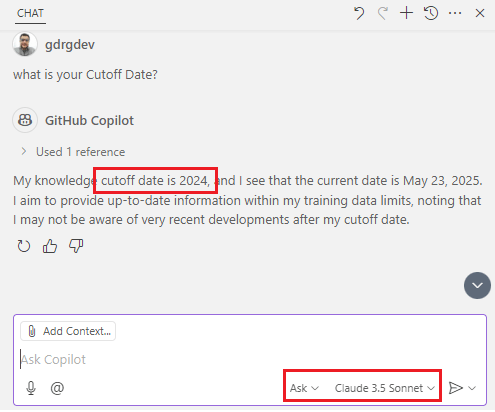


Para demostrar cómo funciona la fecha de corte de entrenamiento me apoyaré en una pregunta técnica que obtuve del siguiente video: Know Your LLM’s Knowledge Cutoff Date – YouTube.
La pregunta a formular es: ¿Cuál es la aplicación de pizarra grande de Google que permite a las personas generar ideas de manera rápida y sencilla?. En la siguiente imagen vemos la respuesta que nos ha brindado Github Copilot, nos indica el producto «Jamboard».

Pero el caso es que, este producto Google Jamboard se dio de baja en diciembre del 2024 y la fecha de corte de entrenamiento de Claude 3.5 Sonnet (Anthropic) es abril del 2024. Models overview – Anthropic

Punto 2: En Visual Studio Code tenemos la facultad de extender el conocimiento, y recuperar contenido de una página web (por ejemplo, para referenciar una página de documentación), utilizando la herramienta Fetch.
Por ejemplo, solicitaremos la API del Centro de administración de Business Central que incluya las aplicaciones dependientes que deben desinstalarse antes de desinstalar una aplicación, y nos devuelve una información errónea. El API mencionado no existe.

Pero cuando usamos la utilidad Fetch relacionando la página de la documentación estándar correspondiente a las API de administración de Business Central de las aplicaciones, vemos que el resultado es preciso, nos indica que API deberíamos usar.

Paso 3: Ahora nos apoyaremos en el servidor MCP Context7.
¿Qué es MCP?
El Protocolo de Contexto de Modelo (MCP) es un protocolo estandarizado que conecta a los agentes de IA con diversas herramientas y fuentes de datos externas.
Así como USB-C simplifica la conexión de diferentes dispositivos a su ordenador, MCP simplifica la interacción de los modelos de IA con sus datos, herramientas y servicios.

Más información:
- Introduction – Model Context Protocol
- Use MCP servers in VS Code (Preview)
- Beyond the tools, adding MCP in VS Code
- Agent mode: available to all users and supports MCP
Desde Visual Studio Code debemos revisar que tengamos habilitado las opciones de MCP siguientes:

Posteriormente procedemos a agregar el servidor MCP de Context7 upstash/context7: Context7 MCP Server — Up-to-date code documentation for LLMs and AI code editors.
El MCP Server Context7 es una herramienta diseñada para proporcionar documentación actualizada y específica sobre código en entornos de desarrollo. Su propósito es mejorar la precisión de las respuestas generadas por modelos de lenguaje al ofrecer información en tiempo real sobre bibliotecas y APIs utilizadas en proyectos
Actualizamos el archivo MCP.json con la siguiente configuración:
{
  "servers": {
    "Context7": {
      "type": "stdio",
      "command": "npx",
      "args": ["-y", "@upstash/context7-mcp"]
    }
  }
}
Desde la vista de agente aparecen nuevas opciones y herramientas. Context7 tiene 2 herramientas:
- resolve-library-id: Resuelve un nombre de biblioteca general en un ID de biblioteca compatible con Context7.
- get-library-docs: Obtiene la documentación de una biblioteca que utiliza un ID de biblioteca compatible con Context7.

Ahora volveremos a solicitar la API del Centro de administración de Business Central que incluya las aplicaciones dependientes que deben desinstalarse antes de desinstalar una aplicación (ejemplo del punto 2 mencionado anteriormente) pero adicionando un dato muy importante, tendremos que agregar al final del requerimiento «use context7»
Visualizamos que se utiliza la primera herramienta resolve-library-id identificando como biblioteca principal la documentación oficial donde obtendremos información de las APIs de Business Central.

Al ejecutar la herramienta, nos preguntará si deseamos confiar en la misma para la sesión en específico, para el workspace o por siempre. Recomiendo tener el cuidado y control, por sobre todo si trabajaremos con servidor MCP desconocidos.
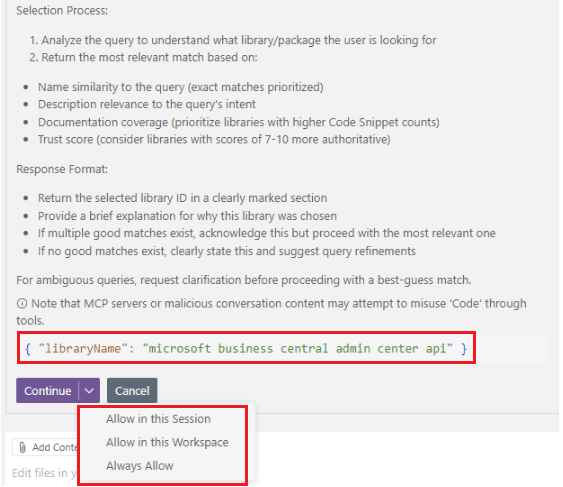
Posteriormente se utiliza la herramienta get-library-docs para obtener la información desde la documentación. De esta manera estamos trabajando siempre con información actualizada.

Conociendo este servidor MCP Context7, volveremos a preguntar ¿Cuál es la aplicación de pizarra grande de Google que permite a las personas generar ideas de manera rápida y sencilla? (ejemplo del Punto 1 mencionado anteriormente), pero esta vez, agregando «use context7».
Y la respuesta es adecuada esta vez, Copilot nos indica que ha revisado información que le ha permitido identificar que es un producto obsoleto.
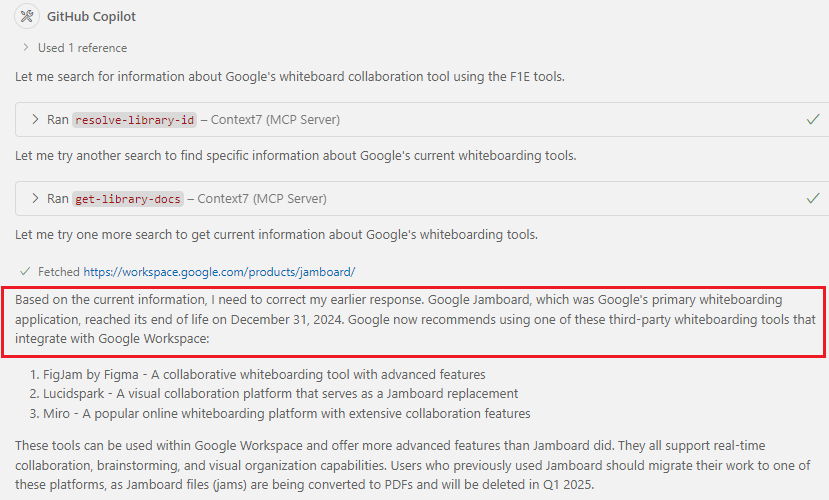
Por lo que, la capacidad del servidor MCP Context7 en proporcionar documentación en tiempo real mejora la eficiencia y reduce la incertidumbre al trabajar con APIs y bibliotecas en constante evolución, además de ayudar a reducir errores causados por datos desactualizados y mejora la eficiencia en la implementación de código.
Espero que esta información te ayude.
LLM’s training cut-off dates 👀MCP Server Context7 to the rescue. 🤖
Training cutoffs are crucial for language models (LLM) because they define the last point at which the model was trained on data. They are important because:
- Knowledge limitations: An LLM only knows the information available up to their training cutoff date. Anything after that won’t be included in their knowledge base unless they have real-time search capabilities.
- Accuracy and relevance: If a model relies solely on preexisting knowledge, users should be aware that some information may be outdated or even obsolete, depending on the timeframe. For example, the APIs, security protocols, frameworks, or methodologies you reference may already be obsolete or have changed.
- Dependency Management: LLMs can suggest obsolete libraries, dependencies, or frameworks that are no longer maintained. Compatibility, version control, and long-term support are essential to avoid technical debt.
- Training data bias: LLMs are trained on large data sets, but these can contain biases. If the model has been exposed to outdated or biased programming patterns, it could suggest poor solutions.
- Safety and misinformation: If an LLM training cutoff date is too old, it may offer outdated safety advice, cite old laws, or fail to warn about recent scams. This makes it essential for users to independently verify the information.
How do we mitigate this scenario?
- Always check the training cutoff date of the model you use.
- Supplement with official documentation to ensure that knowledge is up to date.
- Use Context7 and other tools that provide real-time data to avoid outdated information.
Let’s quickly review these 3 points.
Point 1: We obtain the training cutoff date from official technical reports, API providers, GitHub, and other public resources. Learn more.:
- HaoooWang/llm-knowledge-cutoff-dates: This repository contains a summary of knowledge cut-off dates for various large language models (LLMs), such as GPT, Claude, Gemini, Llama, and more.
- Knowledge Cutoff Dates For ChatGPT, Meta Ai, Copilot, Gemini, Claude – ComputerCity
- The ‘Cut-Off Date’ in Large Language Models: What It Means and Why It Matters | LinkedIn
- LLM Data Cutoff Dates: Why They Matter for AI Content | by Randy Savicky | Writing For Humans™ | Medium
For example:
To demonstrate how the training cut-off date works, I will rely on a technical question that I got from the following video: Know Your LLM’s Knowledge Cutoff Date – YouTube.
The question to ask is: What is Google’s large whiteboard application that let’s people brainstorm quickly and easily? In the following image, we see the answer provided by Github Copilot, which indicates the product «Google Jamboard.»
But the fact is, this Google Jamboard product was discontinued in December 2024 and the training cut-off date for Claude 3.5 Sonnet (Anthropic) is April 2024. Models overview – Anthropic
Point 2: In Visual Studio Code we have the ability to extend knowledge and retrieve content from a web page (for example, to reference a documentation page), using the Fetch tool.
For example, we’ll request the Business Central Admin Center API to list the dependent applications that must be uninstalled before uninstalling an application, and it returns incorrect information. The API mentioned above doesn’t exist.
But when we use the Fetch tool to link the standard documentation page to the Business Central administration APIs for the applications, we see that the result is accurate, telling us which API we should use.
Point 3: Now we will rely on the MCP Context7 server.
What is MCP?
The Model Context Protocol (MCP) is a standardized protocol that connects AI agents to various external tools and data sources. Imagine it as a USB-C port – but for AI applications.
Just as USB-C simplifies how you connect different devices to your computer, MCP simplifies how AI models interact with your data, tools, and services.
More information:
- Introduction – Model Context Protocol
- Use MCP servers in VS Code (Preview)
- Beyond the tools, adding MCP in VS Code
- Agent mode: available to all users and supports MCP
First, from Visual Studio Code we must check that we have enabled the following MCP options:
Then we proceed to add the Context7 MCP server upstash/context7: Context7 MCP Server — Up-to-date code documentation for LLMs and AI code editors.
The MCP Server Context7 is a tool designed to provide up-to-date, code-specific documentation in development environments. Its purpose is to improve the accuracy of responses generated by language models by providing real-time information about libraries and APIs used in projects.
We update the MCP.json file with the following configuration:
{
  "servers": {
    "Context7": {
      "type": "stdio",
      "command": "npx",
      "args": ["-y", "@upstash/context7-mcp"]
    }
  }
}
New options and tools appear in the agent option. Context7 has two tools:
- resolve-library-id: Resolves a general library name into a Context7-compatible library ID.
- get-library-docs: Fetches documentation for a library using a Context7-compatible library ID.
Now we will request again, the Business Central Administration Center API that includes the dependent applications that must be uninstalled before uninstalling an application (example of point 2 mentioned above) but adding a very important piece of information, we will have to add at the end of the request «use context7»
We see that the first tool, resolve-library-id, is used, identifying the official Business Central documentation as the main library, where we will obtain information on the administration APIs.
When you run the tool, it will ask you if you want to trust it for a specific session, for the workspace, or forever. I recommend being careful and vigilant, especially if you’re working with unknown MCP servers.
The get-library-docs tool is then used to retrieve information from the documentation. This way, we always get up-to-date information.
Knowing how this MCP Context7 server helps us, we’ll ask again, What is Google’s large whiteboard application that let’s people brainstorm quickly and easily? (example from Point 1 mentioned above), but this time, adding «use context7».
And the answer is correct this time. Copilot tells us that it has reviewed information that has allowed it to identify that it is an obsolete product.
Therefore, the MCP Context7 server’s ability to provide real-time documentation improves efficiency and reduces uncertainty when working with constantly evolving APIs and libraries, while also helping to reduce errors caused by outdated data and improving efficiency in code deployment.
I hope this information helps you.
Más información / More information:




 Gerardo Rentería Blog
Replica a 🤖 Manage your projects, repositories, and more with Azure DevOps MCP Server ✅ – Gerardo Rentería Blog Cancelar la respuesta