
2024 Wave 1: How to manage sales invoice disputes? ✍️(English version)
2024 Wave 1: ¿Cómo gestionar disputas de facturas de venta? ✍️
En esta nueva versión tenemos la posibilidad de identificar las facturas de venta registradas disputadas.
Algo de teoría
Una factura de venta en disputa es una factura que un cliente cuestiona y con la que no está de acuerdo y no quiere pagar. El cliente podrá impugnar la totalidad de la factura en algunas circunstancias, o simplemente cargos específicos.
Un cliente puede impugnar una factura por diversos motivos. Tal vez piensen que los precios son demasiado altos, que los productos o servicios que recibieron fueron deficientes o que nunca los recibieron. Por lo que debemos primero que registrar la disputa y luego buscar una solución con rapidez.
Solución en Business Central
Tenemos una nueva tabla donde indicamos el motivo u origen de la disputa.

Vemos el estado en el histórico de facturas de ventas, y podemos actualizar su valor desde la opción de «actualizar documento».
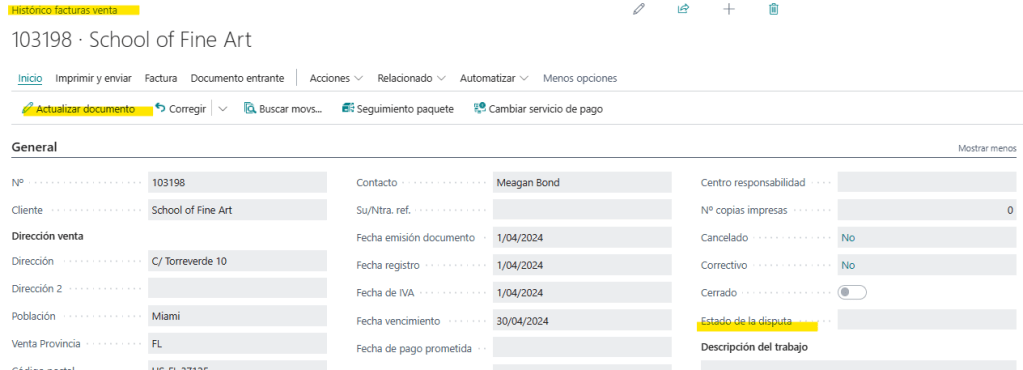
En la pantalla de actualización ubicamos el campo del estado de la disputa.
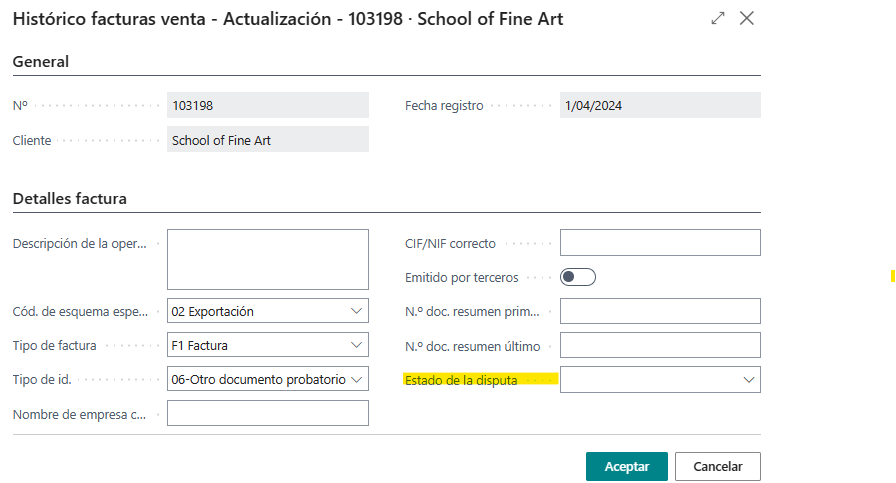
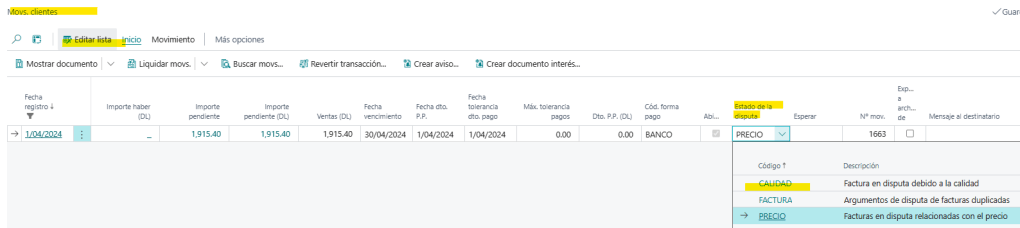
De igual manera, encontramos este campo en los movimientos de clientes. Este valor nos permitirá gestionar los cobros de una manera diferente.

En este caso de ejemplo, cambiaremos el valor a «Precio».

En el momento de actualizar, vemos que en la ficha de la factura de venta registrada y en los movimientos de clientes se ha actualizado el valor.

En la lista de estados de disputa tenemos un campo que nos indica que si seleccionamos dicho valor estaríamos sobrescribiendo el valor del campo «En Espera» en los movimientos de clientes.

Tenemos la posibilidad de cambiar el valor de la disputa desde los movimientos de clientes, al editar la lista.
O desde la opción que revisamos anteriormente de actualización de documento de factura de venta registrada.

Al seleccionar el nuevo estado de la disputa, vemos que también ha marcado el campo de En Espera con una «X».

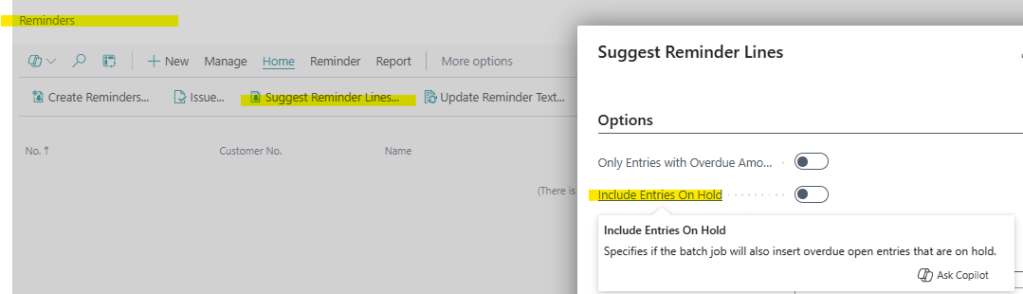
Esta identificación del campo «en espera» afecta a algunas operaciones como la de proponer líneas de recordatorio, en el cual podemos incluir o no los movimientos en espera.
Cobrar saldos pendientes – Business Central | Microsoft Learn

En la versión de España, hay que hacer algunos cambios por ahora que no están implementados y que si están en una versión US. En el siguiente enlace de GitHub dejo el código adicional para que funcione tal como está explicado.
Blog/GDRGDev_DisputaES at main · gdrgdev/Blog (github.com)
Se ha creado una extensión de la página de actualización de valores de una factura de venta registrada.
pageextension 80000 GRGPostedSalesInvoiceUpdate extends "Posted Sales Invoice - Update"
{
    layout
    {
        addafter("SII Last Summary Doc. No.")
        {
            field("Dispute Status"; Rec."Dispute Status")
            {
                ApplicationArea = All;
                Editable = true;
            }
        }
    }
}
Y adicionalmente, se ha añadido la funcionalidad de actualizar los movimientos de clientes, suscribiéndonos a un par de eventos necesarios.
codeunit 80000 GRGPostedSalesInvoiceUpdate
{
    [EventSubscriber(ObjectType::Codeunit, Codeunit::"Sales Invoice Header - Edit", OnRunOnBeforeSalesInvoiceHeaderModify, '', false, false)]
    local procedure "Sales Invoice Header - Edit_OnRunOnBeforeSalesInvoiceHeaderModify"
        (var SalesInvoiceHeader: Record "Sales Invoice Header"; FromSalesInvoiceHeader: Record "Sales Invoice Header")
    begin
        SalesInvoiceHeader."Dispute Status" := FromSalesInvoiceHeader."Dispute Status";
        UpdateCustLedgerEntry(SalesInvoiceHeader)
    end;

    [EventSubscriber(ObjectType::Page, Page::"Posted Sales Invoice - Update", OnAfterRecordIsChanged, '', false, false)]
    local procedure "Posted Sales Invoice - Update_OnAfterRecordIsChanged"(var SalesInvoiceHeader: Record "Sales Invoice Header"; xSalesInvoiceHeader: Record "Sales Invoice Header"; var RecordIsChanged: Boolean)
    begin
        If SalesInvoiceHeader."Dispute Status" <> xSalesInvoiceHeader."Dispute Status" then
            RecordIsChanged := true;
    end;

    local procedure UpdateCustLedgerEntry(SalesInvoiceHeader: Record "Sales Invoice Header")
    var
        CustLedgerEntry: Record "Cust. Ledger Entry";
        DisputeStatus: Record "Dispute Status";
        CustEntryEdit: Codeunit "Cust. Entry-Edit";
        MarkedAsOnHoldLbl: label 'X', Locked = true;
    begin
        if not GetCustLedgerEntry(CustLedgerEntry, SalesInvoiceHeader) then
            exit;

        if CustLedgerEntry."Dispute Status" <> '' then begin
            if DisputeStatus.get(CustLedgerEntry."Dispute Status") then
                if (DisputeStatus."Overwrite on hold") and ClearOnHold(SalesInvoiceHeader) then
                    CustLedgerEntry."On Hold" := ''
        end else
            if SalesInvoiceHeader."Dispute Status" <> '' then
                if DisputeStatus.get(SalesInvoiceHeader."Dispute Status") then
                    if DisputeStatus."Overwrite on hold" then
                        CustLedgerEntry."On Hold" := Copystr(MarkedAsOnHoldLbl, 1, MaxStrLen(CustLedgerEntry."On Hold"));
        CustLedgerEntry."Dispute Status" := SalesInvoiceHeader."Dispute Status";

        CustEntryEdit.SetCalledFromSalesInvoice(true);
        CustEntryEdit.Run(CustLedgerEntry);
    end;

    local procedure GetCustLedgerEntry(var CustLedgerEntry: Record "Cust. Ledger Entry"; SalesInvoiceHeader: Record "Sales Invoice Header"): Boolean
    begin
        if SalesInvoiceHeader."Cust. Ledger Entry No." = 0 then
            exit(false);
        CustLedgerEntry.ReadIsolation(IsolationLevel::UpdLock);
        exit(CustLedgerEntry.Get(SalesInvoiceHeader."Cust. Ledger Entry No."));
    end;

    local procedure ClearOnHold(SalesInvoiceHeader: Record "Sales Invoice Header"): Boolean
    var
        DisputeStatus: Record "Dispute Status";
    begin
        if SalesInvoiceHeader."Dispute Status" = '' then
            exit(true);
        if DisputeStatus.get(SalesInvoiceHeader."Dispute Status") then
            exit(not DisputeStatus."Overwrite on hold");
    end;
}
Esta nueva funcionalidad, se encuentra en los siguientes objetos.
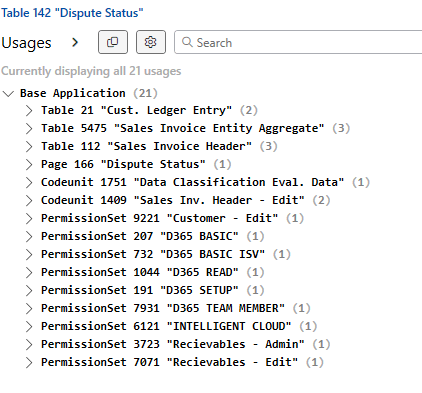
Espero que esta información te ayude.
2024 Wave 1: How to manage sales invoice disputes? ✍️
In this new version we have the possibility of identifying disputed registered sales invoices.
Some theory
A disputed sales invoice is an invoice that a customer disputes and does not agree with and does not want to pay. The customer may dispute the entire invoice in some circumstances, or simply dispute specific charges.
A customer can dispute an invoice for various reasons. They may think that the prices are too high, that the products or services they received were poor, or that they never received them. So we must first register the dispute and then find a solution quickly.
Solution in Business Central
We have a new table where we indicate the reason or origin of the dispute.

We see the dispute status in the posted sales invoice, and we can update its value from the «update document» option.

On the update page we locate the dispute status field.

Similarly, we find this field in customer ledger entries page. This value will allow us to manage collections in a different way.

In this example case, we will change the value to “Price”.

At the time of updating, we see that the value has been updated in the posted sales invoice and in the customer ledger entries.

In the list of dispute status we have a field that tells us that if we select this value we would be overwriting the value of the «On Hold» field in customer ledger entries.

We have the possibility of changing the value of the dispute status from the customer ledger entries, when editing the list.

Or from the option we reviewed previously to update the posted sales invoice document.

When selecting the new dispute status, we see that you have also marked the On Hold field with an “X”.

This identification of the «on hold» field affects some operations such as suggesting reminder lines, in which we can include or not include the entries on hold.
Collect Outstanding Balances – Business Central | Microsoft Learn
As well as the report of projected cash receipts, which does not consider the customer ledger entries with the filter of the “On Hold” field left blank.

This new functionality is found in the following objects.

I hope this information helps you.
Más información / More information:


 Gerardo Rentería Blog
Deja un comentario