
Let’s see our Azure Devops projects and repositories in Business Central (English Version)
Veamos nuestros proyectos y repositorios de Azure Devops en Business Central
Como equipo de desarrollo podemos diseñar, crear, probar e implementar software con la ayuda de un conjunto de herramientas ofrecidas por Azure DevOps, un servicio basado en la nube. Hay muchas capacidades disponibles, incluida la gestión de proyectos, la integración e implementación continuas y el control de versiones.
La API REST de Azure DevOps, nos permite el acceso mediante programación a los servicios de Azure DevOps, de esta manera podemos interactuar con Azure DevOps. La API nos permite configurar y mantener repositorios, proyectos, organizaciones y más.
En Azure DevOps, la organización nos sirve como contenedor para equipos y proyectos. Nos ofrece un mecanismo para controlar el acceso de los recursos y servicios para varios proyectos.
Azure Devops: Personal Access Token
Para iniciar la integración requerimos configurar un PAT (personal access token). Use personal access tokens – Azure DevOps | Microsoft Learn
Debemos ir al portal de Azure Devops de la organización: https://dev.azure.com/

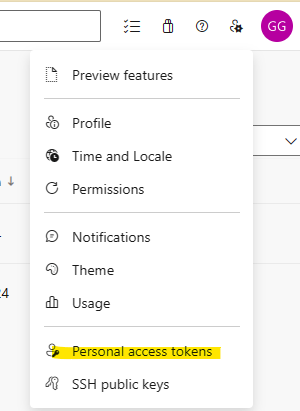
A la opción de Configuración de usuario, y «Personal Access Tokens»
Creamos el PAT y lo configuramos con un alcance personalizado.

En este caso el acceso de Lectura al código, para acceder a los proyectos y repositorios.

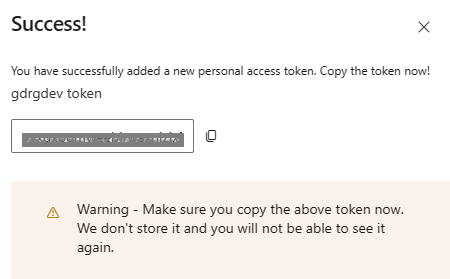
Una vez completado el proceso debemos guardar el token creado, ya que no volverás a verlo otra vez.

Escenario de ejemplo
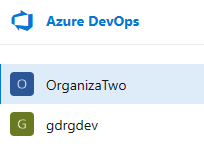
Cuento con 2 organizaciones dentro del servicio de Azure Devops.
La organización GRDGDev cuenta con 3 proyectos.

El proyecto llamado Test tiene 4 repositorios.

APIs utilizadas
Además del PAT mencionado anteriormente, utilizaremos las siguientes APIs para obtener información de Azure Devops:
- Projects – List
GET https://dev.azure.com/{organization}/_apis/projects?api-version=7.1-preview.4- Repositories – List
GET https://dev.azure.com/{organization}/{project}/_apis/git/repositories?api-version=7.1-preview.1
Solución en acción
Tenemos una página donde configuramos los PATs y otro donde entramos a las organizaciones.

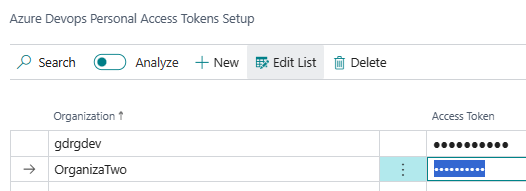
En la página de configuración de PATs, colocamos el nombre de la organización y el token.
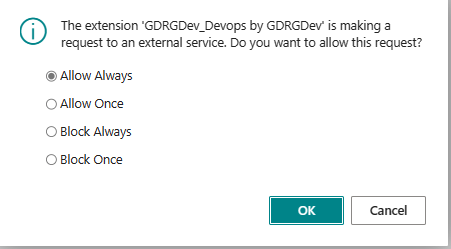
Cuando accedemos por primera vez, nos sale el siguiente mensaje el cual podríamos indicar el de «permitir siempre».
Luego accedemos a la lista de organizaciones, donde podemos navegar hacia la lista de proyectos de cada una de ellas.

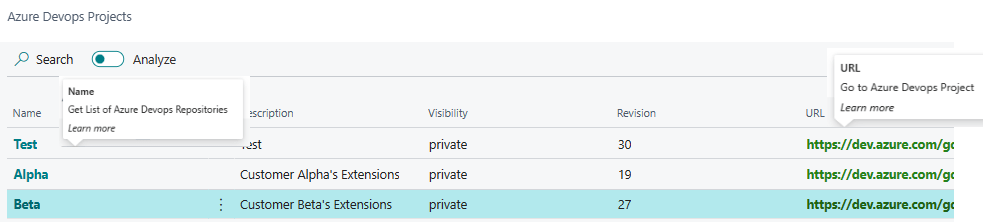
En la lista de proyectos tenemos información genérica de Azure Devops, a continuación vemos un ejemplo de lo que la llamada API nos devuelve.
{

  "count": 3,

  "value": [

    {

      "id": "eb6e4656-77fc-42a1-9181-4c6d8e9da5d1",

      "name": "Fabrikam-Fiber-TFVC",

      "description": "Team Foundation Version Control projects.",

      "url": "https://dev.azure.com/fabrikam/_apis/projects/eb6e4656-77fc-42a1-9181-4c6d8e9da5d1",

      "state": "wellFormed"

    },

    {

      "id": "6ce954b1-ce1f-45d1-b94d-e6bf2464ba2c",

      "name": "Fabrikam-Fiber-Git",

      "description": "Git projects",

      "url": "https://dev.azure.com/fabrikam/_apis/projects/6ce954b1-ce1f-45d1-b94d-e6bf2464ba2c",

      "state": "wellFormed"

    },

    {

      "id": "281f9a5b-af0d-49b4-a1df-fe6f5e5f84d0",

      "name": "TestGit",

      "url": "https://dev.azure.com/fabrikam/_apis/projects/281f9a5b-af0d-49b4-a1df-fe6f5e5f84d0",

      "state": "wellFormed"

    }

  ]

}
Podemos desde el listado de proyectos navegar hacia los repositorios de cada proyecto, y además puedes navegar al proyecto en Azure Devops.
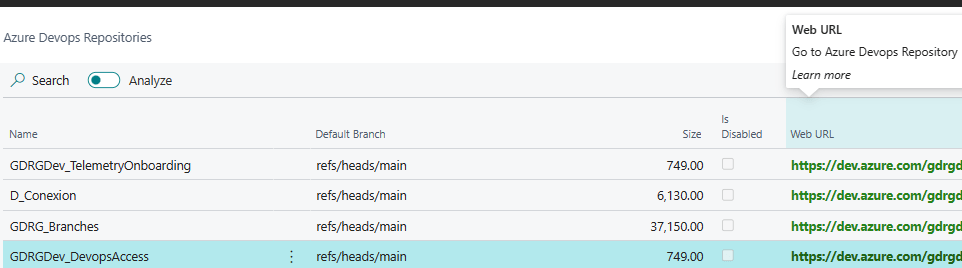
En la lista de repositorios tenemos información genérica de Azure Devops, a continuación vemos un ejemplo de lo que la llamada API nos devuelve.
{

  "count": 3,

  "value": [

    {

      "id": "5febef5a-833d-4e14-b9c0-14cb638f91e6",

      "name": "AnotherRepository",

      "url": "https://dev.azure.com/fabrikam/_apis/git/repositories/5febef5a-833d-4e14-b9c0-14cb638f91e6",

      "project": {

        "id": "6ce954b1-ce1f-45d1-b94d-e6bf2464ba2c",

        "name": "Fabrikam-Fiber-Git",

        "url": "https://dev.azure.com/fabrikam/_apis/projects/6ce954b1-ce1f-45d1-b94d-e6bf2464ba2c",

        "state": "wellFormed"

      },

      "remoteUrl": "https://dev.azure.com/fabrikam/Fabrikam-Fiber-Git/_git/AnotherRepository"

    },

    {

      "id": "278d5cd2-584d-4b63-824a-2ba458937249",

      "name": "Fabrikam-Fiber-Git",

      "url": "https://dev.azure.com/fabrikam/_apis/git/repositories/278d5cd2-584d-4b63-824a-2ba458937249",

      "project": {

        "id": "6ce954b1-ce1f-45d1-b94d-e6bf2464ba2c",

        "name": "Fabrikam-Fiber-Git",

        "url": "https://dev.azure.com/fabrikam/_apis/projects/6ce954b1-ce1f-45d1-b94d-e6bf2464ba2c",

        "state": "wellFormed"

      },

      "defaultBranch": "refs/heads/master",

      "remoteUrl": "https://dev.azure.com/fabrikam/_git/Fabrikam-Fiber-Git"

    },

    {

      "id": "66efb083-777a-4cac-a350-a24b046be6be",

      "name": "TestGit",

      "url": "https://dev.azure.com/fabrikam/_apis/git/repositories/66efb083-777a-4cac-a350-a24b046be6be",

      "project": {

        "id": "281f9a5b-af0d-49b4-a1df-fe6f5e5f84d0",

        "name": "TestGit",

        "url": "https://dev.azure.com/fabrikam/_apis/projects/281f9a5b-af0d-49b4-a1df-fe6f5e5f84d0",

        "state": "wellFormed"

      },

      "defaultBranch": "refs/heads/master",

      "remoteUrl": "https://dev.azure.com/fabrikam/_git/TestGit"

    }

  ]

}
Desde el listado de repositorios puedes navegar al repositorio en Azure Devops.
Sobre el desarrollo de la extensión
Se cuenta con:
- 3 tablas para la configuración (organización), proyecto y repositorio
- 4 páginas para la configuración, organización, proyecto y repositorio
- 1 codeunit que contiene la gestión de las Apis
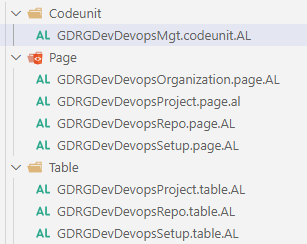
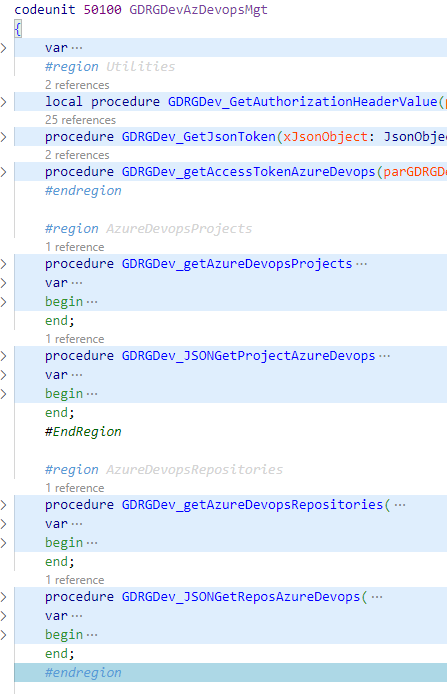
La codeunit contiene funciones de obtención de token, las lecturas de los proyectos dependiendo de la organización y las lecturas de los repositorios dependiendo de los proyectos de sus respectivas organizaciones.
El código se encuentra en GitHub: Blog/GDRGDev_Devops at main · gdrgdev/Blog (github.com)
El código está relacionado con el consumo de las Apis de Azure Devops y ha sido desarrollado y compartido a modo de demostración e información. Puede ser mejorado y extendido.
Espero que esta información te ayude.
Let’s see our Azure Devops projects and repositories in Business Central
As a development team we can design, build, test and deploy software with the help of a set of tools offered by Azure DevOps, a cloud-based service. Many capabilities are available, including project management, continuous integration and deployment, and version control.
The Azure DevOps REST API, allows us programmatic access to Azure DevOps services, in this way we can interact with Azure DevOps. The API allows us to configure and maintain repositories, projects, organizations, and more.
In Azure DevOps, the organization serves as a container for teams and projects. It offers us a mechanism to control access to resources and services for various projects.
Azure Devops: Personal Access Token
To start the integration we need to configure a PAT (personal access token). Use personal access tokens – Azure DevOps | Microsoft Learn
We must go to the organization’s Azure Devops portal: https://dev.azure.com/
To the User Settings option, and «Personal Access Tokens»
We create the PAT and configure it with a custom scope.
In this case, Reading access to the code, to access the projects and repositories.
Once the process is completed, we must save the created token, since you will not see it again.
Example scenario
I have 2 organizations within the Azure Devops service.
The GRDGDev organization has 3 projects.
The project called Test has 4 repositories.
APIs used
In addition to the PAT mentioned above, we will use the following APIs to obtain information from Azure Devops:
- Projects – List
GET https://dev.azure.com/{organization}/_apis/projects?api-version=7.1-preview.4- Repositories – List
GET https://dev.azure.com/{organization}/{project}/_apis/git/repositories?api-version=7.1-preview.1
Solution in action
We have a page where we configure the PATs and another where we see the organizations.
On the PATs configuration page, we enter the name of the organization and the token.
When we access it for the first time, we get the following message which could indicate «allow always».
Then we access the list of organizations, where we can navigate to the list of projects for each of them.
In the list of projects we have generic Azure Devops information, below we see an example of what the API call returns to us.
{

  "count": 3,

  "value": [

    {

      "id": "eb6e4656-77fc-42a1-9181-4c6d8e9da5d1",

      "name": "Fabrikam-Fiber-TFVC",

      "description": "Team Foundation Version Control projects.",

      "url": "https://dev.azure.com/fabrikam/_apis/projects/eb6e4656-77fc-42a1-9181-4c6d8e9da5d1",

      "state": "wellFormed"

    },

    {

      "id": "6ce954b1-ce1f-45d1-b94d-e6bf2464ba2c",

      "name": "Fabrikam-Fiber-Git",

      "description": "Git projects",

      "url": "https://dev.azure.com/fabrikam/_apis/projects/6ce954b1-ce1f-45d1-b94d-e6bf2464ba2c",

      "state": "wellFormed"

    },

    {

      "id": "281f9a5b-af0d-49b4-a1df-fe6f5e5f84d0",

      "name": "TestGit",

      "url": "https://dev.azure.com/fabrikam/_apis/projects/281f9a5b-af0d-49b4-a1df-fe6f5e5f84d0",

      "state": "wellFormed"

    }

  ]

}
From the list of projects we can navigate to the repositories of each project, and you can also navigate to the project in Azure Devops.
In the list of repositories we have generic Azure Devops information, below we see an example of what the API call returns to us.
{

  "count": 3,

  "value": [

    {

      "id": "5febef5a-833d-4e14-b9c0-14cb638f91e6",

      "name": "AnotherRepository",

      "url": "https://dev.azure.com/fabrikam/_apis/git/repositories/5febef5a-833d-4e14-b9c0-14cb638f91e6",

      "project": {

        "id": "6ce954b1-ce1f-45d1-b94d-e6bf2464ba2c",

        "name": "Fabrikam-Fiber-Git",

        "url": "https://dev.azure.com/fabrikam/_apis/projects/6ce954b1-ce1f-45d1-b94d-e6bf2464ba2c",

        "state": "wellFormed"

      },

      "remoteUrl": "https://dev.azure.com/fabrikam/Fabrikam-Fiber-Git/_git/AnotherRepository"

    },

    {

      "id": "278d5cd2-584d-4b63-824a-2ba458937249",

      "name": "Fabrikam-Fiber-Git",

      "url": "https://dev.azure.com/fabrikam/_apis/git/repositories/278d5cd2-584d-4b63-824a-2ba458937249",

      "project": {

        "id": "6ce954b1-ce1f-45d1-b94d-e6bf2464ba2c",

        "name": "Fabrikam-Fiber-Git",

        "url": "https://dev.azure.com/fabrikam/_apis/projects/6ce954b1-ce1f-45d1-b94d-e6bf2464ba2c",

        "state": "wellFormed"

      },

      "defaultBranch": "refs/heads/master",

      "remoteUrl": "https://dev.azure.com/fabrikam/_git/Fabrikam-Fiber-Git"

    },

    {

      "id": "66efb083-777a-4cac-a350-a24b046be6be",

      "name": "TestGit",

      "url": "https://dev.azure.com/fabrikam/_apis/git/repositories/66efb083-777a-4cac-a350-a24b046be6be",

      "project": {

        "id": "281f9a5b-af0d-49b4-a1df-fe6f5e5f84d0",

        "name": "TestGit",

        "url": "https://dev.azure.com/fabrikam/_apis/projects/281f9a5b-af0d-49b4-a1df-fe6f5e5f84d0",

        "state": "wellFormed"

      },

      "defaultBranch": "refs/heads/master",

      "remoteUrl": "https://dev.azure.com/fabrikam/_git/TestGit"

    }

  ]

}
From the repository list you can navigate to the repository in Azure Devops.
About the extension
Contains:
- 3 tables for configuration (organization), project and repository
- 4 pages for configuration, organization, project and repository
- 1 codeunit that contains the management of the APIs
The codeunit contains token fetch, project reads depending on the organization, and repository reads depending on the projects of their respective organizations functions.
The code is on GitHub: Blog/GDRGDev_Devops at main · gdrgdev/Blog (github.com)
The code is related to the consumption of Azure Devops APIs and has been developed and shared for demonstration and information purposes. It can be improved and extended.
I hope this information helps you.
Más información / More information:




 Gerardo Rentería Blog
Replica a See the git actions made to your repositories such as commits, pull requests.👀 – Gerardo Rentería Blog Cancelar la respuesta