
Customer onboarding supported by telemetry (English Version)
Onboarding de cliente soportado por la telemetría
Business Central nos proporciona una variedad de herramientas nativas (Onboarding Framework) que permiten entre otras cosas acelerar el proceso de configuraciones principalmente las más básicas y genéricas de Business Central. De esa manera los usuarios aprenden a utilizar Business Central con mayor facilidad y rapidez.

En la versión 22. se añade una funcionalidad muy interesante que complementa este framework, que es la posibilidad de emitir señales de telemetría que permiten seguir y medir el progreso del onboarding de los usuarios en Business Central.
Estas señales se generan como resultado de la ejecución de procesos empresariales específicos en Business Central, de manera nativa se contempla operaciones de venta, compra, cobros y pagos.
La medición a través de la telemetría estas operaciones permite a los implementadores identificar el grado de avance de los usuarios, y en base a los resultados ejecutar planes de acciones correspondientes para reforzar o redireccionar las actividades.
Señales estándar
Se definen señales estándar que envía Business Central, son señales genéricas que se aplican en la gran mayoría de negocios.
- Cuando se inicializa una empresa, se inicia el onboarding (Onboarding Started)
- Habilitación del módulo de ventas de productos y servicios (Sales Invoice Signal). Se emite la señal una vez registrada 5 facturas de venta (TB 112, sales invoice header).
- Habilitación del módulo de compras de productos y servicios (Purchase Invoice Signal). Se emite la señal una vez registrada 5 facturas de compra (TB 122, purch. inv. header).
- Habilitación del módulo de cobros (Customer Payment Signal). Se emite la señal cuando se registra 5 cobros a clientes. (TB 21, cust. ledger entry, tipo de documento = Payment).
- Habilitación del módulo de pagos (Vendor Payment Signal). Se emite la señal cuando se registra 5 pagos a proveedor. (TB 25, vendor ledger entry, tipo de documento = Payment).
La señal se emite una sola, una vez completado el criterio, una rutina diariamente verifica que se haya completado el criterio.
Señales personalizadas
Nos ofrece una gran posibilidad de extender las señales estándar, agregando diferentes criterios dependiendo lo que nos interesa controlar y vigilar en la evolución e involucramiento de los usuarios en Business Central.
Podemos agregar una señal que controle la cantidad de registros en la tabla de los movimientos de IVA, de Contabilidad o de Activos Fijos, así como también en la cantidad de productos, clientes registrados.
La funcionalidad está diseñada bajo la figura de interfaces, por lo que los pasos serían:
- Extender el enum «Onboarding Signal Type» agregando una nueva señal de onboarding.
- Implementar otra señal de onboarding implementando la interfaz «Onboarding Signal».
- Registrar la nueva señal de onboarding por ejemplo en el momento del registro de la extensión que crearemos.
enumextension 50100 "GL Entry Onboarding Signal" extends "Onboarding Signal Type"

{

    value(50100; "GL Entry Signal")

    {

        Implementation = "Onboarding Signal" = "GL Entry Signal";

    }

}
codeunit 50100 "GL Entry Signal" implements "Onboarding Signal"
{
Access = Internal;
Permissions = tabledata "G/L Entry" = r;
procedure IsOnboarded(): Boolean
var
GLEntry: Record "G/L Entry";
OnboardingThreshold: Integer;
begin
OnboardingThreshold := 1000;
exit(GLEntry.Count() >= OnboardingThreshold);
end;
}codeunit 50100 "Register Onboarding Signals"
{
Access = Internal;
Subtype = Install;
trigger OnInstallAppPerCompany()
begin
RegisterOnboardingSignals();
end;
internal procedure RegisterOnboardingSignals()
var
Company: Record Company;
OnboardingSignal: Codeunit "Onboarding Signal";
EnvironmentInfo: Codeunit "Environment Information";
OnboardingSignalType: Enum "Onboarding Signal Type";
begin
if not Company.Get(CompanyName()) then
exit;
if Company."Evaluation Company" then
exit;
if EnvironmentInfo.IsSandbox() then
exit;
OnboardingSignal.RegisterNewOnboardingSignal(Company.Name, OnboardingSignalType::"GL Entry Signal");
end;
}Ejemplo: https://github.com/gdrgdev/Blog/tree/main/GDRGDev_OnboardingTelemetry
Señales y Telemetría
Se utilizan estos ID de eventos en la telemetría.
- 0000EIW: Se inicia en una empresa el Onboarding de un criterio.
- 0000EIV: Cuando se cumplen los criterios de los procesos en seguimiento se emite una señal. La señal del cumplimiento de un proceso se emite una sola vez. Las nuevas señales agregadas también se registran con este código.
Aquí tenemos ejemplos de sentencias KQL relacionadas a las señales mencionadas: https://github.com/microsoft/BCTech/blob/master/samples/AppInsights/KQL/Queries/ExampleQueriesForEachArea/Onboarding.kql

Como era de esperarse también se añadió a la aplicación de Telemetría en Power Bi: https://www.linkedin.com/pulse/whats-new-dynamics-365-business-central-telemetry-july-pontoppidan/

Ejemplo: https://github.com/gdrgdev/Blog/tree/main/GDRGDev_OnboardingTelemetry
Objetos AL
Para cubrir la funcionalidad se han creado varios objetos nuevos AL, entre ellos los que vemos a continuación:
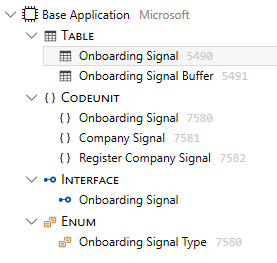
- Una interfaz «Onboarding Signal» con una función IsOnboarded
- Una Codeunit 7581 «Company Signal» que implementa la interfaz
- Un Enum extendible 7580 «Onboarding Signal Type» que implementa la interfaz y que contiene un valor denomiando compañía y referencia a la Codeunit 7581
- Una Codeunit 7580 «Onboarding Signal» con funciones que validan si la empresa se ha inicializado en onboarding, así como también permite registrar nuevas señales o borrar el detalle de las tablas de señales luego de la eliminación de la empresa.

- Una Codeunit 7582 «Register Company Signal» que registra la señal de inicialización de onboarding en la empresa.
- Una Tabla 5490 «Onboarding Signal» en donde se registran las señales y su estado.
- Una Tabla temporal 5491 «Onboarding Signal Buffer» que permite obtener las señales con acceso de lectura.
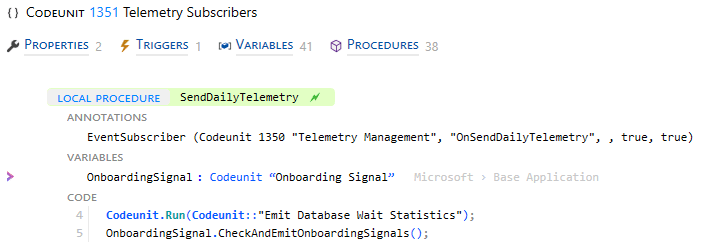
- Una rutina diaria comprueba si se cumplen los criterios para cada uno de los procesos de negocio, esta se encuentra en la Codeunit 1351 «Telemetry Subscribers».
Como hemos podido observar se nos ofrece una herramienta extendible que permite asegurar un adecuado onboarding de los usuarios en cada una de los procesos que merezcan un seguimiento desde el punto de vista de la implementación del negocio.
Espero que esta información te ayude.
Customer onboarding supported by telemetry
Business Central provides us with a variety of native tools (Onboarding Framework) that allow, among other things, to speed up the configuration process, especially the most basic and generic configurations of Business Central. In this way, users learn to use Business Central more easily and quickly.
Version 22.1 adds a very interesting feature that complements this framework, which is the possibility of emitting onboarding telemetry signals that allow you to track and measure the progress of user onboarding in Business Central.
These signals are generated as a result of the execution of specific business processes in Business Central, natively contemplating sales, purchases, receivables and payments.
Measuring these operations through telemetry allows the implementers to identify the degree of progress of the users and, based on the results, to execute corresponding action plans to reinforce or redirect activities.
Standard signals
Standard signals sent by Business Central are defined as generic signals that apply to the vast majority of businesses.
- When a company is initialized, onboarding begins. (Onboarding Started)
- Enabling the sales module for items and services. (Sales Invoice Signal). The signal is emitted after 5 sales invoices have been posted. (TB 112, sales invoice header).
- Enabling the purchase module for items and services. (Purchase Invoice Signal). Signal is emitted after 5 purchase invoices have been posted. (TB 122, purch. inv. header).
- Enabling the receivables module (Customer Payment Signal). The signal is emitted when 5 customer payments are posted. (TB 21, cust. ledger entry, tipo de documento = Payment).
- Enabling the payment module. (Vendor Payment Signal).Signal is emitted when 5 vendor payments are posted. (TB 25, vendor ledger entry, tipo de documento = Payment).
The signal is emitted only once, once the criterion is completed, a daily routine verifies that the criterion has been completed.
Customized signals
It offers us a great possibility to extend the standard signals, adding different criteria depending on what we are interested in controlling and monitoring in the evolution and involvement of users in Business Central.
We can add a signal that controls the number of posted records in the table of VAT, G/L or Fixed Assets entries, as well as the number of items, customers.
The functionality is designed under the figure of interfaces, so the steps would be:
- Extend the «Onboarding Signal Type» enum by adding a new onboarding signal.
- Implement another onboarding signal by implementing the «Onboarding Signal» interface.
- Register the new onboarding signal for example at the time of the installation of the new created extension.
enumextension 50100 "GL Entry Onboarding Signal" extends "Onboarding Signal Type"

{

    value(50100; "GL Entry Signal")

    {

        Implementation = "Onboarding Signal" = "GL Entry Signal";

    }

}
codeunit 50100 "GL Entry Signal" implements "Onboarding Signal"
{
Access = Internal;
Permissions = tabledata "G/L Entry" = r;
procedure IsOnboarded(): Boolean
var
GLEntry: Record "G/L Entry";
OnboardingThreshold: Integer;
begin
OnboardingThreshold := 1000;
exit(GLEntry.Count() >= OnboardingThreshold);
end;
}codeunit 50100 "Register Onboarding Signals"
{
Access = Internal;
Subtype = Install;
trigger OnInstallAppPerCompany()
begin
RegisterOnboardingSignals();
end;
internal procedure RegisterOnboardingSignals()
var
Company: Record Company;
OnboardingSignal: Codeunit "Onboarding Signal";
EnvironmentInfo: Codeunit "Environment Information";
OnboardingSignalType: Enum "Onboarding Signal Type";
begin
if not Company.Get(CompanyName()) then
exit;
if Company."Evaluation Company" then
exit;
if EnvironmentInfo.IsSandbox() then
exit;
OnboardingSignal.RegisterNewOnboardingSignal(Company.Name, OnboardingSignalType::"GL Entry Signal");
end;
}Example: https://github.com/gdrgdev/Blog/tree/main/GDRGDev_OnboardingTelemetry
Signals and Telemetry
These event IDs are used in telemetry:
- 0000EIW: Onboarding of a criterion is initiated in a company.
- 0000EIV: When the criteria of the processes being monitored are met, a signal is emitted. The signal of the fulfillment of a process is emitted only once. New custom signals added are also recorded with this code.
Here are examples of KQL queries related to this: https://github.com/microsoft/BCTech/blob/master/samples/AppInsights/KQL/Queries/ExampleQueriesForEachArea/Onboarding.kql
As expected, the Telemetry application was also added to the Telemetry application on Power Bi: https://www.linkedin.com/pulse/whats-new-dynamics-365-business-central-telemetry-july-pontoppidan/
Example: https://github.com/gdrgdev/Blog/tree/main/GDRGDev_OnboardingTelemetry
AL Objects
To cover the functionality, several new AL objects have been created, including the ones shown below:
- An «Onboarding Signal» interface with an IsOnboarded function.
- A Codeunit 7581 «Company Signal» implementing the interface
- An extendable Enum 7580 «Onboarding Signal Type» that implements the interface and contains a value naming company and reference to Codeunit 7581.
- A Codeunit 7580 «Onboarding Signal» with functions to validate whether the company has been initialized in onboarding, as well as to register new signals or delete the detail of the signal tables after deletion of the company.
- A Codeunit 7582 «Register Company Signal» that registers the onboarding initialization signal in the company.
- A Table 5490 «Onboarding Signal» where the signals and their status are recorded.
- A temporary Table 5491 «Onboarding Signal Buffer» that allows to obtain the signals with read access.
- A daily routine checks if the criteria are met for each of the business processes, this is found in Codeunit 1351 «Telemetry Subscribers».
As we have seen, we are offered an extensible tool that allows us to ensure adequate onboarding of users in each of the processes that deserve monitoring from the point of view of business implementation.
I hope this information helps you.
Más información / More information:




 Gerardo Rentería Blog
Replica a Customer onboarding (Checklist) supported by telemetry – Gerardo Rentería Blog Cancelar la respuesta