2023 Wave 2 – v23: Feature Allow Multiple Customer and Vendor Posting Groups (English version)
2023 Wave 2 – v23: Característica permitir múltiple grupos contables de clientes y proveedores
En esta nueva versión de Business Central v23, se habilitará por defecto la funcionalidad de permitir múltiples grupos contables en clientes y proveedores. En mi experiencia es una funcionalidad muy solicitada y necesaria por las localizaciones de algunos países en latinoamérica para superar requerimientos fiscales.
Visualizamos en la página de mantenimiento de características el anuncio de su activación por defecto en la versión 23.

Funciona de manera similar en los módulos de compras, ventas y servicios, considerando los clientes y proveedores. Veremos las configuraciones y su comportamiento con el módulo de ventas y clientes. Pero consideremos que es similar para compras y proveedores.
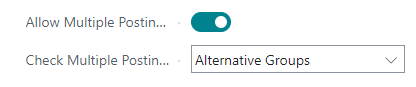
En la página de configuración de ventas y cobros contamos con los 2 campos siguientes:
- Permitir Múltiples Grupos Contables: Opción que permite habilitar la opción.
- Verificar Múltiples Grupos Contables: Opción que permite elegir el tipo de validación (la solución se basa en el uso de interfaces), por defecto el valor es «Alternative Groups»

Existe el siguiente objeto Enum 960 «Posting Group Change Method» que es extensible y por consiguiente permitirá que añadamos más opciones personalizadas, una forma de implementar muy escalable.
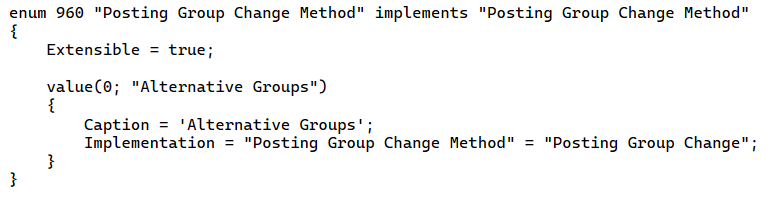
El Enum tiene un valor llamado «Alternative Groups» configurado con la Codeunit 960 «Posting Group Change» que implementa la interface siguiente:

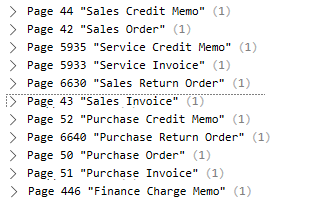
Esta funcionalidad impacta en las operaciones/documentos de ventas, de compras, de servicio, documentos de interés y algunos diarios. Podemos ver en la siguiente imagen la implementación de estas opciones.


Una vez que hemos activado la opción de permitir múltiples grupos contables en la página de configuración de ventas y cobros, tenemos que ir a la página de los grupos contables de clientes, podemos acceder a dicha opción desde varios lugares. Desde la página de configuración de ventas y cobros misma.

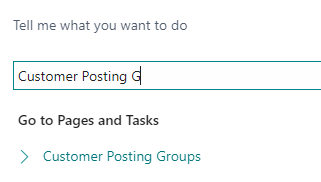
Desde la búsqueda general.
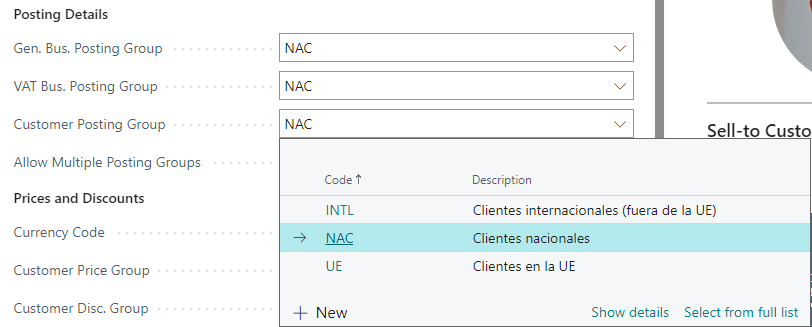
Y desde la ficha del cliente en la pestaña de Facturación, accedemos a la opción de grupo contable de cliente y seleccionamos la opción de lista completa.
En esta pantalla de grupos contable de clientes accedemos al menú Relacionado y a la opción de Grupos Alternativos. Esta opción solo se visualiza si hemos activado la opción en la página de Configuración de Ventas y Cobros previamente.

Aquí configuraremos los grupos contables alternativos de un grupo contable en particular, en el caso siguiente debemos seleccionar un grupo contable alternativo al grupo contable llamado «NAC».

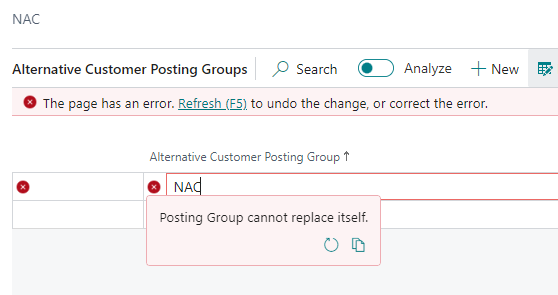
Como validación básica, no se permite seleccionar el mismo grupo contable.
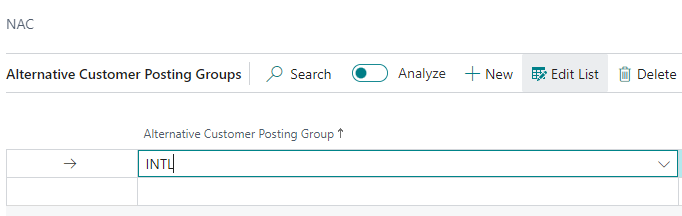
Seleccionamos cualquier otro grupo contable, en este caso el «INTL».
Posteriormente debemos configurar el cliente con el que deseamos trabajar con más de un grupo contable en el registro de sus operaciones. Si no activamos la opción en la página de configuración de Ventas y Cobros, NO tendremos la opción para configurar en la ficha del cliente, como podemos ver a continuación. En la sección de Detalles de Registro no vemos ninguna opción para habilitar.
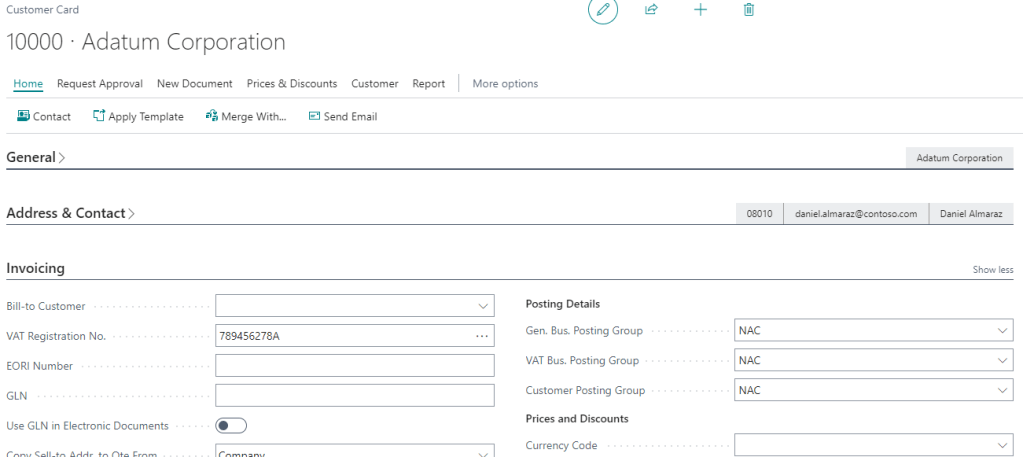
Cuando se configura la opción en la página de configuración de ventas y cobros, aparece la opción «Permitir Múltiple Grupos Contables» en la ficha del cliente, en la sección de Detalle de registro. Debemos habilitar esta opción en los clientes donde queremos trabajar esta funcionalidad. Para ilustrar el ejemplo vamos a activar la opción en el cliente «10000 – Adatum Corporation».

Vemos los siguientes objetos de tipo table de Business Central donde se encuentra el nuevo campo denominado «Permitir Múltiple Grupos Contables», en la ficha del cliente y del proveedor y en las configuraciones de compras, ventas y servicios.

Si creamos un pedido de venta usando el cliente «101003 School of Fine Art», el cual no hemos activado la opción vemos que el campo de Grupo contable de cliente en el documento se encuentra no editable. No se nos permite cambiarlo.
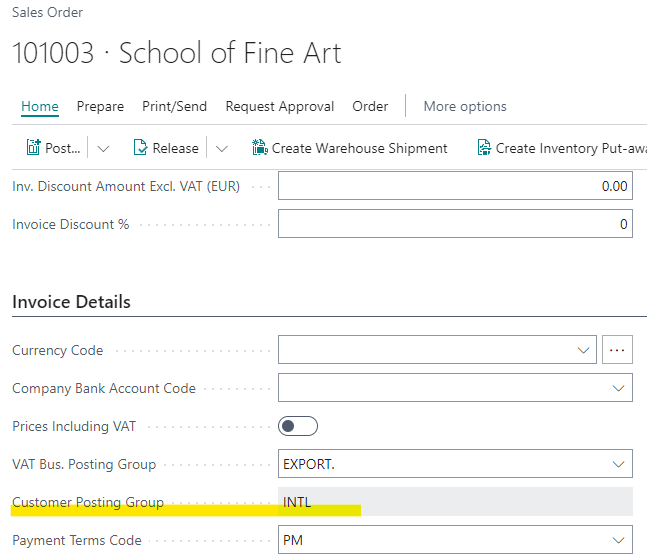
En cambio si creamos un pedido de venta con el cliente «10000 – Adatum Corporation» vemos que el campo de Grupo Contable de Cliente se encuentra editable y nos permite seleccionar otro grupo contable diferente.

La funcionalidad valida que seleccionemos un grupo contable alternativo previamente configurado en la página de grupos contables de cliente, sino provoca un error como el siguiente:
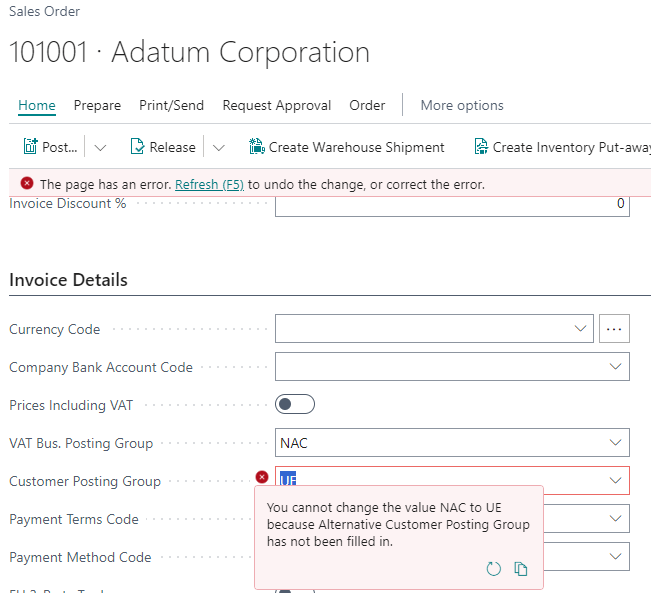
Podemos seleccionar el gupo contable «INTL» que hemos configurado como alternativo para «NAC». En el momento de registrar el documento se registrará el asiento contable en la cuenta contable configurada en este grupo contable de cliente y no usará el grupo contable que se encuentra por defecto en la ficha del cliente.
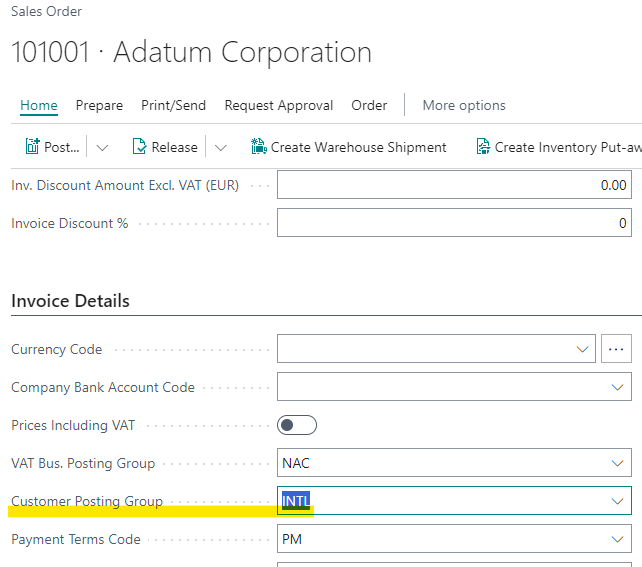
Esta funcionalidad se encuentra en los siguientes objetos de documentos de business central, en los documentos de pedido, factura, nota de crédito, pedido de devolución de compra y venta, factura y nota de crédito de servicio, y documento de interés de cliente.
Esta funcionalidad también impacta en las operaciones de diarios donde trabajemos un cliente y un proveedor, por ejemplo en el diario de cobros visualizamos a continuación el campo de grupo contable editable, solo se visualiza el campo de grupo contable si hemos habilitado la opción previamente.

Como validación inicial, solo se permite el cambio de grupo contable si es que en la ficha del cliente/proveedor se ha activado la opción de permitir múltiples grupos contables, sino tendremos un error.
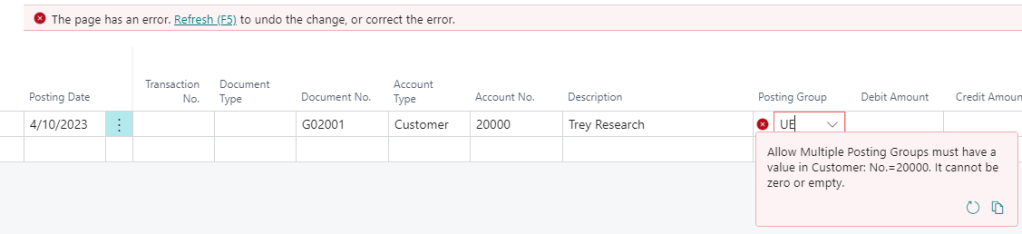
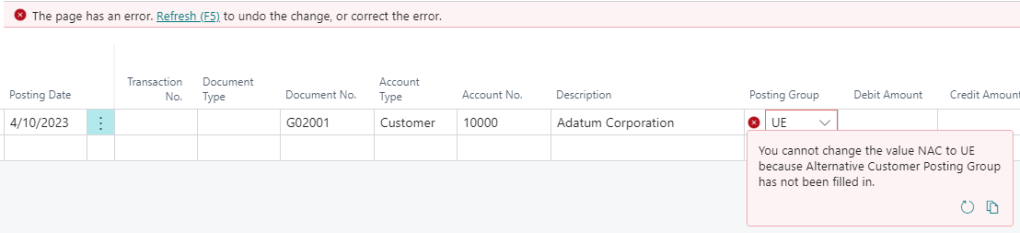
De manera similar que en los documentos, se valida que no se pueda cambiar a un grupo contable que no ha sido previamente configurado como grupo contable alternativo en la página de grupos contables.
Si permite el cambio hacia un grupo contable previamente configurado como alternativo, en este caso el «INTL» es alternativo al «NAC».

Esta funcionalidad se encuentra en los siguientes objetos de diarios de Business Central, diario de cobros y ventas, diario de pagos y de compras y el diario general.

Es importante remarcar, que Busines Central mueve los importes entre las cuentas correspondientes de una factura y un pago si se aplican y contabilizan con varios grupos contables de clientes o proveedores, de esta manera mantiene la coherencia y el balance adecuado entres sus cuentas. Espero que te haya servido de ayuda esta información.
2023 Wave 2 – v23: Feature Allow Multiple Customer and Vendor Posting Groups
In this new version of Business Central v23, the functionality to allow multiple posting groups in customers and vendors will be enabled by default. In my experience this is a very requested and necessary functionality for some Latin American countries to overcome fiscal requirements.
We see on the feature management page the announcement of its default activation in version 23.
It works in a similar way in the purchase, sales and services modules, considering customers and vendors. We will see the configurations and its behavior with the sales and customers module. But let’s consider that it is similar for purchases and vendors.
In the sales and receivables setup page, we have the following 2 fields:
- Allow Multiple Posting Groups: Option that allows you to enable the option.
- Check Multiple Posting Groups: Option to choose the type of validation (the solution is based on the use of interfaces). By default «Alternative Groups».
There is the following object: Enum 960 «Posting Group Change Method» which is extensible and therefore will allow us to add more custom options, a very scalable way of implementation.
The Enum has a value called «Alternative Groups» configured with the Codeunit 960 «Posting Group Change» which implements the following interface:
This functionality impacts on sales, purchase and service documents, finance charge memo and some journals. We can see in the following image the implementation of these options.
Once we have activated the option to allow multiple posting groups in the sales and receivables setup page, we have to go to the customer posting groups page, we can access this option from several places. From the sales and receivables setup page itself.
From Tell Me search option.
And from the customer’s card page in the Invoicing tab, we select the customer posting group field and select from full list option.
From this page of customer posting groups we access the Related menu and the Posting Group/Alternative Groups menu. This menu is only displayed if we have previously enabled the option in the Sales and Receivables Setup page.
Here we will configure the alternative customer posting groups of a particular customer posting group, in the following case we must select an alternative customer posting group to the customer posting group called «NAC».
As a basic validation, it is not allowed to select the same customer posting group.
Select any other customer posting group, in this case «INTL».
Subsequently we must configure the customer with whom we want to work with more than one posting group in the posting of its operations. If we do not activate the option in the sales and receivables setup page, we will NOT have the option to configure in the customer’s card page, as we can see below. In the Invoicing/Posting Details section we do not see any option to enable.
When the option is configured in the sales and receivables setup page, the option «Allow Multiple Posting Groups» appears in the customer’s card page, in the Invoicing/Posting Details section. We must enable this option in the customers where we want to work with this functionality. To illustrate the example we are going to enable the option in the customer «10000 – Adatum Corporation».
We see the following table type objects in Business Central where the new field called «Allow Multiple Posting Groups» is located, in the customer and vendor and in the purchase, sales and services setup.
If we create a sales order using the customer «101003 School of Fine Art» (in this customer we have not activated the option), we see that the Customer Posting Group field in the document is not editable. We are not allowed to change it.
On the other hand, if we create a sales order with the customer «10000 – Adatum Corporation» we see that the Customer Posting Group field is editable and allows us to select a different customer posting group.
The functionality validates that we select an alternative customer posting group previously configured in the customer posting groups page, otherwise it causes an error like the following one:
We can select the customer posting group «INTL» that we have configured as an alternative for «NAC». When the document is posted, it will be posted in the g/l account configured in this customer posting group and will not use the default customer posting group configured in the customer’s card page.
This functionality is found in the following Business Central document objects, in the sales and purchase order, invoice, credit memo, return order, also in service invoice and service credit memo, and finance charge memo.
This functionality also impacts on the operations of journals where we work with a customer and a vendor, for example in the cash receipt journal we see below the editable posting group field, the posting group field is only displayed if we have previously enabled the option of Allow Multiple Posting Groups.
As an initial validation, the change of customer posting group is only allowed if the option to allow multiple posting groups has been activated in the customer/vendor card page, otherwise we will have an error.
Similarly to the documents, it is validated that it is not possible to change to a customer posting group that has not been previously configured as an alternative customer posting group in the customer posting groups page.
If it allows the change to a customer posting group previously configured as alternative, in this case «INTL» is alternative to «NAC».
This functionality is found in the following Business Central journal objects, Sales and Cash Receipt Journal, Purchase and Payment Journal and the General Journal.
It is important to note that Busines Central moves the amounts between the corresponding g/l accounts of an invoice and a payment if they are applied and posted with several posting groups of customers or vendors, thus maintaining consistency and proper balance between all g/l accounts. I hope you found this information helpful.
Más información / More Information




 Gerardo Rentería Blog
Replica a gerardorenteria Cancelar la respuesta