2023 Wave 2 – v23 Feature Mandatory: Check Documents and Journals while you work (English version)
2023 Wave 2 – v23 Característica por defecto: Consultar documentos y diarios mientras trabaja
Desde el siguiente Wave 2 del 2023, esta funcionalidad estará activada por defecto y no podrá desactivarse. Optional features now mandatory – Business Central | Microsoft Learn

Anteriormente esta funcionalidad trabajaba con un campo en la tabla de Sección de Diario General, este campo será removido en esta versión 23. Mucha atención a este tema por si estamos aún utilizando este campo en alguna personalización.


Debemos activar la siguiente opción de «Habilitar comprobación de datos» en Configuración de Contabilidad.

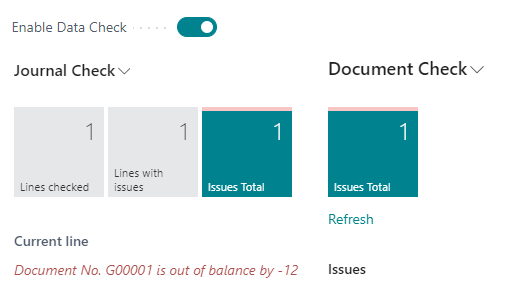
Habilitando esta opción podemos visualizar una nueva sección en el cuadro informativo de los diarios (FactBox), como podemos ver a continuación, donde se visualizarán las líneas revisadas, las líneas con incidencias y el total de incidencias encontradas.

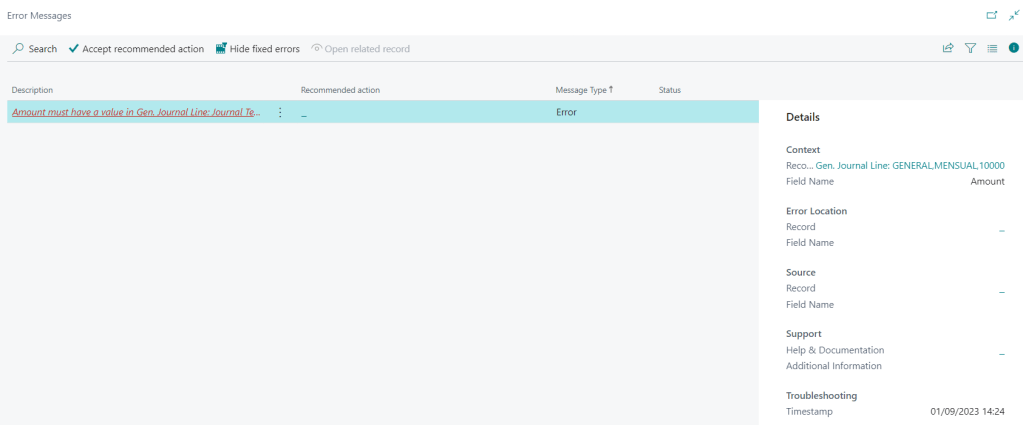
Puedes acceder al detalle de las incidencias pulsando el botón de total de incidencias. Encontraremos mayor detalle de los errores, y podremos aplicar recomendaciones que nos ofrecen y ocultar los errores ya corregidos. Más información: Fix-it-for-me actions
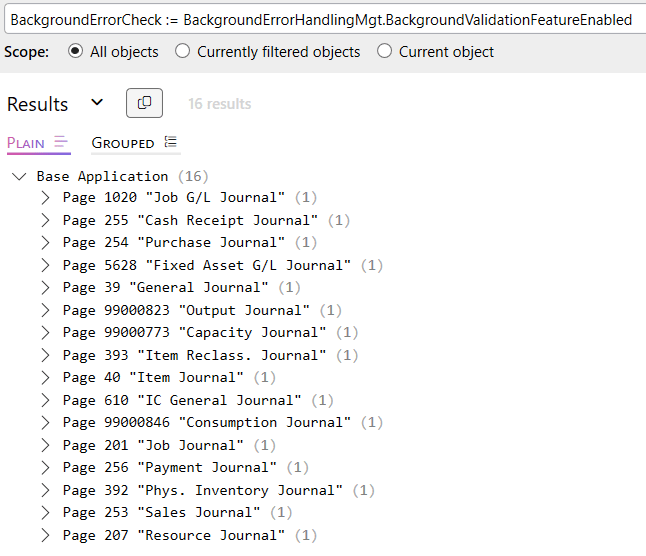
Encontramos esta funcionalidad en los siguientes objetos de diarios en Business Central.
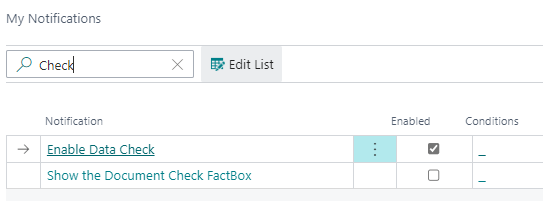
Adicionalmente esta opción de «Habilitar comprobación de datos» agregará 2 opciones más en la lista de «Mis notificaciones», puedes acceder desde el buscador y sino desde la opción de «Mi configuración».

Ambas nos ayudarán en activación de la funcionalidad en los documentos.
- Notificación: Habilitar Comprobación de Datos
Cuando accedemos a los documentos nos aparecerá una notificación indicando que para analizar los errores e incidencias debemos habilitar y mostrar el cuadro informativo de comprobación de documentos (FactBox).
Si no queremos habilitarlo aún y tampoco queremos que se nos muestre la notificación cada vez que trabajamos con documentos, debemos deshabilitar la notificación mencionada de «Habilitar Comprobación de Datos».

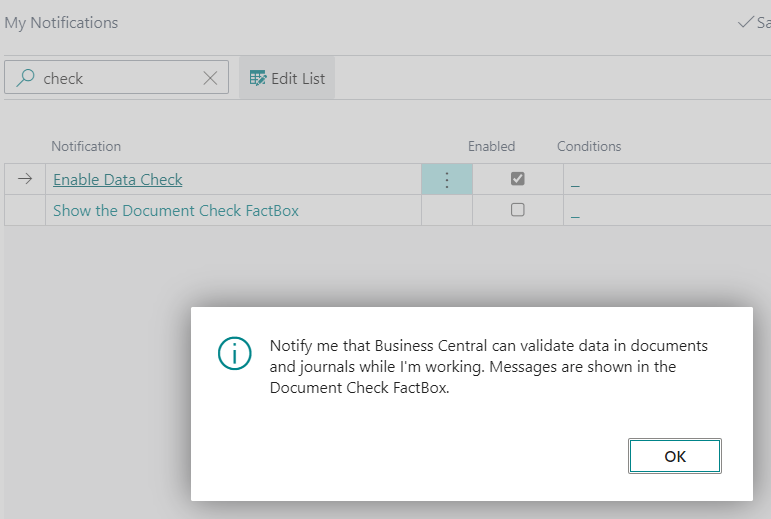
- Notificación: Mostrar el cuadro informativo de comprobación de documentos (CheckBox)
Esta notificación es la que permite habilitar el cuadro informativo en las páginas de documentos dentro de Business Central.

Como podemos ver a continuación, se muestra el cuadro informativo de comprobación de documento (FactBox) y la información de la cantidad de errores e incidencias del documento.

De igual manera puedes entrar para ver el detalle de los errores y aplicar recomendaciones de solución.

Encontramos esta funcionalidad en los siguientes objetos de documentos en Business Central.

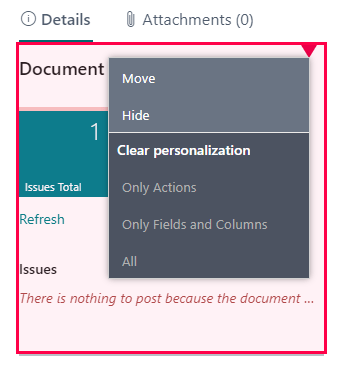
De igual manera es importante mencionar que estos cuadros informativos (FactBox) se pueden ocultar a través de la personalización de la página.
Por lo visto es una importante herramienta de revisión previa al registro de los diarios y de los documentos, espero te haya servido de ayuda.
2023 Wave 2 – v23 Feature Mandatory: Check Documents and Journals while you work
From the next Wave 2 in 2023, this functionality will be now mandatory and can no longer be disabled. Optional features now mandatory – Business Central | Microsoft Learn
Previously this functionality worked with a field in the General Journal Batch table, this field will be removed in this version 23. Pay attention to this issue in case you are still using this field in any customization.
We must activate the following option «Enable data check» in General Ledger Setup.
By enabling this option we can display a new FactBox as shown below (Journal Chek), which displays the lines reviewed/checked, the lines with issues and the total number of issues found.
You can access the details of the incidents by clicking on the issues total button. You will find more details of the errors, and you will be able to apply the recommendations offered and hide the errors already corrected. More information: Fix-it-for-me actions
This functionality can be found in the following journal objects in Business Central.
Additionally this «Enable data check» option will add 2 more options in the «My notifications» list, you can access from the Tell Me browser or from the «My settings» option.
Both will help us in the activation of the functionality in the documents.
- Notification: Enable Data Check
When we access the documents, a notification will appear indicating that in order to analyze errors and incidents we must enable and display the document check FactBox.
If we do not want to enable it yet and we do not want to be shown the notification every time we work with documents, we must disable the «Enable Data Check» notification mentioned above.
- Notification: Show the Document Check FactBox.
This notification is the one that enables the FactBox on the document pages within Business Central.
As we can see below, the document check information FactBox and the information on the number of errors and issues in the document are displayed.
You can also log in to see the details of the errors and apply recommendations for solutions.
This functionality can be found in the following document objects in Business Central.
It is also important to mention that these FactBoxes can be hidden by personalizing the page.
So it is an important tool for review prior to the recording of journals and documents, I hope it has been helpful.
Más información / More Information


 Gerardo Rentería Blog
Deja un comentario