2023 Wave 2 – v23: Report read-only data access (English version)
2023 Wave 2 – v23: Acceso a datos de solo lectura en Reportes
Vemos este tema en la lista de las características que serán aplicadas desde el próximo Wave 2 del 2023, v23. Optional features now mandatory – Business Central | Microsoft Learn

Como superusuario o administrador, se puede cambiar la intención de acceso a la base de datos en reportes, páginas del tipo API y Queries para mejorar el rendimiento del servicio. Manage database access intent in Business Central – Business Central | Microsoft Learn
La forma en que Business Central Server trabaja con la base de datos puede clasificarse en dos escenarios:
- Procesos empresariales que leen y escriben datos, desde páginas de interfaz de usuario o servicios web.
- Trabajo analítico que sólo leen datos, como queries, reportes o páginas API. Estas transacciones pueden causar problemas de bloqueo, penalizando con tiempos de espera a los procesos empresariales.
La base de datos de Business Central en una arquitectura de alta disponibilidad, puede utilizar la función Read Scale-Out integrada en Azure SQL Database o SQL Server para equilibrar la carga de trabajo de solo lectura. Using Read Scale-Out for Better Performance – Business Central | Microsoft Learn. En Business Central Online, esta funcionalidad se activa automáticamente en las bases de datos. Para instalaciones On-Premise aquí la información necesaria para habilitarlo. Configuring a Database for Read Scale-Out – Business Central | Microsoft Learn
Con esta configuración el acceso a datos de estos objetos utiliza la réplica de sólo lectura, por consiguiente no es posible realizar operaciones de inserción, actualización ni eliminación.
Activación por código AL
Usando la propiedad DataAccessIntent que se aplica a objetos de tipo Página API, Query y Reportes, permite establecer si se obtienen los datos requeridos de una réplica de sólo lectura de la base de datos o de la base de datos primaria y principal.
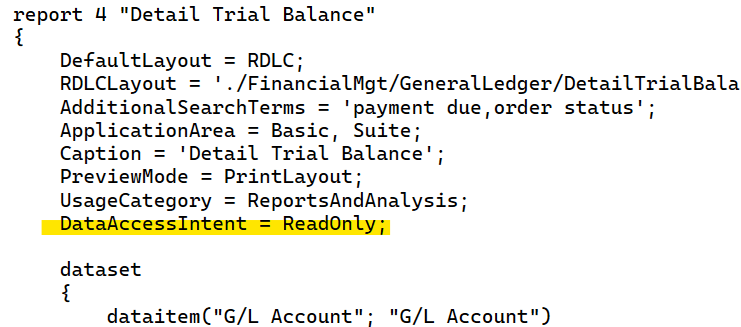
Para identificar el valor de la propiedad DataAccessIntent en un reporte tenemos la función Report.IsReadOnly() Method – Business Central | Microsoft Learn, por lo pronto no existe esta función para los objetos tipo página, en el portal de ideas de Microsoft se cuenta con esta entrada para poder contar con ello: Add IsReadOnly to the page object to get the current data access intent
Activación en la llamada de ODATA
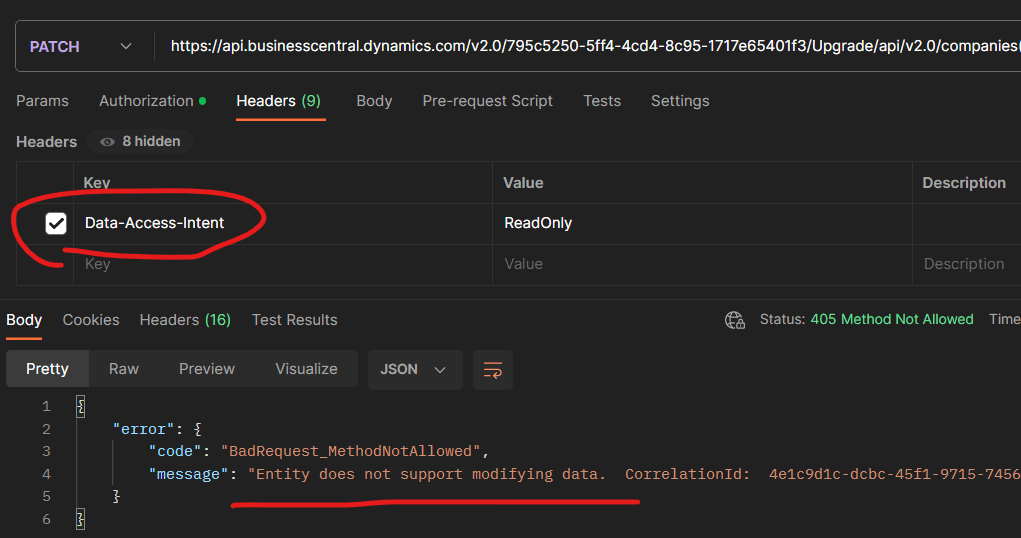
Es posible también configurar el valor de Data-Access-Intent en la llamada OData, como vemos a continuación en la imagen de un ejemplo en el cual se desea realizar una modificación de los datos de un empleado vía API, el mensaje es claro e indica que No permite la modificación de datos.
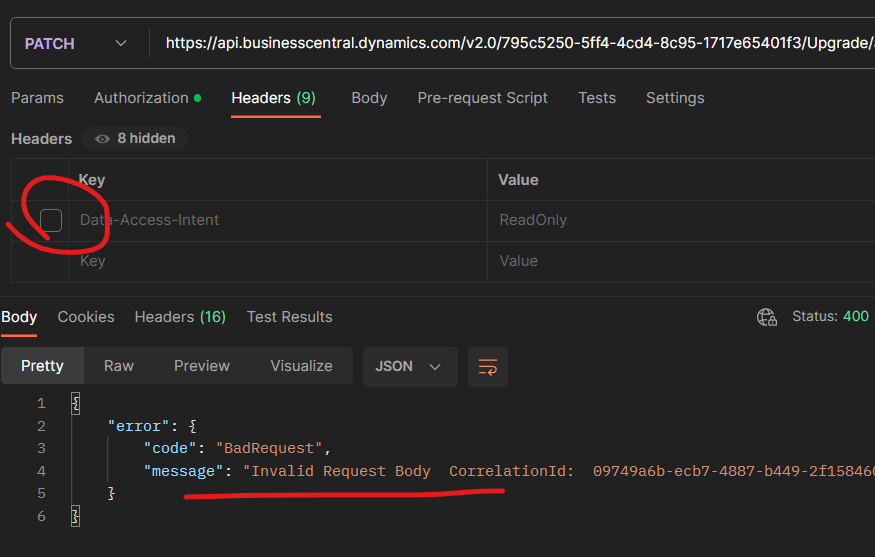
De no enviar dicha configuración el mensaje es diferente. En el ejemplo se visualiza que se ha intentado modificar el registro.
Activación por configuración
Tenemos una página de configuración el cual podemos indicar la intención de acceso a los datos de reportes, páginas API y queries, estas configuraciones anulan la que pueda haberse configurado en la llamada ODATA.
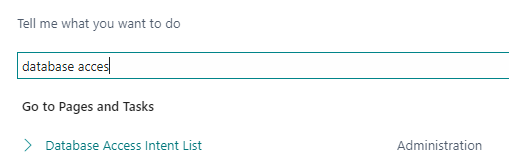
El acceso predeterminado usa el valor de la propiedad por defecto colocada vía código en el objeto, la opción de solo lectura usa la base de datos de réplica de solo lectura y la opción permitir escritura utiliza la base de datos primaria.
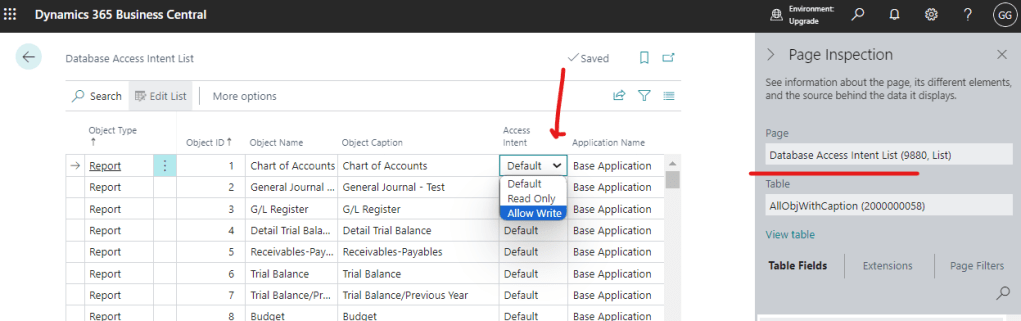
Algunas consideraciones que debemos tener en cuenta es que si por alguna razón se experimenta algún error de comunicación con la base de datos de réplica, automáticamente se redirigirá a la principal. También existe un ligero o mínimo retraso casi imperceptible entre la comunicación de la base de datos de réplica y la principal que varía entre decenas de milisegundos y un dígito de segundo . Read queries on replicas – Azure SQL Database & SQL Managed Instance | Microsoft Learn Y por último este tipo de configuración solo funciona en los ambientes de tipo de producción, en los sandbox solo se trabaja con las bases de datos primarias.
Para integraciones externas, si requerimos lectura de datos y no escritura en algunas de las operaciones con este tipo de configuraciones ganaremos rendimiento en el sistema evitando impactar en el trabajo diario de producción.
2023 Wave 2 – v23: Report read-only data access
We see this topic in the list of features that will be implemented from the next 2023 Wave 2, v23. Optional features now mandatory – Business Central | Microsoft Learn
As a superuser or administrator, you can change the database access intent in reports, API pages and Queries to improve service performance. Manage database access intent in Business Central – Business Central | Microsoft Learn
The way in which Business Central Server works with the database can be classified into two scenarios:
- Business processes that read and write data, from user interface pages or web services.
- Analytical work that only reads data, such as queries, reports or API pages. These transactions can cause blocking problems, penalizing business processes with timeouts.
Business Central database in a high-availability architecture, you can use the Read Scale-Out feature built into Azure SQL Database or SQL Server to balance the read-only workload. Using Read Scale-Out for Better Performance – Business Central | Microsoft Learn. In Business Central Online, this functionality is automatically enabled in the databases. For On-Premise installations here is the information needed to enable it. Configuring a Database for Read Scale-Out – Business Central | Microsoft Learn
With this configuration, data access to these objects uses read-only replication, therefore it is not possible to perform insert, update or delete operations.
Activation by AL Code
Using the DataAccessIntent property that applies to objects of type API Page, Query and Reports, allows you to set whether the required data is obtained from a read-only replica of the database or from the primary and main database.
To identify the value of the DataAccessIntent property in a report we have the function Report.IsReadOnly() Method – Business Central | Microsoft Learn, for the moment this function does not exist for the objects type page, in the portal of ideas of Microsoft we have this entry to be able to count on it: Add IsReadOnly to the page object to get the current data access intent
Activation on OData Call
It is also possible to configure the value of Data-Access-Intent in the OData call, as we see below in the image of an example in which you want to modify the data of an employee via API, the message is clear and indicates that the modification of data is not allowed.
If this configuration is not sent, the message is different. The example shows that an attempt has been made to modify the registry.
Activation by configuration
We have a configuration page in which we can indicate the database access intent to reports, API pages and queries, these configurations override the one that may have been configured in the ODATA call.
The default access uses the value of the default property placed via code in the object, the read-only option uses the read-only replica database and the allow Write option uses the primary database.
Some considerations to keep in mind is that if for some reason a communication error is experienced with the replica database, it will automatically redirect to the main one. There is also a slight or minimal almost imperceptible delay between the communication of the replica database and the main one that varies between tens of milliseconds and a digit of a second. Read queries on replicas – Azure SQL Database & SQL Managed Instance | Microsoft Learn And finally this type of configuration only works in production environments, sandboxes only work with the primary databases.
For external integrations, if we require data reading and not writing in some of the operations with this type of configurations we will gain performance in the system avoiding impacting the daily production work.
Más información / More Information
- Database access intent changed to read-only for frequently used reports – Dynamics 365 Release Plan | Microsoft Learn
- Read-scale out with Azure SQL and Dynamics 365 Business Central – Stefano Demiliani
- Read Data from Dynamics 365 Business Central Replica Database (Data Access Intent) – TharangaC
- Dynamics 365 Business Central APIs and Data Access Intent – Stefano Demiliani
- Sales APIs returns error in a read-only request (v20 and earlier) – Kauffmann @ Dynamics 365 Business Central


 Gerardo Rentería Blog
Deja un comentario