🚫 Never Publish an AL Extension with Missing Translations Again (English version)
🚫 No vuelvas a publicar una extensión AL con traducciones faltantes.
Desarrollando extensiones en VSC para BC, me encontré que no hay manera de exigir que siempre existan los archivos de traducción necesarios, es decir, se genera el archivo principal g.xlf durante la compilación, pero nada impide que publiques una extensión sin un idioma para los mercados que realmente lo necesitan. Por ejemplo, el caso es-ES.xlf y es-ES_tradnl, o el fr-FR con fr-CH y/o fr-CA.
Así que, he creado una pequeña extensión para VS Code que intenta solucionar precisamente eso. Esta extensión valida que los archivos de traducción de lenguajes obligatorios estén presentes, gestiona las variantes regionales y resalta las traducciones incompletas mientras trabajas.
¿Qué hace?
Validación de idiomas requeridos: Puedes definir qué idiomas son requeridos/obligatorios para tu extensión:
- Define los idiomas obligatorios en la configuración de VS Code.
- Ejecuta la validación mediante la paleta de comandos (
AL Translation Requirements: Validate) - Las traducciones faltantes aparecen en el panel OUTPUT de VS Code con mensajes de error claros.
- Evita que las traducciones incompletas pasen desapercibidas antes de la implementación.
"alTranslationRequirements.required": ["es-ES", "fr-FR","nl-BE"],Idiomas obligatorios expandidos: Al configurar idiomas equivalentes, la validación los incluye automáticamente. Por ejemplo, si estableces es-ES como obligatorio y tiene es-ES_tradnl como equivalente, ambos se validarán. Esto nos garantizará que las variantes regionales no sean olvidadas.
Gestión de idiomas equivalentes: Puedes crear y mantener automáticamente los archivos de traducción para variantes regionales:
- Configura mapeos base-a-equivalente en la configuración. Por ejemplo:
es-ESyes-ES_tradnl(español tradicional para Business Central) - Ejecuta la validación mediante la paleta de comandos (
AL Translation Requirements: Sync Equivalents) - Los archivos se crean/sobrescriben automáticamente desde el idioma base.
"alTranslationRequirements.equivalents": [ { "base": "es-ES", "equivalent": "es-ES_tradnl" }, { "base": "es-ES", "equivalent": "es-MX" }, { "base": "fr-FR", "equivalent": "fr-CH" } ]
Indicadores visuales de traducción: Puedes ver el estado de traducción de un vistazo con resaltado visual.
- En archivos g.xlf: Resaltará trans-units que tienen problemas (Faltan elementos
<target>, Elementos<target>están vacíos, Estados indican traducción necesaria (needs-translation,new) ) en CUALQUIER archivo de idioma. - En archivos específicos de idioma: Resalta solo trans-units con problemas en ese idioma específico.
- Color de resaltado configurable: Cámbialo a cualquier color hexadecimal (predeterminado:
#F0D269)
"alTranslationRequirements.decoration.backgroundColor": "#F0D269"
¿Cómo funciona?
Considerando la siguiente configuración y el estado actual del proyecto, lo leemos de la siguiente manera:
- Los idiomas obligatorios y requeridos son: «es-ES», «fr-FR»,»nl-BE»
- Los idiomas «es-ES_tradnl» y «es-MX» son equivalentes a «es-ES», por lo que, requiero que sean idénticos en su contenido de traducción.
{ "alTranslationRequirements.required": ["es-ES", "fr-FR","nl-BE"], "alTranslationRequirements.equivalents": [ { "base": "es-ES", "equivalent": "es-ES_tradnl" }, { "base": "es-ES", "equivalent": "es-MX" }, { "base": "fr-FR", "equivalent": "fr-CH" } ], "alTranslationRequirements.decoration.backgroundColor": "#F0D269"}
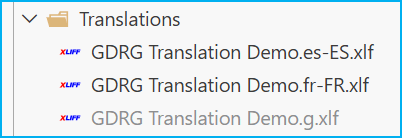
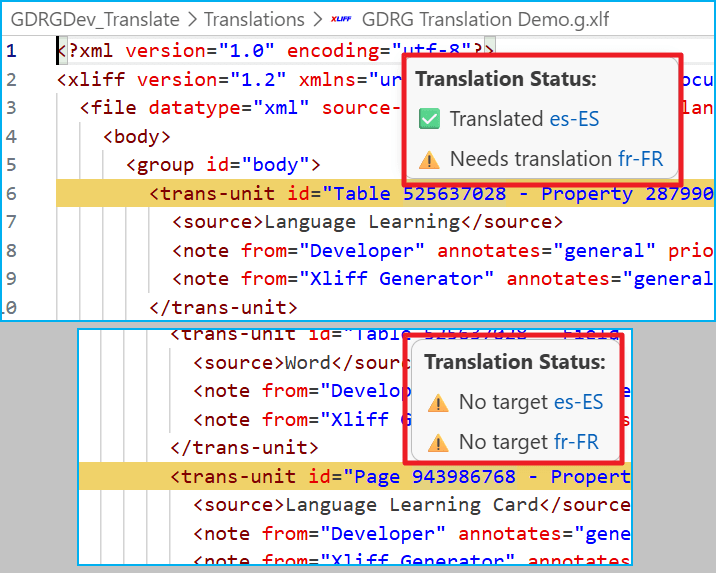
(1) Si vemos el archivo «Translations/GDRG Translation Demo.g.xlf«. Veremos resaltados amarillos en los trans-units que tienen problemas en algún archivo de idioma. En un caso, fr-FR tiene traducciones faltantes e incompletas, y en el otro ambos idiomas tienen la traducción faltante.
(2) Si pasamos el cursor sobre cualquier <trans-unit> resaltado. El tooltip muestra el estado por idioma. Puedes hacer clic en cualquier código de idioma para ir directamente a ese archivo.
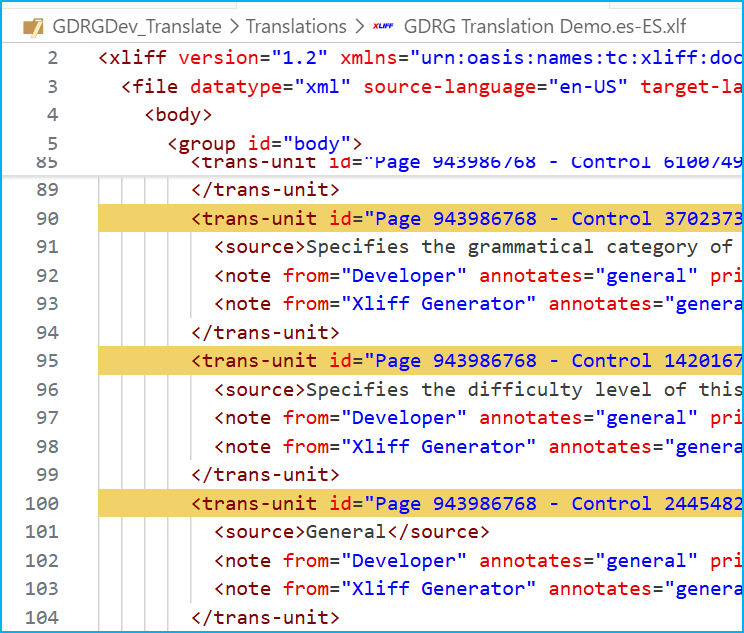
(3) Si abrimos el archivo «Translations/GDRG Translation Demo.es-ES.xlf", solo se resaltan las entradas incompletas en español. Lo veo útil cuando estás trabajando en un idioma concreto.
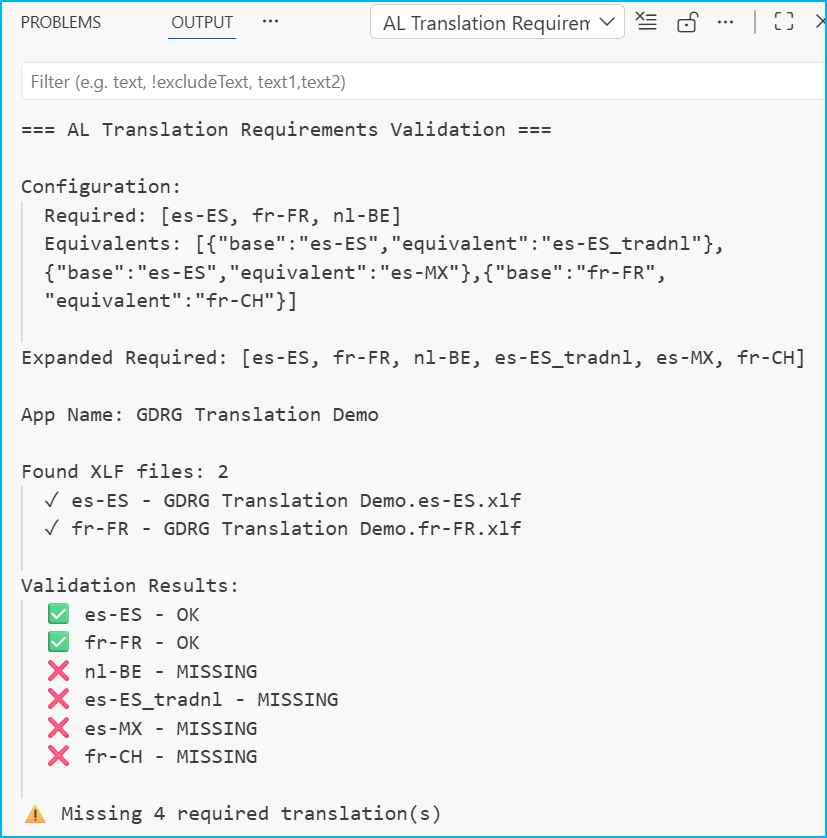
(4) Si ejecutamos el comando «AL Translation Requirements: Validate», la extensión verifica todos los idiomas requeridos, incluidos los equivalentes. Como vemos, identifica las traducciones obligatorias, las equivalentes y las que nos faltan generar.
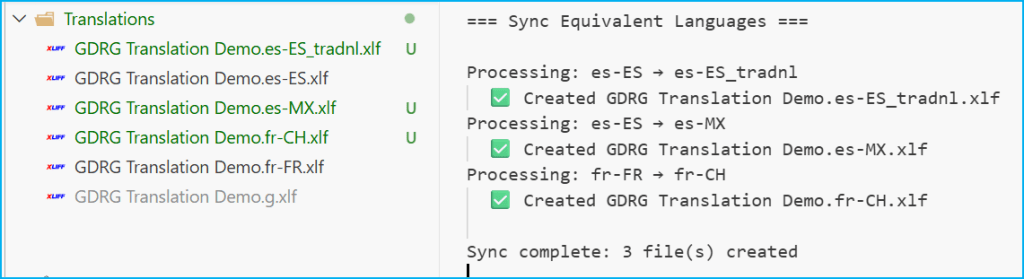
(5) Si ejecutamos el comando «AL Translation Requirements: Sync Equivalents», la extensión crea es-MX.xlf, es-ES_tradnl.xlf y fr-CH.xlf automáticamente, copiando el contenido de los archivos de origen correspondientes.
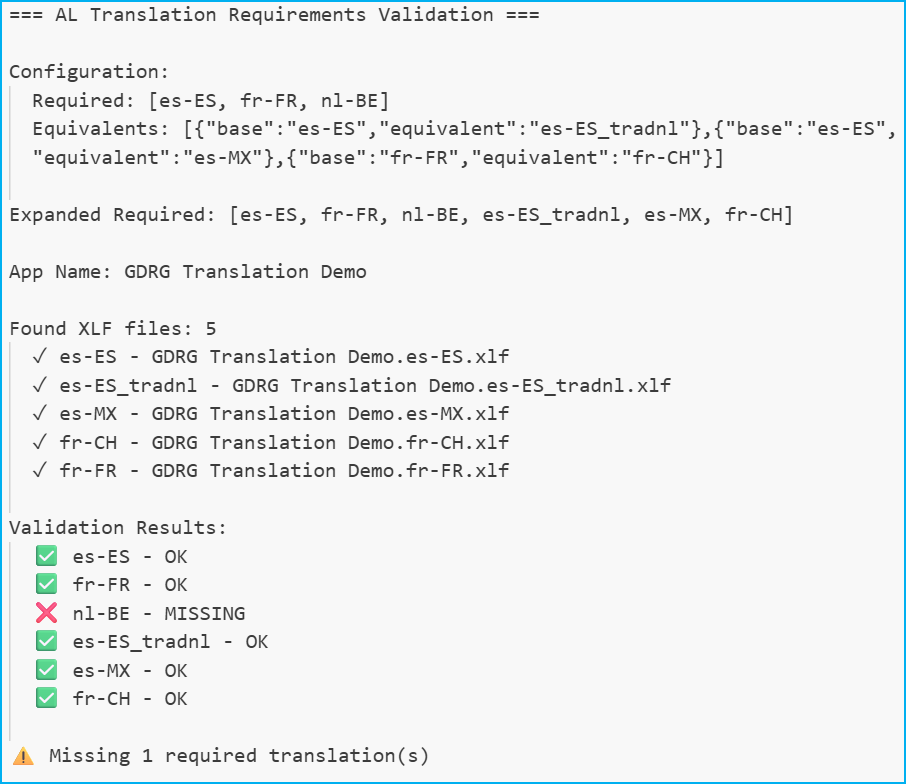
(6) Si volvemos a ejecutar el comando «AL Translation Requirements: Validate», la extensión se analiza y vemos que los resultados son diferentes y nos informa que aún nos falta un idioma.
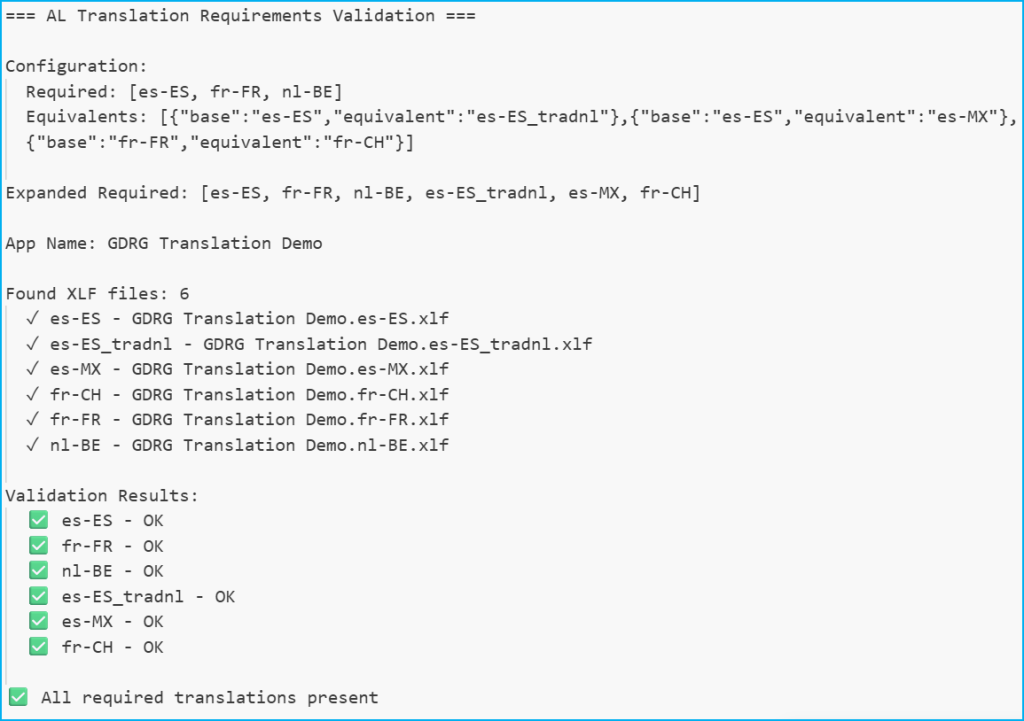
(6) Cuando completemos las traducciones requeridas, los errores desaparecen, y la extensión confirma que los requisitos de traducción están cumplidos.
Puedes instalar la extensión desde VS Code Marketplace: AL Translation Requirements – Visual Studio Marketplace
Espero que esta extensión te ayude en tu trabajo diario con Visual Studio Code.
🚫 Never Publish an AL Extension with Missing Translations Again
While developing extensions in VSC for BC, I found that there is no way to require that the necessary translation files always exist; that is, the main g.xlf file is generated during compilation, but nothing prevents you from publishing an extension without a language for the markets that really need it. For example, the case es-ES.xlf y es-ES_tradnl, or the fr-FR with fr-CH and/or fr-CA.
So, I’ve created a small extension for VS Code that attempts to solve precisely that problem. This extension validates that required language translation files are present, manages regional variations, and highlights incomplete translations as you work.
What does the extension do?
Validation of required languages: You can define which languages are required/mandatory for your extension:
- Define the required languages in the VS Code configuration.
- Run the validation using the command palette (AL Translation Requirements: Validate).
- Missing translations will appear in the VS Code OUTPUT panel with clear error messages.
- Prevent incomplete translations from going unnoticed before deployment.
"alTranslationRequirements.required": ["es-ES", "fr-FR","nl-BE"],Expanded required languages: When you configure equivalent languages, validation automatically includes them. For example, if you set es-ES as required and es-ES_tradnl as its equivalent, both will be validated. This ensures that regional variations are not overlooked.
Equivalent language management: You can automatically create and maintain translation files for regional variants:
- Configure base-to-equivalent mappings in the settings. For example: es-ES and es-ES_tradnl (traditional Spanish for Business Central).
- Run validation using the command palette (AL Translation Requirements: Sync Equivalents).
- Files are automatically created/overwritten from the base language.
"alTranslationRequirements.equivalents": [ { "base": "es-ES", "equivalent": "es-ES_tradnl" }, { "base": "es-ES", "equivalent": "es-MX" }, { "base": "fr-FR", "equivalent": "fr-CH" } ]
Visual translation indicators: You can see the translation status at a glance with visual highlighting.
- In g.xlf files: Highlights trans-units with issues (Missing <target> elements, elements <target> are empty, States indicate needed translation (needs-translation, new)) in ANY language file.
- In language-specific files: Highlights only trans-units with issues in that specific language.
- Configurable highlighting color: Change to any hexadecimal color (default: #F0D269)
"alTranslationRequirements.decoration.backgroundColor": "#F0D269"
How does it work?
Considering the following configuration and the current state of the project, we read it as follows:
- The required languages are: «es-ES», «fr-FR», «nl-BE».
- The languages »es-ES_tradnl» and «es-MX» are equivalent to «es-ES», «fr-CH» is equivalent to «fr-FR», therefore, I require that they be identical in their translation content.
{ "alTranslationRequirements.required": ["es-ES", "fr-FR","nl-BE"], "alTranslationRequirements.equivalents": [ { "base": "es-ES", "equivalent": "es-ES_tradnl" }, { "base": "es-ES", "equivalent": "es-MX" }, { "base": "fr-FR", "equivalent": "fr-CH" } ], "alTranslationRequirements.decoration.backgroundColor": "#F0D269"}
(1) If we look at the file «Translations/GDRG Translation Demo.g.xlf«, we’ll see yellow highlights in the trans-units that have problems with a language file. In one case, fr-FR has missing and incomplete translations, and in the other, both languages have the missing translation.
(2)If you hover over any highlighted «<trans-unit>«, the tooltip displays the status by language. You can click on any language code to go directly to that file.
(3) If we open the file «Translations/GDRG Translation Demo.es-ES.xlf«, only the incomplete entries in Spanish are highlighted. I find this useful when you’re working in a specific language.
(4) If we run the command «AL Translation Requirements: Validate«, the extension checks all required languages, including equivalents. As we can see, it identifies the required translations, the equivalents, and those that we still need to generate.
(5) If we run the command «AL Translation Requirements: Sync Equivalents«, the extension automatically creates es-MX.xlf, es-ES_tradnl.xlf and fr-CH.xlf, copying the contents of the corresponding source files.
(6) If we run the command «AL Translation Requirements: Validate» again, the extension is analyzed and we see that the results are different, informing us that we are still missing a language.
(6) When we complete the required translations, the errors disappear, and the extension confirms that the translation requirements are met.
You can install the extension from the VS Code Marketplace: AL Translation Requirements – Visual Studio Marketplace
I hope this extension helps you in your daily work with Visual Studio Code.
Más información / More information:



 Gerardo Rentería Blog
Deja un comentario