🧠 Agent Skills + MCPs: check your BC extension health in VS Code 🔍 (English version)
🧠 Agent Skills + MCPs: diagnostica tu extensión BC en VS Code 🔍
En la publicación anterior hablé de cómo controlar qué contexto tiene GitHub Copilot activo por workspace. Ahora intentaremos empaquetar ese contexto como un skill reutilizable que orqueste herramientas externas para responder una duda como «Verifica el estado de mi extensión en un tenant«.
¿Qué es un Agent Skill?: Podría definirla como una carpeta de instrucciones, scripts y recursos que GitHub Copilot puede cargar e utilizar cuando el contexto es relevante para realizar una tarea especializada.
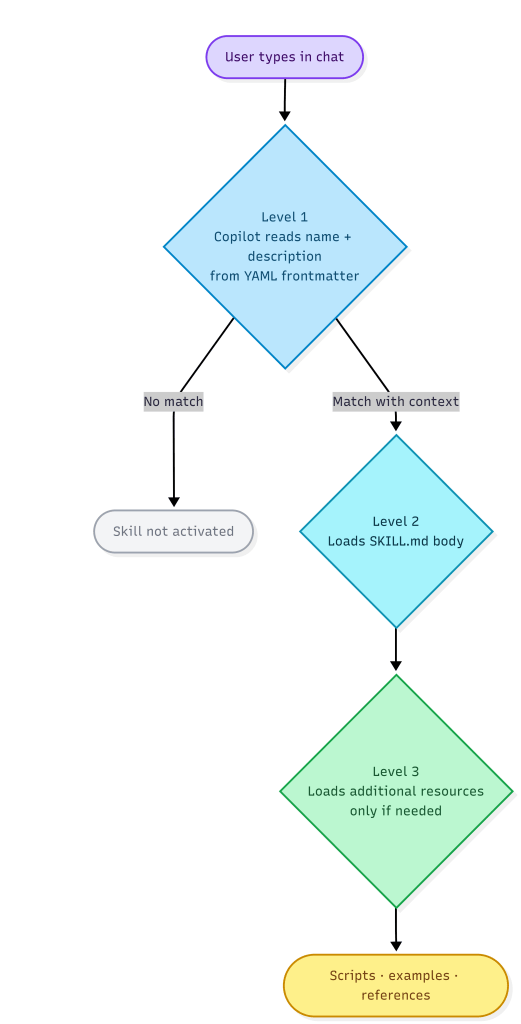
Esta carga sigue un modelo de tres niveles, aquí te dejo la documentación oficial: Use Agent Skills in VS Code
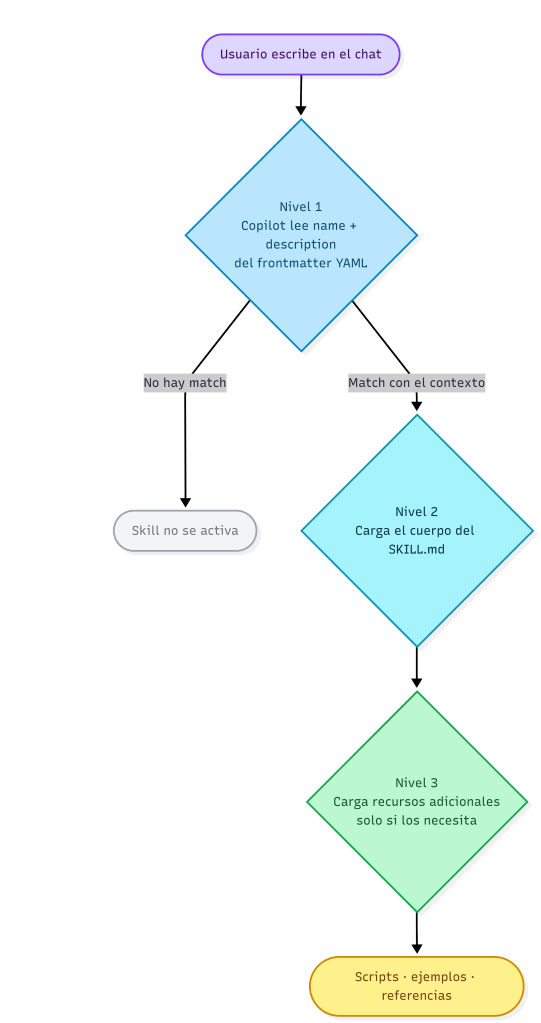
Esto significaría que puedes tener muchos skills instalados sin penalizar el contexto, por lo que Copilot solo carga lo que es pertinente para cada requerimiento.
Los skills viven en la carpeta «.github/skills/«. Cada skill es una carpeta con un SKILL.md obligatorio y los recursos que necesite.
.github/skills/ my-custom-skill/ SKILL.md ← instructions + orchestration flow tool-reference-1.md ← detailed tool reference tool-reference-2.md ← detailed tool referenceEl SKILL.md arranca con un frontmatter YAML. El description es crítico ya que es lo que Copilot lee en el Nivel 1 para decidir si el skill es relevante. Si no se describe bien los casos de uso, el skill no se activará.
---name: my-custom-skilldescription: "Does X for Y context. USE FOR: scenario A, scenario B. DO NOT USE FOR: scenario C."---Ahora intentemos aplicar lo mencionado teóricamente, por lo que, crearemos un skill que orquesta YAMPI y BC Telemetry Buddy.
- YAMPI creado por Stefano Demiliani, es el MCP server para administración de Business Central.
- BC Telemetry Buddy, creado por Waldo, conecta Application Insights con lenguaje natural.
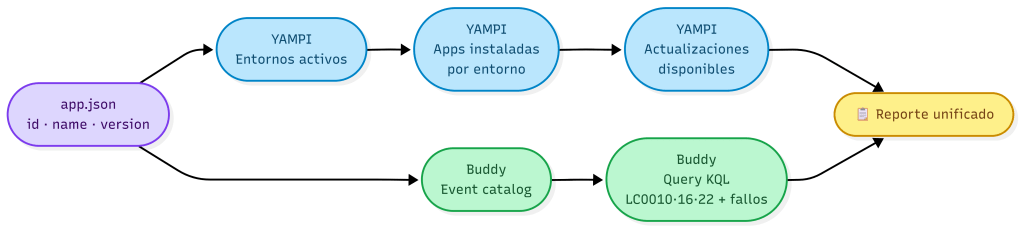
El skill define 4 pasos:
- Leer app.json: extraer el id y la versión de la extensión como referencia base.
- YAMPI: obtener los entornos activos del tenant, la versión instalada de la extensión en cada uno y si hay actualizaciones disponibles.
- Buddy: consultar el catálogo de eventos y ejecutar una query del ciclo de vida filtrada por extensionId para detectar instalaciones, actualizaciones y fallos.
- Reporte unificado: consolidar los resultados en dos tablas Markdown.
Cada uno de esos pasos vive en archivos separados dentro del skill:
.github/skills/ bc-extension-health/ SKILL.md ← instrucciones + flujo de orquestación yampi-environments-reference.md ← referencia detallada de herramientas YAMPI buddy-telemetry-reference.md ← referencia detallada de herramientas BuddyNuestro SKILL.md empieza con el frontmatter YAML siguiente:
---name: bc-extension-healthdescription: "Analyze the health of the current Business Central extension across all client environments. Combines YAMPI (d365bc-admin MCP) for environment and version data, and BC Telemetry Buddy for lifecycle event analysis. USE FOR: extension health check, check extension in production, how is my extension deployed, extension version across environments, extension install failures, extension update errors..."---Para YAMPI, el skill realiza las siguientes llamadas al MCP:
Tool: mcp_d365bc-admin_get_environment_informationsParameters: tenantId: <tenantId provided by user>Tool: mcp_d365bc-admin_get_installed_appsParameters: tenantId: <tenantId> environmentName: <environmentName>Para Buddy, el skill lanza una query KQL que cubre 6 eventos de ciclo de vida de las extensiones:
- LC0010: Extensión instalada correctamente en un entorno.
- LC0011: Fallo en la instalación de la extensión.
- LC0016: Extensión desinstalada correctamente de un entorno.
- LC0017: Fallo en la desinstalación de la extensión.
- LC0022: Extensión actualizada correctamente a una nueva versión.
- LC0023: Fallo en la actualización de la extensión.
traces| where timestamp > ago(30d)| where tostring(customDimensions.extensionId) == '<id from app.json>'| where customDimensions.eventId in ('LC0010','LC0011','LC0016','LC0017','LC0022','LC0023')| summarize count() by eventId = tostring(customDimensions.eventId), environmentName = tostring(customDimensions.environmentName), result = tostring(customDimensions.result)| order by eventId ascCon un único mensaje en el chat, Copilot detecta el skill, carga los tres archivos de referencia y extrae automáticamente los datos del app.json:
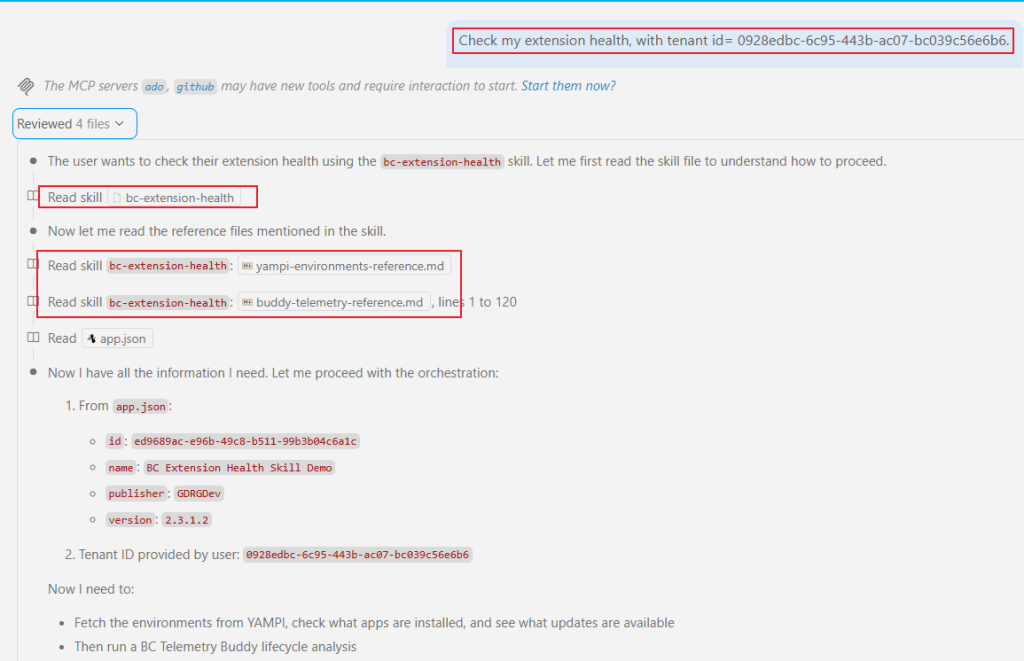
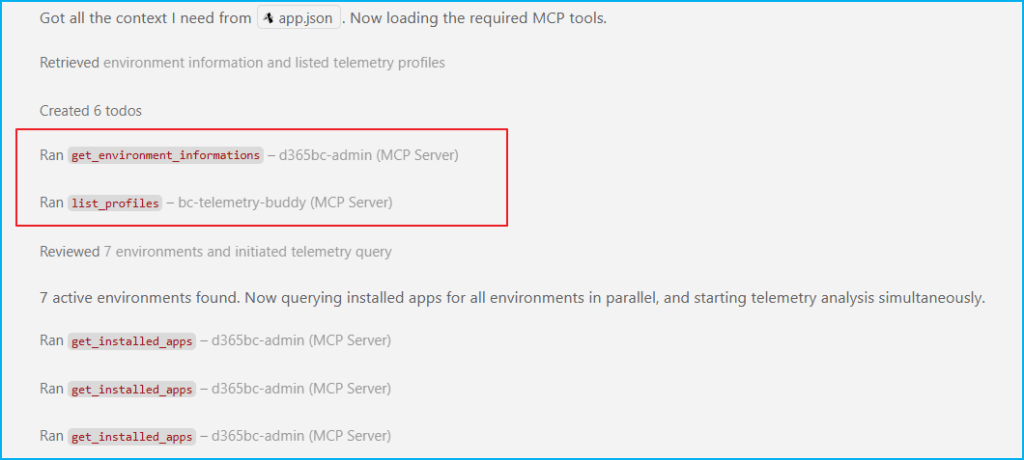
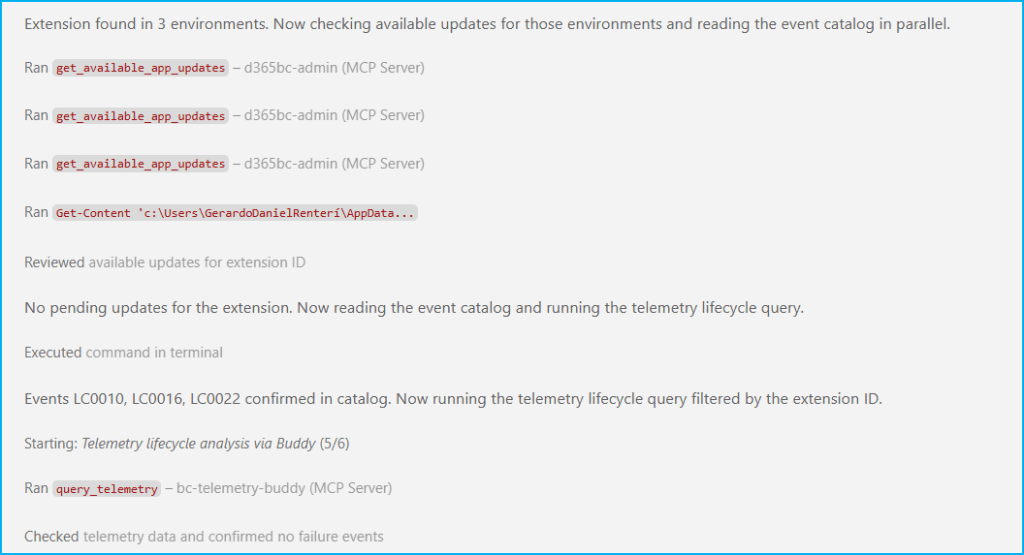
A continuación el skill orquesta las llamadas a ambos MCPs: YAMPI y Buddy, ejecutando varias herramientas en paralelo:
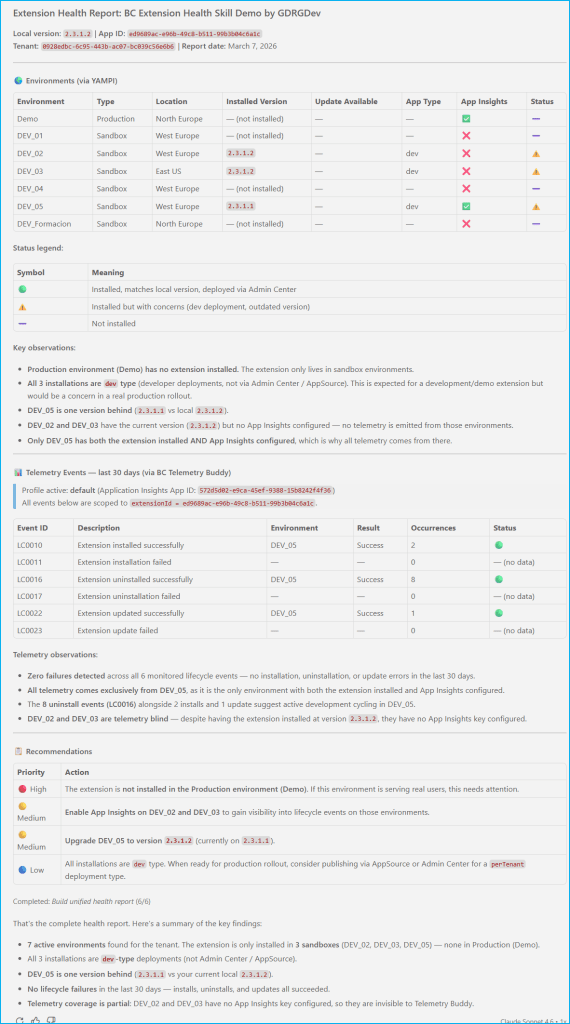
Finalmente, tras la query de telemetría, el skill consolida todo en un reporte unificado con el estado de la extensión en cada entorno:
El skill no ejecuta código propio, lo que hace es orquestar. Describe a Copilot qué hacer, en qué orden, con qué herramientas, y cómo presentar el resultado.
El código del skill está aquí por si quieres revisarlo o adaptarlo: https://github.com/gdrgdev/Blog/tree/main/GDRGDev_SkillBCExtensionHealth/bc-extension-health
Espero que esta información te ayude.
🧠 Agent Skills + MCPs: check your BC extension health in VS Code 🔍
In the previous post, I discussed how to control which GitHub Copilot context is active per workspace. Now, we’ll try to package that context as a reusable skill that orchestrates external tools to answer a question like «Check my extension health in a tenant.«
What is an Agent Skill?: I could define it as a folder of instructions, scripts, and resources that GitHub Copilot can load and use when the context is relevant to perform a specialized task.
This loading process follows a three-level model; here is the official documentation: Use Agent Skills in VS Code
This would mean that you can have many skills installed without penalizing the context, so Copilot only loads what is relevant for each requirement.
The skills reside in the «.github/skills/» folder. Each skill is a folder containing a required SKILL.md file and any necessary resources.
.github/skills/ my-custom-skill/ SKILL.md ← instructions + orchestration flow tool-reference-1.md ← detailed tool reference tool-reference-2.md ← detailed tool referenceThe SKILL.md file starts with a YAML front matter. The description is critical because it’s what Copilot reads at Level 1 to decide if the skill is relevant. If the use cases aren’t described well, the skill won’t be activated.
---name: my-custom-skilldescription: "Does X for Y context. USE FOR: scenario A, scenario B. DO NOT USE FOR: scenario C."---Now let’s try to apply what we’ve mentioned theoretically, so we’ll create a skill that orchestrates YAMPI and BC Telemetry Buddy.
- YAMPI, created by Stefano Demiliani, it is the MCP server for Business Central administration.
- BC Telemetry Buddy, created by Waldo, it connects Application Insights with natural language.
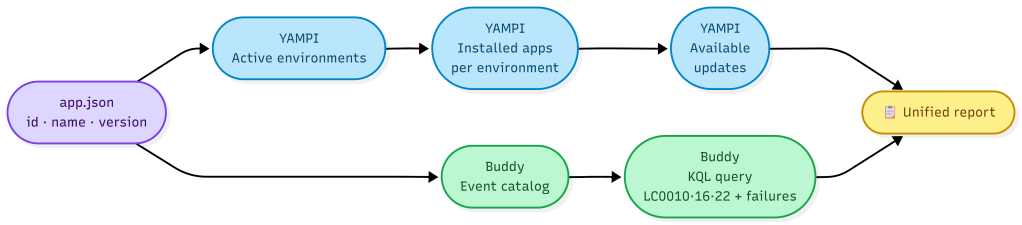
The skill defines 4 steps:
- Read app.json: Extract the extension’s ID and version as a baseline.
- YAMPI: Obtain the tenant’s active environments, the installed extension version in each, and whether updates are available.
- Buddy: Query the event catalog and run a lifecycle query filtered by extensionId to detect installations, updates, and failures.
- Unified report: Consolidate the results into two Markdown tables.
Each of those steps resides in separate files within the skill:
.github/skills/ bc-extension-health/ SKILL.md ← instrucciones + flujo de orquestación yampi-environments-reference.md ← referencia detallada de herramientas YAMPI buddy-telemetry-reference.md ← referencia detallada de herramientas BuddyOur SKILL.md starts with the following YAML frontmatter:
---name: bc-extension-healthdescription: "Analyze the health of the current Business Central extension across all client environments. Combines YAMPI (d365bc-admin MCP) for environment and version data, and BC Telemetry Buddy for lifecycle event analysis. USE FOR: extension health check, check extension in production, how is my extension deployed, extension version across environments, extension install failures, extension update errors..."---For YAMPI, the skill makes the following calls to the MCP:
Tool: mcp_d365bc-admin_get_environment_informationsParameters: tenantId: <tenantId provided by user>Tool: mcp_d365bc-admin_get_installed_appsParameters: tenantId: <tenantId> environmentName: <environmentName>For Buddy, the skill launches a KQL query that covers 6 extension lifecycle events:
- LC0010: Extension successfully installed in an environment.
- LC0011: Extension installation failed.
- LC0016: Extension successfully uninstalled from an environment.
- LC0017: Extension uninstallation failed.
- LC0022: Extension successfully updated to a new version.
- LC0023: Extension update failed.
traces| where timestamp > ago(30d)| where tostring(customDimensions.extensionId) == '<id from app.json>'| where customDimensions.eventId in ('LC0010','LC0011','LC0016','LC0017','LC0022','LC0023')| summarize count() by eventId = tostring(customDimensions.eventId), environmentName = tostring(customDimensions.environmentName), result = tostring(customDimensions.result)| order by eventId ascWith a single message in the chat, Copilot detects the skill, loads the three reference files, and automatically extracts the data from app.json:
The skill then orchestrates calls to both MCPs: YAMPI and Buddy, executing several tools in parallel:
Finally, after the telemetry query, the skill consolidates everything into a unified report showing the status of the extension in each environment:
The skill doesn’t execute its own code; it orchestrates. It tells Copilot what to do, in what order, with what tools, and how to present the result.
The skill code is here if you want to review or adapt it: https://github.com/gdrgdev/Blog/tree/main/GDRGDev_SkillBCExtensionHealth/bc-extension-health
I hope this information helps you.
Más información / More information:
- Use Agent Skills in VS Code
- AL Development Collection: First Skill Available- BC Diagnostics – Tech Sphere Dynamics
- Analyzing BC Telemetry with AI with the “BC Telemetry Buddy”
- Introducing YAMPI: the MCP server for Dynamics 365 Business Central administration. – Stefano Demiliani
- Analyzing Extension Lifecycle Trace Telemetry


 Gerardo Rentería Blog
Deja un comentario