
📝 Adding Notes to Financial Report Lines 📊(English version)
📝 Agregando Notas a Líneas de Reportes Financieros 📊
Un compañero me comentó que extrañaba poder agregar notas o comentarios directamente en las líneas de un reporte financiero (Account Schedule). Algunos usuarios en las reuniones de cierre mensual, siempre tenía que tener documentación adicional y separada para explicar cosas como:
- 📌 Por qué «Un apartado» aumentó 15% este trimestre.
- 📝 Que «Un grupo» incluye una adquisición específica de $28.5M.
- 💡 Que «Una cuenta» corresponde al préstamo con ABC Bank al 4.75%.
- 🔍 Contexto de variaciones en «Un punto especifico».
La idea de esta extensión es dar esa posibilidad: agregar notas a nivel de línea que se integren en contextos diferentes:
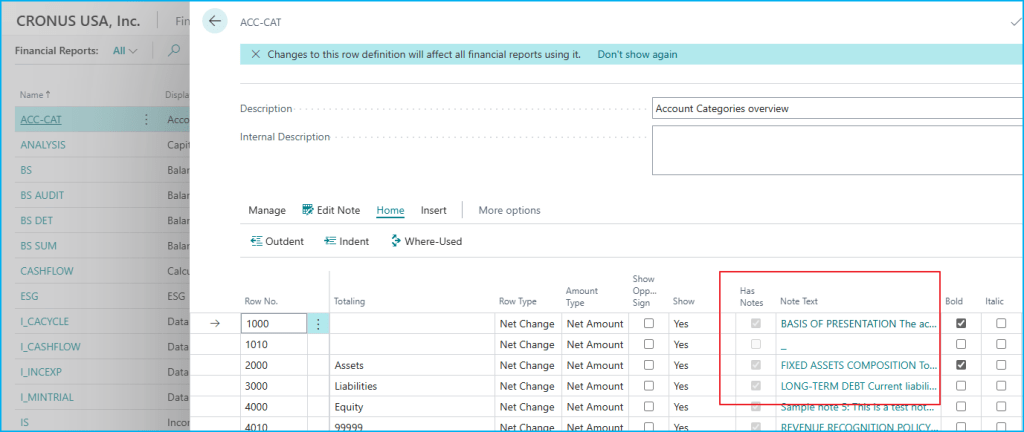
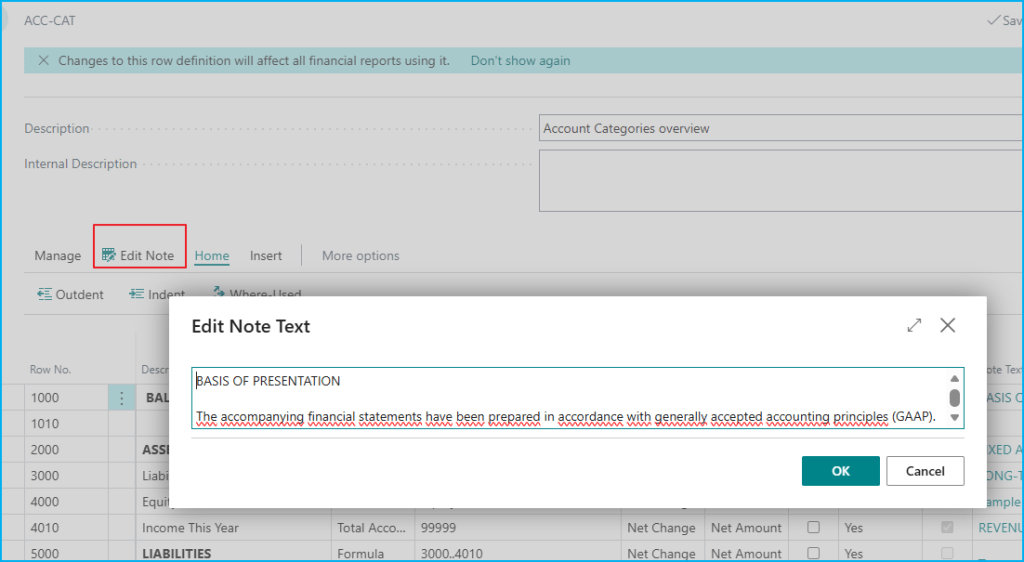
- Página de Definición 📋: Campo «Note Text» con DrillDown para edición directa y campo «Has Notes» calculado automáticamente.
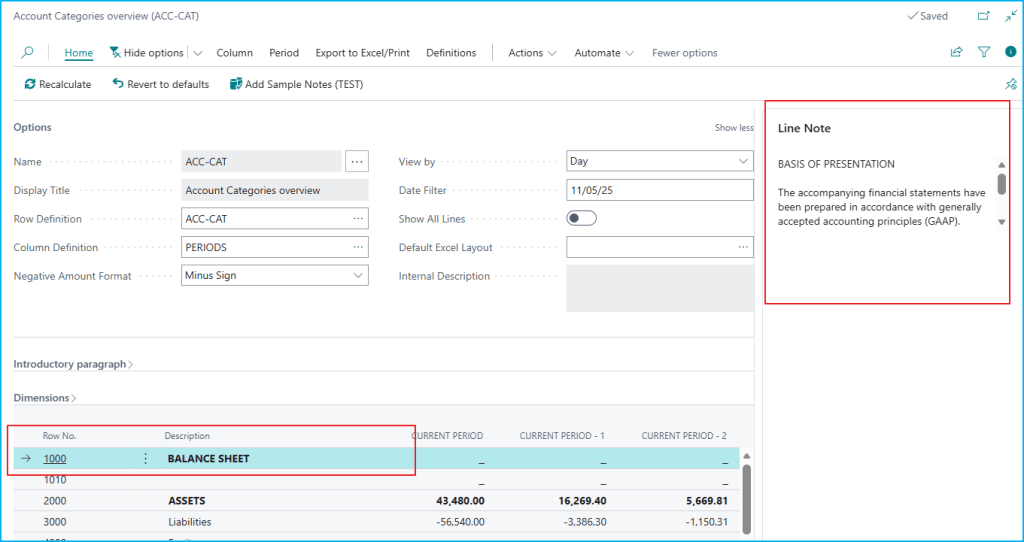
- Página Overview (Matrix) 🎯: FactBox que muestra las notas de la línea seleccionada con visibilidad completa en la matriz dinámica.
- Reportes 📄: Numeración con índices (1)(2) en las descripciones y sección «NOTES TO FINANCIAL STATEMENTS» al final del reporte con numeración sincronizada.
- Exportación a Excel 📊: Columna «Notes» en negrita que siempre exporta las notas de todas las líneas con saltos de línea preservados.
Algunos usos podrían ser:
- Para CFO y Controllers: Tener el contexto directo en el reporte sin documentos separados, notas para presentaciones, mantener el historial de explicaciones.
- Para Auditores: Documentar notas de auditoría en el mismo reporte, mantener trail de explicaciones.
- Para Analistas Financieros: Agregar comentarios de variaciones, documentar puntos específicos, preservar explicaciones técnicas.
Desde la configuración hasta la visualización veamos cómo funciona:
En la página «Acc. Schedule Names» (104), al abrir las líneas de definición, encontramos dos nuevos campos: «Has Notes» (calculado automáticamente) y «Note Text» con DrillDown que abre un diálogo de edición.
En la página «Acc. Schedule Overview» (490), la matriz dinámica ahora incluye un FactBox lateral que muestra las notas de la línea seleccionada. Las acciones «Edit Note» permiten editar las notas sin salir de la matriz.
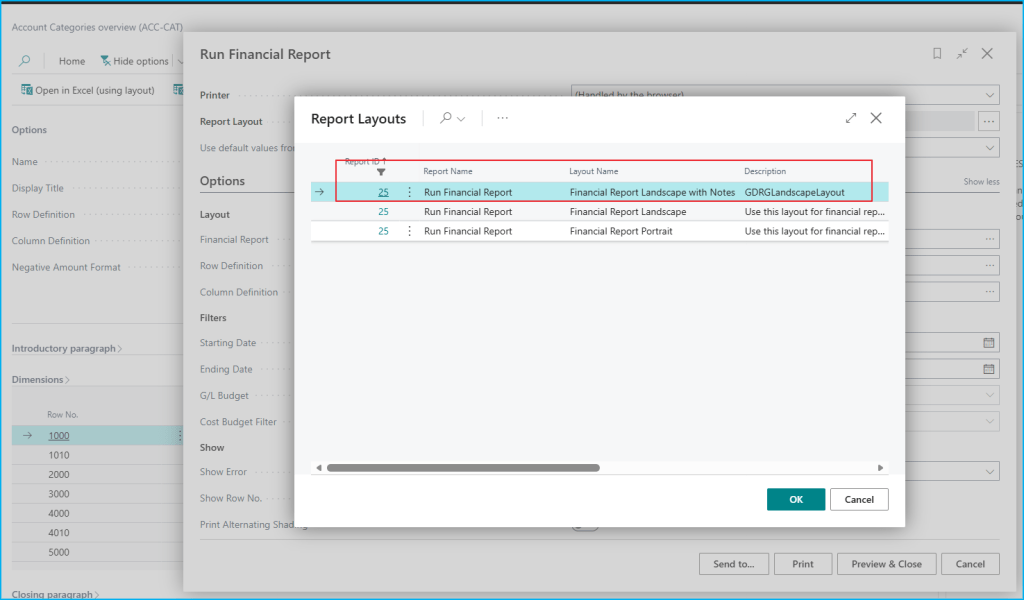
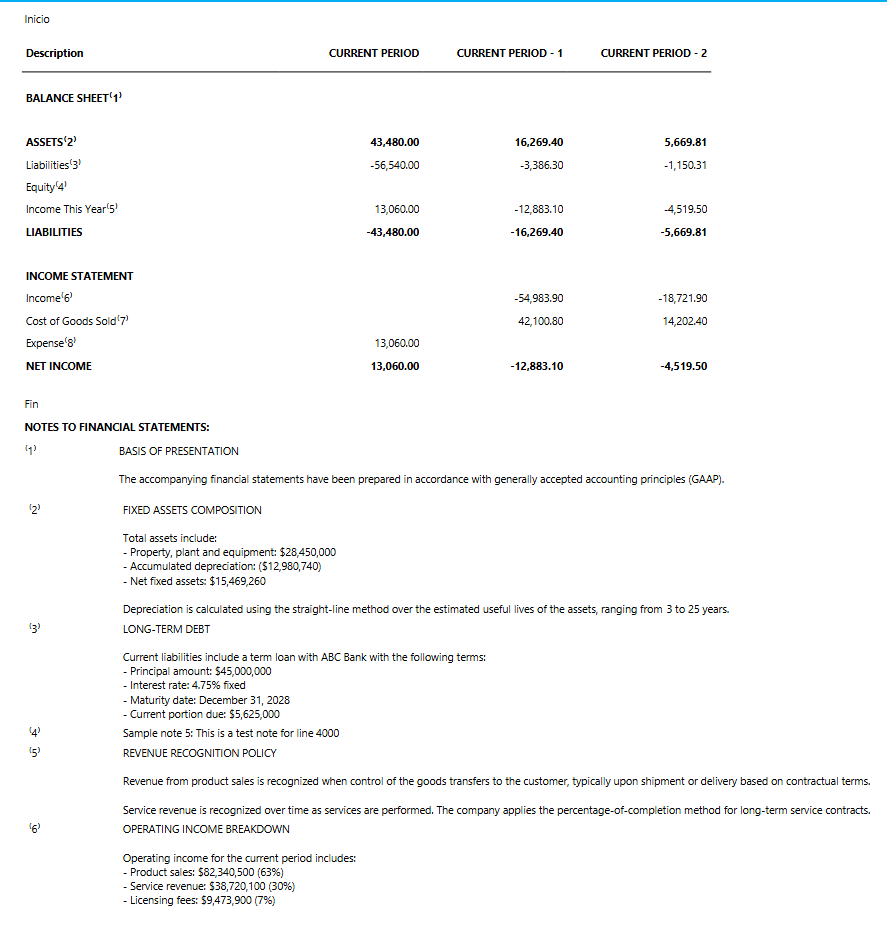
Al momento de imprimir desde la página 490, seleccionamos el layout «Financial Report Landscape with Notes» desde el diálogo de layouts. El reporte PDF muestra:
- Índices (1)(2)(3)… en las descripciones de líneas con notas.
- Sección «NOTES TO FINANCIAL STATEMENTS:» al final con numeración sincronizada.
- Notas con saltos de línea preservados.
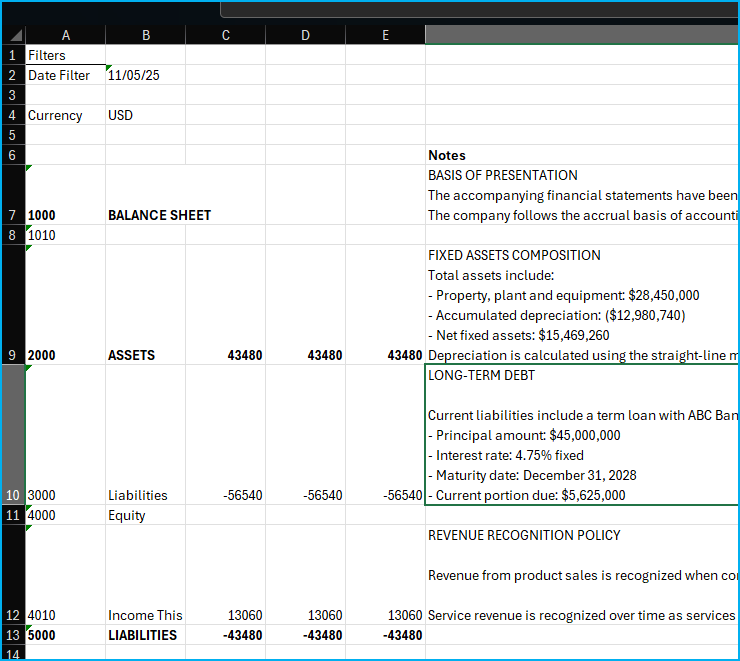
Al exportar a Excel desde «Actions → Export to Excel → Export to Excel (with Notes)», se genera un archivo Excel con:
- Columna «Notes» en negrita.
- Todas las notas exportadas automáticamente.
- Sin Request Page, exportación directa.

El código se encuentra aquí, por si quieres revisarlo: https://github.com/gdrgdev/Blog/tree/main/GDRGDev_NotesFinancialReport
La solución se compone:
- GDRGAccScheduleLineExt.TableExt.al – Campos GDRG Has Notes y Note Text con validación automática.
- GDRGAccScheduleNoteFactBox.Page.al – FactBox para mostrar notas en «Acc. Schedule Overview».
- GDRGEditNoteDialog.Page.al – Diálogo para edición de notas.
- GDRGAccountScheduleExt.PageExt.al – Gestión de notas en «Acc. Schedule Names».
- GDRGAccScheduleOverviewExt.PageExt.al – Acciones de notas y Excel export en «Acc. Schedule Overview».
- GDRGAccountScheduleExt.ReportExt.al – Report Extension con layout «Financial Report Landscape with Notes».
- GDRGExportAccSchedToExcel.Report.al – Export a Excel con columna Notes en negrita.
- GDRGLandscapeLayout.rdl – Layout RDLC con superíndices y sección NOTES sincronizada.
La idea es mantener las notas dentro del reporte financiero, llevando su propio contexto sin documentación externa.
Espero que esta información te ayude.
📝 Adding Notes to Financial Report Lines 📊
A colleague mentioned he missed the ability to add notes or comments directly to lines in a financial report (Account Schedule). Some users in monthly closing meetings always had to keep additional separate documentation to explain things like:
- 📌 Why «A section» increased 15% this quarter.
- 📝 That «A group» includes a specific $28.5M acquisition.
- 💡 That «An account» corresponds to the ABC Bank loan at 4.75%.
- 🔍 Context for variations in «A specific point».
The idea of this extension is to provide that possibility: add line-level notes integrated into different contexts:
- Definition Page 📋: «Note Text» field with DrillDown for direct editing and «Has Notes» field calculated automatically.
- Overview Page (Matrix) 🎯: FactBox displaying notes for the selected line with full visibility in the dynamic matrix.
- Reports 📄: Numbering with indices (1)(2) in descriptions and «NOTES TO FINANCIAL STATEMENTS» section at the end of the report with synchronized numbering.
- Excel Export 📊: «Notes» column in bold that always exports notes from all lines with preserved line breaks.
Some possible uses could be:
- For CFOs and Controllers: Having context directly in the report without separate documents, notes for presentations, maintaining explanation history.
- For Auditors: Documenting audit notes in the same report, maintaining explanation trail.
- For Financial Analysts: Adding variance comments, documenting specific points, preserving technical explanations.
From setup to visualization, let’s see how it works:
On the «Acc. Schedule Names» page (104), when opening definition lines, we find two new fields: «Has Notes» (calculated automatically) and «Note Text» with DrillDown that opens an edit dialog.
On the «Acc. Schedule Overview» page (490), the dynamic matrix now includes a side FactBox displaying notes for the selected line. «Edit Note» actions allow editing notes without leaving the matrix.
When printing from page 490, we select the «Financial Report Landscape with Notes» layout from the layouts dialog. The PDF report shows:
- Indices (1)(2)(3)… in descriptions of lines with notes.
- «NOTES TO FINANCIAL STATEMENTS:» section at the end with synchronized numbering.
- Notes with preserved line breaks.
When exporting to Excel from «Actions → Export to Excel → Export to Excel (with Notes)», an Excel file is generated with:
- «Notes» column in bold.
- All notes exported automatically.
- No Request Page, direct export.
The code is here, if you want to check it out: https://github.com/gdrgdev/Blog/tree/main/GDRGDev_NotesFinancialReport
The solution is composed of:
- GDRGAccScheduleLineExt.TableExt.al – GDRG Has Notes and Note Text fields with automatic validation.
- GDRGAccScheduleNoteFactBox.Page.al – FactBox to display notes in «Acc. Schedule Overview».
- GDRGEditNoteDialog.Page.al – Dialog for note editing.
- GDRGAccountScheduleExt.PageExt.al – Note management in «Acc. Schedule Names».
- GDRGAccScheduleOverviewExt.PageExt.al – Note actions and Excel export in «Acc. Schedule Overview».
- GDRGAccountScheduleExt.ReportExt.al – Report Extension with «Financial Report Landscape with Notes» layout.
- GDRGExportAccSchedToExcel.Report.al – Excel export with bold Notes column.
- GDRGLandscapeLayout.rdl – RDLC layout with superscripts and synchronized NOTES section.
The idea is to keep notes within the financial report, carrying its own context without external documentation.
I hope this information helps you.
Más información / More information:



 Gerardo Rentería Blog
Deja un comentario