
📣 Real-Time Alerts for BC: Popup Notification System for Active Users 💬(English version)
📣 Alertas en tiempo real para BC: Sistema de notificaciones emergentes para usuarios activos 💬
Empiezo este post con una duda: ¿qué sucede cuando necesitas comunicar información urgente a todos los usuarios conectados simultáneamente dentro de BC? Por ejemplo, anuncios de mantenimiento del sistema, actualizaciones críticas o alertas de emergencia que demandan una atención inmediata.
Mientras exploraba algunas formas de habilitar este tipo de comunicaciones, pensé en un sistema de notificaciones popup. En el camino la idea evolucionó hacia una funcionalidad que difunde mensajes, rastrea qué usuarios han leído cada notificación y se integra perfectamente con las páginas de tipo Role Center.
Escenarios donde considero que puede funcionar:
- Mantenimiento planificado del ERP.
- Alertas críticas de negocio.
- Comunicaciones urgentes de RRHH.
- Cambios operativos inmediatos.
La arquitectura de este sistema de notificaciones popup sigue un diseño modular:
- Control Add-in: Ventana popup personalizada basada en JavaScript que muestra notificaciones y comportamiento modal que requiere aceptación del usuario.
- Almacenamiento de datos: Tabla para la cola de gestión de notificaciones y seguimiento de destinatarios para estado de entrega.
- Lógica de negocio: Codeunit para difusión y seguimiento de notificaciones.
- Presentación: Páginas para crear notificaciones, gestión de cola y de historial de destinatarios.

¿Cómo funciona el sistema de notificaciones popup en Business Central? La creación, difusión, seguimiento de destinatarios y su integración en el entorno de trabajo. Lo veremos ahora.
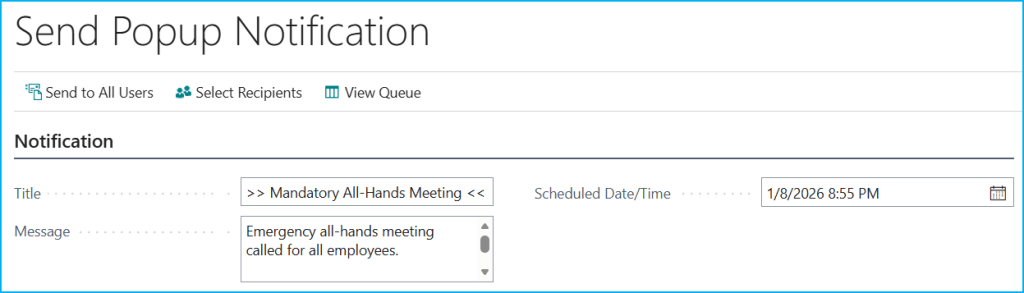
Se crean las notificaciones a través de la página «Send Popup Notification» donde se definen el título, mensaje y fecha/hora programada, que es el momento exacto en que la notificación debe aparecer (por defecto usa la fecha/hora actual para envío inmediato).
La página ofrece tres acciones promocionadas en la barra superior:
- Send to All Users: Difunde inmediatamente la notificación a todos los usuarios del sistema. Crea una entrada en la cola y genera automáticamente registros de destinatarios para cada usuario.
- Select Recipients: Permite la selección manual de destinatarios específicos. Primero se guarda la notificación en la cola y luego se abre una página donde se pueden elegir los usuarios.
- View Queue: Abre la lista completa de notificaciones (cola) para revisar, gestionar o eliminar notificaciones existentes.
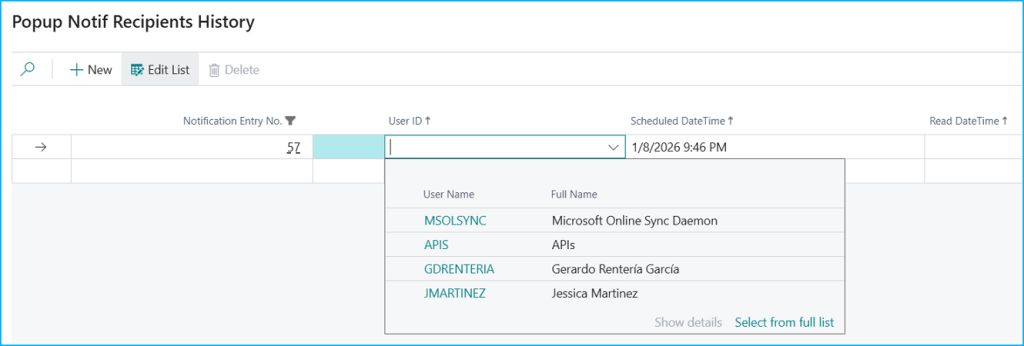
Si elegimos la opción «Select Recipients» tenemos la opción de seleccionar los usuarios a los cuales va dirigida la notificación.
Una vez creada, como hemos indicado, la notificación se almacena en la tabla «Popup Notification Queue». Desde esta lista se puede gestionar las notificaciones existentes, ver los destinatarios mediante la acción «View Recipients», o eliminar las notificaciones seleccionadas con «Delete Selected».

La situación inicial es la siguiente, es decir los usuarios a los cuales se les ha enviado la notificación, pero sin acuse de lectura.

Cuando llega la hora programada la página «GDRG Popup Notif Monitor» (Add-in + timer) integrada con el Role Center detecta la notificación pendiente. El Control Add-in JavaScript muestra una ventana centrada que bloquea la interacción con BC hasta que el usuario haga clic en el botón OK.
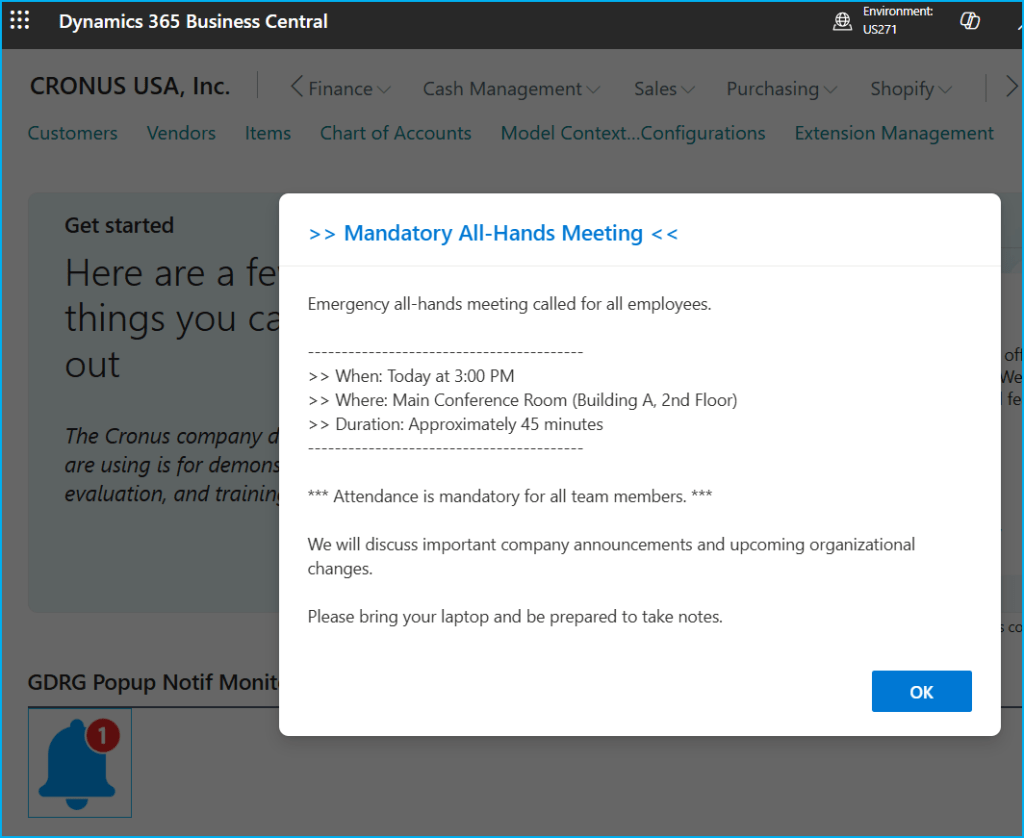
Al hacer clic en OK, después de cerrar el popup, se registra la fecha/hora exacta del reconocimiento. Permitiendo una auditoría completa de quién vio cada notificación y cuándo.

Aquí te muestro otros ejemplos:


El código está aquí, si quieres revisarlo: Blog/GDRGDev_PopupNotifications at main · gdrgdev/Blog
La solución se compone:
- GDRGPopupNotification.ControlAddIn.al – Definición del control add-in e implementación JavaScript.
- GDRGPopupNotifMgt.Codeunit.al – Lógica de gestión para difusión y seguimiento.
- GDRGPopupNotifQueue.Table.al – Almacenamiento de cola de notificaciones.
- GDRGPopupNotifRecipient.Table.al – Seguimiento de destinatarios y estado de entrega.
- GDRGPopupNotifQueue.Page.al – Lista de cola para gestión de notificaciones.
- GDRGPopupNotifCard.Page.al – Página para crear nuevas notificaciones.
- GDRGPopupNotifMonitor.Page.al – Integración del Role Center para monitoreo.
- GDRGPopupNotifRecipients.Page.al – Historial de destinatarios y estado.
- GDRGRCPopupNotif.PageExt.al – Extensión del Role Center.
- GDRGPopupNotif.PermissionSet.al – Permisos de seguridad.
- Startup.js – Inicialización del control add-in.
- GDRGPopupNotification.js – Lógica de visualización de popup.
- GDRGPopupNotification.css – Estilos de popup.
La idea de esta solución es entregar comunicaciones urgentes a todos los usuarios conectados de forma inmediata y visible.
Espero que esta extensión te ayude en tu trabajo diario con Business Central.
📣 Real-Time Alerts for BC: Popup Notification System for Active Users 💬
I’m starting this post with a question: what happens when you need to communicate urgent information to all users simultaneously connected within BC? For example, system maintenance announcements, critical updates, or emergency alerts that require immediate attention.
While exploring ways to enable this type of communication, I considered a popup notification system. Along the way, the idea evolved into a feature that broadcasts messages, tracks which users have read each notification, and integrates seamlessly with Role Center pages.
Scenarios where I believe it could work:
- Planned ERP maintenance.
- Critical business alerts.
- Urgent HR communications.
- Immediate operational changes.
The architecture of this popup notification system follows a modular design:
- Control Add-in: A custom JavaScript-based popup window that displays notifications and modal behavior requiring user acceptance.
- Data Storage: A table for managing the notification queue and tracking user reads.
- Business Logic: A codeunit for distributing and tracking notifications.
- Presentation: Pages for creating notifications, managing the queue, and maintaining recipient history.
How does the push notification system work in Business Central? Specifically, how do you create it, distribute it, track recipients, and integrate it into your work environment?
Notifications are created through the «Send Popup Notification» page where the title, message, and scheduled date/time are defined, which is the exact moment when the notification should appear (by default, it uses the current date/time for immediate sending).
The page offers three promoted actions in the top bar:
- Send to All Users: Immediately sends the notification to all system users. Creates an entry in the queue and automatically generates recipient records for each user.
- Select Recipients: Allows manual selection of specific recipients. The notification is first saved in the queue, and then a page opens where users can be selected.
- View Queue: Opens the complete list of notifications (queue) to review, manage, or delete existing notifications.
If we choose the «Select Recipients» option, we have the option to select the users to whom the notification is directed.
Once created, as mentioned, the notification is stored in the «Popup Notification Queue» table. From this list, you can manage existing notifications, view recipients using the «View Recipients» action, or delete selected notifications with «Delete Selected».
The initial situation is as follows: the users to whom the notification has been sent, but without acknowledgment of reading.
When the scheduled time arrives, the «GDRG Popup Notification Monitor» page (Add-in + timer) integrated with Role Center detects the pending notification. The JavaScript Add-in Control displays a centered window that blocks interaction with BC until the user clicks the OK button.
Clicking OK after closing the popup records the exact date and time of the notification, allowing for a complete audit of who viewed each notification and when.
Here are some other examples:
The code is here, if you want to check it out: Blog/GDRGDev_PopupNotifications at main · gdrgdev/Blog
The solution is composed of these objects:
- GDRGPopupNotification.ControlAddIn.al – Control add-in definition and JavaScript implementation.
- GDRGPopupNotifMgt.Codeunit.al – Management logic for broadcasting and tracking.
- GDRGPopupNotifQueue.Table.al – Notification queue storage.
- GDRGPopupNotifRecipient.Table.al – Recipient tracking and delivery status.
- GDRGPopupNotifQueue.Page.al – Queue list for notification management.
- GDRGPopupNotifCard.Page.al – Page for creating new notifications.
- GDRGPopupNotifMonitor.Page.al – Role Center integration for monitoring.
- GDRGPopupNotifRecipients.Page.al – Recipients history and status.
- GDRGRCPopupNotif.PageExt.al – Role Center extension.
- GDRGPopupNotif.PermissionSet.al – Security permissions.
- Startup.js – Control add-in initialization.
- GDRGPopupNotification.js – Popup display logic.
- GDRGPopupNotification.css – Popup styling.
The idea behind this solution is to deliver urgent communications to all connected users immediately and visibly.
I hope this extension helps you in your daily work with Business Central
Más información / More information:


 Gerardo Rentería Blog
Deja un comentario