
📡 RSS Feed Reader: Real-Time Information at Your Fingertips 🔔(English version)
📡 Lector de feeds RSS: Información en tiempo real a tu alcance🔔
El siguiente blog de Andy Wingate (Dynamics 365 Business Central collected RSS feeds – Blogs, YouTube, LinkedIn, GitHub…), nos habla de una iniciativa muy interesante y útil: un feed RSS que reúne muchas fuentes sobre Business Central, como blogs, actualizaciones de Microsoft Learn, videos de YouTube, newsletters de LinkedIn y repositorios de GitHub. Y me dije: ¿por qué no llevar las novedades de BC al usuario final dentro de Business Central?
Pero esa idea evolucionó hacia algo igual de interesante, como traer y consumir información de distintas fuentes categorizadas a las distintas áreas funcionales de Business Central. Por ejemplo:
- Monitorear noticias de la FDA mientras se gestiona un inventario de productos farmacéuticos.
- Revisar alertas de cambios regulatorios, fiscales o noticias de la Agencia tributaria o del Banco de España.
- Noticias de mercado, o información específicas de determinados productos, clientes o proveedores.
La idea es un RSS Feed Reader para Business Central, donde la arquitectura del RSS Feed Reader sigue un diseño modular:
- Gestión de feeds: Codeunit centralizada que maneja la obtención, parsing y almacenamiento del contenido RSS/Atom.
- Almacenamiento: Tres tablas para la configuración general, de rss feeds source y del contenido de las mismas.
- Presentación: Páginas ListPart y Factbox genéricos que filtran por categoría los rss feeds.
- Integración: PageExtensions que insertan información RSS cualquier página, usando el Factbox (List/Card) o el ListPart (RoleCenter)
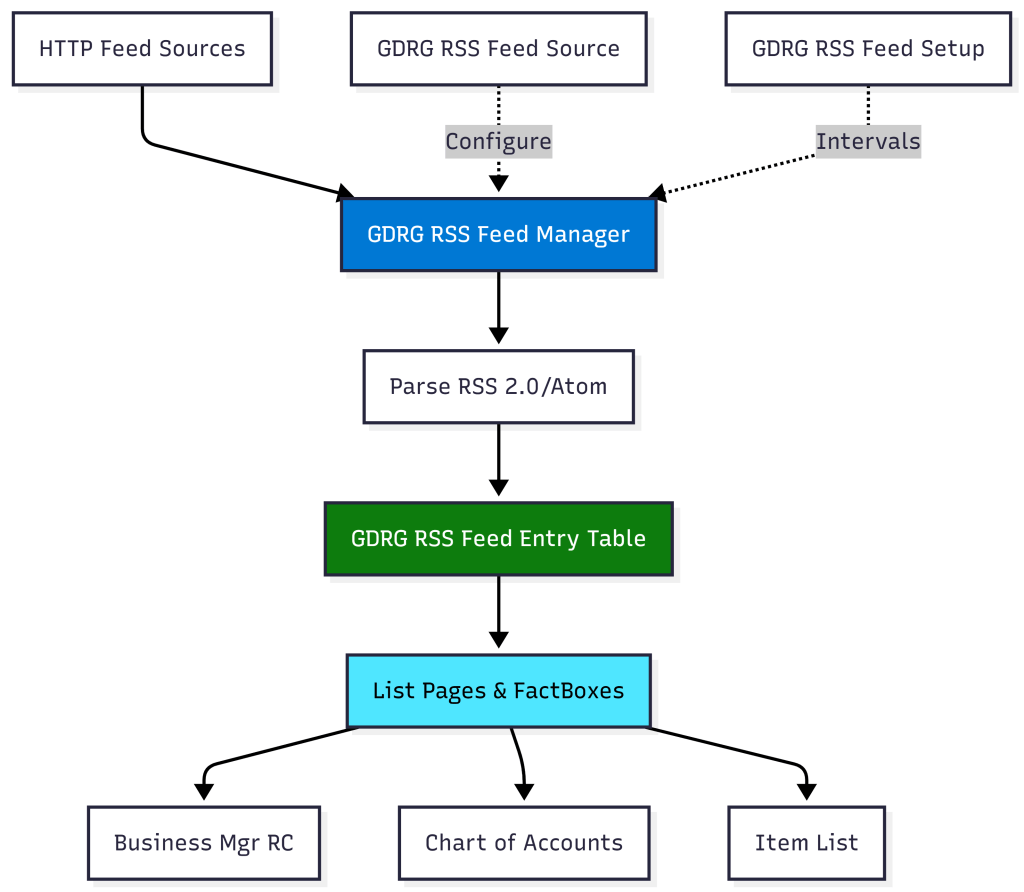
Veamos cómo funciona el RSS Reader Module en Business Central: configuración, gestión de fuentes, visualización de contenido y su integración fluida en el entorno de trabajo diario.
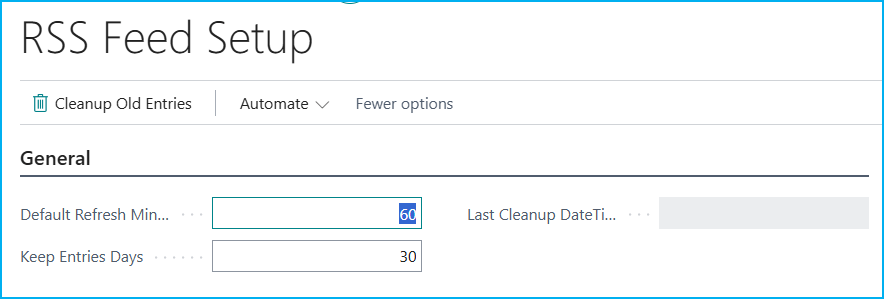
El módulo RSS Feed Reader comienza con una página de configuración donde definimos algunos parámetros por defecto. Aquí establecemos el intervalo de actualización automática (60 minutos por defecto) y el período de retención de entradas antiguas (30 días). La acción «Cleanup Old Entries» nos permite limpiar manualmente las entradas obsoletas.
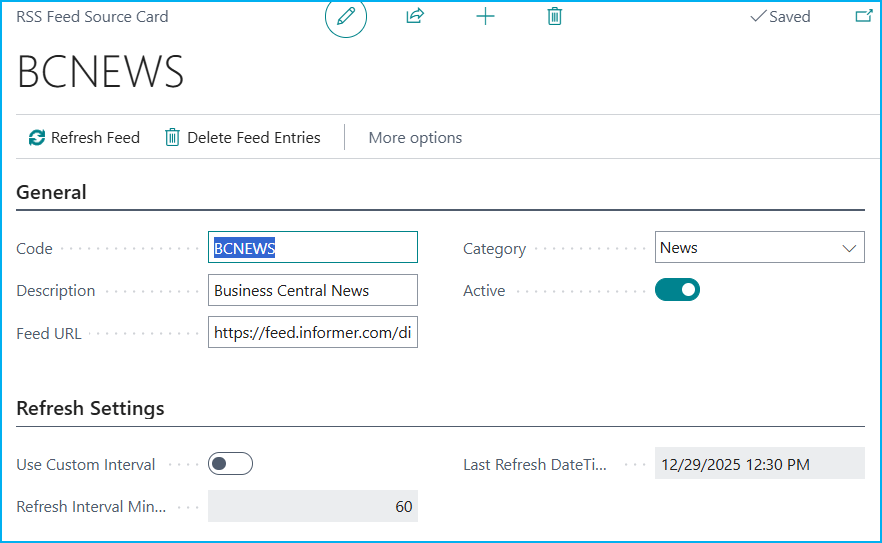
En el siguiente ejemplo vemos como configuramos una fuente RSS, en este caso «Business Central News» (BCNEWS), donde definimos el código único, descripción, URL del feed y una categoría (muy importante este valor). Lo interesante es la sección «Refresh Settings»: puedes usar el intervalo por defecto mencionado anteriormente o activar un intervalo personalizado específico para esta fuente.
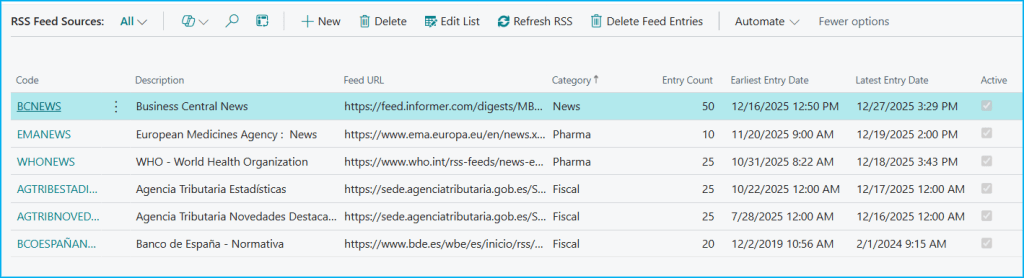
La página «RSS Feed Sources» centraliza todas las fuentes RSS. Aquí vemos información como: descripción, URL, categoría, número de entradas descargadas, fechas de primera y última entrada, y estado activo. Las acciones principales nos permiten refrescar feeds manualmente o eliminar todas las entradas de las fuente seleccionadas.
Todas las entradas RSS descargadas se almacenan y visualizan en la siguiente lista «RSS Feed Entries». Cada artículo nos muestra el título (clickeable), descripción, fecha de publicación y el código de la fuente. Esta página podría usarse de forma independiente o embeberse en otras páginas como Part o FactBox.

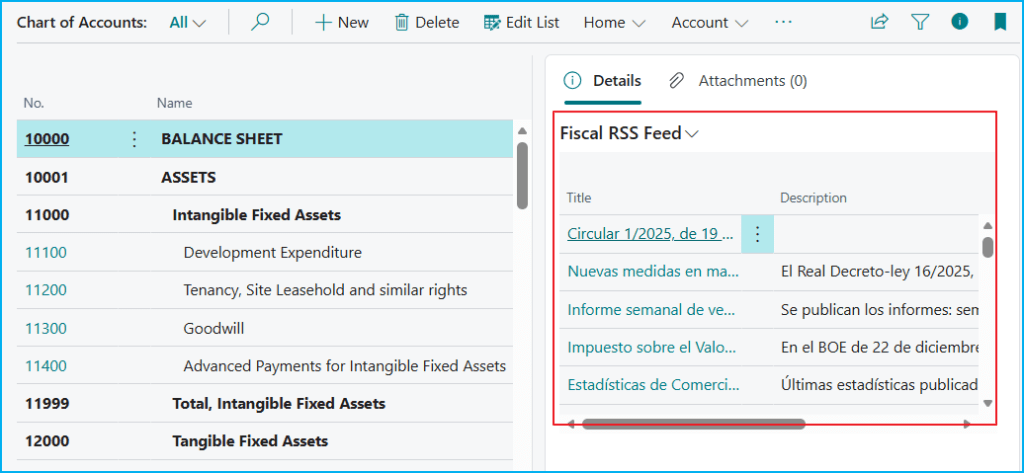
El RSS Feed Reader se integra nativamente en cualquier página estándar de Business Central. En el siguiente ejemplo, en el Plan de Cuentas, el FactBox «Fiscal RSS Feed» muestra las entradas RSS filtradas por la categoría «Fiscal», mostrando automáticamente las noticias relevantes de fuentes como Agencia Tributaria o Banco de España mientras navegas.
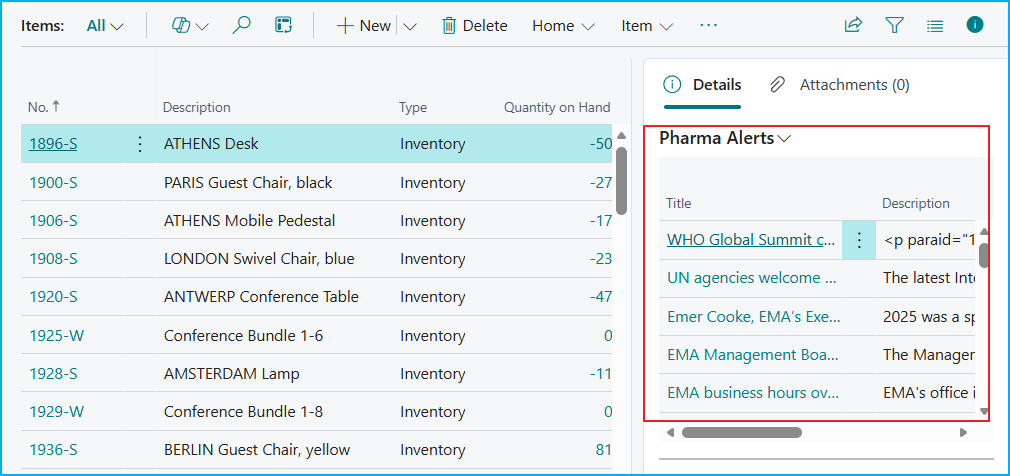
Otro ejemplo, sería en la lista de productos, el FactBox «Pharma Alerts» filtra automáticamente las entradas RSS de categoría «Pharma», mostrando noticias de fuentes como WHO y EMA (European Medicines Agency).
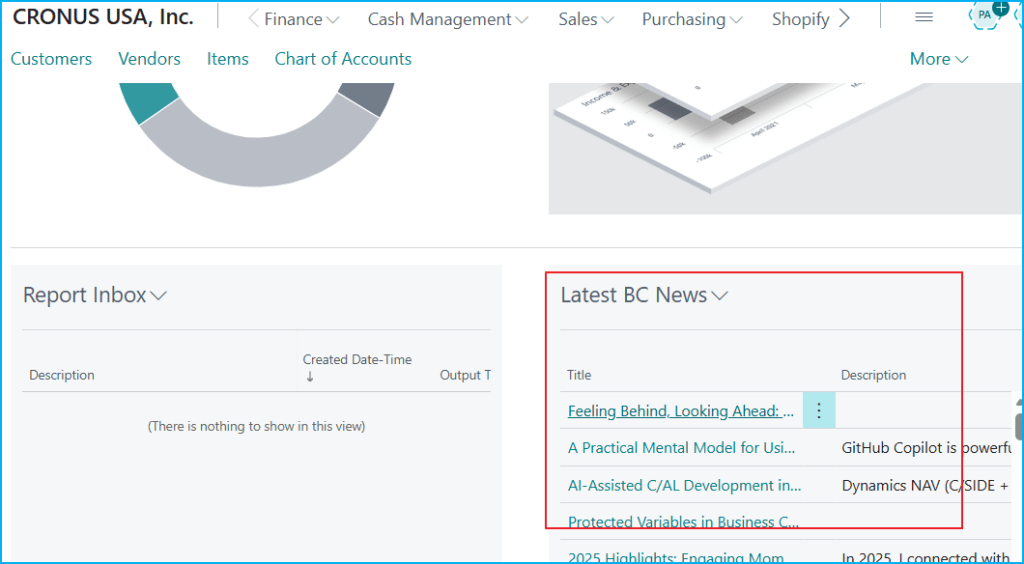
Otra integración muy útil es con un Role Center, como, el Role Center del Business Manager que incluye el componente «Latest BC News» que muestra las últimas entradas RSS. De esta manera, podríamos mantener a nuestro equipo informado con noticias actualizadas automáticamente sin salir de Business Central.
El RSS Feed Reader sigue un patrón de diseño extensible basado en un único FactBox genérico que se reutiliza en múltiples páginas aplicando filtros de categoría:
page 80103 "GDRG RSS Feed Entries FactBox"
{
    Permissions = tabledata "GDRG RSS Feed Source" = R;

    PageType = ListPart;
    ApplicationArea = All;
    SourceTable = "GDRG RSS Feed Entry";
    Caption = 'RSS Feed Entries';
    Editable = false;
    SourceTableView = sorting("Published Date") order(descending);

    layout
    {
        area(Content)
        {
            repeater(Group)
            {
                field(Title; Rec.Title)
                {
                    Width = 20;

                    trigger OnDrillDown()
                    begin
                        Hyperlink(Rec.Link);
                    end;
                }
.....
    actions
    {
        area(Processing)
        {
            action(OpenFeedSources)
            {
.....
Ejemplos: Extensiones en las páginas del plan de cuentas y la lista de productos.
pageextension 80100 "GDRG Chart Accounts RSS" extends "Chart of Accounts"
{
    layout
    {
        addfirst(factboxes)
        {
            part(FiscalRSSFeed; "GDRG RSS Feed Entries FactBox")
            {
                ApplicationArea = All;
                Caption = 'Fiscal RSS Feed';
                SubPageView = where(Category = const(Fiscal));
            }
        }
    }
}
pageextension 80102 "GDRG Item List RSS" extends "Item List"
{
layout
{
addfirst(factboxes)
{
part(PharmaAlerts; "GDRG RSS Feed Entries FactBox")
{
ApplicationArea = All;
Caption = 'Pharma Alerts';
SubPageView = where(Category = const(Pharma));
}
}
}
}De igual manera, sigue un patrón de diseño extensible basado en un único Page genérico que se reutiliza en múltiples Role Center filtros de categoría:
page 80105 "GDRG RSS Feed Entries Part"
{
    Permissions = tabledata "GDRG RSS Feed Source" = R;

    PageType = ListPart;
    ApplicationArea = All;
    SourceTable = "GDRG RSS Feed Entry";
    Caption = 'RSS Feed Entries';
    Editable = false;
    SourceTableView = sorting("Published Date") order(descending);

    layout
    {
        area(Content)
        {
            repeater(Group)
            {
                field(Title; Rec.Title)
                {
                    trigger OnDrillDown()
                    begin
                        Hyperlink(Rec.Link);
                    end;
                }
.......
    actions
    {
        area(Processing)
        {
            action(OpenFeedSources)
            {
                Caption = 'Open Feed Sources';
                ToolTip = 'Open the RSS Feed Sources page filtered by the current category.';
                Image = List;
.......
Ejemplos: Extensión del Role Center «Business Manager Role Center»
pageextension 80101 "GDRG Business Mgr RC RSS" extends "Business Manager Role Center"
{
    layout
    {
        addlast(rolecenter)
        {
            part(RSSLatestNews; "GDRG RSS Feed Entries Part")
            {
                ApplicationArea = All;
                SubPageView = where(Category = const(News));
                Caption = 'Latest BC News';
            }
        }
    }
}
El código está aquí, si quieres revisarlo: Blog/GDRGDev_RSSFeedReader at main · gdrgdev/Blog
La solución se compone:
- GDRGRSSFeedSetup.Table.al – Tabla de configuración global con intervalos y políticas de retención.
- GDRGRSSFeedSetup.Page.al – Página de configuración con acción de limpieza manual de entradas.
- GDRGRSSFeedSource.Table.al – Tabla de fuentes RSS con URLs, categorías y configuración de intervalos.
- GDRGRSSFeedSources.Page.al – Lista de todas las fuentes con acciones de refresh y eliminación.
- GDRGRSSFeedSourceCard.Page.al – Página detallada para configuración individual de cada fuente RSS.
- GDRGRSSFeedEntry.Table.al – Tabla de entradas RSS con títulos, descripciones, links y fechas indexadas.
- GDRGRSSFeedEntriesList.Page.al – Vista completa de todas las entradas RSS con drill-down a URLs.
- GDRGRSSFeedEntriesPart.Page.al – Componente tipo Part para integración en Role Centers.
- GDRGRSSFeedEntriesFactBox.Page.al – FactBox compacto para integración contextual filtrada por categoría.
- GDRGRSSFeedManager.Codeunit.al – Motor de fetching, parsing RSS 2.0/Atom, auto-refresh y limpieza.
- GDRGRSSCategory.Enum.al – Enumeración extensible de categorías (News, Pharma, Fiscal, Technical).
- GDRGBusinessMgrRCRSS.PageExt.al – Extensión del Business Manager Role Center con widget RSS.
- GDRGChartAccountsRSS.PageExt.al – Extensión del Chart of Accounts con FactBox de noticias fiscales.
- GDRGItemListRSS.PageExt.al – Extensión del Item List con FactBox de alertas farmacéuticas.
- GDRGRSSReader.PermissionSet.al – Permission Set completo con permisos RIMD sobre todos los objetos.
La idea es entregar proactivamente noticias relevantes a los usuarios, convirtiendo cada página en un punto de acceso contextual que potencia decisiones más rápidas e informadas.
Espero que esta extensión te ayude en tu trabajo diario con Business Central.
📡 RSS Feed Reader: Real-Time Information at Your Fingertips 🔔
Andy Wingate’s blog post (Dynamics 365 Business Central collected RSS feeds – Blogs, YouTube, LinkedIn, GitHub…), discusses a very interesting and useful initiative: an RSS feed that aggregates many sources about Business Central, such as blogs, Microsoft Learn updates, YouTube videos, LinkedIn newsletters, and GitHub repositories. And I thought to myself: why not bring BC news to the end user directly within Business Central?
But that idea evolved into something equally interesting: bringing in and consuming information from various categorized sources across different functional areas of Business Central. For example:
- Monitor FDA news while managing a pharmaceutical inventory.
- Review alerts for regulatory and tax changes, as well as news from the Spanish Tax Agency or the Bank of Spain.
- Stay informed about market news and specific information regarding particular products, customers, or suppliers.
The idea is an RSS Feed Reader for Business Central, where the architecture of the RSS Feed Reader follows a modular design:
- Feed Management: A centralized codeunit handles the retrieval, parsing, and storage of RSS/Atom feeds.
- Storage: Three tables for general configuration, RSS feed sources, and their content.
- Presentation: Generic ListPart and Factbox pages that filter RSS feeds by category.
- Integration: PageExtensions that insert RSS information into any page using the Factbox (List/Card) or the ListPart (RoleCenter).
Let’s see how the RSS Reader Module works in Business Central: configuration, feed management, content display, and its seamless integration into the daily work environment.
The RSS Feed Reader module begins with a settings page where we define some default parameters. Here we set the automatic update interval (60 minutes by default) and the retention period for old entries (30 days). The «Cleanup Old Entries» action allows us to manually clear outdated entries.
In the following screen, we see how to configure an RSS feed, in this case «Business Central News» (BCNEWS), where we define the unique code, description, feed URL, and a category (this value is very important). In «Refresh Settings» section: you can use the default interval mentioned earlier or activate a custom interval specific to this feed.
The «RSS Feed Sources» page centralizes all RSS feeds. Here you’ll find information such as: description, URL, category, number of downloaded entries, dates of first and last entry, and active status. The main actions allow you to manually refresh feeds or delete all entries from the selected feeds.
All downloaded RSS feeds are stored and displayed in the «RSS Feed Entries» list. Each entry shows the title (clickable), description, publication date, and source code. This page can be used independently or embedded in other pages such as Part or FactBox.
The RSS Feed Reader is natively integrated into any standard Business Central page. In the following example, in the Chart of Accounts, the «Tax(Fiscal) RSS Feed» FactBox displays RSS feeds filtered by the «Tax» (Fiscal) category, automatically showing relevant news from sources such as the Spanish Tax Agency or the Bank of Spain as you browse.
Another example would be in the item list, the FactBox «Pharma Alerts» automatically filters RSS entries in the «Pharma» category, showing news from sources such as WHO and EMA (European Medicines Agency).
Another very useful integration is with a Role Center, such as the Business Manager Role Center, which includes the «Latest BC News» component that displays the latest RSS feeds. This way, we can keep our team informed with automatically updated news without leaving Business Central.
The RSS Feed Reader follows an extensible design pattern based on a single generic FactBox that is reused across multiple pages by applying category filters:
page 80103 "GDRG RSS Feed Entries FactBox"
{
    Permissions = tabledata "GDRG RSS Feed Source" = R;

    PageType = ListPart;
    ApplicationArea = All;
    SourceTable = "GDRG RSS Feed Entry";
    Caption = 'RSS Feed Entries';
    Editable = false;
    SourceTableView = sorting("Published Date") order(descending);

    layout
    {
        area(Content)
        {
            repeater(Group)
            {
                field(Title; Rec.Title)
                {
                    Width = 20;

                    trigger OnDrillDown()
                    begin
                        Hyperlink(Rec.Link);
                    end;
                }
.....
    actions
    {
        area(Processing)
        {
            action(OpenFeedSources)
            {
.....
Examples: Extensions on the chart of accounts and item list pages.
pageextension 80100 "GDRG Chart Accounts RSS" extends "Chart of Accounts"
{
    layout
    {
        addfirst(factboxes)
        {
            part(FiscalRSSFeed; "GDRG RSS Feed Entries FactBox")
            {
                ApplicationArea = All;
                Caption = 'Fiscal RSS Feed';
                SubPageView = where(Category = const(Fiscal));
            }
        }
    }
}
pageextension 80102 "GDRG Item List RSS" extends "Item List"
{
layout
{
addfirst(factboxes)
{
part(PharmaAlerts; "GDRG RSS Feed Entries FactBox")
{
ApplicationArea = All;
Caption = 'Pharma Alerts';
SubPageView = where(Category = const(Pharma));
}
}
}
}Similarly, it follows an extensible design pattern based on a single generic Page that is reused across multiple Role Center category filters:
page 80105 "GDRG RSS Feed Entries Part"
{
    Permissions = tabledata "GDRG RSS Feed Source" = R;

    PageType = ListPart;
    ApplicationArea = All;
    SourceTable = "GDRG RSS Feed Entry";
    Caption = 'RSS Feed Entries';
    Editable = false;
    SourceTableView = sorting("Published Date") order(descending);

    layout
    {
        area(Content)
        {
            repeater(Group)
            {
                field(Title; Rec.Title)
                {
                    trigger OnDrillDown()
                    begin
                        Hyperlink(Rec.Link);
                    end;
                }
.......
    actions
    {
        area(Processing)
        {
            action(OpenFeedSources)
            {
                Caption = 'Open Feed Sources';
                ToolTip = 'Open the RSS Feed Sources page filtered by the current category.';
                Image = List;
.......
Examples: Extension of the Role Center «Business Manager Role Center»
pageextension 80101 "GDRG Business Mgr RC RSS" extends "Business Manager Role Center"
{
    layout
    {
        addlast(rolecenter)
        {
            part(RSSLatestNews; "GDRG RSS Feed Entries Part")
            {
                ApplicationArea = All;
                SubPageView = where(Category = const(News));
                Caption = 'Latest BC News';
            }
        }
    }
}
The code is here, if you want to check it out: Blog/GDRGDev_RSSFeedReader at main · gdrgdev/Blog
The solution is composed of these objects:
- GDRGRSSFeedSetup.Table.al – Configuration table with intervals and retention policies.
- GDRGRSSFeedSetup.Page.al – Configuration page with manual cleanup action for old entries.
- GDRGRSSFeedSource.Table.al – RSS feed sources table with URLs, categories and interval configuration.
- GDRGRSSFeedSources.Page.al – List of all feed sources with refresh and deletion actions.
- GDRGRSSFeedSourceCard.Page.al – Card Page for individual RSS feed source configuration.
- GDRGRSSFeedEntry.Table.al – RSS entries table with titles, descriptions, links and indexed dates.
- GDRGRSSFeedEntriesList.Page.al – Complete view of all RSS entries with URL drill-down.
- GDRGRSSFeedEntriesPart.Page.al – Part-type component for Role Center integration.
- GDRGRSSFeedEntriesFactBox.Page.al – Compact FactBox for contextual integration filtered by category.
- GDRGRSSFeedManager.Codeunit.al – Fetching and parsing engine for RSS 2.0/Atom, auto-refresh and cleanup.
- GDRGRSSCategory.Enum.al – Extensible category enumeration (News, Pharma, Fiscal, Technical).
- GDRGBusinessMgrRCRSS.PageExt.al – Business Manager Role Center extension with RSS widget.
- GDRGChartAccountsRSS.PageExt.al – Chart of Accounts extension with fiscal news FactBox.
- GDRGItemListRSS.PageExt.al – Item List extension with pharmaceutical alerts FactBox.
- GDRGRSSReader.PermissionSet.al – Complete Permission Set with RIMD permissions on all objects.
The idea is to proactively deliver relevant news to users, turning each page into a contextual access point that empowers faster, more informed decisions.
I hope this extension helps you in your daily work with Business Central
Más información / More information:



 Gerardo Rentería Blog
Deja un comentario