
● Mark, Filter, Focus: Bringing Precision to BC List Analysis ✅ (English version)
● Marcar, filtrar, enfocar: aportando precisión al análisis de listas de BC ✅
Si bien Business Central ofrece potentes funciones de filtrado en las páginas tipo lista, combinar los resultados de varios criterios de filtro en un único conjunto de datos puede ser complicado.
¿Recuerdas cuando trabajar con listas de NAV permitía marcar registros específicos con Ctrl+F1 para centrarse en un subconjunto de datos? Esta sencilla pero potente función permitía a los usuarios:
- Aplicar filtros complejos en diferentes campos.
- Marcar resultados interesantes de esos filtros.
- Continuar filtrando y marcando más registros.
- Trabajar exclusivamente con registros marcados.
- Borrar marcas y empezar de cero cuando fuera necesario.
En esta publicación, intento recuperar la funcionalidad de marcado. Nos permitirá la selección entre filtros cruzados, donde podría aplicar un primer filtro y marcar los resultados, aplicar otro(s) filtro(s) y marcar dichos resultados para analizar al final todos los registros marcados.
La solución utiliza una arquitectura de los siguientes componentes que funciona con cualquier página de lista:
- Extensión de tabla: Contiene un único campo de tipo booleano a cualquier tabla para almacenar el estado de la marca.
tableextension 77890 "GDRG Customer" extends Customer
{
    fields
    {
        field(77890; GDRGMarkStatus; Enum "GDRG Mark Status")
        {
            Caption = '፞';
            ToolTip = 'Specifies if the record is marked.';
            DataClassification = CustomerContent;
        }
    }
}- Enumeración visual con símbolo Unicode: Contiene un marcador visual ● que aparece directamente en la lista.
enum 77889 "GDRG Mark Status"
{
    Extensible = false;

    value(0; " ")
    {
        Caption = ' ', Locked = true;
    }
    value(1; Marked)
    {
        Caption = '●';
    }
}- Extensión de página con atajos de teclado: Contiene botones controlados por teclado y agrega vista filtrada para los registros marcados.
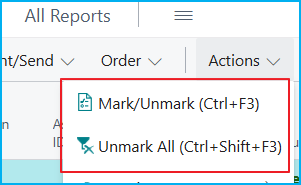
pageextension 77891 "GDRG Customer List Ext" extends "Customer List"
{
    layout
    {
        addafter("No.")
        {
            field(GDRGMarkStatus; Rec.GDRGMarkStatus)
            {
......
......
  actions
    {
        addfirst(processing)
        {
            action(GDRGMarkRecord)
            {
                ApplicationArea = All;
                Caption = 'Mark/Unmark';
                ToolTip = 'Specifies to toggle mark on current or selected records (Ctrl+F3).';
                Image = CheckList;
                ShortcutKey = 'Ctrl+F3';
......
......
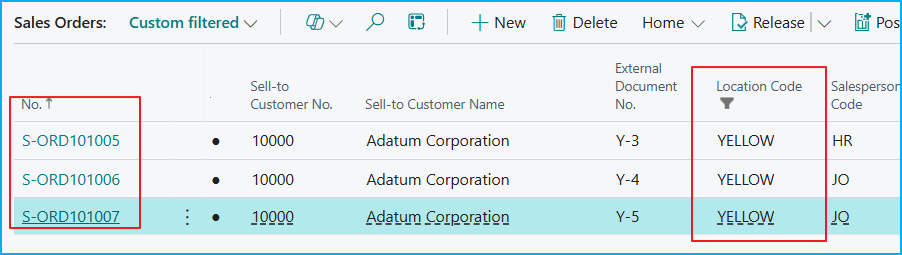
Por ejemplo, en la lista de pedidos de venta aplicamos un primer criterio, y marcamos los registros resultantes:
Luego, aplicamos otro criterio y volvemos a marcar un segundo bloque de registros resultantes:
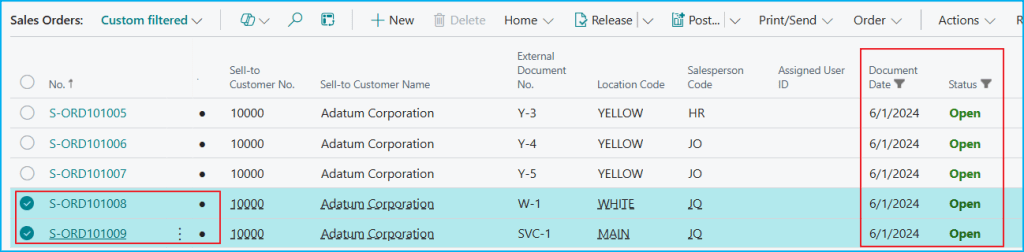
Después de aplicar filtros y marcar registros según diferentes criterios, podemos ver todos los elementos marcados juntos usando la vista «Marked Only».

El marcado no se limita al filtrado básico, se integra perfectamente con el modo de análisis, donde, se puede agrupar, totalizar y visualizar solo el subconjunto marcado.

El código está aquí, si quieres revisarlo: Blog/GDRGDev_MarkRecords at main · gdrgdev/Blog
La solución se compone:
- GDRGMarkStatus.Enum.al – Define los valores del marcador visual.
- GDRGCustomer.TableExt.al – Agrega campo de estado de marcado.
- GDRGCustomerListExt.PageExt.al – Proporciona atajos de teclado, acciones y vista filtrada.
- GDRGSalesHeader.TableExt.al – Agrega campo de estado de marcado.
- GDRGSalesOrderListExt.PageExt.al – Proporciona atajos de teclado, acciones y vista filtrada.
Espero que esta extensión te ayude a ahorrar tiempo en tu trabajo diario con Business Central.
● Mark, Filter, Focus: Bringing Precision to BC List Analysis ✅
While Business Central offers powerful filtering features on list-type pages, combining the results of multiple filter criteria into a single dataset can be complicated.
Do you remember when working with NAV lists allowed you to mark specific records with Ctrl+F1 to focus on a subset of data? This simple yet powerful feature allowed users to:
- Apply complex filters to different fields.
- Mark interesting results from those filters.
- Continue filtering and marking more records.
- Work exclusively with marked records.
- Delete marks and start over when necessary.
In this post, I’m trying to restore the markup functionality. This will allow us to select between cross-filters, where we could apply a first filter and mark the results, apply another filter(s) and mark those results, and then analyze all the marked records at the end.
The solution uses an architecture of the following components that works with any list page:
- Table extension: Adds a single boolean field to any table to store the mark status.
tableextension 77890 "GDRG Customer" extends Customer
{
    fields
    {
        field(77890; GDRGMarkStatus; Enum "GDRG Mark Status")
        {
            Caption = '፞';
            ToolTip = 'Specifies if the record is marked.';
            DataClassification = CustomerContent;
        }
    }
}- Visual enumeration with Unicode symbol: Contains a visual marker ● that appears directly in the page list.
enum 77889 "GDRG Mark Status"
{
    Extensible = false;

    value(0; " ")
    {
        Caption = ' ', Locked = true;
    }
    value(1; Marked)
    {
        Caption = '●';
    }
}- Page extension with keyboard shortcuts (buttons): Contains keyboard-controlled buttons and adds a filtered view for the marked records.
pageextension 77891 "GDRG Customer List Ext" extends "Customer List"
{
    layout
    {
        addafter("No.")
        {
            field(GDRGMarkStatus; Rec.GDRGMarkStatus)
            {
......
......
  actions
    {
        addfirst(processing)
        {
            action(GDRGMarkRecord)
            {
                ApplicationArea = All;
                Caption = 'Mark/Unmark';
                ToolTip = 'Specifies to toggle mark on current or selected records (Ctrl+F3).';
                Image = CheckList;
                ShortcutKey = 'Ctrl+F3';
......
......
For example, in the sales order list we apply a first filter, and mark the resulting records:
Next, we apply another criterion and mark a second block of resulting records:
After applying filters and marking records according to different criteria, we can see all the marked records together using the «Marked Only» view.
The marking is not limited to basic filtering; it integrates seamlessly with the analysis mode, where you can group, total, and visualize only the marked subset.
The code is here, if you want to check it out: Blog/GDRGDev_MarkRecords at main · gdrgdev/Blog
The solution is composed of these objects:
- GDRGMarkStatus.Enum.al – Defines the visual marker values.
- GDRGCustomer.TableExt.al – Adds mark status field.
- GDRGCustomerListExt.PageExt.al – Provides keyboard shortcuts, actions, and filtered view.
- GDRGSalesHeader.TableExt.al – Adds mark status field.
- GDRGSalesOrderListExt.PageExt.al – Provides keyboard shortcuts, actions, and filtered view.
I hope this extension helps you save time in your daily work with Business Central
Más información / More information:


 Gerardo Rentería Blog
Deja un comentario