📍 Navigation History: Quick Access to Recently Visited Pages in BC 🧭(English version)
📍 Historial de navegación: acceso rápido a páginas visitadas recientemente en BC 🧭
En Business Central, cuando trabajamos con múltiples registros y páginas, es frecuente que necesitemos volver a información que ya consultamos. Es decir, volver a una página o registro que visitaste hace unos minutos.
En esta publicación intentaremos cubrir esta necesidad de manera ágil y sencilla, registrando automáticamente cada página que visitas y cada registro que abres. Lo que te permitiría:
- Ver tu historial completo ordenado por fecha/hora.
- Reabrir cualquier registro con un solo clic.
- Identificar visualmente si visitaste una lista o un registro específico.
- Limpiar tu historial cuando lo necesites.

La solución se compone en 4 objetos:
- GDRGNavHistoryType.Enum.al: Enum para tipos de página (List/Card).
- GDRGNavigationHistory.Table.al: Almacena cada entrada del historial. Indexada por usuario y fecha.
- GDRGNavigationHistory.Page.al: Lista visual del historial. Con las acciones de Open (reabre la página o registro guardado en el historial), Clear All History, Delete Entries Older Than 30 Days.
- GDRGNavigationHistoryMgt.Codeunit.al: Event subscribers y lógica de registro.
Donde el patrón de las suscripciones sería el siguiente:
List Pages (OnOpenPageEvent)
[EventSubscriber(ObjectType::Page, Page::"ListPage Name", OnOpenPageEvent, '', false, false)]
local procedure TrackListPage()
begin
    LogListVisit(Database::"Table Name", Page::"ListPage Name", 'Description');
end;
Card Pages (OnAfterGetCurrRecordEvent)
[EventSubscriber(ObjectType::Page, Page::"CardPage Name", OnAfterGetCurrRecordEvent, '', false, false)]
local procedure TrackCardPage(var Rec: Record "Table Name")
begin
    if Rec."No." <> '' then
        LogRecordVisit(Database::"Table Name", Rec.RecordId(), Page::"CardPage Name", Rec."No.", Rec."Name Field");
end;
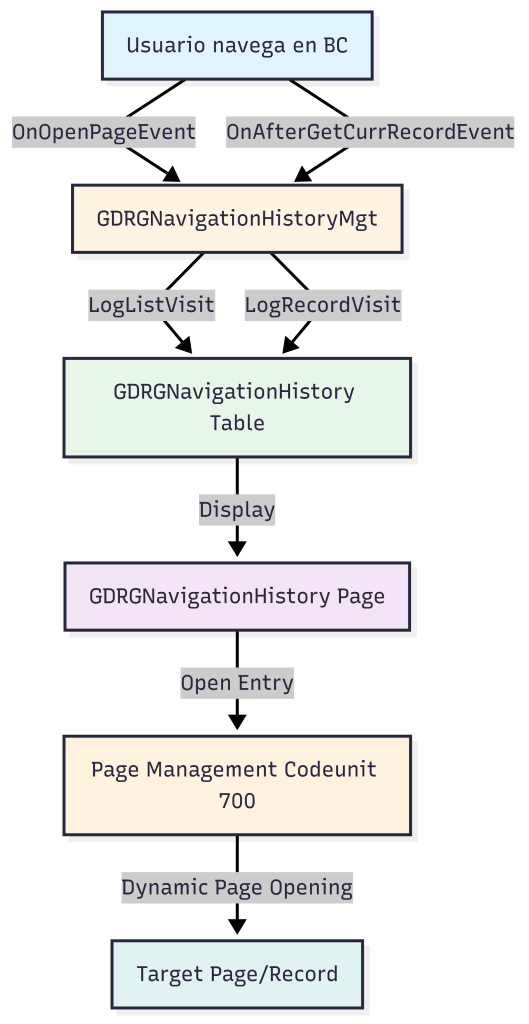
Y el flujo sería el siguiente:
Es importante mencionar que al registrar automáticamente cada navegación se añade un tiempo adicional, aunque sin mucho impacto en el rendimiento.
El código se encuentra aquí, por si quieres revisarlo: Blog/GDRGDev_NavigationHistory at main · gdrgdev/Blog
Espero que esta información te ayude.
📍 Navigation History: Quick Access to Recently Visited Pages in BC 🧭
In Business Central, when working with multiple records and pages, we often need to return to information we’ve already viewed. That is, to return to a page or record you visited a few minutes ago.
In this post, we’ll try to address this need in a quick and easy way, automatically recording every page you visit and every entry you open. This would allow you to:
- View your complete history sorted by date/time.
- Reopen any record with a single click.
- Visually identify whether you visited a specific list or record.
- Clear your history whenever you need to.
The solution is composed of 4 objects:
- GDRGNavHistoryType.Enum.al: Enum for page types (List/Card).
- GDRGNavigationHistory.Table.al: Stores each history entry. Indexed by user and date.
- GDRGNavigationHistory.Page.al: Visual history list. With the actions Open (reopens the page or record saved in the history), Clear All History, and Delete Entries Older Than 30 Days.
- GDRGNavigationHistoryMgt.Codeunit.al: Event subscribers and logging logic.
Where the subscription pattern would be as follows:
List Pages (OnOpenPageEvent)
[EventSubscriber(ObjectType::Page, Page::"ListPage Name", OnOpenPageEvent, '', false, false)]
local procedure TrackListPage()
begin
    LogListVisit(Database::"Table Name", Page::"ListPage Name", 'Description');
end;
Card Pages (OnAfterGetCurrRecordEvent)
[EventSubscriber(ObjectType::Page, Page::"CardPage Name", OnAfterGetCurrRecordEvent, '', false, false)]
local procedure TrackCardPage(var Rec: Record "Table Name")
begin
    if Rec."No." <> '' then
        LogRecordVisit(Database::"Table Name", Rec.RecordId(), Page::"CardPage Name", Rec."No.", Rec."Name Field");
end;
And the flow would be as follows:
It’s important to note that automatically recording each navigation adds additional time, although without much impact on performance.
The code is here, if you want to check it out: Blog/GDRGDev_NavigationHistory at main · gdrgdev/Blog
I hope this information helps you.
Más información / More information:


 Gerardo Rentería Blog
Deja un comentario