
🌟 Improving Business Central user tasks 🛠️(English version)
🌟 Mejorando las tareas de los usuarios de Business Central 🛠️
Revisando la funcionalidad estándar de las tareas de usuario en Business Central, he reconfirmado que tienen un gran potencial, pero mejorable. Donde he extrañado poder conectar una tarea directamente a un registro específico. ¿Por qué una tarea sobre «Revisión de términos de pago» no puede estar vinculada automáticamente al cliente específico en cuestión.
Por lo tanto, esta publicación tiene como objetivo evolucionar la funcionalidad de la tarea de usuario estándar en un sistema que conecte tareas con registros específicos.
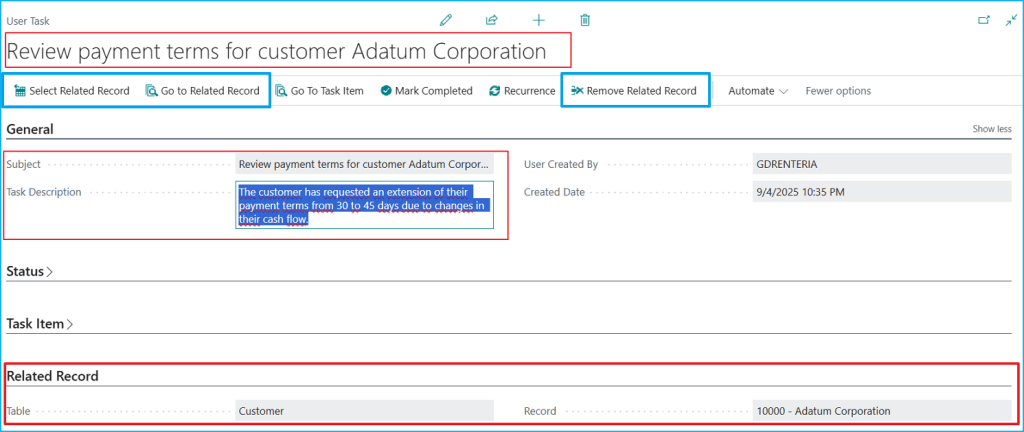
Y para lograr este objetivo, como podemos ver en la siguiente imagen, la tarea ya no se encuentra «sola», sino que se encuentra conectada a un registro. En la sección «Related Record» al final de la página está la clave de esto.
Creamos una tarea «Review payment terms for customer Adatum Corporation» y lo relacionamos al Customer No. 10000 (Adatum Corporation) . El botón «Go to Related Record» te lleva directamente al Customer Card correspondiente.
¿Cómo hemos llegado a esta tarea? Tenemos dos opciones para lograrlo, la primera es a través de la página estándar conocida de tareas de usuario. Desde la ficha de tarea estándar, tenemos un nuevo botón «Select Related Record» que nos lleva al primer paso del proceso, donde se puede elegir entre Customer, Vendor, Item, Sales Order y cualquier tabla del sistema.
En este ejemplo, seleccionamos «Customer» porque queremos vincular nuestra tarea a un cliente específico.
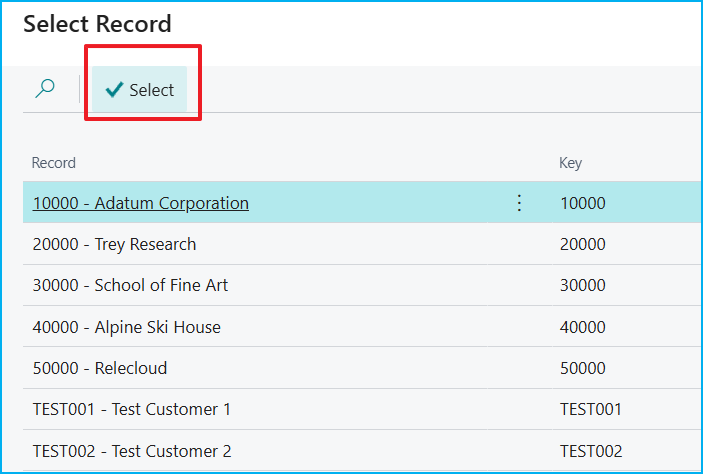
Una vez que se ha elegido el tipo de tabla, el botón «Select Records» nos presenta todos los registros disponibles para elegir el específico.

El botón «Select» confirma la elección y establece la conexión, entonces, la tarea «conoce» a qué cliente pertenece.
La segunda opción es trabaja directamente desde cualquier registro. Es decir, creando tareas automáticamente contextualizadas directamente desde el registro con el que estás trabajando.
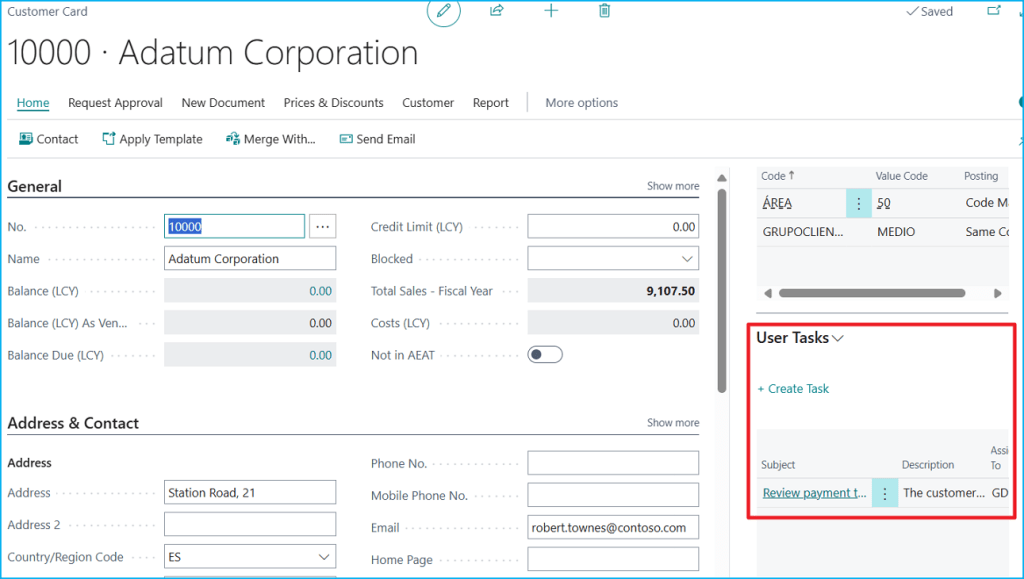
En la siguiente imagen vemos que estamos en el Customer Card de «10000 – Adatum Corporation» y en la parte derecha tienes el FactBox «User Tasks».
Este factbox muestra solo las tareas relacionadas con el cliente actual (Adatum Corporation) con información importante como el asunto, la descripción y el usuario responsable de la tarea. También nos permite a través de la opción de «Create Task» crear automáticamente una tarea vinculada al registro actual, reflejando estos cambios en tiempo real.
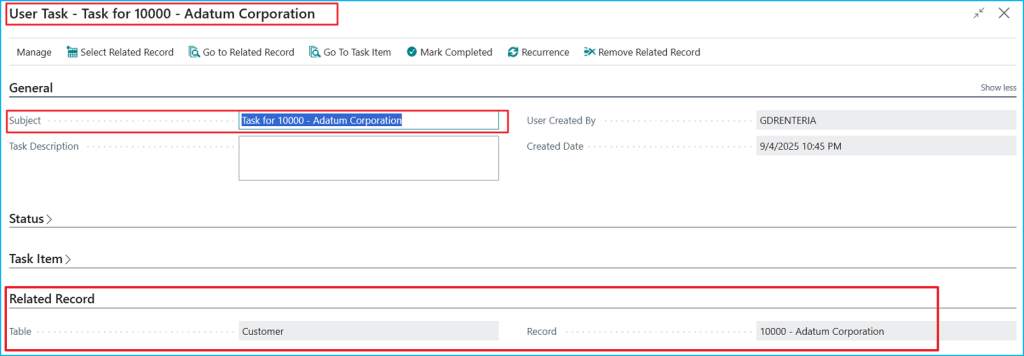
La siguiente imagen nos muestra el resultado de esta creación automática.
Creo que esta propuesta es la evolución natural de la funcionalidad de tareas de usuario en Business Central, proporcionándoles un contexto inteligente.
El código se encuentra aquí, por si quieres revisarlo: Blog/GDRGDev_EnhancedUserTask at main · gdrgdev/Blog
Los objetos son los siguientes:
- PTEUserTaskExt.TableExt.al: Extensión de la tabla User Task con campos contextuales para vincular tareas a registros específicos.
- PTEUserTaskRecordMgt.Codeunit.al: Gestión que maneja todas las operaciones de vinculación y navegación contextual.
- PTEUserTasksFactBox.Page.al: FactBox que muestra tareas relacionadas al registro actual con capacidad de crear nuevas tareas contextuales.
- PTEUserTaskCardExt.PageExt.al: Extensión de la página del User Task Card con acciones para seleccionar, navegar y gestionar registros relacionados.
- PTETableSelectorForTask.Page.al: Selector de tablas que permite elegir el tipo de registro a vincular.
- PTERecordSelector.Page.al: Selector de registros específicos que presenta una lista filtrada de registros del tipo seleccionado.
- PTECustomerCardExt.PageExt.al: Integración del FactBox en Customer Card para gestión de tareas relacionadas a clientes.
Espero que esta información te ayude.
🌟 Improving Business Central user tasks 🛠️
Reviewing the standard functionality of user tasks in Business Central, I’ve reconfirmed that they have great potential, but room for improvement. One thing I missed was being able to link a task directly to a specific record. Why can’t a «Payment Terms Review» task be automatically linked to the specific customer in question?
Therefore, this release aims to evolve the functionality of the standard user task into a system that connects tasks to specific records.
To achieve this goal, as we can see in the following image, the task is no longer «alone,» but rather connected to a record. The key to this is the «Related Record» section at the bottom of the page.
We created a task, «Review payment terms for customer Adatum Corporation,» and linked it to Customer No. 10000 (Adatum Corporation). The «Go to Related Record» button takes you directly to the corresponding Customer Card.
How do we accomplish this? We have two options to accomplish this. The first is through the standard user task page. From the standard task tab, we have a new «Select Related Record» button that takes us to the first step of the process, where we can choose between Customer, Vendor, Item, Sales Order, and any table in the system.
In this example, we selected «Customer» because we want to link our task to a specific customer.
Once the table type has been chosen, the «Select Records» button presents us with all the available records to choose the specific one.
The «Select» button confirms the choice and establishes the connection, so the task «knows» which client it belongs to.
The second option is to work directly from any record. That is, automatically creating contextualized tasks directly from the record you’re working with.
In the following image we see that we are in the Customer Card of «10000 – Adatum Corporation» and on the right side you have the FactBox «User Tasks«.
This factbox displays only tasks related to the current customer (Adatum Corporation) with important information such as the subject, description, and the user responsible for the task. It also allows us to automatically create a task linked to the current record through the «Create Task» option, reflecting these changes in real time.
The following image shows us the result of this automatic creation.
I believe this proposal is the natural evolution of the user task functionality in Business Central, providing them with intelligent context.
The code is here, if you want to check it out: Blog/GDRGDev_EnhancedUserTask at main · gdrgdev/Blog
The objects are as follows:
- PTEUserTaskExt.TableExt.al: Extending the User Task table with contextual fields to link tasks to specific records.
- PTEUserTaskRecordMgt.Codeunit.al: Management that handles all contextual linking and navigation operations.
- PTEUserTasksFactBox.Page.al: FactBox that displays tasks related to the current record with the ability to create new contextual tasks.
- PTEUserTaskCardExt.PageExt.al: User Task Card page extension with actions to select, navigate, and manage related records.
- PTETableSelectorForTask.Page.al: Table selector that allows you to choose the type of record to link.
- PTERecordSelector.Page.al: Record-specific selector that presents a filtered list of records of the selected type.
- PTECustomerCardExt.PageExt.al: (Example) Integration of FactBox into Customer Card for managing customer-related tasks.
I hope this information helps you.
Más información / More information:



 Gerardo Rentería Blog
Deja un comentario