
🏆🎯 Accelerate your BC Go-Live with Gamification (English Version)
🏆🎯 Acelera tu Go-Live de BC con Gamificación
La experiencia nos ha enseñado que los arranques (Go-Live) de cualquier ERP suelen enfrentar a un reto común: la resistencia al cambio. Muchas veces, después de meses ajustando el sistema y capacitando a los equipos, varias empresas se dan cuenta de que la adopción no es tan rápida como esperaban. Los usuarios suelen sienten abrumados, poco motivados, cada departamento avanza a su propio ritmo y el olvido suele ser parte del común denominador entre los usuarios.
¿Qué sucedería si agregamos cierto nivel de competencia durante este proceso?. Los equipos competirían de forma sana por ser los primeros en dominar procesos como las ventas, la creación de clientes o el manejo de órdenes sin errores, por lo que, (esperamos) que la adopción del ERP se da casi por sí sola.
Propongo como punto de partida la siguiente solución, que desde mi punto de vista, tendría utilidad para:
- Una implementación nueva con equipos de 15 usuarios a más.
- Rollout de nuevos módulos.
- Nuevas versiones y reimplementaciones.
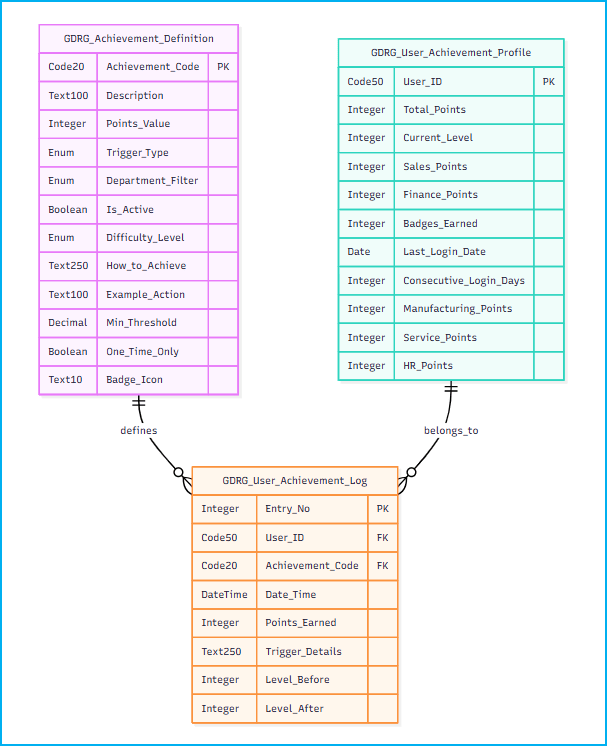
La solución se basa en 3 tablas:
- GDRG Achievement Definition – Definiciones de logros configurables.
- GDRG User Achievement Profile – Perfiles de usuario con estadísticas.
- GDRG User Achievement Log – Historial completo de logros obtenidos.
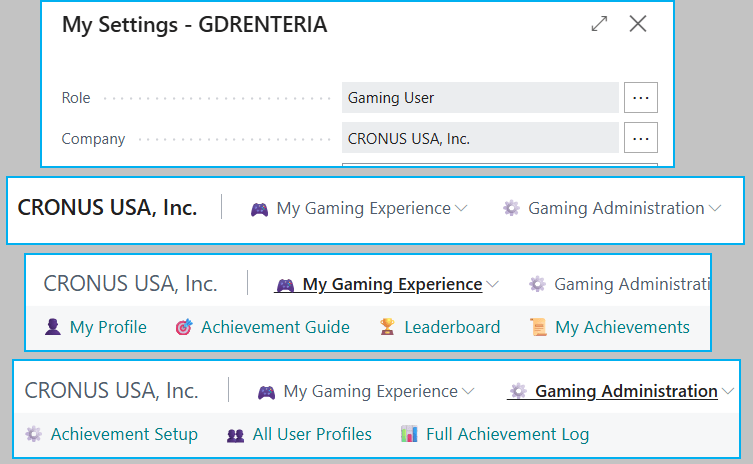
La estructura de las páginas de la solución es la siguiente:
- Gaming Dashboard – Panel principal de control.
- My Profile – Perfil personal del usuario.
- Achievement Setup – Configuración de logros (administradores).
- Achievement Log – Historial de logros.
- Leaderboard – Clasificación general.
- Achievement Guide – Guía para obtener logros.

Tenemos acceso a las opciones a través de un Rolecenter, y diferenciado por dos roles
- Usuario: Acceso al perfil personal, visualización de logros, clasificaciones y progreso individual.
- Administrador: Configuración completa de logros, acceso a métricas y reportes.
A través de la siguiente página se configuran los logros, cada fila es un logro que los usuarios pueden desbloquear en la medida que usan BC. Contiene el detalle y descripción del logro, los puntos que ganas, el departamento al que pertenece la operación, la dificultad, y otros.

Tenemos la misma información pero vista como una guía para ganar puntos para el usuario.

Como usuario también tengo acceso a mi perfil, donde puedo ver mi progreso en tiempo real.

Existen niveles, 🌱 Novice, 0-499 pts 🎓 Apprentice, 500-999 pts ⭐ Expert, 1,000-1,499 pts 🏆 Master, 1,500-1,999 pts 👑 Champion, 2,000-2,499 pts 🌟 Legend, 2,500-2,999 pts 💫 Grand Master, 3,000-3,499 pts ⚡ Elite, 3,500-3,999 pts 🔥 Legendary, 4,000-4,499 pts 🚀 Mythical, 4,500-4,999 pts 🌌 Ultimate Level 11+, 5,000+ pts.
En la codeunit 50102 «GDRG Achievement Events» tenemos los suscriptores a los eventos que otorgan los puntos de los logros:
- OnAfterCustomerInsert – Se ejecuta cuando se crea un nuevo cliente → Otorga puntos por «Customer Created»
- OnAfterPostSalesDoc – Se ejecuta al publicar documentos de ventas → Otorga puntos por «Sales Order Posted» + revisa logros de grandes ventas
- OnAfterItemInsert – Se ejecuta cuando se crea un nuevo artículo → Otorga puntos por «Item Created»
- OnAfterVendorInsert – Se ejecuta cuando se crea un nuevo proveedor → Otorga puntos por «Vendor Created»
- OnAfterContactInsert – Se ejecuta cuando se crea un nuevo contacto → Otorga puntos por «Contact Created»
- OnAfterSalesQuoteInsert – Se ejecuta cuando se crea una cotización → Otorga puntos por «Quote Created»
- OnAfterPostPurchaseDoc – Se ejecuta al publicar documentos de compras → Otorga puntos por «Purchase Order Posted»
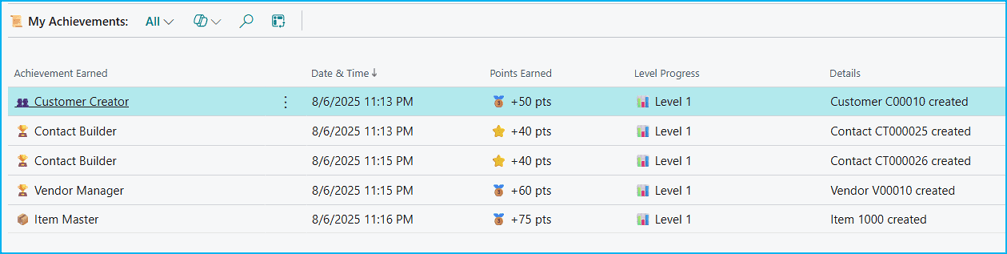
Por ejemplo, luego de crear un producto, un proveedor, un contacto y un cliente, puedo ya visualizar mis logros y los puntos que he ganado.
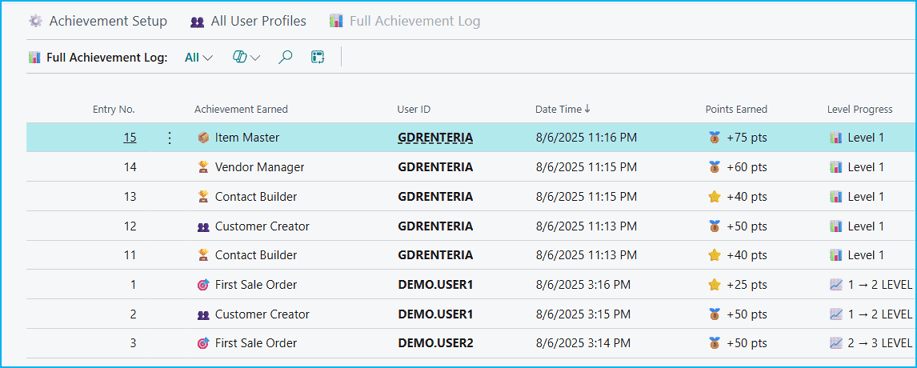
Además el perfil administrador visualiza también mis logros, junto con el del resto de usuarios. Donde se visualiza que al gestionar operaciones dentro de BC se otorgan puntos y logros.
Por último tenemos esta página muy importante y que se vuelve el corazón de la solución, por así decirlo, es la tabla de clasificación donde vemos el progreso de todos los usuarios, en las diferentes áreas, demostrando las capacidades ganadas así como también los puntos y badges.

Los objetos que contempla la funcionalidad son los siguientes:
- Table 50100 – GDRG Achievement Definition: Tabla maestra que define los logros disponibles, criterios, puntos y departamentos.
- Table 50101 – GDRG User Achievement Profile: Perfil de usuario con puntos totales, niveles, puntos por departamento y insignias ganadas.
- Table 50102 – GDRG User Achievement Log: Registro histórico de todos los logros obtenidos por cada usuario con timestamps.
- Codeunit 50100 – GDRG Achievement Processor: Motor principal de procesamiento que evalúa acciones y otorga logros automáticamente.
- Codeunit 50101 – GDRG UI Helper: Biblioteca de funciones de visualización para niveles, badges, departamentos y formato de datos.
- Codeunit 50102 – GDRG Achievement Events: Suscriptor de eventos del sistema que captura acciones BC y las convierte en logros.
- Codeunit 50103 – GDRG Demo Data: Generador de datos de demostración para testing y ejemplos del sistema.
- Enum 50100 – GDRG Achievement Trigger Type: Define tipos de acciones que disparan logros (creación de productos, proveedores, clientes etc.).
- Enum 50101 – GDRG Department Filter: Clasificación por departamentos (Sales, Finance, Manufacturing, Service, HR).
- Enum 50102 – GDRG Difficulty Level: Niveles de dificultad para logros (Easy, Medium, Hard, Expert).
- Page 50100 – GDRG Gaming Dashboard: Panel principal de gamificación con resumen personal y acceso rápido.
- Page 50101 – GDRG Achievement Definitions: Interfaz administrativa para configurar y gestionar definiciones de logros.
- Page 50102 – GDRG User Profile List: Lista general de perfiles de usuario con breakdown departamental.
- Page 50103 – GDRG My Profile: Vista personal detallada del perfil individual del usuario actual.
- Page 50104 – GDRG Achievement Leaderboard: Ranking competitivo ordenado por puntos totales con métricas departamentales.
- Page 50105 – GDRG Achievement Log: Historial cronológico de logros obtenidos con detalles de progreso.
- Page 50106 – GDRG Achievement Guide: Guía informativa de logros disponibles y cómo obtenerlos.
- Page 50107 – GDRG My Achievement Log: Vista personal del historial de logros del usuario actual con progreso de niveles.
- PermissionSet 50100 – GDRG Gaming: Conjunto de permisos para acceso completo al sistema de gamificación.
- Profile 50100 – GDRG Gaming User: Perfil de usuario configurado específicamente para la experiencia gamificada.
El código lo encuentras aquí: Blog/GDRGDev_Leaderboard at main · gdrgdev/Blog
Toma esta referencia para evolucionar esta funcionalidad y añadirle muchos matices, ya que da mucho juego y muchas posibilidades.
Espero que esta información te ayude.
🏆🎯 Accelerate your BC Go-Live with Gamification
Experience has taught us that Go-Live start-ups of any ERP usually face a common challenge: resistance to change. Many times, after months of fine-tuning the system and training the teams, several companies realize that adoption is not as fast as they expected. Users often feel overwhelmed, unmotivated, each department moves at its own pace and forgetfulness is often part of the common denominator among users.
What would happen if we added some level of competition during this process? Teams would compete in a healthy way to be the first to master processes such as sales, customer creation or error-free order handling, so (hopefully) ERP adoption almost happens on its own.
I propose as a starting point the following solution, which from my point of view, would be useful for:
- A new implementation with teams of 15 or more users.
- Rollout of new modules.
- New versions and reimplementations.
The solution is based on 3 tables:
- GDRG Achievement Definition: Configurable achievement definitions.
- GDRG User Achievement Profile: User profiles with statistics.
- GDRG User Achievement Log: Complete history of achievements earned.
The structure of the solution pages is as follows:
- Gaming Dashboard: Main Role Center.
- My Profile: Personal user profile.
- Achievement Setup: Achievement settings (administrators).
- Achievement Log: Achievement history.
- Leaderboard: Overall ranking.
- Achievement Guide: Guide to earning achievements.

We have access to the options through a Role center, and differentiated by two roles
- User: Access to personal profile, view achievements, rankings, and individual progress.
- Administrator: Complete achievement configuration, access to metrics and reports.
From the next page, achievements are configured. Each row represents an achievement that users can unlock as they use BC. It contains the details and description of the achievement, the points earned, the department the operation belongs to, the difficulty, and more.
We have the same information but seen as a guide to earning points for the user.
As a user I also have access to my profile, where I can see my progress in real time.
There are the following levels: 🌱 Novice, 0-499 pts 🎓 Apprentice, 500-999 pts ⭐ Expert, 1,000-1,499 pts 🏆 Master, 1,500-1,999 pts 👑 Champion, 2,000-2,499 pts 🌟 Legend, 2,500-2,999 pts 💫 Grand Master, 3,000-3,499 pts ⚡ Elite, 3,500-3,999 pts 🔥 Legendary, 4,000-4,499 pts 🚀 Mythical, 4,500-4,999 pts 🌌 Ultimate Level 11+, 5,000+ pts.
Codeunit 50102 «GDRG Achievement Events» has the subscribers to the events that award the achievement points:
- OnAfterCustomerInsert – Triggers when a new customer is created → Awards points for «Customer Created»
- OnAfterPostSalesDoc – Triggers when sales documents are posted → Awards points for «Sales Order Posted» + checks big deal achievements
- OnAfterItemInsert – Triggers when a new item is created → Awards points for «Item Created»
- OnAfterVendorInsert – Triggers when a new vendor is created → Awards points for «Vendor Created»
- OnAfterContactInsert – Triggers when a new contact is created → Awards points for «Contact Created»
- OnAfterSalesQuoteInsert – Triggers when a sales quote is created → Awards points for «Quote Created»
- OnAfterPostPurchaseDoc – Triggers when purchase documents are posted → Awards points for «Purchase Order Posted»
For example, after creating a product, a supplier, a contact, and a customer, I can now view my achievements and the points I’ve earned.
Additionally, the administrator profile also displays my achievements, along with those of other users. It shows that points and achievements are awarded for managing operations within BC.
Finally, we have this very important page, which becomes the heart of the solution: the leaderboard where we see the progress of all users in different areas, demonstrating the skills gained as well as the points and badges.
The objects that the functionality contemplates are the following:
- Table 50100 – GDRG Achievement Definition: Master table that defines available achievements, criteria, points and departments.
- Table 50101 – GDRG User Achievement Profile: User profile with total points, levels, departmental points and badges earned.
- Table 50102 – GDRG User Achievement Log: Historical record of all achievements obtained by each user with timestamps.
- Codeunit 50100 – GDRG Achievement Processor: Main processing engine that evaluates actions and automatically grants achievements.
- Codeunit 50101 – GDRG UI Helper: Display function library for levels, badges, departments and data formatting.
- Codeunit 50102 – GDRG Achievement Events: System event subscriber that captures BC actions and converts them into achievements.
- Codeunit 50103 – GDRG Demo Data: Demo data generator for system testing and examples.
- Enum 50100 – GDRG Achievement Trigger Type: Defines action types that trigger achievements (creation of items, vendors, customers, etc.).
- Enum 50101 – GDRG Department Filter: Department classification (Sales, Finance, Manufacturing, Service, HR).
- Enum 50102 – GDRG Difficulty Level: Achievement difficulty levels (Easy, Medium, Hard, Expert).
- Page 50100 – GDRG Gaming Dashboard: Main gamification panel with personal summary and quick access. Role Center Page.
- Page 50101 – GDRG Achievement Definitions: Administrative interface to configure and manage achievement definitions.
- Page 50102 – GDRG User Profile List: General list of user profiles with departmental breakdown.
- Page 50103 – GDRG My Profile: Detailed personal view of current user’s individual profile.
- Page 50104 – GDRG Achievement Leaderboard: Competitive ranking ordered by total points with departmental metrics.
- Page 50105 – GDRG Achievement Log: Chronological history of achievements obtained with progress details.
- Page 50106 – GDRG Achievement Guide: Informative guide of available achievements and how to obtain them.
- Page 50107 – GDRG My Achievement Log: Personal view of current user’s achievement history with level progress.
- PermissionSet 50100 – GDRG Gaming: Permission set for complete access to the gamification system.
- Profile 50100 – GDRG Gaming User: User profile specifically configured for the gamified experience.
You can find the code here: Blog/GDRGDev_Leaderboard at main · gdrgdev/Blog
Take this as a reference to evolve this functionality and add many nuances to it, as it offers a lot of play and many possibilities.
I hope this information helps you.
Más información / More information:


 Gerardo Rentería Blog
Deja un comentario