
👀A Visual Personal Tags System 📢(English version)
👀Un sistema visual de etiquetas personales 📢
Revisando hace unos días algunos vídeos, me encontré con este vídeo Add colors to your data, and use less Excel that way! – Erik Hougaard, y me pareció muy útil para mejorar la experiencia de usuario con ciertas labores.
El vídeo me inspiró para crear una funcionalidad de etiquetado personal, que espero que potencie la manera en que los usuarios interactúan con los registros de Business Central a nivel de entidades.
La funcionalidad permite:
- Un etiquetado entre entidades que funciona universalmente en diferentes tipos de registros.
- Una categorización visual de registros a simple vista.
- Identificación de prioridad con códigos de colores para un reconocimiento visual inmediato.
Puedes inspirarte como yo, el código se encuentra aquí: Blog/GDRGDev_TagSystem at main · gdrgdev/Blog
Puntos de atención:
- Diseño Visual
- Combinaciones de emojis o colores para un reconocimiento instantáneo.
- Lenguaje visual uniforme en todos los tipos de registros.
- Arquitectura
- Funciona con cualquier tabla de Business Central como (Cliente, Proveedor, Pedidos de Venta, Pedidos de Compra, Artículos, etc.)
- Diseño basado en dos tablas.
- Etiquetas con alcance de usuario sin afectar a los demás.

La funcionalidad se sustenta en dos tablas, son las siguientes, una que contempla la lista de Tags y la otra que contiene las relaciones con los diferentes registros.
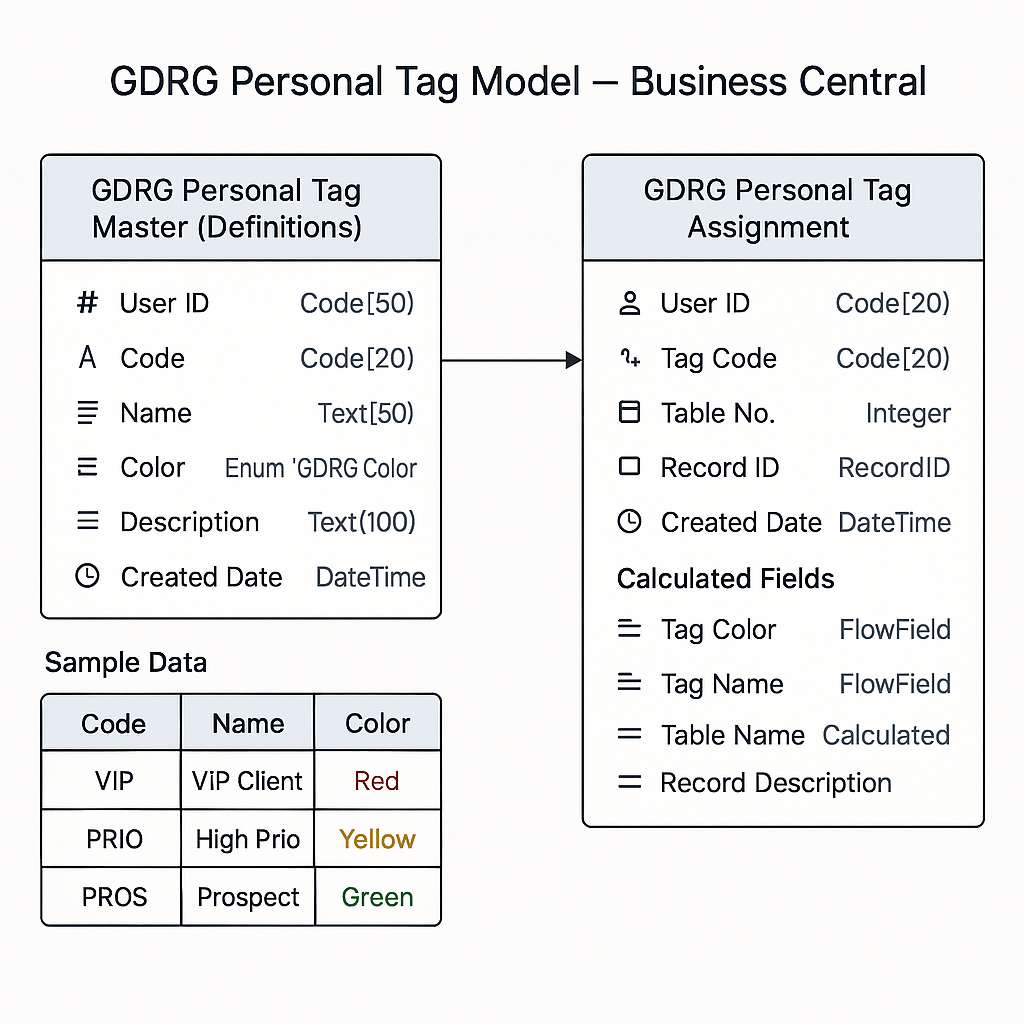


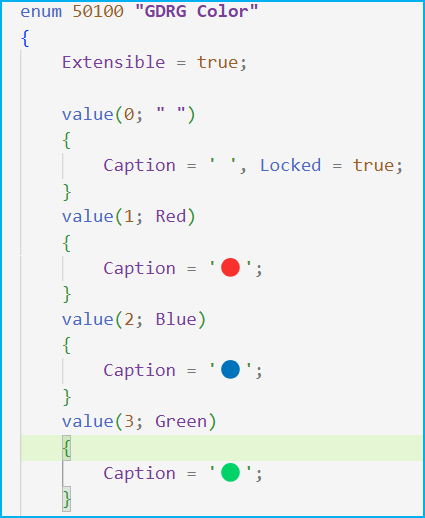
También me apoyo en una enumeración de colores y emoticones, que servirán para un reconocimiento visual rápido, y extensible para agregar nuevos valores.
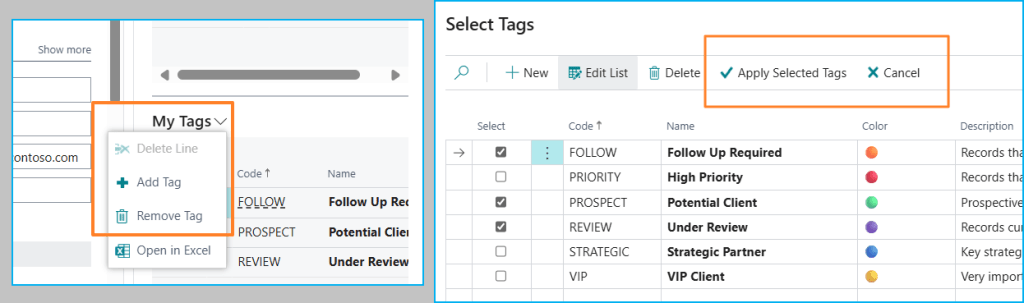
La funcionalidad de etiquetas se integra a través de un FactBox y se muestra en la página del registro. Los botones permiten una fácil gestión de las mismas.
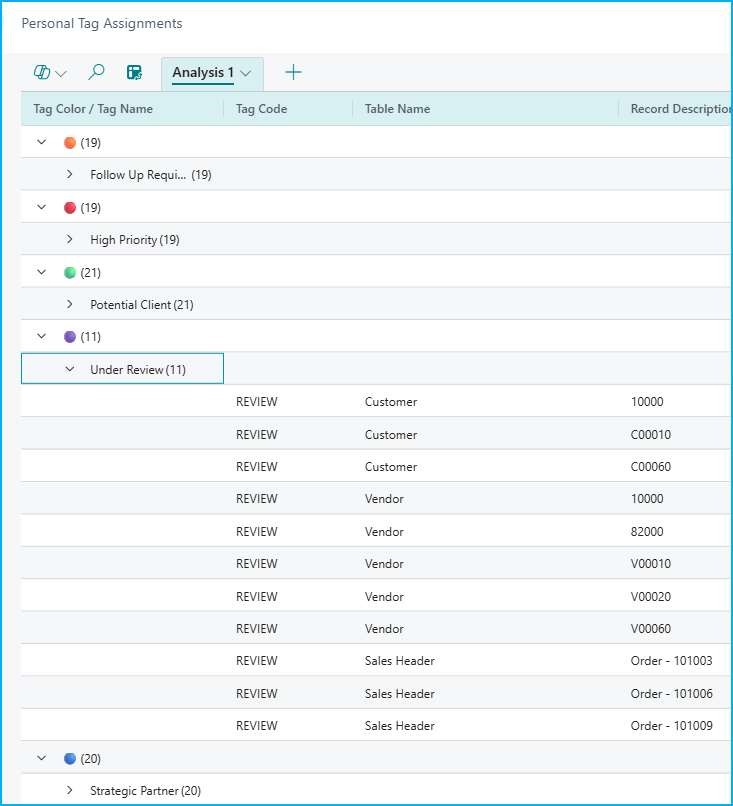
También se tiene una navegación detallada de las etiquetas asignadas a los registros a través de la página de asignación de etiquetas.
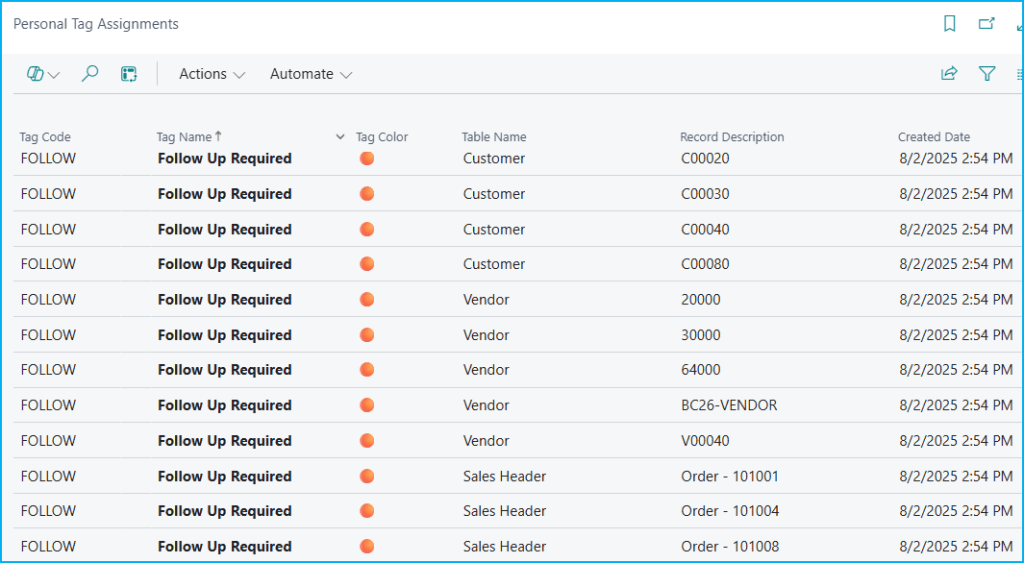

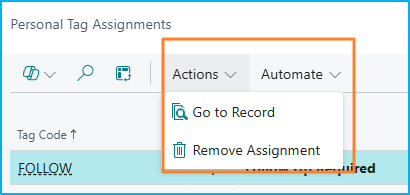
También tenemos la posibilidad de ir directamente al registro original y eliminar también la asignación del tag al registro.
Los objetos que contempla la funcionalidad son los siguientes:
- Table 50100 – GDRG Personal Tag Master: Tabla maestra que contiene definiciones de etiquetas y metadatos.
- Table 50101 – GDRG Personal Tag Assignment: Tabla de unión que vincula etiquetas a registros específicos en cualquier tabla BC.
- Enum 50100 – GDRG Color: Sistema visual de colores con representaciones de emojis.
- Page 50100 – GDRG Personal Tags FactBox: Visualización y gestión de etiquetas para el registro actual en cualquier tarjeta de entidad.
- Page 50101 – GDRG Tag Search: Vista general e interfaz de navegación para todas las etiquetas de usuario.
- Page 50102 – GDRG Personal Tag Assignments: Interfaz administrativa para la gestión de asignaciones de etiquetas.
- Page 50103 – GDRG Personal Tag Master: Interfaz maestra para la definición y gestión de etiquetas.
- Page 50104 – GDRG Tag Selection: Interfaz de selección de etiquetas para operaciones de asignación.
- PageExtension 50100 – GDRG Customer Tags: Añade el FacBox de etiquetas personales a la ficha del cliente (página 21).
- PageExtension 50101 – GDRG Vendor Tags: Añade el FacBox de etiquetas personales a la ficha del Proveedor (Page 26).
- PageExtension 50102 – GDRG Sales Order Tags: Añade el FacBox de etiquetas personales a la ficha del pedido de venta (Page 42).
- Codeunit 50100 – GDRG Personal Tag Manager: Lógica de negocio básica para operaciones con etiquetas.
- Codeunit 50101 – GDRG Demo Data Setup: Generación automatizada de datos de demostración para pruebas y demostraciones.
- PermissionSet 50100 – GDRG Personal Tags: Acceso completo a la funcionalidad de etiquetas personales.
La Codeunit 50100 – GDRG Personal Tag Manager contiene las siguientes funciones:
- AddTag: Asigna un tag existente a cualquier registro de Business Central.
- CreateTag: Crea un nuevo tag maestro con todos sus metadatos.
- RemoveTag: Elimina la asignación de un tag específico de un registro específico.
- GetRecordTags: Obtiene todos los tags asignados a un registro específico.
- GetUserTags: Obtiene todos los tags maestros de un usuario específico.
- SearchByTag: Busca todos los registros que tienen un tag específico asignado.
- HasTag: Verifica si un registro específico tiene un tag específico asignado.
- GetTagColor: Obtiene el color de un tag específico asignado a un registro.
Lo veo como un punto de partida, en el cual sería conveniente si se piensa en ponerlo en producción en darle un significado al color a nivel organizacional, la idea tampoco es abusar del etiquetado, y como en todo una limpieza de etiquetas también sería necesario aplicar con cierta frecuencia.
Espero que esta información te ayude.
👀A Visual Personal Tags System 📢
Going through some videos a few days ago, I came across this video Add colors to your data, and use less Excel that way! – Erik Hougaard, and I found it very useful to improve the user experience with certain tasks.
The video inspired me to create a personal tagging functionality, which I hope will enhance the way users interact with Business Central records at the entity level.
The functionality allows:
- A tagging between entities that works universally across different types of records.
- Visual categorization of records at a glance.
- Color-coded priority identification for immediate visual recognition.
You can get inspired like me, the code can be found here: Blog/GDRGDev_TagSystem at main · gdrgdev/Blog
Points of attention:
- Visual Design
- Emoji or color combinations for instant recognition.
- Uniform visual language across all record types.
- Architecture
- Works with any Business Central table such as (Customer, Supplier, Sales Orders, Purchase Orders, Items, etc.)
- Design based on two tables.
- User scoped tags without affecting others.
The functionality is based on two tables, one containing the list of Tags and the other containing the relationships with the different records.
I also rely on an enum of colors and emoticons, which will serve for quick visual recognition, and extensible to add new values.
The tag functionality is integrated through a “FactBox” and displayed on the entity’s card page. Buttons allow easy management of the tags.
There is also a detailed navigation of the tags assigned to the records through the tag assignment page.
We also have the possibility to go directly to the original record and remove the tag assignment to the record as well.
The objects covered by the functionality are the following:
- Table 50100 – GDRG Personal Tag Master: Master table containing tag definitions and metadata.
- Table 50101 – GDRG Personal Tag Assignment: Junction table linking tags to specific records across any BC table.
- Enum 50100 – GDRG Color: Visual color system with emoji representations.
- Page 50100 – GDRG Personal Tags FactBox: Display and manage tags for current record in any entity card.
- Page 50101 – GDRG Tag Search: Overview and navigation interface for all user tags.
- Page 50102 – GDRG Personal Tag Assignments: Administrative interface for managing tag assignments.
- Page 50103 – GDRG Personal Tag Master: Master tag definition and management interface.
- Page 50104 – GDRG Tag Selection: Tag selection interface for assignment operations.
- PageExtension 50100 – GDRG Customer Tags: Adds Personal Tags FactBox to Customer Card (Page 21).
- PageExtension 50101 – GDRG Vendor Tags: Adds Personal Tags FactBox to Vendor Card (Page 26).
- PageExtension 50102 – GDRG Sales Order Tags: Adds Personal Tags FactBox to Sales Order (Page 42).
- Codeunit 50100 – GDRG Personal Tag Manager: Core business logic for tag operations.
- Codeunit 50101 – GDRG Demo Data Setup: Automated demo data generation for testing and demonstrations.
- PermissionSet 50100 – GDRG Personal Tags: Complete access to personal tags functionality.
Codeunit 50100 – GDRG Personal Tag Manager contains the following functions:
- AddTag: Assigns an existing tag to any Business Central record.
- CreateTag: Creates a new master tag with all its metadata.
- RemoveTag: Removes the assignment of a specific tag from a specific record.
- GetRecordTags: Retrieves all tags assigned to a specific record.
- GetUserTags: Retrieves all master tags for a specific user.
- SearchByTag: Finds all records that have a specific tag assigned.
- HasTag: Checks if a specific record has a specific tag assigned.
- GetTagColor: Retrieves the color of a specific tag assigned to a record.
I see it as a starting point, in which it would be convenient if you think of putting it into production to give a meaning to color at the organizational level, the idea is not to abuse the tagging, and as in all a cleaning of tags would also be necessary to apply with some frequency.
I hope this information helps you.
Más información / More information:



 Gerardo Rentería Blog
Deja un comentario