
Unveiling the AI’s Power 🤖 to analyze differences between BC versions. 💡(English version)
Descubriendo el poder de la IA 🤖 para analizar las diferencias entre versiones de BC.💡
En el intento de identificar los cambios técnicos entre las versiones de BC, en esta oportunidad me he apoyado en la potencia de la IA para que me documente y me indique donde están los cambios, en qué áreas y en que objetos. No es la primera vez que toco este tema, puedes revisar una publicación anterior donde encontrarás información interesante. How to compare technical changes between Business Central versions?
Los pasos son relativamente sencillos, y a continuación los listo y posteriormente lo veremos:
- Tener los archivos descomprimidos de la extensión Microsoft_Base Application de las versiones a comparar. Para más información de como obtener estos archivos ver la publicación anterior.
- Obtener archivos tipo diff que identifiquen los cambios entre los objetos de una versión anterior a una nueva. Los archivos Diff contienen solo los cambios realizados entre archivos o un conjunto de archivos dentro de un sistema de carpetas y pueden o no contener una cantidad de líneas de contexto antes y después de los cambios de línea.
- Estos archivos los obtendremos ejecutando un script vía Git Bash. Git bash: Definition, commands, & getting started | Atlassian
- Usando Cursor y el modo agente Features | Cursor – The AI Code Editor – Cursor – Models analizaremos los cambios encontrados.
Le solicité a Cursor AI que me cree un script para ser ejecutado por Git Bash, del cual obtenga un archivo Diff por cada archivo comparado y que tenga diferencias.
En el script tenemos las variables:
- folder1: Carpeta donde se encuentran los archivos que contienen el código de la versión de BC. En el ejemplo, estaría la versión 25.4.
- forder2: Carpeta donde se encuentran los archivos que contienen el código de la versión de BC de la versión diferente. En el ejemplo, estaría la versión 25.5.
- diff_output: Carpeta donde se crearán los archivos Diff que contienen las diferencias.
#!/bin/bash

folder1="/c/zCompare/US/Microsoft_Base Application/Microsoft_Base Application_25.4.29661.29959/src"
folder2="/c/zCompare/US/Microsoft_Base Application/Microsoft_Base Application_25.5.30849.31230/src"
diff_output="/c/zCompare/US/Diffresults"

# Create folder to store diff files if it doesn't exist
echo "Checking the folder to store results..."
mkdir -p "$diff_output"
echo "Output folder created or verified: $diff_output"

# Function to perform recursive comparison
compare_files() {
    local file1=$1
    local file2=$2
    local diff_file=$3

    echo "Comparing file:"
    echo "  File 1: $file1"
    echo "  File 2: $file2"

    if [ -f "$file2" ]; then
        # Compare files and generate diff file only if differences exist
        diff -u "$file1" "$file2" > "$diff_file"
        if [ $? -ne 0 ]; then
            echo "  Differences found. Diff file saved at: $diff_file"
        else
            # echo "  No differences found. Removing empty diff file: $diff_file"
            rm "$diff_file" # Remove diff file if no differences are found
        fi
    else
        echo "  File $file2 does not exist in folder2. Skipping."
    fi
}

# Recursively iterate through files in folder1
echo "Starting recursive file comparison..."
find "$folder1" -type f | while read file1; do
    # Generate the corresponding path in folder2
    subpath=${file1#$folder1/} # Get the relative subpath
    file2="$folder2/$subpath"
    diff_file="$diff_output/${subpath//\//_}.diff" # Replace / with _ in the diff file name

    compare_files "$file1" "$file2" "$diff_file"
done

echo "Process completed. Diff files are located at: $diff_output"
Guardamos el script con el nombre «comparation.sh» y luego de su ejecución con Git Bash, obtendremos los archivos Diff generados de la comparación.


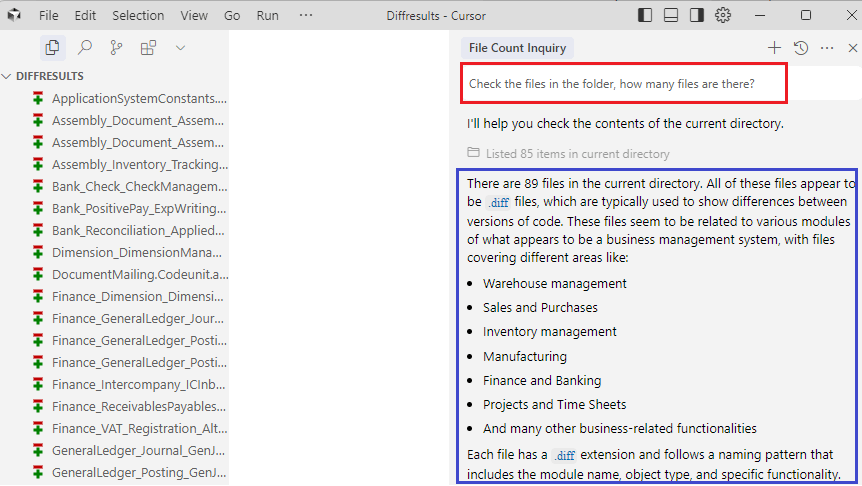
Nos da mucha información luego de una primera revisión, donde le preguntaba la cantidad de archivos con diferencias. Nos dice que hay 89 archivos y en que áreas encuentra los cambios.
Le preguntamos en qué área encuentra más diferencia, así como también en que tipo de objeto. Nos detalla cada una de las preguntas, pero adicionalmente agrega un comentario muy válido relacionado al análisis que ha realizado.

Como ha identificado el área de inventario como la que tiene más cambios, le solicité que analice los cambios y me comente los mismos. Nuevamente, nos detalla los cambios ejecutados, las mejoras que identifica y más comentarios adicionales. Nosotros posteriormente podríamos y tendríamos que revisar lo detallado para validar estos análisis.

Ahora me intereso en los nuevos eventos creados, le solicito que me los dé agrupados por área y por tipo de objeto, nuevamente obtengo lo solicitado más comentarios adicionales a revisar.


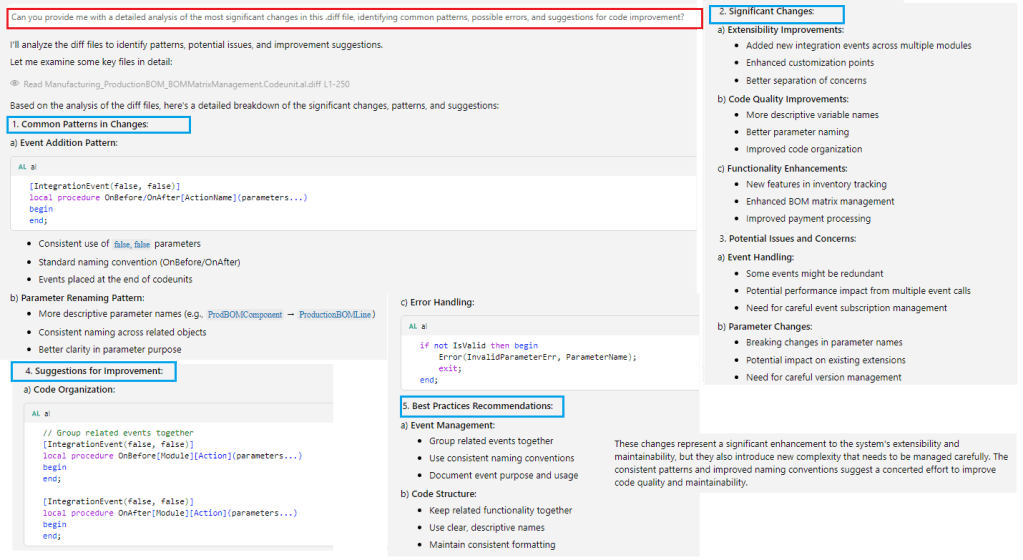
Nos ofrece mucha más información si le hablamos de otros temas como patrones comunes, posibles errores o sugerencias, con base a lo analizado nos da mucho contenido a ser revisado.
Creo que nos encontramos en un momento donde debemos aprovechar al máximo las capacidades que nos ofrece la IA. Con base a lo obtenido en este análisis, creo que podemos aprovechar el resultado para identificar que módulos y objetos han sido modificados entre un cambio de versión a otra, lo que nos permita reforzar las pruebas con los clientes con determinadas actividades.
También nos permite analizar si los cambios pueden impactar en nuestras soluciones, o dependiendo del cliente en los módulos implementados.
Espero que esta información te ayude.
Unveiling the AI’s Power 🤖 to analyze differences between BC versions. 💡
In the attempt to identify the technical changes between versions of BC, this time I have relied on the power of AI to document and show me where the changes are, in which areas and in which objects. This is not the first time I have addressed this topic; you can check a previous post where you’ll find interesting information. How to compare technical changes between Business Central versions?
The steps are relatively simple, and I will list them below and then explain them later:
- Have the files from the Microsoft_Base Application extension of the versions to be compared uncompressed. For more information on how to obtain these files, check the previous post.
- Obtain diff files that identify the changes between the objects of a previous version and a new one. Diff files contain only the changes made between files or a set of files within a folder system and may or may not include a number of context lines before and after the line changes.
- These files will be obtained by running a script via Git Bash. Git bash: Definition, commands, & getting started | Atlassian
- Using Cursor and agent mode, we will analyze the changes found. Features | Cursor – The AI Code Editor – Cursor – Models
I asked Cursor AI to create a script to be executed via Git Bash, which generates a Diff file for each compared file that has differences.
In the script, we have these variables:
- folder1: Folder where the files containing the code of the BC version are located. In the example, it is version 25.4.
- forder2: Folder where the files containing the code of the different BC version are located. In the example, it is version 25.5
- diff_output: Folder where the Diff files containing the differences will be created.
#!/bin/bash

folder1="/c/zCompare/US/Microsoft_Base Application/Microsoft_Base Application_25.4.29661.29959/src"
folder2="/c/zCompare/US/Microsoft_Base Application/Microsoft_Base Application_25.5.30849.31230/src"
diff_output="/c/zCompare/US/Diffresults"

# Create folder to store diff files if it doesn't exist
echo "Checking the folder to store results..."
mkdir -p "$diff_output"
echo "Output folder created or verified: $diff_output"

# Function to perform recursive comparison
compare_files() {
    local file1=$1
    local file2=$2
    local diff_file=$3

    echo "Comparing file:"
    echo "  File 1: $file1"
    echo "  File 2: $file2"

    if [ -f "$file2" ]; then
        # Compare files and generate diff file only if differences exist
        diff -u "$file1" "$file2" > "$diff_file"
        if [ $? -ne 0 ]; then
            echo "  Differences found. Diff file saved at: $diff_file"
        else
            # echo "  No differences found. Removing empty diff file: $diff_file"
            rm "$diff_file" # Remove diff file if no differences are found
        fi
    else
        echo "  File $file2 does not exist in folder2. Skipping."
    fi
}

# Recursively iterate through files in folder1
echo "Starting recursive file comparison..."
find "$folder1" -type f | while read file1; do
    # Generate the corresponding path in folder2
    subpath=${file1#$folder1/} # Get the relative subpath
    file2="$folder2/$subpath"
    diff_file="$diff_output/${subpath//\//_}.diff" # Replace / with _ in the diff file name

    compare_files "$file1" "$file2" "$diff_file"
done

echo "Process completed. Diff files are located at: $diff_output"
We save the script with the name ‘comparation.sh,’ and after running it with Git Bash, we will obtain the Diff files generated from the comparison.
It provides us with a lot of information after an initial review, where I asked about the number of files with differences. It tells us that there are 89 files and in which areas the changes are found.
We asked in which area it finds the most differences, as well as the type of object. It details each of the questions but additionally adds a very valid comment related to the analysis it performed
Since it identified the inventory area as the one with the most changes, I asked it to analyze the changes and provide feedback. Once again, it details the changes made, the improvements it identifies, and additional comments. We would later need to review these details to validate the analysis.
Now I am interested in the new events created. I ask it to provide them grouped by area and by object type, and once again I receive the requested information along with additional comments to review.
It provides us with much more information if we discuss other topics such as common patterns, possible errors, or suggestions. Based on the analysis, it gives us a lot of content to review.
I believe we are at a point where we must fully leverage the capabilities offered by AI. Based on the results obtained from this analysis, I think we can use the outcome to identify which modules and objects have been modified between version changes, allowing us to strengthen testing with clients through specific activities.
It also allows us to analyze whether the changes might impact our solutions or, depending on the client, the implemented modules.
I hope this information helps you.
Más información / More information:


 Gerardo Rentería Blog
Deja un comentario