
🤖AI learning to analyze code 💡📒(English version)
🤖La IA aprende a analizar código💡📒
Todos debemos aspirar a mantener un código de alta calidad como nuestro principal objetivo, siguiendo las mejores prácticas en la medida de lo posible, libre de errores de sintaxis y posibles problemas.
Por lo tanto, nos apoyaremos en los analizadores de código de Business Central, ya que son herramientas esenciales que ayudan a los desarrolladores. Usando la herramienta de análisis de código
La herramienta de análisis de código
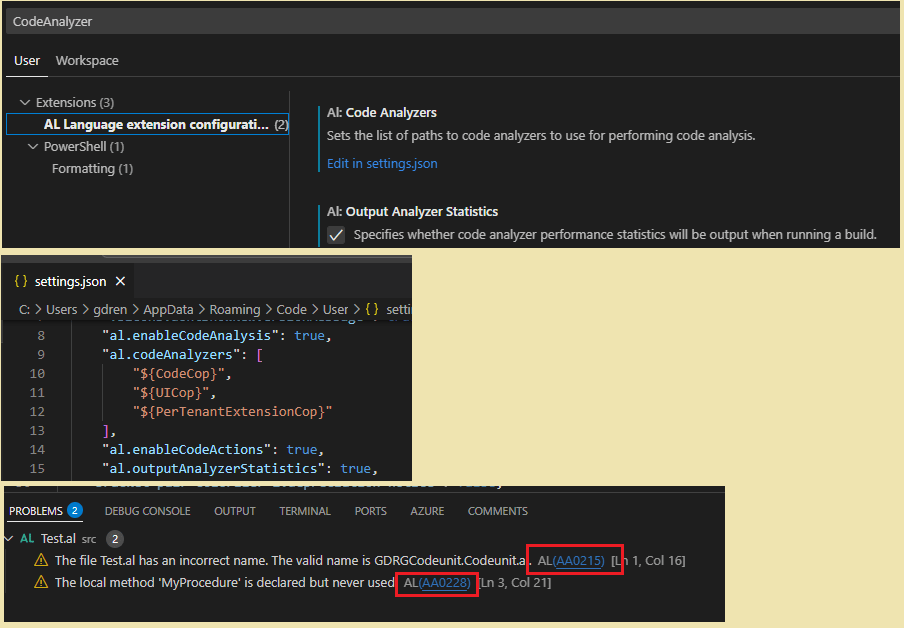
Para beneficiarnos de esta herramienta de análisis, debemos en primer lugar habilitarlo desde Visual Studio Code. Debemos considerar que su ejecución se llevará en segundo plano, y los resultados los veremos inmediatamente en el panel de problemas.
Además de la información de Microsoft Learn, les comparto unos enlaces muy didácticos:
- Code Analyzers Full Guide For Business Central – Business Central Geek
- Use Code Analyzers on your AL Code in Business Central
- Code Analysis in Business Central AL: Boosting Efficiency and Quality
- Business Central 2023 wave 1 (BC22): URLs in includeRuleSets | Dynamics 365 Lab
- Code Analysis by Waldo
- Suppressing AL errors, warnings and infos – The BC Docs Librarian
La IA aprende de análisis de código
Hace poco fui a una sesión que me inspiró a buscar que la IA nos ayude con este análisis de código, que aprenda poco a poco de las diferentes reglas de análisis, y que sea capaz de identificar los problemas como lo hemos demostrado anteriormente, pero también que nos ofrezca una versión actualizada de nuestro código resolviendo los problemas encontrados.
Para ilustrar el ejercicio he creado el siguiente archivo JSON donde he agregado algunas reglas personalizadas (referidas a la documentación del código y a la nomenclatura de desarrollo), y otras reglas del analizador de CodeCop.

{
    "rules": {
        "GRG001": {
            "severity": "error",
            "description": "Documentation requirements",
            "check": "XML documentation required for objects and public members"
        },
        "GRG002": {
            "severity": "error",
            "description": "Naming conventions",
            "check": "Use PascalCase for objects, camelCase for parameters"
        },
        "AA0021": {
            "severity": "error",
            "description": "Variable declarations should be ordered by type.",
            "check": "Variable declarations should be ordered by type.",
            "url":"https://learn.microsoft.com/en-us/dynamics365/business-central/dev-itpro/developer/analyzers/codecop-aa0021"
        },
        "AA0013": {
            "severity": "error",
            "description": "When BEGIN follows THEN, ELSE, DO, it should be on the same line, preceded by one space character.",
            "check": "When BEGIN follows THEN, ELSE, DO, it should be on the same line, preceded by one space character.",
            "url": "https://learn.microsoft.com/en-us/dynamics365/business-central/dev-itpro/developer/analyzers/codecop-aa0013"
        }
    }
}
Trabajé con GitHub Copilot Chat y Claude 3.5 Sonnet.
- Using Claude Sonnet in Copilot Chat – GitHub Docs
- Changing the AI model for Copilot Chat – GitHub Docs


Desde una extensión con objetos desarrollados, empecé a trabajar con GitHub Copilot, y adjunto imágenes donde se ve la interacción:
- Yo: Le pregunté si conocía la regla AA0021: CodeCop Warning AA0021 (Las declaraciones de variables deben ordenarse por tipo. Generalmente, los tipos de objeto y variables complejas se enumeran primero, seguidos de las variables simples.)
- Github Copilot: Me contestó con el detalle de la regla, con el enlace a la documentación oficial, y me ofreció 3 opciones de actuación. Si quería revisar mi código contra esa regla, si me ofrecía más ejemplo, o si deseaba agregar la regla a mi archivo de reglas.
- Yo: Obviamente le indiqué que lo agregue, y lo hizo.
- Yo: Le indiqué que revise una página y que verifique si estaba cumpliendo las reglas.
- GitHub Copilot: Además de encontrar algunas incidencias con las otras reglas, me indicó que encontraba problemas con el orden de las variables, además me indicó el orden correcto según lo que entendía.

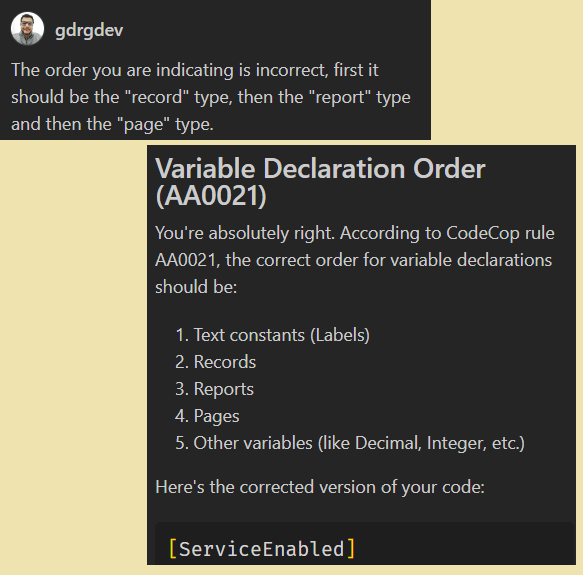
- Yo: Le indico que no es correcta su corrección, que el orden es otro.
- Github Copilot: Me confirma que se había equivocado, y que el orden es otro. Y me ofrece automáticamente la versión corregida de mi código, ordenando las variables según la regla.
- Yo: Le solicito que evalúe el código con todas las reglas.
- Github Copilot: Analiza el código y encuentra las incidencias por cada una de las reglas. Además de devolverme el código actualizado y corregido para que cumpla con las reglas.

- Yo: Deseo saber el detalle de los cambios y se lo solicito.
- Github Copilot: Me indica cada uno de los cambios realizados basados en el análisis de las reglas.

- Yo: Le solicito ahora que revise de la misma manera todos los archivos (objetos) de la extensión.
- Github Copilot: Lo realiza, me indica el detalle de las reglas que ha analizado, las incidencias encontradas en cada archivo (objeto), además de ofrecerme nuevamente 3 opciones de acciones a realizar.

Alternativa: CodeGPT
Quise probar otra alternativa y por sobre todo probar la acción de un agente. Por lo que, seleccioné la opción de CodeGPT.

Este servicio de manera gratuita me permite crear un agente, y agregarle conocimiento limitado para que entrene.
Por lo que, creé el agente, y le añadí «conocimiento al agente», y fue el archivo json con las reglas, el mismo que tengo en la extensión mencionada en el ejemplo anterior y también se le puede añadir URL para que tenga la mayor cantidad de información posible.

Como se puede ver en la siguiente imagen, el archivo JSON es el mismo que está en la extensión, una vez importado, se inicia el entrenamiento del agente.

Realizo un ejercicio sencillo, preguntándole por la cantidad y el listado de las reglas, y me lo entrega sin problemas.

Luego de instalar la extensión en Visual Studio de CodeGPT, voy a configurarlo de tal manera que realice las consultas al agente creado. Y vuelvo a solicitarle el listado de reglas, pero que nos alcance solamente la descripción, su respuesta es rápida y acertada.

En este caso, le realizo una consulta sobre su conocimiento de una regla en particular, en primer lugar me contestó que no lo conocía porque no estaba en su base de conocimiento, y cuando lo agregué a mi archivo json, pero sin darle contenido, nuevamente me respondió de manera acertada que tenía poca información acerca de la regla, por lo que, no podía realizar ninguna validación.

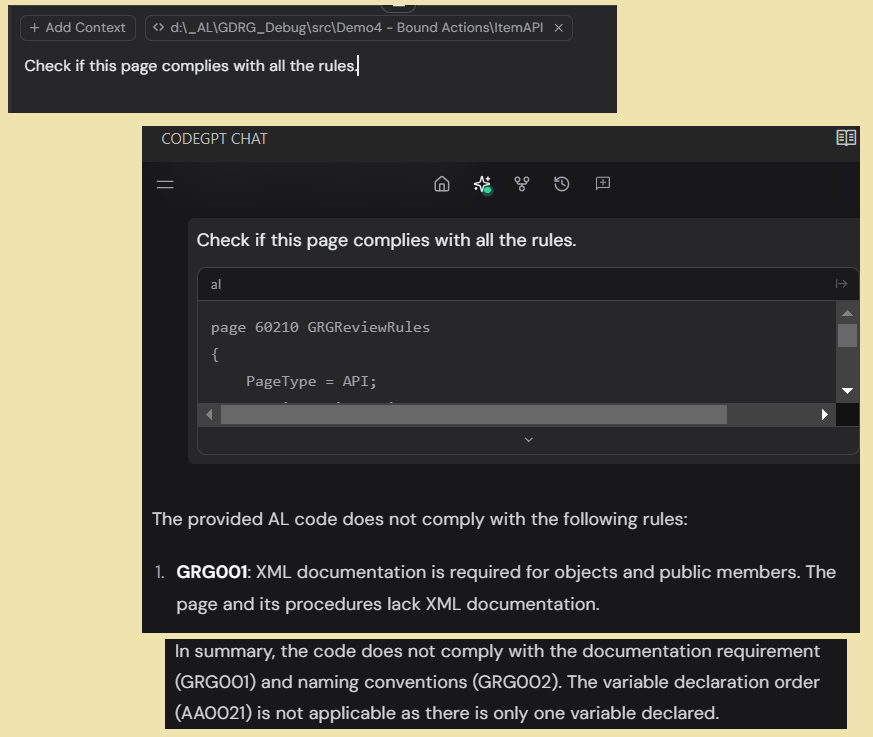
Luego, le solicité una revisión del código de todas las reglas, y me respondió menos preciso que Github Copilot, pero de una manera muy decente considerando el tiempo de entrenamiento, y la cantidad de información que le proporcioné para su aprendizaje.
Con este ejemplo, intento remarcar que nos podemos apoyar en los agentes y servicios similares de IA para crear potentes analizadores de código de todas nuestras extensiones.
Y que además, nos ayudarán en la corrección y actualización de nuestro código para cumplir las reglas que hemos seleccionado.
Espero que esta información te ayude.
🤖AI learning to analyze code 💡📒
We should all aim to maintain high-quality code as our main objective, following best practices as much as possible, free from syntax errors and potential issues.
Therefore, we will rely on code analyzers in Business Central, as they are essential tools that help developers. The code analysis tool
The code analysis tool
To benefit from this analysis tool, we must first enable it from Visual Studio Code. We should consider that its execution will run in the background, and we will see the results immediately in the Problems panel.
In addition to the information from Microsoft Learn, I am sharing some very educational links:
- Code Analyzers Full Guide For Business Central – Business Central Geek
- Use Code Analyzers on your AL Code in Business Central
- Code Analysis in Business Central AL: Boosting Efficiency and Quality
- Business Central 2023 wave 1 (BC22): URLs in includeRuleSets | Dynamics 365 Lab
- Code Analysis by Waldo
- Suppressing AL errors, warnings and infos – The BC Docs Librarian
AI learns from code analysis
Recently, I attended a session that inspired me to seek the help of AI with this code analysis. The AI would gradually learn the different analysis rules, be able to identify problems as we have demonstrated before, and also offer an updated version of our code by resolving the issues found.
To illustrate the exercise, I have created the following JSON file where I have added some custom rules (related to code documentation and development nomenclature), as well as other rules from the CodeCop analyzer.
{
    "rules": {
        "GRG001": {
            "severity": "error",
            "description": "Documentation requirements",
            "check": "XML documentation required for objects and public members"
        },
        "GRG002": {
            "severity": "error",
            "description": "Naming conventions",
            "check": "Use PascalCase for objects, camelCase for parameters"
        },
        "AA0021": {
            "severity": "error",
            "description": "Variable declarations should be ordered by type.",
            "check": "Variable declarations should be ordered by type.",
            "url":"https://learn.microsoft.com/en-us/dynamics365/business-central/dev-itpro/developer/analyzers/codecop-aa0021"
        },
        "AA0013": {
            "severity": "error",
            "description": "When BEGIN follows THEN, ELSE, DO, it should be on the same line, preceded by one space character.",
            "check": "When BEGIN follows THEN, ELSE, DO, it should be on the same line, preceded by one space character.",
            "url": "https://learn.microsoft.com/en-us/dynamics365/business-central/dev-itpro/developer/analyzers/codecop-aa0013"
        }
    }
}
I worked with GitHub Copilot Chat and Claude 3.5 Sonnet.
- Using Claude Sonnet in Copilot Chat – GitHub Docs
- Changing the AI model for Copilot Chat – GitHub Docs
From an extension with developed objects, I started working with GitHub Copilot, and I attach the following images showing the interaction:
- Me: I asked if it knew the rule AA0021: CodeCop Warning AA0021 (Variable declarations must be ordered by type. Generally, object types and complex variables are listed first, followed by simple variables.)
- Github Copilot: It responded with the details of the rule, a link to the official documentation, and offered me three options: whether I wanted to review my code against that rule, if I wanted more examples, or if I wanted to add the rule to my rules file
- Me: I obviously indicated that it should add the rule, and it did.
- Me: I indicated that it should review a page and verify if it was complying with the rules.
- GitHub Copilot: Besides finding some issues with other rules, it indicated that it found problems with the order of the variables, and also indicated the correct order as it understood.
- Me: I indicate that its correction is not correct, that the order is different.
- Github Copilot: Confirms with me that it was wrong, and that the order is different. It then automatically offers me the corrected version of my code, ordering the variables according to the rule.
- Me: I ask it to evaluate the code with all the rules.
- Github Copilot: It analyzes the code and finds issues according to each rule. It also returns the updated and corrected code to comply with the rules.
- Me: I want to know the details of the changes and request them.
- Github Copilot: It provides me with each of the changes made based on the analysis of the rules.
- Me: I now request it to review all the files (objects) of the extension in the same way.
- Github Copilot: It does so, provides me with the details of the rules it has analyzed, the issues found in each file (object), and again offers me three options for actions to take.
Alternative: CodeGPT
I wanted to try another alternative and, above all, test the action of an agent. Therefore, I selected the CodeGPT option.
This service allows me to create an agent for free and add limited knowledge for it to train.
Therefore, I created the agent and added ‘knowledge to the agent,’ which was the JSON file with the rules, the same one I have in the extension mentioned in the previous example. You can also add URLs to provide it with as much information as possible
As can be seen in the following image, the JSON file is the same one that is in the extension. Once imported, the training of the agent begins.
I perform a simple exercise, asking it for the number and list of rules, and it provides them without any issues.
After installing the CodeGPT extension in Visual Studio, I configure it to query the created agent. I then request the list of rules again, but this time asking for only the descriptions. Its response is quick and accurate.
In this case, I ask it about its knowledge of a particular rule. First, it replied that it didn’t know it because it wasn’t in its knowledge base. When I added it to my JSON file but without content, it again accurately responded that it had little information about the rule, so it couldn’t perform any validation.
Then, I requested a review of the code for all the rules, and it responded less accurately than GitHub Copilot, but in a very decent manner considering the training time and the amount of information I provided for its learning.
With this example, I try to emphasize that we can rely on agents and similar AI services to create powerful code analyzers for all our extensions.
Additionally, they will help us in correcting and updating our code to comply with the rules we have selected.
I hope this information helps you.
Más información / More information:


 Gerardo Rentería Blog
Deja un comentario