
🕵🏼 Are you being audited? Business Central information is required. Microsoft Purview helps you. 🔎 (English version)
🕵🏼¿Le están realizando una auditoría? Se requiere información de Business Central. Microsoft Purview le ayuda. 🔎
Desde el wave 1 del 2024, disponemos de una integración muy interesante y útil con la Plataforma de gobernanza de datos llamada Microsoft Purview.
Se nos indica que los entornos de Business Central emiten automáticamente eventos auditables a las soluciones de auditoría de Microsoft Purview. Auditando eventos en Purview
Entonces, ante esta afirmación, tuve algunas preguntas:
- ¿Qué operaciones se auditan?
- ¿Y la telemetría, son diferentes, se complementan?
- ¿Se pueden personalizar los eventos auditables?
Luego de revisar la documentación, algunas pruebas y leer los comentarios de expertos y conocedores, he ido clarificando mis dudas y se las comparto.
Tenemos un listado que irá creciendo relacionado a los tipos y operaciones que se auditan de manera automática:
- Actividades de administración de ambientes: Creación, copiado, renombre, borrado, restauración, actualización de configuraciones de los ambientes de Business Central.
- Actividades de administración de extensiones: Instalación, actualización, desinstalación, publicación, des publicación, cambio de permisos en extensiones.
- Actividades de administración de usuarios: Actualización, creación de PermissionSet, actualización de configuración de licencias, sincronización de usuarios.
- Actividades de administración de empresas: Creación, copiado y borrado de empresas. Modificaciones de operaciones en Business Central como la de monitoreo de campos, campos con datos sensibles, políticas de retención, colas de proyectos, otros.
- Actividades de administración de integraciones: Gestión de aplicaciones de Microsoft Entra, gestión de recipiente de notificaciones, gestión de nuevos servicios web, de nuevas apis, habilitación de varios servicios de integración.
- Actividades de administración de Copilot: Activaciones de capacidades de Copilot/AI.
- Actividades de administración de migración de datos.
- Actividades de administración de reportes: Creación, modificación y eliminación de diseños de reportes.
El detalle completo lo puedes revisar aquí: Auditando eventos en Purview, pero como podemos ver, hablamos de operaciones muy susceptibles de cambios importantes o de transcendencia dentro de la aplicación que merecen ser auditados y analizados en el caso se necesite identificar el origen de una consecuencia o una situación.
¿Podemos crear nuestros propios eventos de auditoría? La respuesta rápida es no, lo revisaré un poco más en detalle más adelante, pero la función que se utiliza para auditar estas acciones se encuentra habilitado para un alcance de OnPrem.

En cuanto a la diferencia o su impacto con la telemetría que conocemos y usamos de manera habitual diría que es el objetivo para lo cual han sido creadas y los servicio que la soportan, las operaciones antes mencionadas están orientadas a ser auditadas y por sobre todo apoyadas en un servicio potente como Microsoft Purview que permite potenciar las investigaciones forenses, de TI, de cumplimiento y legales necesarias y requeridas. Kennie Nybo Pontoppidan (Principal Program Manager at Microsoft) lo ha comentado muy bien en la siguiente publicación What’s new in Dynamics 365 Business Central telemetry – February 2024 | LinkedIn (Como siempre de obligada lectura).
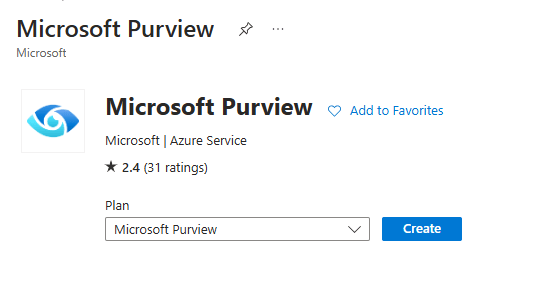
Para revisar directamente esta funcionalidad, voy a proceder a crear el servicio de Microsoft Purview.
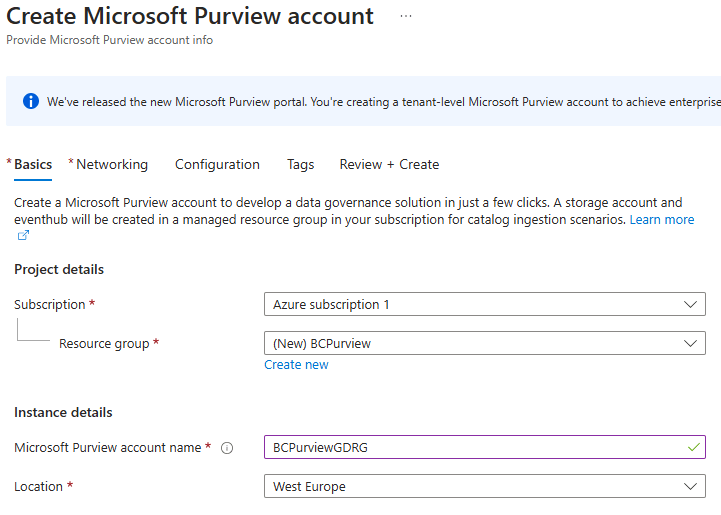
Para crear la cuenta se requieren datos genéricos muy similares entre los servicios de Azure, como el nombre, el grupo de recursos y ubicación geográfica.
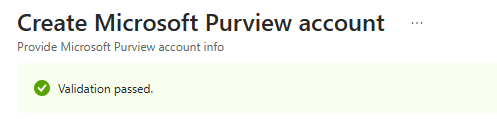
Se realiza una validación inicial que debe ser superada.
Una vez validada procedemos a crearlo, y ya lo tenemos listo.


Una vez creado, accedemos al portal de gobernanza de Microsoft Purview (la nueva interfaz).

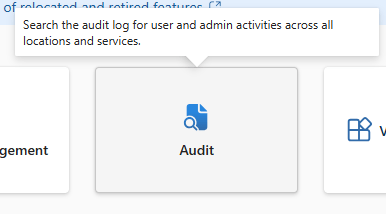
Y seleccionamos la opción de auditorías.

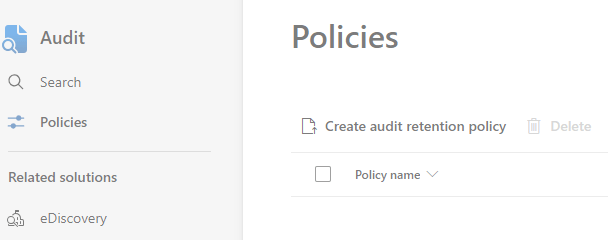
Procedemos a crear una política de retención relacionada a las operaciones de Business Central. Administrar políticas de retención de registros de auditoría
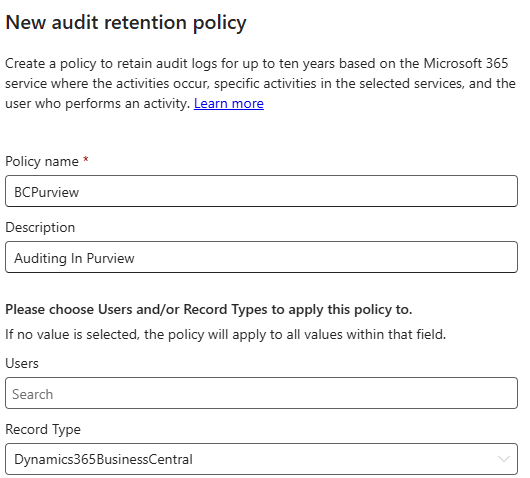
Para completar una política de retención de auditoría requerimos el nombre, una descripción, podríamos limitar a un usuario o usuarios. También requerimos elegir en la opción de Tipo de Registro el valor de «Dynamics365BusinessCentral», también podríamos limitar más la información a buscar si decidimos un tipo de actividad específica, las cuales hemos comentado anteriormente. Otro valor importante es la cantidad de días de retención de la información, el tiempo que hablamos es de días o hasta años. Para conservar los registros de auditoría durante 10 años, al usuario que genera el registro de auditoría también se le debe asignar una licencia complementaria de retención de registro de auditoría de 10 años, además de una licencia E5.


Explotaremos la información utilizando la funcionalidad de «Buscar en el registro de auditoría«.
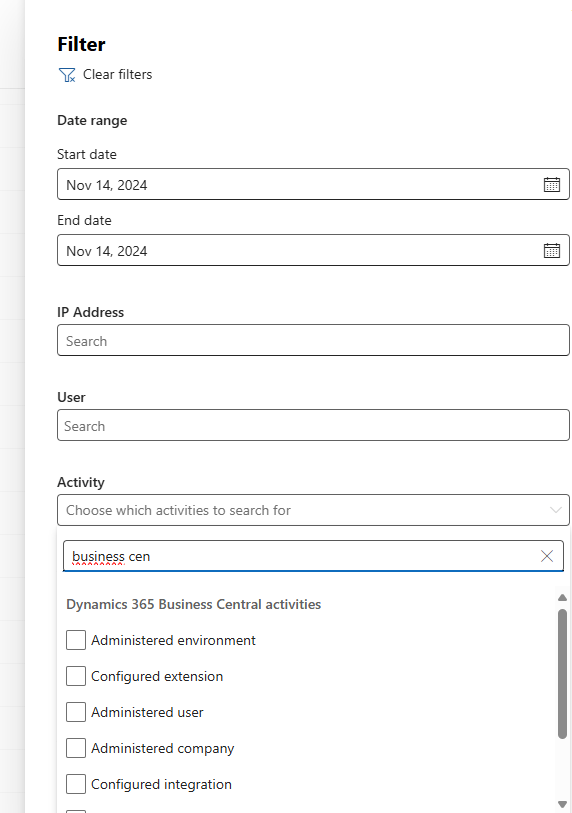
Para eso, aplicaremos los filtros requeridos, necesarios y adecuados con la intención de obtener solamente la información relevante. Podemos aplicar los mismos filtros que hemos visto en la creación de la retención de la política de auditoría, como las actividades, los usuarios y otros.

Cuando seleccionamos la opción de buscar, inicialmente la búsqueda se coloca en un estado de «encolado», luego va avanzando en su preparación y se encuentra en el estado de «en progreso», para finalmente pasar al estado de «completado».



El resultado de la búsqueda nos brinda un listado con información adicional y detallada del evento que ha auditado.

Es posible filtrar dentro de los resultados de la búsqueda, lo que nos permite acotar aún más los datos a analizar.
¿Puedo explotar esta información de otra manera?, la respuesta es si. Por lo que, tenemos varias posibilidades para revisar los datos.
- Powershell: Export, configure, and view audit log records | Microsoft Learn
- KQL: Use the KQL editor to build search queries | Microsoft Learn
- Search Graph Api: Introducing the Microsoft Purview Audit Search Graph API | Microsoft Community Hub
En Business Central he podido identificar que estos eventos auditados se han trabajado desde la versión 24.5 y ha ido evolucionando.
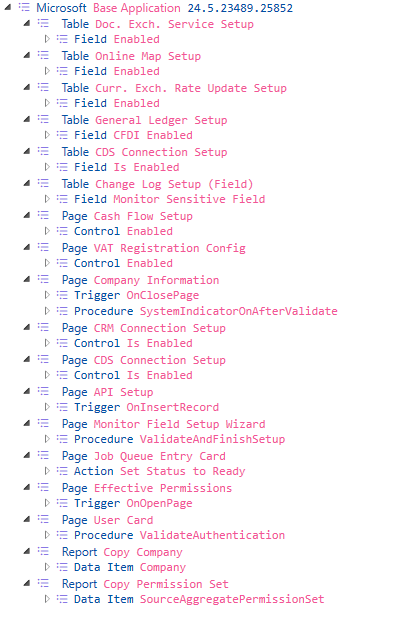
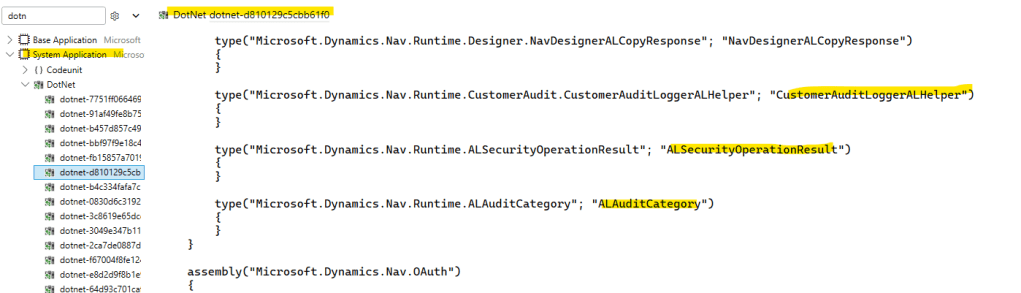
En la versión 24.5 se empezaron a auditar actividades de administración de empresas y de integraciones, en la siguiente imagen se ve el código en el evento OnInsert de la tabla «Retention Policy Setup», se usan variables tipo DotNet para el registro y auditoría del evento.

    trigger OnInsert()
    var
        MyCustomerAuditLoggerALHelper: DotNet CustomerAuditLoggerALHelper;
        MyALSecurityOperationResult: DotNet ALSecurityOperationResult;
        MyALAuditCategory: DotNet ALAuditCategory;
        NewRetentionPolicyCreatedLbl: Label 'The new Retention Policy record with Table ID %1 is created by the UserSecurityId %2.', Locked = true;
    begin
        MyCustomerAuditLoggerALHelper.LogAuditMessage(StrSubstNo(NewRetentionPolicyCreatedLbl, Rec."Table ID", UserSecurityId()), MyALSecurityOperationResult::Success, MyALAuditCategory::ApplicationManagement, 3, 0);
    end;
Visualizamos en los siguientes listados, la extensión, el objeto y el evento donde se ha trabajado esta funcionalidad

Desde la versión 25, tenemos una función adicional en el tipo de datos Session llamado LogAuditMessage. Session.LogAuditMessage(Text, SecurityOperationResult, AuditCategory, Integer, Integer [, Dictionary of [Text, Text]]) Method
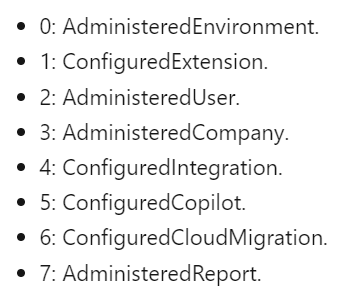
El parámetro AuditMessageOperation nos indica el origen de las actividades, el tipo de operación del mensaje de auditoría.
Esta función es la que se usa actualmente en todos los eventos y operaciones que se auditan desde Business Central.

   trigger OnInsert()
    var
        NewRetentionPolicyCreatedLbl: Label 'The new Retention Policy record with Table ID %1 is created by the UserSecurityId %2.', Locked = true;
    begin
        Session.LogAuditMessage(StrSubstNo(NewRetentionPolicyCreatedLbl, Rec."Table ID", UserSecurityId()), SecurityOperationResult::Success, AuditCategory::ApplicationManagement, 3, 0);
    end;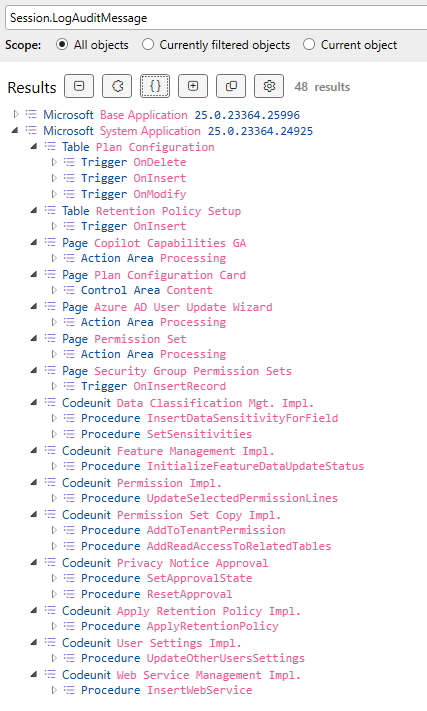

Como información adicional tenemos la diferencia entre los niveles de auditoría que Microsoft Purview ofrece, la versión Standard cubre la mayoría de necesidades. Soluciones de auditoría en Microsoft Purview. Este servicio de auditoría también podría revisarse y decidir que no es necesario, o no deseado, por lo que existe la posibilidad de apagarlo. Activar o desactivar la auditoría
Espero que esta información te ayude.
🕵🏼Are you being audited? Business Central information is required. Microsoft Purview helps you. 🔎
Since 2024 Wave 1, we have a very interesting and useful integration with the Data Governance Platform called Microsoft Purview.
The documentation tells us that Business Central environments automatically emit auditable events to Microsoft Purview auditing solutions. Auditing in Purview
So, in light of this statement, I had a few questions:
- What operations are audited?
- And telemetry, are they different or complementary?
- Can auditable events be customized?
After reviewing the documentation, some tests and reading the comments of experts, I have clarified my doubts and I share them with you.
We have a list that will continue to grow related to the types and operations that are audited automatically:
- Administered environment activities: Creating, copying, renaming, deleting, restoring, updating Business Central environments.
- Configured extension activities: Install, update, uninstall, publish, unpublish, change permissions on extensions.
- Administered user activities: Updating, Creating PermissionSet, Updating License Configuration, Synchronizing Users.
- Administered company activities: Creating, copying and deleting companies. Modifying operations in Business Central such as field monitoring, fields with sensitive data, retention policies, job queues, etc.
- Configured integration activities: Microsoft Entra application management, notification receipts management, management of new web services, management of new APIs, enabling various integration services.
- Configured Copilot activities: Copilot/AI Capability Activations.
- Configured cloud migration activities.
- Administered report activities: Creating, modifying and deleting report layouts.
You can check the full details here: Auditing in Purview, but as we can see, we are talking about operations that are very susceptible to important or significant changes within the application that deserve to be audited and analyzed in case it is necessary to identify the origin of a consequence or a situation.
Can we create our own audit events? The quick answer is no, I’ll go into this in a bit more detail later, but the method used to audit these actions is enabled for an OnPrem scope: Session.LogAuditMessage.
Regarding the difference or its impact with the telemetry that we know and use on a regular basis, I would say that it is the objective for which they have been created and the services that support them, the aforementioned operations are oriented to be audited and, above all, supported by a powerful service such as Microsoft Purview that allows to enhance the necessary and required forensic, IT, compliance and legal investigations. Kennie Nybo Pontoppidan (Principal Program Manager at Microsoft) has commented very well on this in the following post What’s new in Dynamics 365 Business Central telemetry – February 2024 | LinkedIn (As always, a must read).
To directly review this functionality, I will proceed to create the Microsoft Purview service.
To create the account, generic data is required that is very similar between Azure services, such as name, resource group, and geographic location.
An initial validation is performed which must be passed.
Once validated, we proceed to create it, and it would be ready.
Once created, we access the Microsoft Purview governance portal (the new interface).
And we select the audits option.
We proceed to create an audit retention policy related to Business Central operations. Manage audit log retention policies
To complete an audit retention policy we require the name, a description, we could limit it to a user or users. We also need to choose the value of «Dynamics365BusinessCentral» in the Record Type option, we could also further limit the information to be searched if we decide on a specific type of activity, which we have discussed above. Another important value is the number of days to retain the information, the time we are talking about is days or even years. To retain audit records for 10 years, the user who generates the audit record must also be assigned a 10-year audit log retention add-on license, in addition to an E5 license.
We will exploit the information using the functionality of «Search the audit log«.
To do this, we will apply the required, necessary and appropriate filters with the intention of obtaining only the relevant information. We can apply the same filters that we have seen in the creation of the audit policy retention, such as activities, users and others.
When we select the search option, the search is initially placed in a «queued» state, then it progresses in its preparation and is in the «in progress» state, and finally it moves to the «completed» state.
The search result provides us with a list with additional and detailed information about the event that has been audited.
It is possible to filter within the search results, which allows us to further narrow down the data to be analyzed.
Can I consume this information in another way? The answer is yes. Therefore, we have several possibilities to review the data.
- Powershell: Export, configure, and view audit log records | Microsoft Learn
- KQL: Use the KQL editor to build search queries | Microsoft Learn
- Search Graph Api: Introducing the Microsoft Purview Audit Search Graph API | Microsoft Community Hub
In Business Central I have been able to identify that these audited events have been worked on since version 24.5 and have been evolving.
In version 24.5, auditing of business administration and integration activities began. The following image shows the code in the OnInsert event of the «Retention Policy Setup» table, using DotNet type variables to record and audit the event.
    trigger OnInsert()
    var
        MyCustomerAuditLoggerALHelper: DotNet CustomerAuditLoggerALHelper;
        MyALSecurityOperationResult: DotNet ALSecurityOperationResult;
        MyALAuditCategory: DotNet ALAuditCategory;
        NewRetentionPolicyCreatedLbl: Label 'The new Retention Policy record with Table ID %1 is created by the UserSecurityId %2.', Locked = true;
    begin
        MyCustomerAuditLoggerALHelper.LogAuditMessage(StrSubstNo(NewRetentionPolicyCreatedLbl, Rec."Table ID", UserSecurityId()), MyALSecurityOperationResult::Success, MyALAuditCategory::ApplicationManagement, 3, 0);
    end;
We visualize in the following lists, the extension, the object and the event where this functionality has been added.
Since version 25, we have an additional function in the Session data type called LogAuditMessage. Session.LogAuditMessage(Text, SecurityOperationResult, AuditCategory, Integer, Integer [, Dictionary of [Text, Text]]) Method
The AuditMessageOperation parameter tells us the origin of the activities, the type of operation of the audit message.
This function is currently used for all events and operations that are audited from Business Central.
   trigger OnInsert()
    var
        NewRetentionPolicyCreatedLbl: Label 'The new Retention Policy record with Table ID %1 is created by the UserSecurityId %2.', Locked = true;
    begin
        Session.LogAuditMessage(StrSubstNo(NewRetentionPolicyCreatedLbl, Rec."Table ID", UserSecurityId()), SecurityOperationResult::Success, AuditCategory::ApplicationManagement, 3, 0);
    end;
As additional information we have the difference between the audit levels that Microsoft Purview offers, the Standard version covers most needs. Learn about auditing solutions in Microsoft Purview.
This audit service could also be reviewed and decided not to be necessary, or unwanted, so there is the possibility of turning it off. Turn auditing on or off
I hope this information helps you.
Más información / More information:


 Gerardo Rentería Blog
Deja un comentario