
24.2: New Json Codeunit 💡(English version)
24.2: Nueva Codeunit Json💡
En la versión 24.2 encontramos un par de codeunits nuevas relacionadas a la gestión de datos json, se encuentran como un módulo adicional de la aplicación de sistema: BCApps/src/System Application/App/Json – GitHub
Este módulo sigue el patrón de diseño de fachada (facade). Façade | alguidelines.dev – Business Central Design Patterns
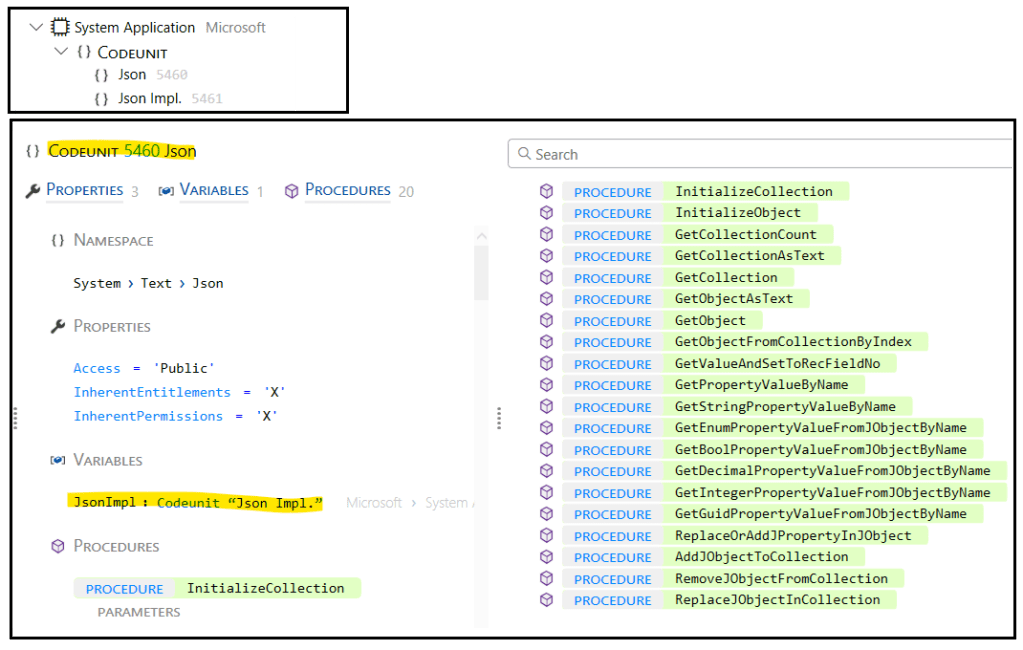
- Codeunit 5460: (imagen inferior), codeunit de acceso publico, la fachada, que llama a los métodos de la codeunit 5461.
- Codeunit 5461: la codeunit de acceso interno, con métodos que interactúan con objetos .NET.
Me he apoyado en el siguiente código (github) para probar las principales funcionalidades que nos permiten interactuar con datos Json. Blog/GDRGDev_JsonCodeunit at main · gdrgdev/Blog (github.com)
- Página Extendida GDRJsonMgtTest: He extendido la página de cliente, para agregar un botón que permita realizar el ejercicio.
- Tabla GDRGJsonTable y Página GDRGJsonPage: Donde se registrarán los valores de los datos json.
- Codeunit GDRGMgtTest: Contiene el código que llama a los métodos de la codeunit 5460.

El botón siguiente es el que ejecuta el ejercicio.

Utilizaremos los métodos siguientes para leer los datos Json e iteraremos dentro de la colección para mostrar sus valores.
- InitializeCollection: Inicializa el array JSON con la cadena JSON especificada.
- GetCollectionAsText: Devuelve el array JSON en formato de texto.
- GetCollectionCount: Devuelve el número de elementos del array JSON.
- GetObjectFromCollectionByIndex: Devuelve el objeto JSON en el índice especificado en el array JSON.
- InitializeObject: Inicializa el objeto JSON con la cadena JSON especificada.
- GetObjectAsText: Devuelve el objeto JSON en formato de texto.
//Json Collection Example
jsonArrayText := '[' +
            '{"string":"string 1", "integer":30, "decimal":30.30,"boolean":true},' +
            '{"string":"string 2", "integer":40, "decimal":40.40,"boolean":false}' +
            ']';

//Initial reading of the json
JsonCU.InitializeCollection(jsonArrayText);
Message('Collection as Text (Original): ' + JsonCU.GetCollectionAsText());

for i := 0 to JsonCU.GetCollectionCount() - 1 do begin
            JsonCU.GetObjectFromCollectionByIndex(i, JsonObjectText);
            JsonCU.InitializeObject(JsonObjectText);

            Message('Object as Text (Original): ' + JsonCU.GetObjectAsText());
Los resultados los muestro a través de los mensajes siguientes, vemos el array que trabajaremos.

Y vemos el primer objeto del array.

También podríamos usar los siguientes métodos para obtener los datos:
- GetCollection: Devuelve el Array en DotNet JArray.
- GetObject: Devuelve el Objeto en DotNet JObject.
Utilizaremos los métodos siguientes para acceder a los valores que contiene los datos de los objetos Json.
- GetStringPropertyValueByName: Obtiene el valor de texto en el nombre de propiedad especificado en el objeto JSON.
- GetIntegerPropertyValueFromJObjectByName: Obtiene el valor entero en el nombre de propiedad especificado en el objeto JSON.
- GetDecimalPropertyValueFromJObjectByName: Obtiene el valor decimal en el nombre de propiedad especificado en el objeto JSON.
- GetBoolPropertyValueFromJObjectByName: Obtiene el valor booleano en el nombre de propiedad especificado en el objeto JSON.
//Getting values from json
JsonCU.GetStringPropertyValueByName('string', JsonvalueText);
JsonCU.GetIntegerPropertyValueFromJObjectByName('integer', JsonvalueInt);
JsonCU.GetDecimalPropertyValueFromJObjectByName('decimal', Jsonvaluedecimal);
JsonCU.GetBoolPropertyValueFromJObjectByName('boolean', JsonValuebool);
Message('GetStringPropertyValueByName: ' + JsonvalueText);
Message('GetIntegerPropertyValueFromJObjectByName: ' + format(JsonvalueInt));
Message('GetDecimalPropertyValueFromJObjectByName: ' + format(Jsonvaluedecimal));
Message('GetBoolPropertyValueFromJObjectByName: ' + format(JsonValuebool));Los mensajes siguientes muestran el contenido de cada uno de los valores.

Además también puedes usar los siguientes métodos:
- GetEnumPropertyValueFromJObjectByName: Obtiene el valor de la opción en el nombre de propiedad especificado en el objeto JSON.
- GetGuidPropertyValueFromJObjectByName: Obtiene el valor GUID en el nombre de propiedad especificado en el objeto JSON.
Utilizaremos el método ReplaceOrAddJPropertyInJObject para reemplazar el valor de la propiedad especificada en el objeto JSON.
//Replacing values of the "string" property
JsonCU.ReplaceOrAddJPropertyInJObject('string', JsonvalueText + ' replace');
JsonObjectTextReplace := JsonCU.GetObjectAsText();
JsonCU.ReplaceJObjectInCollection(i, JsonObjectTextReplace);
Message('Object as Text (After replacement): ' + JsonCU.GetObjectAsText());
Message('Collection as Text (After replacement): ' + JsonCU.GetCollectionAsText());El mensaje siguiente nos muestra el array nuevamente, donde vemos que el valor string ha sido reemplazado por la misma cadena adicionando la palabra «replace» al final.

Utilizaremos el método RemoveJObjectFromCollection para eliminar el objeto JSON en el índice especificado en el array JSON. En el ejercicio siguiente estamos indicando borrar la posición 1 del array, es decir, el que contiene el valor de cadena «string 2 replace».
//Removing object
JsonCU.RemoveJObjectFromCollection(1);
Message('Collection as Text (After deletion): ' + JsonCU.GetCollectionAsText());
El mensaje siguiente nos muestra el array nuevamente con el único valor que queda.

Utilizaremos el método AddJObjectToCollection para agregar un objeto JSON al array JSON. En el ejemplo, agregamos un objeto con el valor de cadena «New String».
//Adding object
JsonCU.InitializeObject(JsonObjectTextNew);
JsonCU.ReplaceOrAddJPropertyInJObject('string', 'New String');
JsonCU.ReplaceOrAddJPropertyInJObject('integer', 50);
JsonCU.ReplaceOrAddJPropertyInJObject('decimal', 50.50);
JsonCU.ReplaceOrAddJPropertyInJObject('boolean', false);
JsonObjectTextNew := JsonCU.GetObjectAsText();
JsonCU.AddJObjectToCollection(JsonObjectTextNew);
Message('Collection as Text (After the addition): ' + JsonCU.GetCollectionAsText());
El mensaje siguiente nos muestra el array nuevamente, donde se visualiza el nuevo objeto añadido.

Utilizaremos el método GetValueAndSetToRecFieldNo para obtener el valor en la ruta de propiedad especificada en el objeto JSON y lo establece en el campo de registro especificado.
Utilizaremos la tabla creada inicialmente, y el tipo de datos RecordRef para crear un registro, obtener el valor de los datos json e insertarlos en la tabla.
//Adding in the table
GDRJsonTable.DeleteAll();
for i := 0 to JsonCU.GetCollectionCount() - 1 do begin
            JsonCU.GetObjectFromCollectionByIndex(i, JsonObjectTextTable);
            JsonCU.InitializeObject(JsonObjectTextTable);
            RecRef.GetTable(GDRJsonTable);
            RecRef.Init();
            JsonCU.GetValueAndSetToRecFieldNo(RecRef, 'string', GDRJsonTable.FieldNo(string));
            JsonCU.GetValueAndSetToRecFieldNo(RecRef, 'integer', GDRJsonTable.FieldNo(integer));
            JsonCU.GetValueAndSetToRecFieldNo(RecRef, 'decimal', GDRJsonTable.FieldNo(decimal));
            JsonCU.GetValueAndSetToRecFieldNo(RecRef, 'boolean', GDRJsonTable.FieldNo(boolean));
            RecRef.Insert(true);
end;
Message('Filled table');
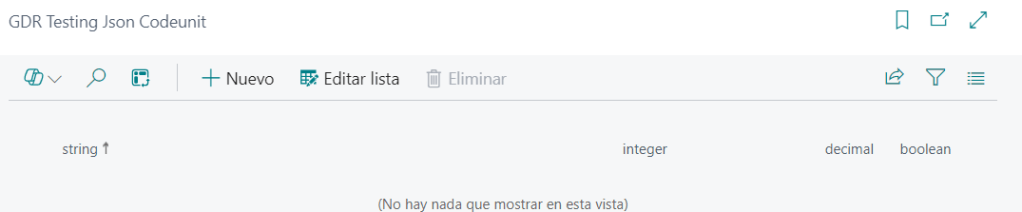
La tabla inicialmente no tiene valores.
Y luego del siguiente mensaje.

Vemos nuevamente la tabla y contiene los valores existentes del array de JSON.

Es importante remarcar que la codeunit 5459 «JSON Management», está vigente y contiene más funciones y facilidades. Además de mencionar, que he podido guiarme en la utilización de esta nueva codeunit, gracias a unos objetos codificados por Dmitry Katson.
Espero que esta información te ayude.
24.2: New Json Codeunit 💡
In version 24.2 we find a couple of new codeunits related to json data management, they are found as an additional module of the system application: BCApps/src/System Application/App/Json – GitHub
This module follows the facade design pattern. Façade | alguidelines.dev – Business Central Design Patterns
- Codeunit 5460: (bottom image), publicly accessible codeunit, the facade, which calls the methods of the codeunit 5461.
- Codeunit 5461: the internal access codeunit, with methods that interact with .NET objects.
I have developed the following code (github) to test the main functionalities that allow us to interact with Json data. Blog/GDRGDev_JsonCodeunit at main · gdrgdev/Blog (github.com)
- GDRJsonMgtTest Extended Page: I have extended the customer list page to add a button that allows you to perform the exercise.
- GDRGJsonTable Table and GDRGJsonPage Page: Where the json data values will be recorded.
- Codeunit GDRGMgtTest: Contains the code that calls the methods of codeunit 5460.
The next button is the one that executes the exercise.
We will use the following methods to read the Json data and iterate within the collection to display its values.
- InitializeCollection: Initializes the JSON array with the specified JSON string.
- GetCollectionAsText: Returns the number of elements in the JSON array.
- GetCollectionCount: Returns the number of elements in the JSON array.
- GetObjectFromCollectionByIndex: Returns the JSON object at the specified index in the JSON array.
- InitializeObject: Initializes the JSON object with the specified JSON string.
- GetObjectAsText: Returns the JSON object in text format.
//Json Collection Example
jsonArrayText := '[' +
            '{"string":"string 1", "integer":30, "decimal":30.30,"boolean":true},' +
            '{"string":"string 2", "integer":40, "decimal":40.40,"boolean":false}' +
            ']';

//Initial reading of the json
JsonCU.InitializeCollection(jsonArrayText);
Message('Collection as Text (Original): ' + JsonCU.GetCollectionAsText());

for i := 0 to JsonCU.GetCollectionCount() - 1 do begin
            JsonCU.GetObjectFromCollectionByIndex(i, JsonObjectText);
            JsonCU.InitializeObject(JsonObjectText);

            Message('Object as Text (Original): ' + JsonCU.GetObjectAsText());
I show the results through the following messages, we see the array that we will work with.
And we see the first object of the array.
We could also use the following methods to get the data:
- GetCollection: Returns the JSON array.
- GetObject: Returns the JSON object.
We will use the following methods to access the values contained in the Json objects.
- GetStringPropertyValueByName: Gets the text value at the specified property name in the JSON object.
- GetIntegerPropertyValueFromJObjectByName: Gets the integer value at the specified property name in the JSON object.
- GetDecimalPropertyValueFromJObjectByName: Gets the decimal value at the specified property name in the JSON object.
- GetBoolPropertyValueFromJObjectByName: Gets the boolean value at the specified property name in the JSON object.
//Getting values from json
JsonCU.GetStringPropertyValueByName('string', JsonvalueText);
JsonCU.GetIntegerPropertyValueFromJObjectByName('integer', JsonvalueInt);
JsonCU.GetDecimalPropertyValueFromJObjectByName('decimal', Jsonvaluedecimal);
JsonCU.GetBoolPropertyValueFromJObjectByName('boolean', JsonValuebool);
Message('GetStringPropertyValueByName: ' + JsonvalueText);
Message('GetIntegerPropertyValueFromJObjectByName: ' + format(JsonvalueInt));
Message('GetDecimalPropertyValueFromJObjectByName: ' + format(Jsonvaluedecimal));
Message('GetBoolPropertyValueFromJObjectByName: ' + format(JsonValuebool));The following messages show the content of each of the values.
Additionally, you can also use the following methods:
- GetEnumPropertyValueFromJObjectByName: Gets the option value at the specified property name in the JSON object.
- GetGuidPropertyValueFromJObjectByName: Gets the Guid value at the specified property name in the JSON object.
We will use the ReplaceOrAddJPropertyInJObject method to replace the value of the specified property in the JSON object.
//Replacing values of the "string" property
JsonCU.ReplaceOrAddJPropertyInJObject('string', JsonvalueText + ' replace');
JsonObjectTextReplace := JsonCU.GetObjectAsText();
JsonCU.ReplaceJObjectInCollection(i, JsonObjectTextReplace);
Message('Object as Text (After replacement): ' + JsonCU.GetObjectAsText());
Message('Collection as Text (After replacement): ' + JsonCU.GetCollectionAsText());The following message shows us the array again, where we see that the string value has been replaced by the same string by adding the word «replace» at the end.
We will use the RemoveJObjectFromCollection method to remove the JSON object at the specified index in the JSON array. In the following exercise we are indicating to delete position 1 of the array, that is, the one that contains the string value «string 2 replace».
//Removing object
JsonCU.RemoveJObjectFromCollection(1);
Message('Collection as Text (After deletion): ' + JsonCU.GetCollectionAsText());
The following message shows us the array again with the only object left.
We will use the AddJObjectToCollection method to add a JSON object to the JSON array. In the example, we add an object with the string value «New String».
//Adding object
JsonCU.InitializeObject(JsonObjectTextNew);
JsonCU.ReplaceOrAddJPropertyInJObject('string', 'New String');
JsonCU.ReplaceOrAddJPropertyInJObject('integer', 50);
JsonCU.ReplaceOrAddJPropertyInJObject('decimal', 50.50);
JsonCU.ReplaceOrAddJPropertyInJObject('boolean', false);
JsonObjectTextNew := JsonCU.GetObjectAsText();
JsonCU.AddJObjectToCollection(JsonObjectTextNew);
Message('Collection as Text (After the addition): ' + JsonCU.GetCollectionAsText());
The following message shows us the array again, where the new added object is displayed.
We will use the GetValueAndSetToRecFieldNo method to get the value at the specified property path in the JSON object and sets it to the specified record field.
We will use the table created initially and the RecordRef data type to create records, get the json data values and insert them into the table.
//Adding in the table
GDRJsonTable.DeleteAll();
for i := 0 to JsonCU.GetCollectionCount() - 1 do begin
            JsonCU.GetObjectFromCollectionByIndex(i, JsonObjectTextTable);
            JsonCU.InitializeObject(JsonObjectTextTable);
            RecRef.GetTable(GDRJsonTable);
            RecRef.Init();
            JsonCU.GetValueAndSetToRecFieldNo(RecRef, 'string', GDRJsonTable.FieldNo(string));
            JsonCU.GetValueAndSetToRecFieldNo(RecRef, 'integer', GDRJsonTable.FieldNo(integer));
            JsonCU.GetValueAndSetToRecFieldNo(RecRef, 'decimal', GDRJsonTable.FieldNo(decimal));
            JsonCU.GetValueAndSetToRecFieldNo(RecRef, 'boolean', GDRJsonTable.FieldNo(boolean));
            RecRef.Insert(true);
end;
Message('Filled table');
The table initially has no values.
And after running the process.
We see the table again and it contains the existing values of the JSON array.
It is important to note that codeunit 5459 «JSON Management» is current and contains more functions and facilities. In addition to mentioning, I have been able to understand how to use this new codeunit, thanks to some objects developed by Dmitry Katson.
I hope this information helps you.
Más información / More information:


 Gerardo Rentería Blog
Deja un comentario