Customer onboarding (Checklist) supported by telemetry (English version)
Onboarding de cliente (lista de verificación) soportado por la telemetría
He comentado acerca del soporte de la telemetría en el proceso de onboarding de los clientes anteriormente, en la misma línea me gustaría comentar de una manera rápida como también nos permite darle un seguimiento al componente del Onboarding Framework llamado lista de verificación.
El objetivo principal no es tanto explicar acerca de este componente a detalle – en el apartado de «más información» en la parte inferior añado algunos enlaces que lo explican con profundidad – sino el de comentar como podemos a través de la telemetría seguir el avance y culminación del proceso de aprendizaje a través de las listas de verificación.
Me voy a apoyar en el ejemplo que tenemos a disposición en el Appsource denominado «Onboarding Sample App» (Onboarding Sample App (microsoft.com)).
También podemos encontrar el código en el siguiente enlace de GitHub: microsoft/bcsamples-onboarding: Sample app that showcase how to create a great welcome experience for Business Central customers (github.com)
Lo instalamos:

Cuando iniciamos el proceso de revisión de la lista de verificación se actualiza un estado y emite un evento de telemetría con el código AL0000EIQ. Analyzing User Checklist Telemetry

En el siguiente enlace tenemos un ejemplo de la sentencia KQL: https://github.com/microsoft/BCTech/blob/master/samples/AppInsights/KQL/Queries/ExampleQueriesForEachArea/UserCheckListState.kql
El estado cambia de «No iniciado» a «En progreso».

Luego de terminar de atender todo el bloque tareas que componen la lista de verificación.
El estado cambia de «En progreso» a «Completado»

De igual manera se encuentra añadido en el Power BI de Telemetría (Environment Usage): Dynamics 365 Business Central Usage Analytics (microsoft.com)
Espero que esta información te ayude.
Customer onboarding (Checklist) supported by telemetry
I have commented about the support of telemetry in the customer onboarding process previously, along the same lines I would like to comment in a quick way as it also allows us to follow up on the component of the Onboarding Framework called checklist.
The main objective is not so much to explain about this component in detail (in the «more information» section at the bottom of this post I add some links that explain it in depth ) but to comment on how we can follow the progress and culmination of the learning process by checklists through telemetry.
I am going to rely on the example that we have available in the Appsource called «Onboarding Sample App» (Onboarding Sample App (microsoft.com)).
We can also find the code in the following GitHub link: microsoft/bcsamples-onboarding: Sample app that showcase how to create a great welcome experience for Business Central customers (github.com)
We install it:
When we start the checklist review process, a status is updated and a telemetry event is issued with the code AL0000EIQ. Analyzing User Checklist Telemetry
In the following link we have an example of the KQ sentenceL: https://github.com/microsoft/BCTech/blob/master/samples/AppInsights/KQL/Queries/ExampleQueriesForEachArea/UserCheckListState.kql
Status changes from «Not started» to «In progress».
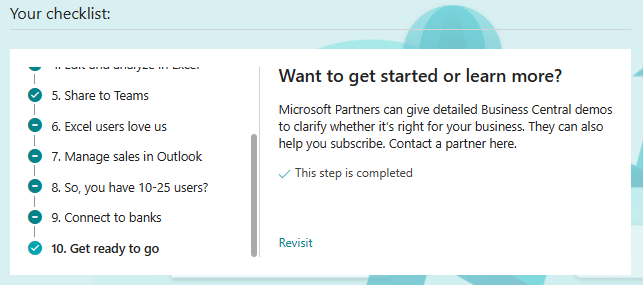
After completing the entire block of tasks that make up the checklist.
Status changes from «In progress» to «Completed».
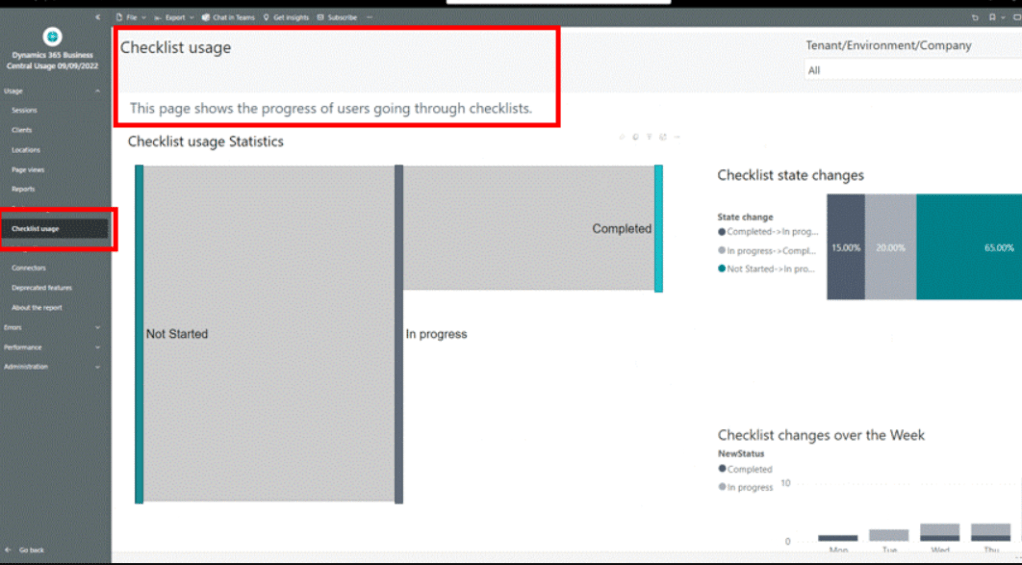
Likewise, it is added to the Telemetry Power BI Application. (Environment Usage): Dynamics 365 Business Central Usage Analytics (microsoft.com)
I hope this information helps you.
Más información / More information


 Gerardo Rentería Blog
Deja un comentario