Type of notifications related to major and minor Business Central Online updates. (English Version)
Tipo de notificaciones relacionadas a las actualizaciones mayores y menores de Business Central Online
Los ambientes de Business Central se actualizan de acuerdo con la hoja de ruta de Business Central, que incluye dos actualizaciones mayores cada año, así como actualizaciones menores mensuales. 1
Microsoft gestiona las actualizaciones de la aplicación base y de la plataforma. Como administrador interno o como partner nos apoyamos en el Centro de Administración de Business Central para especificar el calendario de actualizaciones de cada ambiente y quién recibe las notificaciones cuando hay una actualización disponible. 2
Veremos ahora los diferentes canales de comunicación que tenemos para enterarnos de cada uno de los estados de todo el proceso de actualización. 3
Correo electrónico
Las notificaciones se envían a todas las direcciones de correo electrónico de la lista de destinatarios de notificaciones del centro de administración de Business Central. La lista se administra manualmente añadiendo y eliminando destinatarios para asegurarse de que sólo se notifica a las personas adecuadas. 4

❗Para no perderse las notificaciones de actualización de Microsoft, asegúrese de que su software de correo electrónico no redirige los mensajes a una carpeta de correo no deseado. Las notificaciones se envían desde la cuenta de Microsoft no-reply-dynamics365@microsoft.com.
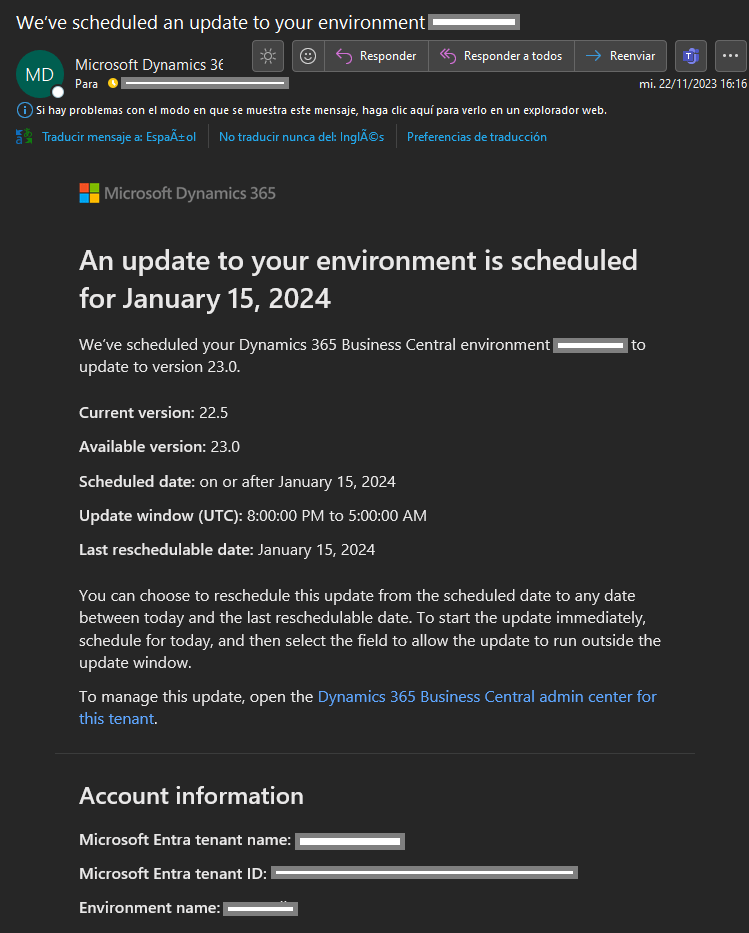
El siguiente es un ejemplo de una notificación de planificación de una actualización mayor, identificamos las versiones anterior y nueva, fecha y hora planificada, nombre de tenant, nombre de ambiente y código de tenant.
El siguiente es un ejemplo de una notificación de una incompatibilidad de una extensión instalada. Identificamos en la notificación la versión a la cual es incompatible la extensión, nombre, versión, publicador y ID de la extensión. La identificación del error encontrado, nombre de tenant, nombre de ambiente y código de tenant. En la notificación nos indican las instrucciones que debemos seguir para superar este incidente.

El siguiente es un ejemplo de una notificación de que el ambiente no pudo ser actualizado debido a un problema en particular, en esta notificación podemos identificar la versión actual y la versión que no pudo actualizarse. El detalle del incidente, un aviso de las consecuencias de no superar este incidente en el proceso de actualización, el nombre de tenant, el nombre del ambiente y código de tenant.

El siguiente es un ejemplo de una notificación de que la actualización en el ambiente ha fallado, debido a varias posibilidades, seguro se ha pospuesto la actualización, o no culminó la actualización en la ventana de tiempo que le configuramos. Podemos identificar el nombre de tenant, nombre del ambiente, código de tenant y la versión a la que no se pudo actualizar.

El siguiente es un ejemplo de una notificación de que se van a posponer las actualizaciones de la versión indicada hasta nuevo aviso. Identificamos el nombre de tenant, el nombre del ambiente y el código de tenant.

El siguiente es un ejemplo de una notificación de éxito en la actualización de un ambiente. Se identifica el nombre del ambiente, la versión a la cual ha sido actualizada, el nombre de tenant y su código.

Centro de Mensajes de Microsoft 365
Pronto, el Centro de mensajes de Microsoft 365 también tendrá acceso a la mayoría de los eventos del ciclo de vida de los ambientes para los que se emiten mensajes de correo electrónico. Los mensajes de correo electrónico que se publiquen en el Centro de mensajes acabarán siendo un subconjunto de los mensajes que se envíen a los destinatarios de notificaciones designados. 5
❗Para no perderse las notificaciones del centro de mensajes de Microsoft 365, asegúrese de que su software de correo electrónico no redirige los mensajes a una carpeta de correo no deseado. Las notificaciones se envían desde la cuenta de Microsoft o365mc@microsoft.com.
La última comunicación que tenemos acerca de este tema es la siguiente: Viva Engage : Dynamics 365 Business Central Partner Community (Formerly: Development) : Ver conversación (yammer.com)

Centro de administración de Busines Central
En el portal de administración de Business Central desde la sección denominada Operaciones tenemos la capacidad de mirar los resultados relacionados a planificación de una actualización, su proceso y si el resultado fue exitoso o fallido. 6
El siguiente es un ejemplo de la actualización de un ambiente, podemos identificar el ambiente, la versión a la que se actualizará, la hora y fecha planificada que hemos actualizado.

El siguiente es un ejemplo de una actualización fallida, se identifica el ambiente, nos muestra el error de la extensión con problemas, y el detalle para que podamos solucionarlo.

El siguiente es un ejemplo de una actualización exitosa, identificamos el ambiente actualizado, la versión inicial y la actualizada, además del tiempo que ha tomado dicha operación.

Telemetría
A través de la telemetría de Application Insights contamos con un listado de eventos de todo el ciclo de vida del los ambientes, con los cuales nos permiten automatizar su seguimiento y utilizarlo para la generación de reportes diversos. 7
Tenemos el siguiente listado de eventos que podemos analizar:

El siguiente es un ejemplo de una sentencia que nos permite identificar los ambientes y las versiones disponibles para su actualización.
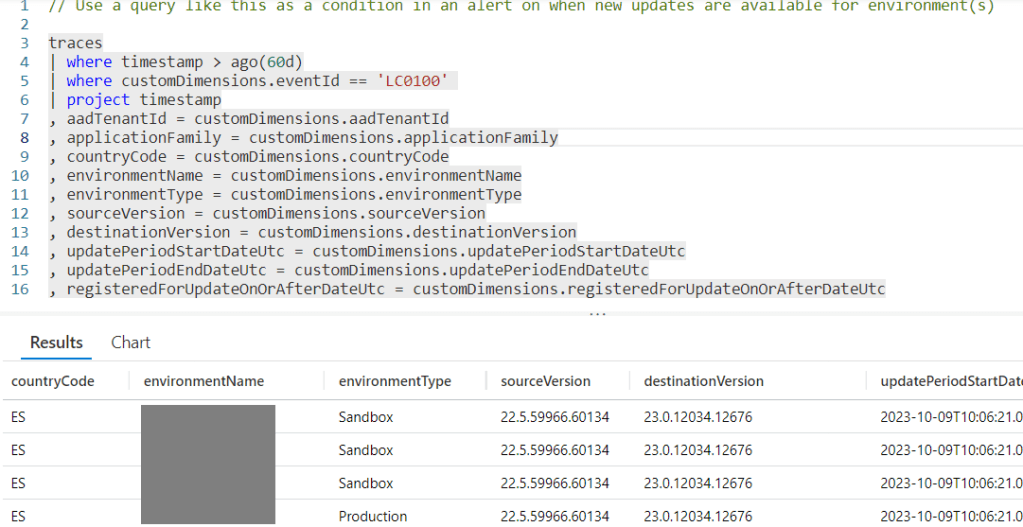
Los código de eventos que utilizaríamos para esta labor serían los siguientes:

Podemos encontrar algunos ejemplos de estas sentencias aquí: BCTech/samples/AppInsights/Alerts/AlertingKQLSamples at master · microsoft/BCTech · GitHub
Espero que esta información te ayude.
Type of notifications related to major and minor Business Central Online updates.
Business Central environments are upgraded according to the Business Central roadmap, which includes two major updates each year, as well as monthly minor updates. 1
Microsoft manages the base application and platform updates. As an internal administrator or as a partner we rely on the Business Central Administration Center to specify the update schedule for each environment and who receives notifications when an update is available. 2
We will now see the different communication channels we have to find out about each of the statuses of the whole update process. 3
Notifications are sent to all email addresses in the notification recipient list in the Business Central administration center. The list is managed manually by adding and removing recipients to ensure that only the right people are notified. 4
❗To avoid missing Microsoft update notifications, make sure that your e-mail software does not redirect messages to a spam folder. Notifications are sent from the Microsoft account no-reply-dynamics365@microsoft.com.
The following is an example of a major update planning notification, we identify the previous and new version available, planned date and time, tenant name, environment name and tenant code.
The following is an example of a notification of an incompatibility of an installed extension. We identify in the notification the version to which the extension is incompatible, name, version, publisher and extension ID. The identification of the error found, tenant name, environment name and tenant code. In the notification we are given the instructions that we must follow to overcome this incident.
The following is an example of a notification that the environment could not be updated due to a particular problem, in this notification we can identify the current version and the version that could not be updated. The incident detail, a warning of the consequences of not overcoming this incident in the update process, the tenant name, the environment name and tenant code.
The following is an example of a notification that the update in the environment has failed, due to several possibilities, for sure the update has been postponed, or the update did not finish in the time window we configured. We can identify the tenant name, environment name, tenant code and the version that could not be updated to.
The following is an example of a notification that updates to the indicated version will be postponed until further notice. We identify the tenant name, the environment name and the tenant code.
The following is an example of an environment update success notification. It identifies the name of the environment, the version to which it has been updated, the tenant name and its code.
Microsoft 365 Message Center
Soon, the Microsoft 365 Message Center will also have access to most of the lifecycle events of the environments for which email messages are issued. Email messages that are published to the Message Center will end up being a subset of the messages that are sent to designated notification recipients. 5
❗To avoid missing Microsoft 365 message center notifications, make sure your email software does not redirect messages to a spam folder. Notifications are sent from the Microsoft account o365mc@microsoft.com.
The latest communication we have on this subject is as follows: Viva Engage : Dynamics 365 Business Central Partner Community (Formerly: Development) : Ver conversación (yammer.com)
The Business Central Administration Center
In the Business Central administration portal from the Operations section we have the ability to look at the results related to the planning of an update, its process and whether the result was successful or unsuccessful. 6
The following is an example of an environment update, we can identify the environment, the version to be updated to, the planned time and date we have updated.
The following is an example of a failed update, it identifies the environment, shows us the error of the extension with problems, and the detail so we can fix it.
The following is an example of a successful update, identifying the updated environment, the initial and updated version, and the time taken for the update.
Telemetry
Through Application Insights telemetry, we have a list of events throughout the lifecycle of the environments, which allows us to automate their monitoring and use it for the generation of various reports. 7
We have the following list of events that we can analyze:
The following is an example of a statement that allows us to identify the environments and versions available for update.
The event codes we would use for this work would be as follows:
Some examples of these sentences can be found here: BCTech/samples/AppInsights/Alerts/AlertingKQLSamples at master · microsoft/BCTech · GitHub
I hope this information helps you.
Más información / More information
- Major Updates and Minor Updates for Business Central Online ↩︎
- Administration of Business Central – Part 1 ↩︎
- Manage Tenant-Specific Notifications ↩︎
- Administration of Business Central – Part 2 ↩︎
- Track new and changed features in the Microsoft 365 Message center ↩︎
- Managing Updates in the Business Central Admin Center ↩︎
- Analyzing Environment Lifecycle Trace Telemetry ↩︎
- Major Updates and Minor Updates for Business Central Online ↩︎
- Administration of Business Central – Part 1 ↩︎
- Manage Tenant-Specific Notifications ↩︎
- Administration of Business Central – Part 2 ↩︎
- Track new and changed features in the Microsoft 365 Message center ↩︎
- Managing Updates in the Business Central Admin Center ↩︎
- Analyzing Environment Lifecycle Trace Telemetry ↩︎


 Gerardo Rentería Blog
Deja un comentario