2023 Wave 2 – v23: New AL language extension settings and new properties in JSON Files (English version)
2023 Wave 2 – v23: Nuevas configuraciones en la extensión de Lenguaje AL y nuevas propiedades en los archivos JSON
A la nueva versión de Business Central (23.0), Wave 2 del 2023 le acompaña una nueva versión del lenguaje AL (12.0). Esta nueva versión trae nuevas configuraciones entre ellas las siguientes:
Podemos acceder a la opción de preferencias desde Visual Studio Code, podemos presionar F1 o la opción en el menú de Ver / Paleta de Comandos.

Y seleccionar la opción de «Preferencia: Abrir Configuración de Usuario»

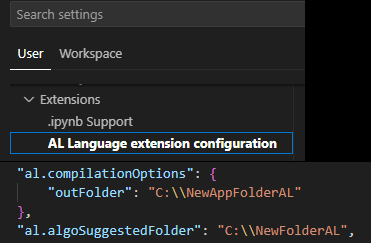
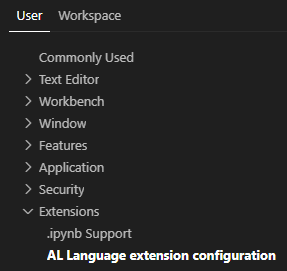
Y nos dirigimos a la opción de «Extensions / AL language extension configuration»
al.algoSuggestedFolder
Para definir la ubicación predeterminada de la carpeta para los nuevos proyectos AL, tenemos la nueva configuración al.algoSuggestedFolder. Esto ofrece flexibilidad en cuanto a dónde pueden iniciarse los nuevos proyectos al configurarse por usuario o por espacio de trabajo (WorkSpace). Set the default folder location for new AL projects | Microsoft Learn


Podemos ver que ahora nos propone la ruta que hemos configurado para crear los nuevos proyectos. Merece recordar que el requerimiento ha sido implementado debido a una idea que la comunidad propuso, por lo que es importante que podamos seguir apoyando en la mejora del producto con nuestras ideas. Microsoft Idea (dynamics.com)

al.inlayhints.parameterNames.enabled y al.inlayhints.functionReturnTypes.enabled
Visual Studio Code admite las sugerencias de incrustación = Inlay Hints. Para aclarar aún más lo que hace el código fuente, éstas añaden información adicional para facilitar la lectura y la navegación. En esta actualización contamos con esta mejora para los nombres de los parámetros y los tipos de retorno de los métodos en AL, podemos habilitarlos por separado. Get inlay hints in source editor for AL method parameters and return types
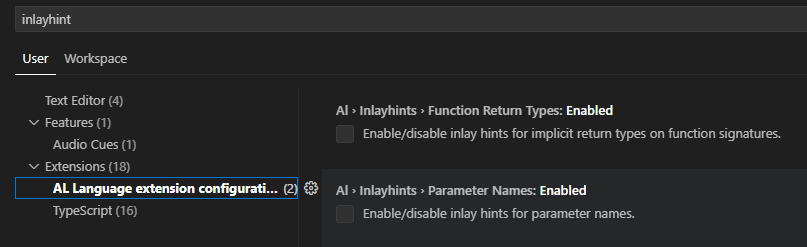
Adicionalmente a las configuraciones mencionadas, y de manera obligatoria debemos configurar otras opciones en el editor de Visual Studio Code para habilitar la funcionalidad.
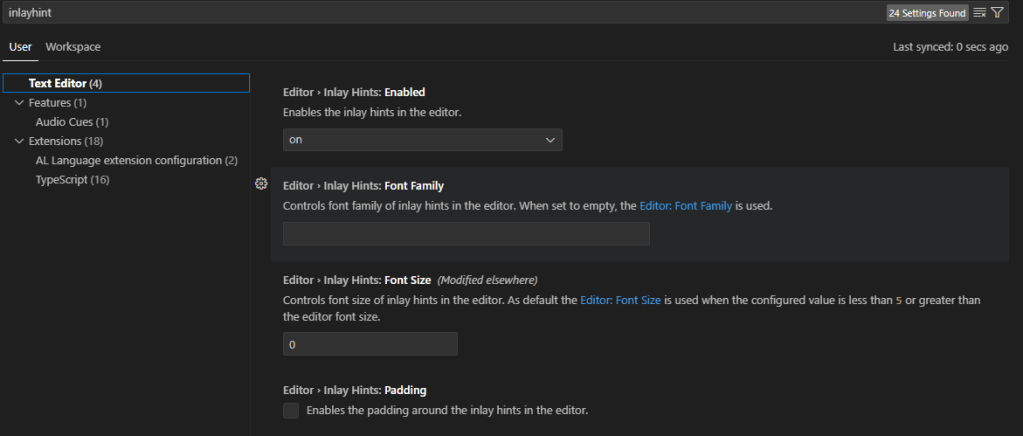
Por ejemplo, podemos configurar para que esta información adicional esté oculta y aparezca cuando presionamos el atajo de teclado CTRL + ALT.

Podemos ver a continuación de color plomo y subrayado la información adicional de la función o método que estemos trabajando, a nivel de parámetro y el tipo de datos de retorno.

al.compilerOptions – Propiedad «outFolder”
Por defecto, el archivo App se guarda en la carpeta del proyecto, sin embargo, publicar en una carpeta de aplicaciones compartida puede ser útil si trabajas en varias aplicaciones que son interdependientes y no se encuentran en el mismo espacio de trabajo (WorkSpace).
La nueva opción «outFolder» de la configuración «al.compilerOptions» permite ahora elegir la carpeta de salida que se utilizará al crear un archivo de app como parte de un proyecto AL. De este modo, se simplifica la gestión y reutilización de las apps creadas en una única ubicación. Set new output folder setting for storing app files at AL project build | Microsoft Learn


APP.JSON: Propiedades Source y Build
Se han añadido 2 propiedades Source y Build en el archivo app.json de las extensiones para facilitar el seguimiento de las extensiones que se producen como parte de los flujos de trabajo de DevOps. Esto facilita por ejemplo la localización del repositorio de código fuente, el ID del Commit y el sistema de compilación que se utilizaron para crear la extensión. Track source and build metadata on extensions | Microsoft Learn
En la propiedad Source tenemos «RepositoryUrl»: que es la dirección del repositorio que contiene el código fuente del proyecto. «Commit»: el ID de código fuente que permite volver al commit que inició la construcción de la extensión.

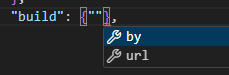
En la propiedad Build tenemos «By»: importante para identificar el agente, como por ejemplo AL-Go para GitHub; y «Url»: que puede utilizarse para la URL a la invocación del sistema de compilación.

LAUNCH.JSON: Configuración snapshotInitialize: Propiedad profileSamplingInterval
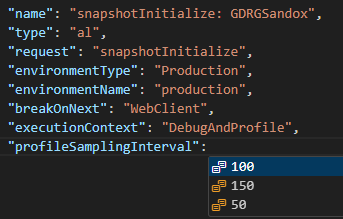
El muestreo se utiliza en el generador de perfiles de rendimiento en cliente web y en AL para decidir la frecuencia con la que el sistema comprueba lo que se está ejecutando. Antes solo se permitía intervalos de muestreo de 100 ms. Ahora se cuenta con la opción de elegir entre 50, 100 y 150 ms. De este modo, es posible obtener información más detallada, permitiendo registrar procesos más pequeños y obtener duraciones más precisas. Se ha creado un nuevo parámetro en el archivo Launch.json para la configuración de instantánea (snapshot). Choose between more sampling intervals for snapshot and in-client profiling | Microsoft Learn
Las mismas opciones internas de muestreo están disponibles en la nueva opción de Configuración del Generador de perfiles de rendimiento en el cliente. El valor predeterminado es 100 ms.

Espero que te haya servido de ayuda esta información.
2023 Wave 2 – v23: New AL language extension settings and new properties in JSON Files
The new version of Business Central (23.0), 2023 Wave 2 is accompanied by a new version of the AL language (12.0). This new version brings new configurations including the following ones:
We can access the preferences option from Visual Studio Code, we can press F1 or the option in the View / Command Palette menu.
And select the option «Preference: Open User Settings».
And we go to the option «Extensions / AL language extension configuration»
al.algoSuggestedFolder
To define the default folder location for new AL projects, we have the new al.algoSuggestedFolder setting. This provides flexibility as to where new projects can be started when configured on a per-user or per-Workspace basis. Set the default folder location for new AL projects | Microsoft Learn
We can see that it now proposes the path we have configured to create new projects. It is worth remembering that the requirement has been implemented due to an idea that the community proposed, so it is important that we can continue to support the improvement of the product with our ideas. Microsoft Idea (dynamics.com)
al.inlayhints.parameterNames.enabled and al.inlayhints.functionReturnTypes.enabled
Visual Studio Code supports Inlay Hints. To further clarify what the source code does, they add additional information to make it easier to read and navigate. In this update we have this enhancement for parameter names and function return types in AL, we can enable them separately. Get inlay hints in source editor for AL method parameters and return types
In addition to the aforementioned configurations, we must configure other options in the Visual Studio Code editor to enable the functionality.
For example, we can set this additional information to be hidden and appear when we press the keyboard shortcut CTRL + ALT.
We can see below in gray color and underlined the additional information of the function or method we are working with, at the parameter level and the return data type.

al.compilerOptions – «outFolder” property
By default, the App file is saved in the project folder, however, publishing to a shared application folder can be useful if you work on several applications that are interdependent and are not in the same workspace.
The new «outFolder» property in the «al.compilerOptions» configuration now allows you to choose the output folder to be used when creating an app file as part of an AL project. This simplifies the management and reuse of apps created in a single location. Set new output folder setting for storing app files at AL project build | Microsoft Learn
APP.JSON: Source and Build properties
Source and Build properties have been added to the extensions app.json file to make it easier to track extensions that are produced as part of DevOps workflows. This makes it easier for example to locate the source repository, Commit ID and build system that were used to create the extension. Track source and build metadata on extensions | Microsoft Learn
In the Source property we have «RepositoryUrl»: which is the address of the repository that contains the source code of the project. «Commit»: the source code ID that allows to go back to the commit that triggered building the extension build.
In the Build property we have «By»: important to identify the agent, such as AL-Go for GitHub; and «Url»: which can be used for the URL to the build system invocation where the build can be found.
LAUNCH.JSON: snapshotInitialize configuration: profileSamplingInterval property
Sampling is used in the in-client performance profiler in web client and the AL performance profiler to decide how often the system checks what is running. Previously only 100 ms sampling intervals were allowed. Now there is the option to choose between 50, 100 and 150 ms. In this way, it is possible to obtain more detailed information, allowing smaller processes to be recorded and more accurate durations to be obtained. A new parameter has been created in the Launch.json file for snapshot configuration. Choose between more sampling intervals for snapshot and in-client profiling | Microsoft Learn
The same internal sampling options are available in the new Performance Profiler Configuration option in the web client. The default value is 100 ms.
I hope this information has been helpful.
Más información / More Information
- AL Language extension configuration
- App.json file
- Launch JSON file
- New and planned features for Dynamics 365 Business Central, 2023 release wave 2 | Development
- What are inlay hints in Visual Studio Code for AL language – Business Central version 23 (Preview)
- Set new output folder setting for storing app files at AL project build


 Gerardo Rentería Blog
Deja un comentario